AWS Storage Blog
Planning data protection before migration: How AWS Storage Assessments model backup and disaster recovery costs
Data Protection and disaster recovery is an important part of any migration. Customers often only consider this once they have already migrated, which increases budgets beyond the initial estimate.
The AWS Storage Assessment solves this: the same source telemetry that sizes your primary storage also produces your data protection costs. No additional data collection, no separate engagement, no second tool. Your business case reflects total operational cost, including protection, from day one.
Part 1 of this series covered what a Storage Assessment delivers, and Part 2 explained the analytical methods behind classification, sizing, and optimization. This post covers data protection: why it belongs in the business case from the start, what the assessment models, and how four protection services work together across your multi-service estate.
Why protection belongs in the primary assessment
When workloads move to AWS, they land across multiple storage services: Amazon Elastic Block Store (Amazon EBS) for block, Amazon FSx for NetApp ONTAP for unified file and block, Amazon FSx for Windows File Server for SMB, Amazon Elastic File System (Amazon EFS) for scalable NFS, and Amazon Simple Storage Service (Amazon S3) for object, among others.
The protection strategy that worked on-premises (a single backup tool covering everything on the Servers/SAN/NAS/Object) maps to AWS Backup for centralized policy-based protection, but AWS also offers service-native mechanisms (NetApp SnapMirror, ONTAP SnapVault, AWS Elastic Disaster Recovery) that provide capabilities beyond what a single backup policy delivers. Understanding the cost of each layer is where the assessment helps.
Protection addresses two fundamentally different risks: data loss (corruption, AWS Regional outage) and data destruction (accidental deletion, ransomware, insider threat). No single mechanism covers both. On AWS, data protection is a layered architecture. Multiple mechanisms work together, each covering a different failure scenario:
- Native snapshots – Recover from accidental deletion in seconds to minutes (each AWS storage service provides its own snapshot or versioning mechanism).
- Retention-based backup – Recovers from data loss or corruption with point-in-time granularity. AWS Backup covers your storage estate (Amazon EBS, Amazon EFS, and Amazon FSx), with ONTAP SnapVault as a NetApp-native option for FSx for ONTAP.
- Cross-Region replication – Recovers from Regional failure. AWS Backup can copy backups to another Region for most supported services (see AWS Backup feature availability), but not for FSx for ONTAP; cross-Region protection for FSx for ONTAP uses NetApp SnapMirror instead. AWS Elastic Disaster Recovery provides continuous cross-Region replication for Amazon EBS workloads.
- Air-gapped vaults – Recover from account compromise or ransomware (logically air-gapped vault).
These are layers, not competing choices. The question is not “Which one?” but “Which combination?” and “What does each layer cost?”
AWS defines four disaster recovery (DR) strategies from backup-and-restore through multi-site active/active (see Disaster recovery options in the cloud). The assessment models the storage cost component across these strategies; whether you operate the DR site as pilot light or warm standby is a compute decision with no impact on storage pricing.
The assessment answers this from data you already have. The same telemetry that determined your primary sizing also determines backup storage, replication bandwidth, and DR staging costs.
What the assessment models
The assessment models four protection services, each using the same source data already collected for primary sizing:
- AWS Backup – Centralized, policy-based backup supporting more than 20 AWS services. The assessment models it for the storage services in your migration: Amazon EBS, Amazon FSx (ONTAP, Windows File Server, OpenZFS, Lustre), and Amazon EFS. Retention across daily, weekly, monthly, and yearly cycles with warm and cold vault tiers. Applies to your storage estate in one policy.
- AWS Elastic Disaster Recovery – Continuous block-level replication for Amazon EBS workloads. Provides seconds Recovery Point Objective (RPO) and minutes Recovery Time Objective (RTO). Uses lightweight staging volumes in the DR Region. Applies to Amazon EBS mapped workloads only.
- SnapMirror – Native NetApp volume-level replication to a secondary FSx for ONTAP file system in another Region. Provides continuous disaster recovery with minutes RPO. Applies to FSx for ONTAP workloads only.
- SnapVault – Native NetApp backup from the primary FSx for ONTAP file system to a secondary file system with independent retention policies. Provides file-level and folder-level restore from historical recovery points. Applies to FSx for ONTAP workloads only.
For FSx for ONTAP workloads, SnapMirror and SnapVault serve distinct purposes: SnapMirror provides failover-capable disaster recovery (automatic replication, crash-consistent, failover/failback supported), and SnapVault provides long-term backup archiving (snapshot copies retained independently of primary, file-level restore, no failover). Both deploy a secondary FSx for ONTAP file system, but the operational model differs: SnapMirror is your DR site, SnapVault is your backup vault. Figure 1 compares these services.
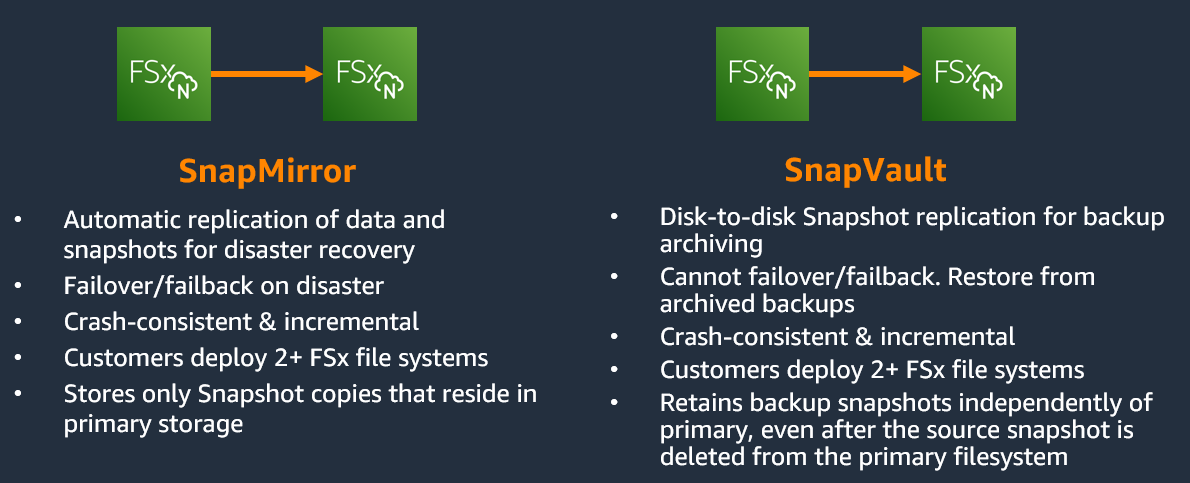
Figure 1: SnapMirror vs. SnapVault, disaster recovery replication vs. backup archiving
Each serviced produces its own cost line in the business case. Because they are configurable add-ons, your business case can start with primary storage alone and layer in protection when you are ready to plan it. Adding or removing add-ons produces updated costs from the same data.
How the assessment models protection cost: Four independent dimensions
Protection is not one decision with one cost driver. The Storage Assessment models it across four independent dimensions; understanding which one you are adjusting prevents the common mistake of treating backup as a flat percentage. The following table shows each dimension with what drives cost and the range from minimum to maximum protection.
| Dimension | What scales cost | Example range |
| Retention depth | Days of retention x daily change rate | 7 days to 7 years |
| Isolation level | Where backups are stored | Standard vault to logically air-gapped vault |
| Geographic scope | Number of Regions | Same Region to cross-Region |
| Recovery granularity | Restore mechanism | Volume-level to file-level |
Each dimension is configured to match your requirements. The cost impact is immediate, modeled from the same source data. Each dimension is adjustable through what-if scenarios: you can change retention from 7 to 30 days or switch vault type from standard to logically air-gapped vault and see the cost impact without re-collecting data. The following sections explain each.
Retention depth
Two services handle retention. AWS Backup covers your entire multi-service estate; SnapVault covers FSx for ONTAP natively.AWS Backup models retention across hourly, daily, weekly, monthly, and yearly cycles. The model accounts for overlapping retention windows to avoid double-counting storage. Per-service rates apply (Amazon EBS, Amazon FSx, Amazon EFS each have their own backup pricing). A multi-service assessment produces separate backup cost lines per service, each at the correct rate.
SnapVault replicates snapshots to a secondary FSx for ONTAP file system with independent retention policies. The assessment sizes the destination with all data on capacity pool and minimum throughput, with deduplication and compression applied. Restores are granular: individual files and folders from a retained snapshot, without restoring the entire volume.
Note that longer retention doesn’t mean linearly more cost. The model accounts for overlapping coverage across tiers, so the actual stored volume is less than a naive “change rate x retention days” estimate.
Isolation level
Isolation is often the least planned dimension. Each protection service provides its own isolation mechanism, as detailed in the following table.
| Service | Vault architecture | Options |
| AWS Backup | Vault architecture | Standard/logically air-gapped vault + Warm/Cold tier + Vault Lock (immutability) |
| ONTAP SnapVault | Snapshot locking | Unlocked/Locked (can’t delete until expiry) |
| AWS Elastic Disaster Recovery | Regional Separation | Staging volumes in separate DR Region |
| NetApp SnapMirror | Regional Separation | Secondary file system in separate DR Region |
For AWS Backup specifically, three vault-level decisions are independent of each other and combine freely.
| Concept | What it does | Options |
| Storage tier | Controls cost and restore speed | Warm (instant restore) vs. Cold (90-day min retention, lower rate) |
| Vault Lock | Makes backups immutable (WORM) | None/Governance (admin override)/Compliance (nobody) |
| Vault type | Controls blast radius | Standard vault vs. logically air-gapped vault (AWS managed, isolated account) |
These three decisions are independent for standard vaults. A logically air-gapped vault comes with compliance-mode lock built in and provides account-level air-gap protection for supported services (see AWS Backup feature availability for current coverage).
For FSx for ONTAP workloads, SnapLock provides ONTAP-native immutability. Snapshot copies can be locked so they can’t be deleted, even by an administrator, until they expire. No additional licensing is required on FSx for ONTAP.
The following table summarizes how SnapVault and SnapLock handles different threats.
| Threat | SnapVault + SnapLock (same account) | SnapVault + SnapLock (same account) | SnapVault + SnapLock (same account) |
| Accidental deletion | Handled | Handled | Handled |
| Rogue admin | Handled | Handled | Handled |
| Full AWS account compromise | Not Handled | Handled | Handled |
| Insider with full account access | Not Handled | Handled | Handled |
The difference is operational: a logically air-gapped vault is AWS managed (no infrastructure to maintain, no file system to size or monitor). Cross-account SnapVault provides equivalent isolation but requires managing a secondary FSx for ONTAP file system, networking, and AWS Identity and Access Management (IAM) in the backup account. Most enterprise customers use both: SnapVault for granular file-level restores, and a logically air-gapped vault for AWS managed account isolation.
Geographic scope
Cross-Region protection adds data transfer costs and a second infrastructure footprint. The assessment models this differently per service.
Amazon FSx for NetApp ONTAP workloads
For FSx for ONTAP workloads, the assessment reruns the full configuration optimizer for the DR Region with scaled performance. A DR file system ingests replication writes, by default 10% of primary IOPS and throughput. This replication factor is customizable: when source arrays have replication metrics (from NetApp Data Infrastructure Insights or native tools or flat file data), the assessment uses actual observed load. When no data exists, 10% is the default, adjustable based on requirements.
The DR file system is sized proportionally: SSD handles the replication write workload, replicated data resides on capacity pool, and throughput is provisioned at the minimum tier for the replication stream.The assessment identifies existing replication destination volumes in the source data and excludes them from DR replication sizing. These volumes are already copies of production data and don’t need a second replication target. The result is a DR file system that costs significantly less than the primary, because it uses cost-optimized deployment, capacity pool storage, and throughput provisioned only for the replication stream.During failover, SSD and throughput can be scaled up on-demand to serve production traffic. After failback, the DR site scales back down, including SSD scale-down on Gen 2 file systems. Production-level performance is charged only during the failover event, with no infrastructure changes required.
Amazon EBS workloads
Amazon EBS workloads have three cost components per protected server:
- A per-server replication agent fee.
- Staging storage (EBS volumes provisioned per source disk at the lowest-cost eligible type).
- Snapshot retention (capacity x change rate x retention days).
- The agent fee is fixed. Storage scales with capacity. Snapshots scale with change rate and retention. Only Amazon EBS mapped workloads qualify for AWS Elastic Disaster Recovery; NAS workloads use SnapMirror.
AWS Backup cross-Region copy
AWS Backup copies recovery points to a second Region on-demand or on a schedule for most supported services. The model calculates per-GB cross-Region egress plus destination vault storage at the secondary Region’s rates. The first copy is full and subsequent copies are incremental; cold-tier backups can’t be copied cross-Region. For cross-Region protection of FSx for ONTAP, SnapMirror is the recommended mechanism.
Recovery granularity
Each protection service addresses a different recovery scenario, as detailed in the following table.
| Need | Service | Applies to | Restore unit | RPO |
| Undo a deletion | Local snapshots | All services | File (from .snapshot) | Minutes |
| Restore from last week | SnapVault | Amazon FSx for NetApp ONTAP | File or folder | Configurable |
| Recover entire volume | AWS Backup | All services | Full volume | Configurable |
| Fail over NAS to DR Region | SnapMirror | Amazon FSx for NetApp ONTAP | Full file system | Minutes |
| Fail over server to DR Region | Amazon Elastic Disaster Recovery | Amazon EBS only | Full server | Seconds |
Each layer catches what the previous cannot. Local snapshots handle accidental deletions. SnapVault handles point-in-time restore with file-level granularity. AWS Backup handles account compromise with volume-level recovery. SnapMirror and AWS Elastic Disaster Recovery handle Regional failure for their respective service types.
How protection integrates into your business case
Protection appears as separate line items alongside primary storage, never merged. This matters for the following key reasons:
- Transparency – Leadership sees storage and protection costs independently, per service
- Scenario flexibility – Compare “full DR + backup” against “backup only” against “protect later,” each generated from the same source data
- Complete total – Primary + each add-on + combined total, with no surprises after approval
AWS Backup applies uniformly across the target services in your assessment (Amazon EBS, FSx for ONTAP, FSx for Windows File Server, FSx for OpenZFS, FSx for Lustre, and Amazon EFS). SnapMirror, SnapVault, and AWS Elastic Disaster Recovery apply to their specific service types as described earlier.
Real-world examples
In this section, we explore the same datasets from Part 1, now with protection modeled.
NAS migration with SnapMirror disaster recovery
For this example, we use the NAS assessment from Part 1 (3,355 in-scope volumes, US-East-1, FSx for ONTAP Gen 2 Single-AZ).The customer required cross-Region DR for production NAS volumes. The assessment identified 646 existing SnapMirror/DP replica volumes already in scope; these don’t need replication again. SnapMirror was scoped to production volumes only (10% replication factor, DR Region: EU-West-1). The following table summarizes the cost and scope of both components.
| Component | Monthly cost | Scope |
| Primary storage (Amazon FSx for NetApp ONTAP NAS) | $197,902 | 3,355 volumes, US-East-1 |
| SnapMirror disaster recovery | $67,229 | Production volumes only, EU-WEST-1 |
| Total | $265,130 |
The following Figure 2 example assessment shows the primary, SnapMirror, and total costs.
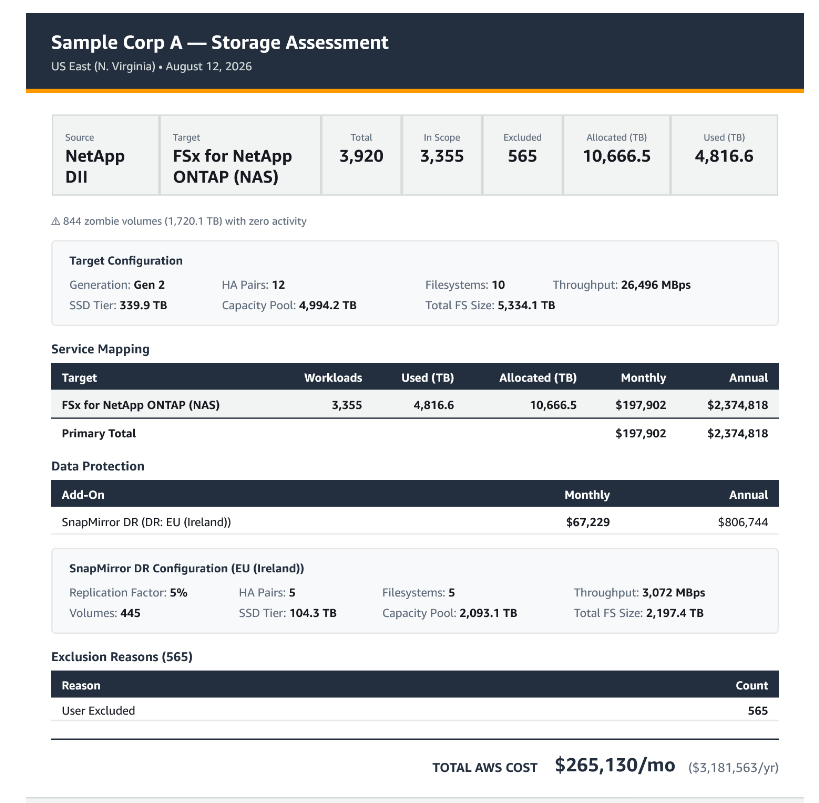
Figure 2: Assessment overview showing primary, SnapMirror, and total costs
The DR file system runs at minimum cost during normal operation. During failover, SSD and throughput scale up on-demand to serve production traffic, then scale back down after failback, including SSD scale-down on Gen 2 file systems.
VMware migration with AWS Backup
In this example, we use the VMware assessment from Part 1 (5,050 in-scope VMs across four services, EU-West-1).The customer required backup protection across the full storage estate. AWS Backup covers the target storage services (Amazon EBS, FSx for ONTAP NAS, and FSx for ONTAP Block) in a single policy with warm vault storage. The following table summarizes the cost and scope of both components.
| Component | Monthly cost | Scope |
| Primary storage (all services) | $118,277 | 5,050 workloads, EU-West-1 |
| AWS Backup (warm vault) | $69,284 | Full estate, daily (7 days) + weekly (14 days) + Monthly (30 days) + Yearly (1 year) |
| Total | $187,560 |
The following Figure 3 example assessment shows the primary, AWS Backup, and total costs.
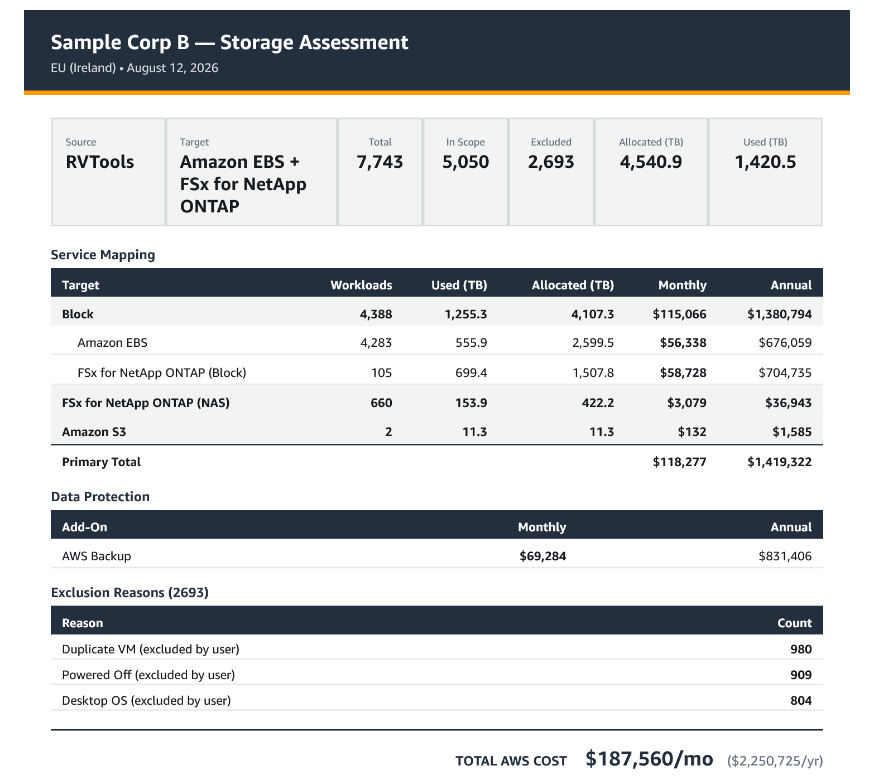
Figure 3: Assessment overview showing primary, AWS Backup, and total costs
For Amazon EBS workloads requiring continuous replication with seconds RPO, AWS Elastic Disaster Recovery provides block-level replication with lightweight staging in the DR Region. For FSx for ONTAP workloads requiring granular file-level restore, SnapVault provides retention-based backup to a secondary file system using capacity pool storage. Each is a separate add-on, modeled from the same data.The what-if engine described in Part 2 applies to protection as well. You can change the retention, add SnapVault, switch vault type, or scope Amazon Elastic Disaster Recovery to production servers only, and each reruns from the same source data.
What you receive
The protection analysis adds dedicated sections to your existing deliverables: per-volume backup sizing with retention calculations, per-array replication costing with DR file system configuration, and AWS Elastic Disaster Recovery per-server staging breakdown. The executive PowerPoint includes add-on slides alongside primary storage. Protection costs appear as separate, labeled line items in the Assessment Overview, giving stakeholders one document with primary and protection costs together.
Getting started
To add data protection to an existing assessment, no new data collection is needed. Enable protection add-ons on your current assessment, specify retention and RPO or RTO requirements, and receive updated costs within seconds. Work with your AWS Migration Solutions Architect to define which workloads need DR, which need backup, and which need both.
Contact your AWS account team or request an assessment. AWS Migration Solutions Architects run these end-to-end at no cost. For self-service analysis, AWS Transform assessments provides automated storage assessment capabilities directly from your AWS Management Console.
Conclusion
In this post, we covered how data protection fits into the migration business case from day one. The AWS Storage Assessment models four protection services (AWS Backup, AWS Elastic Disaster Recovery, SnapMirror, and SnapVault) from the same telemetry used for primary sizing. Each service applies to the workloads that need it, costs are modeled per-workload, and each dimension is adjustable without re-collecting data. The result is a business case that reflects total operational cost, with no post-approval surprises. For the assessment process, see Part 1 of this blog series. For the analytical methods, see Part 2.