Sold by: ProvenCloud
Deployed on AWS
Free Trial
This is a repackaged open source software product wherein additional charges apply for a secure, ready-to-use Snipe-IT 8.8 IT asset management server. Know who has every laptop, licence and accessory in about 3 minutes from launch, with check-in and check-out history, audits and depreciation reports. Every instance gets its own passwords.
Overview
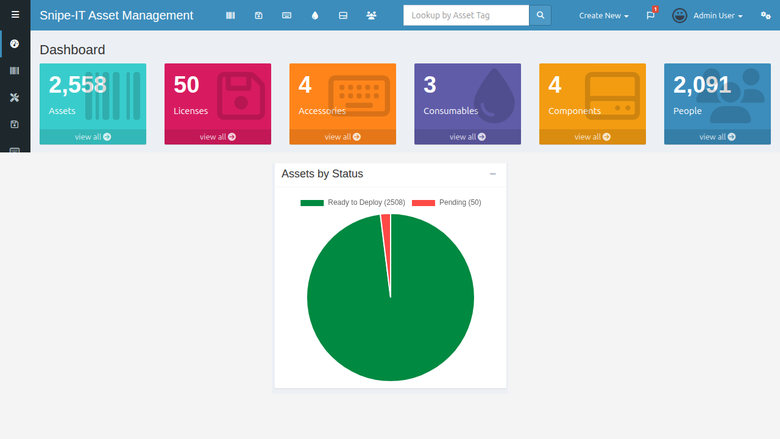
Know who has every IT asset, always
Snipe-IT is a popular open source IT asset management system. It records every laptop, monitor, phone, software licence, accessory and consumable your organisation owns, who has it, where it is and when it is due back. This image gives you a working Snipe-IT server in about 3 minutes, with no installer to run and no database to create.
Who it is for
- IT teams replacing spreadsheets for laptops, phones and licences
- Schools and colleges tracking devices issued to staff and students
- Growing businesses preparing for audits, ISO 27001 or SOC 2 asset registers
What is included
- Snipe-IT 8.8.3 with the setup already complete and the task scheduler running
- Ubuntu 24.04 LTS with every security update applied at release
- Apache 2.4 with PHP 8.3-FPM, MySQL 8.0, phpMyAdmin 5.2 and Webmin
- Audit reminders, depreciation reports and the REST API ready to use; add your SMTP server to turn on email alerts
- Simple scripts to change every password
Secure by default
- No shared or default passwords or keys: every instance generates its own application key, OAuth signing keys, database passwords, phpMyAdmin secret, Webmin password and SSH host keys on first boot
- SSH accepts key-based login only, and MySQL listens only on the server itself
- Built only from official Snipe-IT and Ubuntu sources and scanned by AWS Marketplace before every release
Get started in 4 steps
- Launch the instance (t3a.medium recommended) and allow ports 22, 80 and 8000; limit 22 and 8000 to your own IP
- Wait about 3 minutes for the first-boot setup to finish
- Open http:// and sign in with admin and your instance ID
- Add your locations and users, import your assets from CSV and print asset labels
What you get from ProvenCloud on top of the free software
A pre-built, tested image that saves hours of setup, a unique security setup for every server, password scripts, regular updated versions with the latest security fixes, and email help from engineers who build and test every image.
Snipe-IT is open source software licensed under AGPL-3.0. Snipe-IT is a trademark of Grokability, Inc. This image is an independent build by ProvenCloud and is not affiliated with or endorsed by Grokability, Inc.
Highlights
- Tracking assets in about 3 minutes: Snipe-IT 8.8, PHP 8.3, MySQL 8.0, phpMyAdmin and Webmin are installed and connected, the setup wizard is already done and the task scheduler is running, so audit reminders and reports work from the first sign-in.
- Secure by default: no shared or default passwords. Every instance generates its own Snipe-IT application key, OAuth keys, database passwords and Webmin password on first boot, SSH is key-only and the database is closed to the internet.
- Every IT asset in one place: laptops, phones, monitors, software licences, accessories and consumables, with QR and barcode labels, check-in and check-out history, audit dates, depreciation and a full REST API.
Details
Sold by
Categories
Delivery method
Delivery option
Quick Launch: new VPC and server (CloudFormation)
64-bit (x86) Amazon Machine Image (AMI)
Latest version
Operating system
Ubuntu 24.04
Deployed on AWS
Features and programs
Financing for AWS Marketplace purchases
AWS Marketplace now accepts line of credit payments through the PNC Vendor Finance program. This program is available to select AWS customers in the US, excluding NV, NC, ND, TN, & VT.

Pricing
Free trial
Try this product free for 5 days according to the free trial terms set by the vendor. Usage-based pricing is in effect for usage beyond the free trial terms. Your free trial gets automatically converted to a paid subscription when the trial ends, but may be canceled any time before that.
Pricing is based on actual usage, with charges varying according to how much you consume. Subscriptions have no end date and may be canceled any time. Alternatively, you can pay upfront for a contract, which typically covers your anticipated usage for the contract duration. Any usage beyond contract will incur additional usage-based costs.
Additional AWS infrastructure costs may apply. Use the AWS Pricing Calculator to estimate your infrastructure costs.
- ...
Dimension | Cost/hour |
|---|---|
t3a.medium Recommended | $0.03 |
c1.xlarge | $0.05 |
c3.2xlarge | $0.08 |
c3.4xlarge | $0.08 |
c3.8xlarge | $0.08 |
c3.xlarge | $0.05 |
c4.2xlarge | $0.08 |
c4.4xlarge | $0.08 |
c4.8xlarge | $0.08 |
c4.xlarge | $0.05 |
Dimensions summary
You pay by the hour for the EC2 instance running this software image. The software itself is open source and needs no license key, so the hourly charge reflects your chosen instance size. Pricing is organized around EC2 instance families: general purpose (t, m), compute-optimized (c), memory-optimized (r, x, z), storage-optimized (d, i), and accelerated computing (g, p, f, inf, trn, vt). Within each family, larger sizes cost more per hour as vCPU and memory scale up. Pick the instance that matches your workload. The vendor suggests t3a.medium as a starting point. You also pay AWS for storage.
Top-of-mind questions for buyers
Each hour covers one running EC2 instance of the size you choose. The software image itself is open source under AGPL-3.0 and needs no license key. You are billed per hour the instance runs, plus separate AWS charges for the gp3 root volume and any other resources.
The hourly software charge applies only while the instance runs. A stopped instance does not accrue hourly software fees. You still pay AWS for storage attached to that instance, such as the 30 GiB root volume, while it exists.
Each instance size has its own hourly rate, so switching to a larger size changes your rate from the moment that instance runs. Larger sizes within a family carry more vCPU and memory and cost more per hour. The software stack stays identical across all sizes.
www.provencloud.io+1
Helpful?
Vendor refund policy
Software charges are billed hourly, only while your instance runs. You can stop charges at any time by terminating the instance or cancelling your subscription. Charges already incurred are not refundable.

Legal
Vendor terms and conditions
Upon subscribing to this product, you must acknowledge and agree to the terms and conditions outlined in the vendor's End User License Agreement (EULA) .
Content disclaimer
Vendors are responsible for their product descriptions and other product content. AWS does not warrant that vendors' product descriptions or other product content are accurate, complete, reliable, current, or error-free.
Delivery details
64-bit (x86) Amazon Machine Image (AMI)
Amazon Machine Image (AMI)
An AMI is a virtual image that provides the information required to launch an instance. Amazon EC2 (Elastic Compute Cloud) instances are virtual servers on which you can run your applications and workloads, offering varying combinations of CPU, memory, storage, and networking resources. You can launch as many instances from as many different AMIs as you need.
Version release notes
Same Snipe-IT software and image as version v8.8.3. This version adds a one-click Quick Launch option: an AWS CloudFormation template that creates a new VPC, a security group that keeps SSH and admin ports open only to your IP, and the server with an encrypted disk. Existing servers keep running as they are and need no action.
Additional details
Usage instructions
Open http://<instance-public-ip> and sign in with admin and the instance ID. Allow two to three minutes for first boot. phpMyAdmin is at /phpmyadmin with root and the instance ID. Webmin is at port 8000 with admin and the instance ID. SSH user: ubuntu. Change all passwords after first sign-in.
Resources
Vendor resources
Support
Vendor support
Email: support@provencloud.io
Support page: https://www.provencloud.io/support
Response time: we reply to every support email within 1 business day.
Hours: Monday to Friday, 10:00 to 19:00 IST (UTC+05:30)
Help with: first sign-in, passwords, email alerts, CSV imports, LDAP sign-in, domains and HTTPS, and upgrading to new versions.
Billing and refunds for this subscription are handled by AWS Marketplace.
AWS infrastructure support
AWS Support is a one-on-one, fast-response support channel that is staffed 24x7x365 with experienced and technical support engineers. The service helps customers of all sizes and technical abilities to successfully utilize the products and features provided by Amazon Web Services.
Similar products
This is a repackaged open source software product wherein additional charges apply for a secure, ready-to-use IT helpdesk and asset management server built on GLPI 12.0.0. Handle support tickets with SLAs and keep an up-to-date inventory of every computer, licence and contract about 3 minutes after launch. Every instance gets its own passwords.
This is a repackaged open source software product wherein additional charges apply for a security-hardened Ubuntu 26.04 LTS server. Firewall, fail2ban, key-only SSH, audit logging, file integrity checks and automatic security updates are set up and tested before your first login.
This is a repackaged open source software product wherein additional charges apply for a secure, ready-to-use Node.js 24 LTS stack with Nginx, PM2, MySQL and Redis. Deploy your Node.js app behind Nginx with PM2, MySQL and Redis already running, about 3 minutes after launch. Every instance gets its own passwords.
This is a repackaged open source software product wherein additional charges apply for a secure, ready-to-use Zabbix 7.4 monitoring server. Go from launch to your first live dashboard in about 3 minutes: monitor servers, network devices, applications and websites, and get an alert the moment something breaks. HTTPS is on by default and every instance gets its own passwords.
Customer reviews
No customer reviews yet
Be the first to review this product . We've partnered with PeerSpot to gather customer feedback. You can share your experience by writing or recording a review, or scheduling a call with a PeerSpot analyst.