
Sold by: ProvenCloud
Deployed on AWS
Free Trial
This is a repackaged open source software product wherein additional charges apply for a secure, ready-to-use Node.js 24 LTS stack with Nginx, PM2, MySQL and Redis. Deploy your Node.js app behind Nginx with PM2, MySQL and Redis already running, about 3 minutes after launch. Every instance gets its own passwords.
Overview
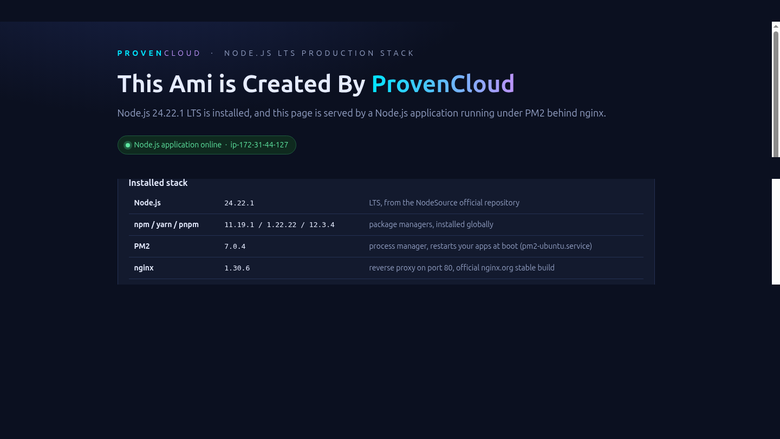
A production-ready Node.js server
Node.js is an open source JavaScript runtime for building fast web servers, APIs and real-time apps. This image gives developers and startups a production-ready Node.js server in minutes: the runtime, a process manager, a reverse proxy, a database and a cache are already installed and connected, so you only need to deploy your code.
Who it is for
- Developers deploying Node.js APIs and web apps
- Startups that want a runtime, database and cache ready together
- Teams moving apps from a laptop to a real server
What is included
- Node.js 24.20.0 LTS on Ubuntu 24.04 LTS
- PM2 running a sample app as the ubuntu user, restarting your apps at boot
- Nginx as a reverse proxy on port 80
- MySQL 8.0 and Redis, kept on the server itself
- phpMyAdmin for database administration and Webmin for server administration over HTTPS
Secure by default
- No password ships in the image: every instance sets its own MySQL root and Webmin passwords on first boot
- A new phpMyAdmin secret and Webmin certificate for every instance
- MySQL and Redis listen only on the server itself, and SSH accepts key-based login only
Get started in 4 steps
- Launch the instance (t3a.small recommended) and allow ports 22, 80 and 8000; limit 22 and 8000 to your own IP
- Wait about 3 minutes, then open http:// to see the sample app
- Connect over SSH as ubuntu and deploy your app with PM2
- Change the passwords after first sign-in and add your domain and certificate
Example use case
A startup deploys its Express API and React front end for its first 1,000 users. It clones the repository into /home/ubuntu/apps, starts the API with PM2 so it restarts on failure and at boot, stores data in MySQL and sessions in Redis, and points its domain at Nginx with a free HTTPS certificate.
About ProvenCloud
ProvenCloud builds and maintains 50 ready-to-use server images on AWS Marketplace. Every image is built from official sources, scanned by AWS Marketplace before each release, and rebuilt when an important security fix ships: in November 2026 we rebuilt and re-released 29 products for CVE-2026-111497. Our Zabbix solution has passed the AWS Foundational Technical Review.
What you get from ProvenCloud on top of the free software
A pre-built and tested image that is ready in minutes, a unique security setup for every server, simple scripts for changing passwords, regular image updates, and help by email whenever you need it. Node.js and PM2 are open source software licensed under MIT, and Nginx under BSD-2-Clause. Node.js is a trademark of the OpenJS Foundation. This image is an independent build by ProvenCloud.
Highlights
- Ready in minutes: launch the instance and open its public IP to see the sample app served through Nginx. Node.js 24 LTS, PM2, MySQL, Redis, phpMyAdmin and Webmin are already set up.
- Secure by default: no shared or default passwords. Every instance sets its own MySQL and Webmin passwords on first boot and a new phpMyAdmin secret is generated, and SSH accepts key-based login only.
- Production basics done for you: PM2 keeps your app running and restarts it after a reboot, Nginx sits in front as a reverse proxy, and Redis is ready for caching and sessions.
Details
Sold by
Categories
Delivery method
Delivery option
64-bit (x86) Amazon Machine Image (AMI)
Latest version
Operating system
Ubuntu 24.04
Deployed on AWS
Features and programs
Financing for AWS Marketplace purchases
AWS Marketplace now accepts line of credit payments through the PNC Vendor Finance program. This program is available to select AWS customers in the US, excluding NV, NC, ND, TN, & VT.

Pricing
Free trial
Try this product free for 5 days according to the free trial terms set by the vendor. Usage-based pricing is in effect for usage beyond the free trial terms. Your free trial gets automatically converted to a paid subscription when the trial ends, but may be canceled any time before that.
Pricing is based on actual usage, with charges varying according to how much you consume. Subscriptions have no end date and may be canceled any time. Alternatively, you can pay upfront for a contract, which typically covers your anticipated usage for the contract duration. Any usage beyond contract will incur additional usage-based costs.
Additional AWS infrastructure costs may apply. Use the AWS Pricing Calculator to estimate your infrastructure costs.
- ...
Dimension | Cost/hour |
|---|---|
t3a.small Recommended | $0.03 |
c1.xlarge | $0.06 |
c3.2xlarge | $0.10 |
c3.4xlarge | $0.10 |
c3.8xlarge | $0.10 |
c3.large | $0.04 |
c3.xlarge | $0.06 |
c4.2xlarge | $0.10 |
c4.4xlarge | $0.10 |
c4.8xlarge | $0.10 |
Dimensions summary
You pay by the hour for the EC2 instance type you choose to run this machine image. The software itself is open-source and needs no license key, so the hourly rate covers the instance you select. Pricing scales with instance size and family. Each family targets a workload profile: compute-optimized (c), general-purpose (m, t), memory-optimized (r, x, z), storage-optimized (d, i, h), and accelerated computing (g, p, f, inf, trn, vt). Within each family, larger sizes cost more per hour. Pick the instance that matches your workload, and your cost follows the hours you run it.
Top-of-mind questions for buyers
You pay the AWS hourly rate for the EC2 instance type you launch. The software stack is open-source under MIT and needs no license key. So your hourly charge covers the compute and underlying AWS resources, not a separate software fee.
Hourly charges meter running time. A fully stopped instance does not accrue hourly software charges. You may still pay AWS for attached storage, since the image uses a 20 GiB gp3 root volume that persists while the instance is stopped.
No. The bundled software is open-source and needs no license key. The image is a static artifact, so anything you launch keeps running whether or not you stay with the vendor. You only pay your cloud provider for the compute and storage used.
www.provencloud.io+1
Helpful?
Vendor refund policy
Software charges are billed hourly, only while your instance runs. You can stop charges at any time by terminating the instance or cancelling your subscription. Charges already incurred are not refundable.

Legal
Vendor terms and conditions
Upon subscribing to this product, you must acknowledge and agree to the terms and conditions outlined in the vendor's End User License Agreement (EULA) .
Content disclaimer
Vendors are responsible for their product descriptions and other product content. AWS does not warrant that vendors' product descriptions or other product content are accurate, complete, reliable, current, or error-free.
Delivery details
64-bit (x86) Amazon Machine Image (AMI)
Amazon Machine Image (AMI)
An AMI is a virtual image that provides the information required to launch an instance. Amazon EC2 (Elastic Compute Cloud) instances are virtual servers on which you can run your applications and workloads, offering varying combinations of CPU, memory, storage, and networking resources. You can launch as many instances from as many different AMIs as you need.
Version release notes
Urgent security update for CVE-2026-109618 and CVE-2026-109619. PHP is updated to Ubuntu package 8.3.6-0ubuntu0.24.04.13. Node.js remains 24.20.0. Boot and application health validation passed on 2026-10-26.
Additional details
Usage instructions
Open http://<instance-public-ip> for the sample app. Allow two to three minutes for first boot. phpMyAdmin is at /phpmyadmin with root and the instance ID. Webmin is at https://<instance-public-ip>:8000 with admin and the instance ID. SSH user: ubuntu. Change all passwords after first sign-in.
Resources
Vendor resources
Support
Vendor support
Email: support@provencloud.io
Support page: https://www.provencloud.io/support
Response time: we reply to every support email within 1 business day.
Hours: Monday to Friday, 10:00 to 19:00 IST (UTC+05:30)
Help with: first sign-in, passwords, domains and HTTPS, configuration questions, and upgrading to new versions.
Billing and refunds for this subscription are handled by AWS Marketplace.
AWS infrastructure support
AWS Support is a one-on-one, fast-response support channel that is staffed 24x7x365 with experienced and technical support engineers. The service helps customers of all sizes and technical abilities to successfully utilize the products and features provided by Amazon Web Services.
Similar products

This is a repackaged open source software product wherein additional charges apply for a secure, ready-to-use Jenkins LTS CI/CD server with Java, Docker and common build tools. Build, test and deploy your code on every change, with Jenkins, Docker and common build tools ready about 3 minutes after launch. Every instance gets its own passwords.

This is a repackaged open source software product wherein additional charges apply for a secure, ready-to-use LAMP stack with Apache, MySQL, PHP 8.3, phpMyAdmin and Webmin. Upload your PHP website or app and serve it with Apache and MySQL about 2 minutes after launch, with phpMyAdmin and Webmin already set up. Every instance gets its own passwords.

This is a repackaged open source software product wherein additional charges apply for a secure, ready-to-use WordPress 7.1 website and blog server. Your site is live in about 3 minutes with Apache, PHP 8.3, MySQL and WP-CLI already set up and tuned. Pick a theme and start publishing; every instance gets its own passwords and security keys.

This is a repackaged open source software product wherein additional charges apply for a secure, ready-to-use ELK Stack 9.5 with Elasticsearch, Logstash and Kibana. Search, analyse and chart all your logs in Kibana about 5 minutes after launch, with Elasticsearch and Logstash already connected. Every instance gets its own passwords.
Customer reviews
No customer reviews yet
Be the first to review this product . We've partnered with PeerSpot to gather customer feedback. You can share your experience by writing or recording a review, or scheduling a call with a PeerSpot analyst.