
Sold by: ADEO Imaging
Deployed on AWS
Free Trial
AWS Free Tier
ADEO Imaging WireGuard VPN Server on Debian - a preconfigured AMI with a built-in web control panel for user management. Launch and connect with zero setup required.
5
Overview
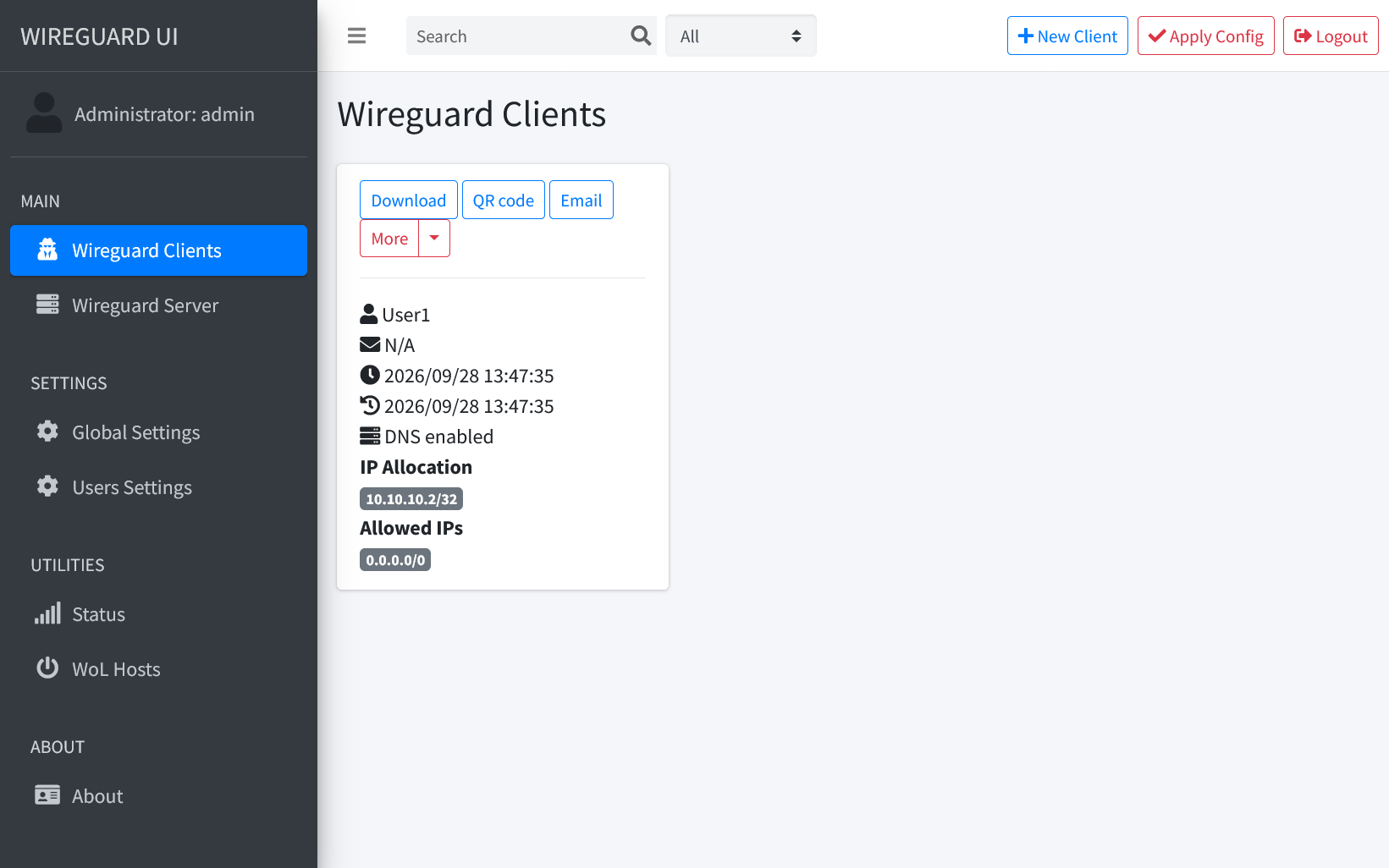
Image
Web panel. Clients list.
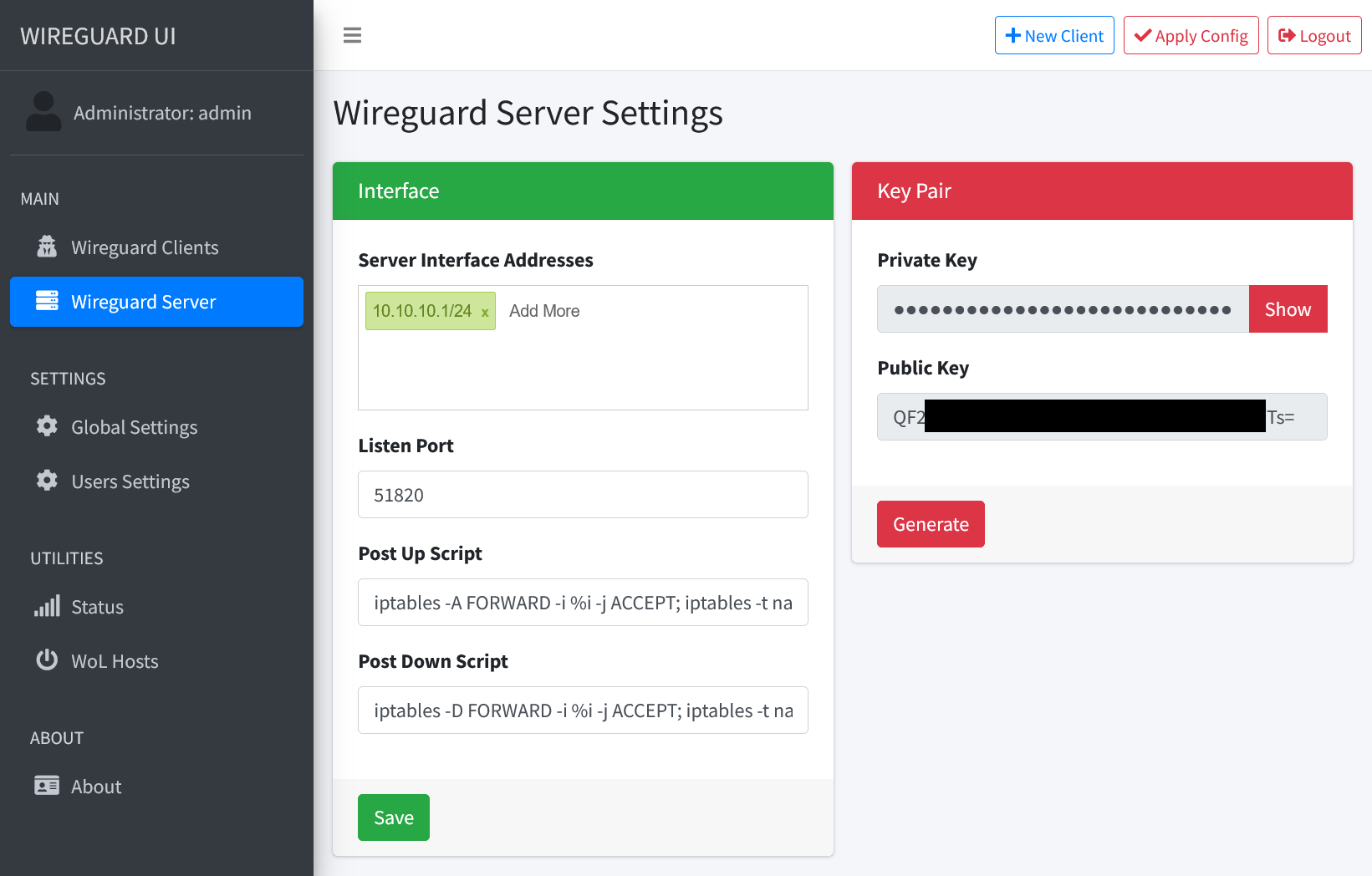
Image
Web panel. Server settings.
WireGuard VPN Server - Preconfigured and Ready to Deploy on AWS
Get a fully preconfigured WireGuard VPN server running on Linux/Debian with a built-in web control panel for user management. Launch the instance and start connecting immediately - no manual configuration, no complex setup. Your WireGuard VPN server is fully operational from the moment it starts.
A free trial is available so you can evaluate the server before committing.
Why WireGuard on AWS?
WireGuard delivers VPN tunnel speeds that exceed IKEv2 and significantly outperform OpenVPN, making it one of the fastest VPN protocols available. Combined with AWS infrastructure, this server provides stable, high-speed secure internet access for computers and mobile devices across Windows, Linux, Android, macOS, and iOS.
The server's high efficiency means it runs effectively even on smaller instance types such as t3.micro, t3.small, or t3.medium, helping you manage AWS infrastructure costs while maintaining excellent VPN performance.
Security and Encryption
WireGuard's protocol employs a modern cryptographic suite including ChaCha20 for symmetric encryption, Poly1305 for message authentication, Curve25519 for key exchange, and BLAKE2s for hashing. User authentication is managed through security keys rather than passwords, providing strong identity verification for every connected client. The VPN tunnel operates on port 51820 UDP.
Built-In Web Control Panel
Manage your VPN server through a convenient and intuitive web control panel that allows you to:
- Add, remove, and manage VPN users
- Adjust basic VPN channel settings
- Monitor connected clients
- Configure server parameters
The control panel eliminates the need for command-line administration, making VPN server management accessible to administrators of all skill levels.
Use Cases
Secure Remote Access for Teams: Deploy a WireGuard VPN server to provide your team with encrypted internet access from any location. The web control panel makes it straightforward to onboard new users and manage access credentials as your team grows.
VPN-as-a-Service for Providers: Companies offering VPN services can use this server as their infrastructure backbone. The user management features in the web control panel support adding and managing end customers, while the high-speed WireGuard protocol ensures a quality experience for subscribers.
Router-Compatible VPN Gateway: WireGuard is used as the default VPN protocol in some routers, making this server a compatible gateway for site-to-site or device-to-site connectivity without additional client software on those devices.
Internet Access in Restricted Regions: Provide secure, encrypted internet access for users in countries where internet use is restricted by authorities. The high-speed WireGuard tunnels and lightweight server footprint make it practical to deploy quickly when access is needed.
Getting Started
- Launch the WireGuard VPN Server AMI on your preferred AWS instance type
- The server starts fully configured and operational - no setup required
- Access the web control panel to create user profiles and security keys
- Install the WireGuard client on your devices (available for Windows, Linux, Android, macOS, and iOS)
- Connect using the generated security keys and start browsing securely
Technical Highlights
- Protocol: WireGuard with ChaCha20, Poly1305, Curve25519, and BLAKE2s
- VPN Port: 51820 UDP
- Operating System: Debian Linux
- Authentication: Key-based user authentication
- Management: Web control panel with user management
- Client Support: Windows, Linux, Android, macOS, iOS
- Recommended Instances: t3.micro, t3.small, t3.medium, or larger
To learn more or request a guided setup session, visit the contact page on the ADEO Imaging website.
WireGuard is a registered trademark of Jason A. Donenfeld. OpenVPN is a registered trademark of OpenVPN Inc.
Highlights
- Easy-to-use. After launching, the WireGuard VPN Server is immediately fully operational without the need for any setup.
- The WireGuard VPN Server on Linux/Debian provides fast and secure internet access for individual users.
- WireGuard is considered a modern VPN protocol. It was developed with a focus on simplicity, high speed, and security. This WireGuard VPN Server on Linux/Debian uses UDP protocol for secure VPN communication, ensuring high-speed VPN performance.
Details
Sold by
Categories
Delivery method
Delivery option
64-bit (x86) Amazon Machine Image (AMI)
Latest version
Operating system
Debian 13
Deployed on AWS
Features and programs
Financing for AWS Marketplace purchases
AWS Marketplace now accepts line of credit payments through the PNC Vendor Finance program. This program is available to select AWS customers in the US, excluding NV, NC, ND, TN, & VT.

Pricing
Free trial
Try this product free for 5 days according to the free trial terms set by the vendor. Usage-based pricing is in effect for usage beyond the free trial terms. Your free trial gets automatically converted to a paid subscription when the trial ends, but may be canceled any time before that.
Pricing is based on actual usage, with charges varying according to how much you consume. Subscriptions have no end date and may be canceled any time. Alternatively, you can pay upfront for a contract, which typically covers your anticipated usage for the contract duration. Any usage beyond contract will incur additional usage-based costs.
Additional AWS infrastructure costs may apply. Use the AWS Pricing Calculator to estimate your infrastructure costs.
If you are an AWS Free Tier customer with a free plan, you are eligible to subscribe to this offer. You can use free credits to cover the cost of eligible AWS infrastructure. See AWS Free Tier for more details. If you created an AWS account before July 15th, 2025, and qualify for the Legacy AWS Free Tier, Amazon EC2 charges for Micro instances are free for up to 750 hours per month. See Legacy AWS Free Tier for more details.
Dimension | Cost/hour |
|---|---|
t3.nano Recommended | $0.063 |
t2.micro | $0.063 |
t3.micro | $0.063 |
t2.small | $0.063 |
m5ad.4xlarge | $0.126 |
m5d.xlarge | $0.063 |
m5.large | $0.063 |
m5ad.2xlarge | $0.126 |
t3.xlarge | $0.063 |
m5n.large | $0.063 |
Dimensions summary
You pay by the hour based on the EC2 instance type you choose to run the VPN server. Pricing is not tiered by features; every instance runs the same software. Instead, your cost scales with the size and compute power of the machine. The t2, t3, and t3a families cover burstable, lower-power options, while the m5, m5a, m5ad, m5d, m5dn, and m5n families offer more compute and memory. Within each family, sizes range from nano and micro up to 4xlarge. Larger instances cost more per hour but handle more VPN users and traffic.
Top-of-mind questions for buyers
You are billed per hour that your chosen EC2 instance runs the VPN server software. The software is the same across all instance types. Your hourly rate reflects the instance size you pick, combining the software charge with the compute and memory that instance provides.
The hourly software charge applies only while the instance runs. A fully stopped instance stops accruing software charges. You may still pay underlying AWS storage fees for the instance volume, but the VPN software meters running time only.
Pick the size based on server load and expected user count. The software runs on low-power machines, so smaller t2, t3, or t3a instances can lower cost for light use. Larger m5-family instances handle more users and traffic per hour.
www.adeoclouds.eu
Helpful?
Vendor refund policy
You may terminate the instance at anytime to stop incurring charges.

Legal
Vendor terms and conditions
Upon subscribing to this product, you must acknowledge and agree to the terms and conditions outlined in the vendor's End User License Agreement (EULA) .
Content disclaimer
Vendors are responsible for their product descriptions and other product content. AWS does not warrant that vendors' product descriptions or other product content are accurate, complete, reliable, current, or error-free.
Delivery details
64-bit (x86) Amazon Machine Image (AMI)
Amazon Machine Image (AMI)
An AMI is a virtual image that provides the information required to launch an instance. Amazon EC2 (Elastic Compute Cloud) instances are virtual servers on which you can run your applications and workloads, offering varying combinations of CPU, memory, storage, and networking resources. You can launch as many instances from as many different AMIs as you need.
Version release notes
Security has been improved.
Additional details
Usage instructions
Launch the server. This server does not require the powerful computing resources - you can choose a simple instance type. If the Elastic IP was assigned to a running instance, the instance must be restarted.
Linux username: admin
After launching the server, it is immediately ready for use, with no additional settings required. It is important that the client device has the WireGuard client application installed, which is available for Windows, Linux, Android, macOS, and iOS.
Control Panel including user management features:
- https://[Public IP address].sslip.io
- http://[Public IP address]
- Please use "admin" as username and your instance ID as password.
By default, a user named 'User 1' is already set up in the WireGuard Control Panel with a randomly generated user key. You can immediately download the configuration file for the Windows WireGuard client or use the QR code to add this user to the WireGuard client application on your mobile device.
After the server has been started, try connecting to it using a WireGuard VPN client. Ensure that when the client connects to the Internet via this VPN server, the client's IP address is different from the original.
The server and user keys were created automatically when the server was first started and are unique.
Resources
Vendor resources
Support
Vendor support
If you have any questions regarding the deployment or use of this server, you can use the Contact Us form on our website or reach out via email. We guarantee a response within 24 hours.
Contact US: https://www.adeoclouds.eu/contact.php?id=2
E-mail: admin@adeoclouds.eu
AWS infrastructure support
AWS Support is a one-on-one, fast-response support channel that is staffed 24x7x365 with experienced and technical support engineers. The service helps customers of all sizes and technical abilities to successfully utilize the products and features provided by Amazon Web Services.
Updated weekly
By ADEO Imaging


Top
25
In Device Security
Top
10
In Network Infrastructure, Infrastructure as Code
Top
10
In Migration
Sentiment is AI generated from actual customer reviews on AWS and G2
Functionality
Ease of use
Customer service
Cost effectiveness
Positive reviews
Mixed reviews
Negative reviews
AI generated from product descriptions
VPN Protocol and Cryptography
WireGuard protocol with ChaCha20 symmetric encryption, Poly1305 message authentication, Curve25519 key exchange, and BLAKE2s hashing
Web-Based Management Interface
Built-in web control panel for adding, removing, and managing VPN users, adjusting VPN channel settings, monitoring connected clients, and configuring server parameters
Key-Based Authentication
Security key-based user authentication instead of password-based authentication for client identity verification
Multi-Platform Client Support
Compatible with WireGuard clients on Windows, Linux, Android, macOS, and iOS operating systems
Lightweight Infrastructure Requirements
Optimized to run efficiently on smaller AWS instance types including t3.micro, t3.small, and t3.medium
VPN Protocol
Built on WireGuard protocol for secure connectivity
Network Architecture
Mesh networking architecture that eliminates single points of failure and replaces legacy hub-and-spoke models
Identity-Based Access Control
Identity-based network access control enabling user and group-based permissions independent of IP addresses
Hostname Resolution
MagicDNS feature enabling device access using memorable hostnames instead of IP addresses
Connection Persistence
Connection migration capability maintaining active connections when switching between different network types
VPN Protocol Support
Routed IPsec site-to-site VPNs, remote access with Mobile IPsec, and WireGuard VPN capabilities
Routing Protocols
BGP, OSPF, RIPv2, IPv4/IPv6, and ECMP routing support
Management and Monitoring Interfaces
Command line interface (CLI), RESTCONF API, GUI, SNMP, Prometheus Exporter, and IPFIX Exporter
Security Access Control
L2/L3/L4 ACLs scalable to over 100,000 rules
Underlying Technology Stack
Vector Packet Processing (VPP), Data Plane Developer Kit (DPDK), Clixon, and Free Range Routing (FRR) on Linux/Ubuntu base
Standard contract
No
No
Customer reviews
Sofi
Simple and easy to use
Reviewed on Jul 21, 2020
Review from a verified AWS customer
The main advantage is ease of use. The initial setup was mostly not required. The database already contains a test user, so you can start testing right away. The VPN server was tested with TP-Link Router WR841N in L2TP mode. The speed is not bad, no breaks in communication have been detected yet. The server allows using concurrent connections, so I also connected PC (Windows 7) and 2 Android smartphones with the same credentials to the server for testing. At the moment no problems were found, but it is not entirely clear how long it holds the VPN connection for the Android device if you are offline. The disadvantages include the not quite familiar user control panel, which will have to be studied further. Also, if you build a complex network configuration, then probably you may need to change the config files (I don't have such a task). So, generally satisfied.