
Sold by: ProvenCloud
Deployed on AWS
Free Trial
This is a repackaged open source software product wherein additional charges apply for a secure, ready-to-use PostgreSQL 18 database server with the pgAdmin 4 web console. Create and manage PostgreSQL 18 databases from your browser about 3 minutes after launch, with pgAdmin 4 already connected to the server. Every instance gets its own passwords.
Overview
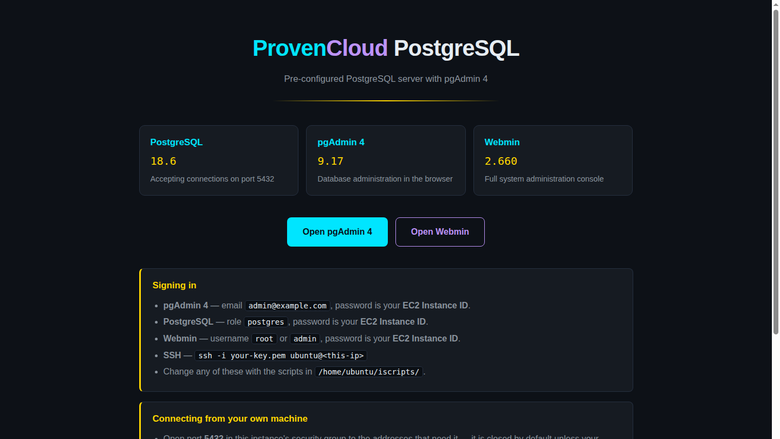
A reliable PostgreSQL server with a web console
PostgreSQL is an open source relational database known for reliability, standards support and powerful features such as JSON, full-text search and extensions. pgAdmin 4 is its web console for creating databases, running queries and managing users. This image gives developers and teams a ready PostgreSQL server in minutes, already connected to pgAdmin.
Who it is for
- Developers who need a PostgreSQL database for their apps
- Data teams running queries and reports in pgAdmin
- Teams moving off a hosted database to their own server
What is included
- PostgreSQL 18.6 on Ubuntu 24.04 LTS
- pgAdmin 4 served by Apache at /pgadmin4, already registered with this server
- Webmin 2.660 for server administration
- Helper scripts pass_postgres.sh, pass_pgadmin.sh and pass_webmin.sh for changing passwords
Secure by default
- No password ships in the image: every instance sets its own postgres, pgAdmin and Webmin passwords on first boot
- PostgreSQL accepts connections only from the server itself until you open it
- SSH accepts key-based login only
Get started in 4 steps
- Launch the instance (t3a.medium recommended) and allow ports 22, 80 and 8000; limit 22 and 8000 to your own IP
- Wait about 3 minutes, then open http:///pgadmin4
- Sign in with admin@example.com and your instance ID; the server is already listed
- Create your database and users, then open port 5432 only to the app servers that need it
Example use case
A SaaS startup with a 4-person engineering team moves its application database off a laptop. It launches the instance, creates a production database and a separate read-only user for reporting in pgAdmin, opens port 5432 only to its two application servers, and schedules nightly EBS snapshots so it can roll back a bad migration.
About ProvenCloud
ProvenCloud builds and maintains 50 ready-to-use server images on AWS Marketplace. Every image is built from official sources, scanned by AWS Marketplace before each release, and rebuilt when an important security fix ships: in November 2026 we rebuilt and re-released 29 products for CVE-2026-111497. Our Zabbix solution has passed the AWS Foundational Technical Review.
What you get from ProvenCloud on top of the free software
A pre-built and tested image that is ready in minutes, a unique security setup for every server, simple scripts for changing passwords, regular image updates, and help by email whenever you need it. PostgreSQL and pgAdmin are open source software released under the PostgreSQL Licence. PostgreSQL is a trademark of the PostgreSQL Community Association. This image is an independent build by ProvenCloud.
Highlights
- Ready in minutes: launch the instance, open pgAdmin in your browser and start creating databases. PostgreSQL 18, pgAdmin 4 and Webmin are already installed and connected.
- Secure by default: no shared or default passwords. Every instance sets its own PostgreSQL, pgAdmin and Webmin passwords on first boot, and SSH accepts key-based login only.
- A dependable SQL database: transactions, JSON, full-text search, extensions and replication, managed from a friendly web console or from psql.
Details
Sold by
Categories
Delivery method
Delivery option
64-bit (x86) Amazon Machine Image (AMI)
Latest version
Operating system
Ubuntu 24.04
Deployed on AWS
Features and programs
Financing for AWS Marketplace purchases
AWS Marketplace now accepts line of credit payments through the PNC Vendor Finance program. This program is available to select AWS customers in the US, excluding NV, NC, ND, TN, & VT.

Pricing
Free trial
Try this product free for 5 days according to the free trial terms set by the vendor. Usage-based pricing is in effect for usage beyond the free trial terms. Your free trial gets automatically converted to a paid subscription when the trial ends, but may be canceled any time before that.
Pricing is based on actual usage, with charges varying according to how much you consume. Subscriptions have no end date and may be canceled any time. Alternatively, you can pay upfront for a contract, which typically covers your anticipated usage for the contract duration. Any usage beyond contract will incur additional usage-based costs.
Additional AWS infrastructure costs may apply. Use the AWS Pricing Calculator to estimate your infrastructure costs.
- ...
Dimension | Cost/hour |
|---|---|
t3a.medium Recommended | $0.04 |
c1.xlarge | $0.06 |
c3.2xlarge | $0.10 |
c3.4xlarge | $0.10 |
c3.8xlarge | $0.10 |
c3.xlarge | $0.06 |
c4.2xlarge | $0.10 |
c4.4xlarge | $0.10 |
c4.8xlarge | $0.10 |
c4.xlarge | $0.06 |
Dimensions summary
You pay by the hour for the EC2 instance type you choose to run this machine image. The many dimensions all represent AWS instance types across families like compute-optimized (c), memory-optimized (r, x, z), storage (d, i), general purpose (m, t), and accelerated (g, p, inf, trn) options. Each family comes in sizes from large to metal. Pricing scales with the size and capability of the instance you select. The software itself is open source and needs no license key, so your hourly cost reflects the compute you run.
Top-of-mind questions for buyers
Your hourly charge covers the EC2 instance you run the machine image on. The PostgreSQL, pgAdmin 4, and Webmin stack is open source under the PostgreSQL License and needs no license key. You pay AWS for the compute and storage the instance uses, plus any software fee for the image.
Hourly software charges apply only while the instance runs. A stopped instance stops accruing hourly charges. You may still pay underlying AWS storage fees for the attached gp3 root volume, which holds your data while the instance is off.
You pick any listed EC2 instance type for your workload. Larger or accelerated instances cost more per hour. The seller recommends the t3a.medium size and the us-east-1 region. The image is x86_64, so choose an x86_64 instance type.
www.provencloud.io
Helpful?
Vendor refund policy
Software charges are billed hourly, only while your instance runs. You can stop charges at any time by terminating the instance or cancelling your subscription. Charges already incurred are not refundable.

Legal
Vendor terms and conditions
Upon subscribing to this product, you must acknowledge and agree to the terms and conditions outlined in the vendor's End User License Agreement (EULA) .
Content disclaimer
Vendors are responsible for their product descriptions and other product content. AWS does not warrant that vendors' product descriptions or other product content are accurate, complete, reliable, current, or error-free.
Delivery details
64-bit (x86) Amazon Machine Image (AMI)
Amazon Machine Image (AMI)
An AMI is a virtual image that provides the information required to launch an instance. Amazon EC2 (Elastic Compute Cloud) instances are virtual servers on which you can run your applications and workloads, offering varying combinations of CPU, memory, storage, and networking resources. You can launch as many instances from as many different AMIs as you need.
Version release notes
Latest stable release on AWS Marketplace.
PostgreSQL 18.6 on Ubuntu 24.04 LTS with pgAdmin 4, Apache and Webmin 2.660.
Unique PostgreSQL, pgAdmin and Webmin passwords are set for every instance on first boot.
Includes helper scripts in /home/ubuntu/iscripts for changing passwords.
Additional details
Usage instructions
Once the instance is running, open pgAdmin at http://<instance-public-ip>/pgadmin4 and sign in with admin@example.com as the email and your instance ID as the password. The PostgreSQL superuser is postgres, with your instance ID as its password. Webmin is on port 8000, so open http://<instance-public-ip>:8000 and sign in with admin as the username and your instance ID as the password. You can also connect over SSH with the username ubuntu and your Amazon key pair.
Required inbound ports: 22 (SSH), 80 (pgAdmin) and 8000 (Webmin). PostgreSQL itself accepts local connections only; to allow remote clients, update postgresql.conf and pg_hba.conf and open port 5432 only to your own addresses. For security, allow ports 22 and 8000 only from your own IP address.
Your instance ID is shown in the EC2 console, for example i-0123456789abcdef0. Every instance sets its own passwords on first boot, so no two instances share a password. Allow two to three minutes after launch for the first-boot setup to finish before you sign in.
Change your passwords after the first sign-in: connect over SSH and run sudo bash /home/ubuntu/iscripts/pass_postgres.sh for PostgreSQL, pass_pgadmin.sh for pgAdmin or pass_webmin.sh for Webmin, from the same folder.
The image serves plain HTTP so it works on a bare IP address. Before using it in production, add your own domain and an SSL certificate, or place it behind a load balancer with HTTPS.
Resources
Vendor resources
Support
Vendor support
Email: support@provencloud.io
Support page: https://www.provencloud.io/support
Response time: we reply to every support email within 1 business day.
Hours: Monday to Friday, 10:00 to 19:00 IST (UTC+05:30)
Help with: first sign-in, passwords, domains and HTTPS, configuration questions, and upgrading to new versions.
Billing and refunds for this subscription are handled by AWS Marketplace.
AWS infrastructure support
AWS Support is a one-on-one, fast-response support channel that is staffed 24x7x365 with experienced and technical support engineers. The service helps customers of all sizes and technical abilities to successfully utilize the products and features provided by Amazon Web Services.
Similar products

This product has charges associated with it, which includes support from Cloud Infrastructure Services. PostgreSQL Server and pgAdmin Web GUI on Ubuntu Server. Open-source relational database system on AWS.

This is a repackaged open source software product wherein additional charges apply for a secure, ready-to-use MariaDB 12.3 LTS database server with phpMyAdmin. Get a MySQL-compatible database server that tunes itself to your instance size on first boot, with phpMyAdmin ready in your browser. Every instance gets its own passwords.

This is a repackaged open source software product wherein additional charges apply for a secure, ready-to-use SonarQube Community Build 26.11 code quality server with PostgreSQL. Scan every build for bugs, security weak spots and duplicated code, with quality gates and dashboards ready about 3 minutes after launch. Every instance gets its own passwords.

This product has charges associated with it for the build, maintenance, and support of the Amazon Machine Image (AMI).
Customer reviews
No customer reviews yet
Be the first to review this product . We've partnered with PeerSpot to gather customer feedback. You can share your experience by writing or recording a review, or scheduling a call with a PeerSpot analyst.