
Sold by: Jellyfish
Deployed on AWS
Jellyfish is the leading intelligence platform for AI-Integrated engineering, helping more than 1000 companies including DraftKings, Box and Blue Yonder, leverage AI to transform how they build software. By combining the deepest engineering dataset with context-rich intelligence, Jellyfish helps R&D organizations understand what is driving impact, adopt proven industry best practices, and make smarter decisions across AI adoption, planning, delivery, and engineering performance. Learn more at jellyfish.co
4.5
Overview
Image
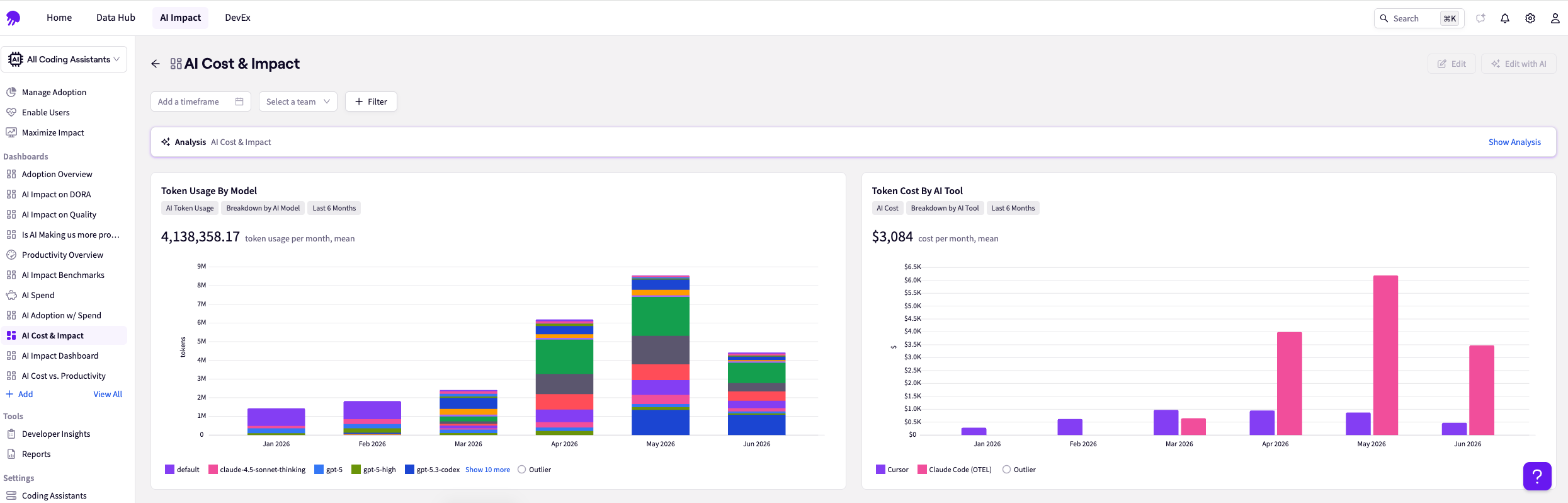
AI & Cost Impact
Image
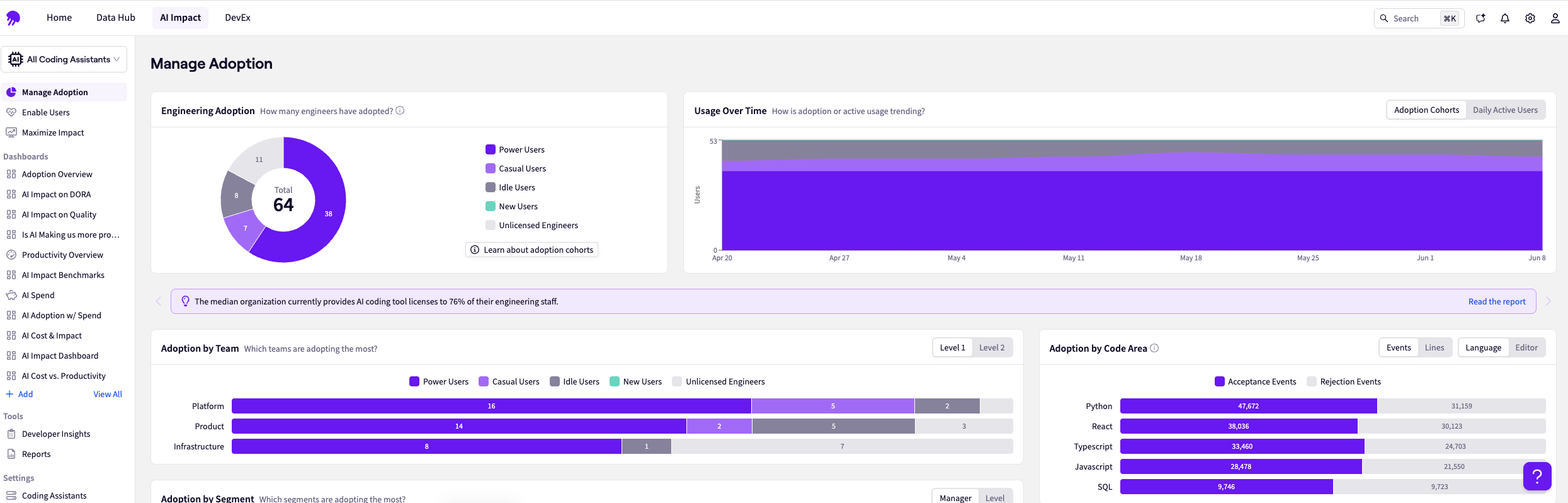
Manage Adoption
Image
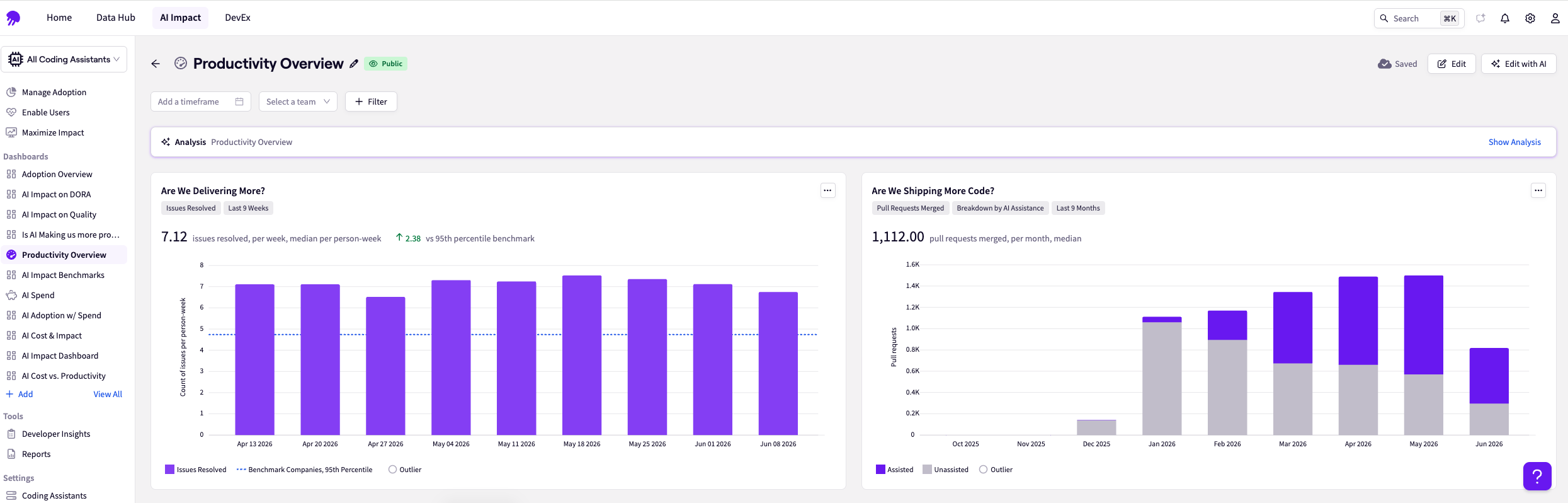
Productivity Overview
Image
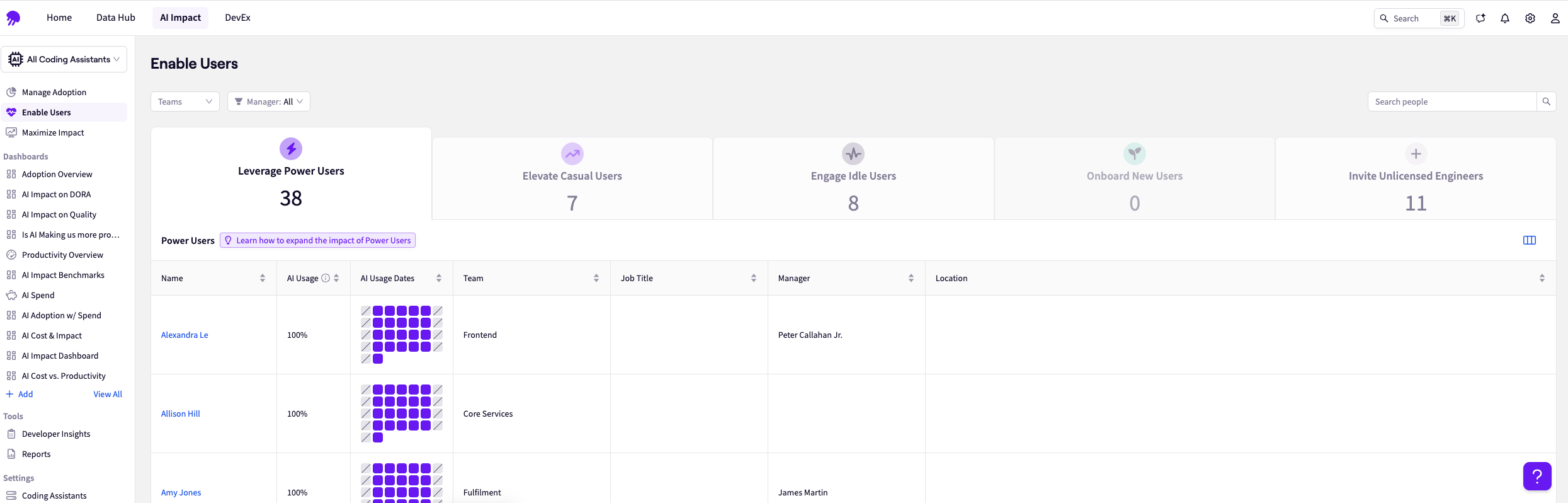
Enable Users
AWS Private Offers available. Contact us at aws@jellyfish.co to get started.
Jellyfish is the Software Engineering Intelligence Platform that answers the question of whether AI investments are delivering the expected business impact, connecting AI tool usage to real engineering outcomes so R&D leaders can see what's actually moving the needle and make confident decisions about where to invest next. More than 1000 companies including DraftKings, Box and Blue Yonder, use Jellyfish to align engineering work with business priorities and ship higher-impact software predictably.
Jellyfish passively ingests signals from across your SDLC and AI tooling, source control, issue trackers, CI/CD, cloud infrastructure, and AI coding assistants, and turns them into a coherent intelligence layer for engineering leadership. You get purpose-built AI Impact dashboards that track adoption and utilization of tools like AWS Kiro and Cursor, measure AI-assisted pull requests, and connect before/after productivity changes to real outcomes: cycle time, deployment frequency, defect rates, and delivery predictability.
This works across software engineering, DevOps, SRE, and infrastructure teams moving beyond ticket velocity to show where engineering effort is going, how work is flowing, and which AI investments are paying off. Engineering leaders get the data to prove ROI to finance and the board. Platform and DevEx teams get the evidence to rationalize tool spend, benchmark impact across cohorts, and make the case for what to double down on, or cut.
Beyond AI impact, Jellyfish gives R&D leaders a unified view of investment allocation, delivery health, and developer experience across every team and product area so that engineering and business leadership share a single, data-backed picture of performance and risk.
Built entirely on AWS and delivered as a multi-tenant SaaS, Jellyfish leverages AWS AI services including Amazon Bedrock (for chat and agentic experiences) and Amazon SageMaker (for intelligent work classification), alongside core AWS infrastructure services, to provide secure, scalable analytics for modern engineering organizations. By tying usage and spend on AWS Kiro, Bedrock-powered assistants, and other AI tools to engineering productivity, quality, and business outcomes, Jellyfish gives AWS customers the data they need to prove ROI and deliver stronger business outcomes from their AI and cloud investments.
Highlights
- Measure how AI affects productivity, speed, and quality to invest confidently in what works
- Combine system data and developer feedback to spot bottlenecks and improve focus, flow, and team performance
- Build a consistent metrics strategy grounded in DORA and SPACE to benchmark trends and report outcomes
Details
Sold by
Delivery method
Deployed on AWS
Features and programs
Buyer guide
Gain valuable insights from real users who purchased this product, powered by PeerSpot.

Financing for AWS Marketplace purchases
AWS Marketplace now accepts line of credit payments through the PNC Vendor Finance program. This program is available to select AWS customers in the US, excluding NV, NC, ND, TN, & VT.

Pricing
Pricing is based on the duration and terms of your contract with the vendor. This entitles you to a specified quantity of use for the contract duration. If you choose not to renew or replace your contract before it ends, access to these entitlements will expire.
Additional AWS infrastructure costs may apply. Use the AWS Pricing Calculator to estimate your infrastructure costs.
Dimension | Description | Cost/12 months |
|---|---|---|
Jellyfish AI Engineering Intelligence Platform | Access to full Jellyfish Platform + 15 Engineering User Seats. Contact us for custom configuration and pricing at aws@jellyfish.co | $30,800.00 |
Dimensions summary
This listing offers one contract option. You buy access to the full Jellyfish Platform bundled with 15 engineering user seats. Pricing is set by a fixed contract rather than usage or hourly billing. If you need a different seat count or a tailored setup, you contact the vendor at aws@jellyfish.co for custom configuration and pricing. There are no separate tiers or add-on dimensions to combine here; the single dimension covers platform access plus the included seats as one package.
Top-of-mind questions for buyers
A seat maps to one engineering user who accesses the platform. The listing includes 15 seats in the base package. Each seat covers one individual user account. If you need more or fewer seats, you contact the vendor at aws@jellyfish.co for a custom configuration.
Platform access covers engineering signal analysis pulled from your existing tools, business alignment views, delivery management, and team health insights. It also supports engineering performance metrics like DORA. Access is bundled with the 15 included seats as one package under this contract.
The listed contract fixes platform access with 15 engineering user seats. For a different seat count or a tailored setup, you contact the vendor at aws@jellyfish.co. Pricing is based on the number of seats and the modules you select, so a custom quote reflects your chosen configuration.
jellyfish.co+2
Helpful?
Vendor refund policy
Refund policy as expressly set forth in the agreement.
Custom pricing options
Request a private offer to receive a custom quote.

Compliance
Compliance profile
This information is produced by a third-party provider from the provider's trust center data and is provided for informational purposes only.
- Source
- Drata Trust Center
SOC 2 Type 2

GDPR

CCPA
CSA STAR AI Level 1

CSA STAR Level 1
SOC 1 Type 2
Legal
Vendor terms and conditions
Upon subscribing to this product, you must acknowledge and agree to the terms and conditions outlined in the vendor's End User License Agreement (EULA) .
Content disclaimer
Vendors are responsible for their product descriptions and other product content. AWS does not warrant that vendors' product descriptions or other product content are accurate, complete, reliable, current, or error-free.
Delivery details
Software as a Service (SaaS)
SaaS delivers cloud-based software applications directly to customers over the internet. You can access these applications through a subscription model. You will pay recurring monthly usage fees through your AWS bill, while AWS handles deployment and infrastructure management, ensuring scalability, reliability, and seamless integration with other AWS services.
Resources
Vendor resources
Support
Vendor support
Jellyfish provides support via the Jellyfish Help Center (https://help.jellyfish.co ), where designated administrators can submit requests. Our support team assists with configuration, integrations, data quality, troubleshooting, and product best practices throughout your subscription. For all Jellyfish users, we also offer robust product documentation, in-app AI help chat, and Jellyfish Academy, an online learning portal for use cases and best practices.
AWS infrastructure support
AWS Support is a one-on-one, fast-response support channel that is staffed 24x7x365 with experienced and technical support engineers. The service helps customers of all sizes and technical abilities to successfully utilize the products and features provided by Amazon Web Services.
Updated weekly

By LinearB
By Allstacks
Top
10
In Agile Lifecycle Management
Top
10
In Agile Lifecycle Management
Top
50
In Agile Lifecycle Management
Sentiment is AI generated from actual customer reviews on AWS and G2
Functionality
Ease of use
Customer service
Cost effectiveness
Positive reviews
Mixed reviews
Negative reviews
AI generated from product descriptions
AI Impact Measurement
Tracks adoption and utilization of AI coding tools, measures AI-assisted pull requests, and connects productivity changes to engineering outcomes including cycle time, deployment frequency, defect rates, and delivery predictability.
Multi-Source Data Integration
Passively ingests signals from source control, issue trackers, CI/CD pipelines, cloud infrastructure, and AI coding assistants to create a unified intelligence layer for engineering leadership.
Performance Metrics Framework
Implements DORA and SPACE metrics to establish consistent measurement strategy for benchmarking trends, tracking delivery health, and reporting engineering performance outcomes.
Intelligent Work Classification
Utilizes Amazon SageMaker for automated classification of engineering work and Amazon Bedrock for chat and agentic experiences to provide context-rich intelligence.
Cross-Functional Team Analytics
Provides unified visibility across software engineering, DevOps, SRE, and infrastructure teams with investment allocation tracking, developer experience metrics, and team-level performance benchmarking.
Metrics Aggregation and Visualization
Aggregates metrics from multiple tools to identify and resolve workflow bottlenecks through intuitive dashboards providing contextual insights for team management.
Workflow Automation
Implements policy as code and automation mechanisms to streamline pull request processes and create efficient workflows across the organization.
Resource Cost Tracking
Visualizes team member costs and project delivery status to align resources with business priorities.
Engineering Operations Analytics
Translates R&D data into quantifiable business impact through software delivery metrics and operational efficiency analysis.
Context-Rich Notifications
Delivers context-rich notifications to support active improvement of engineering operations and workflow optimization.
Multi-Source Data Integration
Ingests engineering data from git-based SCM tools including GitLab and GitHub, build tools such as Jenkins and CircleCI, and portfolio management tools like Jira
Value Stream Metrics and Visualization
Transforms engineering data throughout the SDLC into meaningful metrics and visualizations to measure and visualize the flow of value
Work Completion Forecasting
Provides intelligent forecasting capabilities to predict work completion dates and align engineering output to business initiatives
Delivery Visibility and Monitoring
Delivers complete visibility into the state of deliverables and enables tracking of release predictability and process health
Performance Analytics and Reporting
Generates analytics and reporting on overall team performance to support continuous improvement and organizational change management
Validated by AWS Marketplace
FedRAMP
GDPR
HIPAA
ISO/IEC 27001
PCI DSS
SOC 2 Type 2
-
-
-
-
No security profile
-
-
-
-
Standard contract
No
No
No
Customer reviews
Rhoel P. Lomahan
Agile metrics have transformed how our sprints manage predictability, cut carryovers and eliminate anti-patterns
Reviewed on Nov 23, 2026
Review provided by PeerSpot
What is our primary use case?
Our main use case for Jellyfish is sprint-level metrics. We look at sprint predictability, commitment reliability, sprint completion rates, velocity, and carryover.
In my day-to-day work, the most important thing is sprint predictability. We look at the stories that we commit to and the stories that we complete, and we check for any variance. For example, if we have 10 stories and five were either removed or replaced, we want those metrics so that we can plan better. That is the say-do ratio that we try to observe using Jellyfish.
Beyond that, we also track sprint completion and addition rates, including how much planned work was finished and how much scope was added mid-sprint. We also look at the burndown chart so that we can help our team spot scope creep early. We want to see how we are managing our intake requests because we have quite a few, with intake requests making up almost 30% of every two-week sprint.
How has it helped my organization?
Jellyfish has positively impacted our organization, as we can see ways to improve our agile ways of working. We can improve and minimize scope creep, we can minimize carryovers, and we can get rid of a few other anti-patterns in the way that we handle agile. It is very helpful to look at these metrics, which are not just anecdotal data but something very factual, and Jellyfish provides that.
In terms of specific outcomes, we have minimized carryovers by at least 50%, because my developers had a bad habit of adding stories that could not be completed within a two-week sprint. Looking at these metrics helped them make sure that they can commit to stories within a two-week sprint. It is quite helpful, especially looking at Jira metrics in Jellyfish.
What is most valuable?
The best features of Jellyfish are the graphs and the metrics. I can always download some of the reports and share them with my team.
The graphs and reports I find most valuable are the sprint report, the burndown chart, the velocity report, and the control chart.
I know that some other teams use the DORA metrics related to their DevOps implementation, but my team is not DevOps. I have heard that those metrics are also very useful for them.
What needs improvement?
Out of the box, I think everything in Jellyfish is quite comprehensive, with excellent, robust metrics that can be drilled down from team level to even developer level. I think all of it is quite good. It enhances what Jira provides, as Jellyfish provides even more detail. Especially as our team moves to scaled agile, I think these flow metrics will be very important.
I haven't played much with the interface, but if there is a way to change colors and fonts, that would be useful.
For workflow improvements, if possible, I would like to see integration with other collaboration tools such as Slack and AI tools such as Claude. Integration with those would be helpful, too, for doing a collaborative search using Jira as well as Jellyfish. Maybe Jellyfish could provide a connector to Claude, ChatGPT, and the like.
For how long have I used the solution?
I have been using Jellyfish for about half a year.
What do I think about the stability of the solution?
Jellyfish is stable.
What do I think about the scalability of the solution?
In terms of scalability, Jellyfish appeared to work very well with multiple teams and within the organization.
How are customer service and support?
Customer support was good. We didn't really need it, and I didn't contact support because the tool was quite intuitive.
Which solution did I use previously and why did I switch?
Before Jellyfish, we did not use a different solution. We just used the Jira reports, which were not detailed enough to understand all the pain points of a Scrum team.
What was our ROI?
In terms of return on investment, we have seen time saved. I believe just using their metrics was very helpful to understand how the team functions. We have become more efficient as we use Jira metrics along with Jellyfish to improve teams.
Which other solutions did I evaluate?
Before choosing Jellyfish, we did not evaluate any other options.
What other advice do I have?
On a scale of 1 to 10, I would rate Jellyfish between 9 and 10. It's quite a robust tool.
My rating between 9 and 10 for Jellyfish is because of the amount of detail and metrics that can be used as a way of improving the agile processes within our team as well as our organization.
In terms of Jellyfish's AI capabilities, governance and security look robust to me. From what I've seen, I think it's quite robust and quite secure, and I have no issues with the governance.
I mostly use the metrics portion of Jellyfish.
My advice for others looking into Jellyfish is to use it in collaboration with your Scrum teams and your release trains. It's helpful to see where there are anti-patterns and ways that you can improve the efficiency of your Scrum team.
Anshuman K.
High-Level CxO Reporting Powered by JIRA and Git Insights
Reviewed on Nov 19, 2026
Review provided by G2
What do you like best about the product?
A single, high-level view of reporting for CxOs, while also helping drive different Agile teams using facts pulled from JIRA and Git.
What do you dislike about the product?
This new AI Data Hub isn’t providing the same feature set and dashboards I had before. The AI controls and the correctness of the AI data feel questionable, especially with the AI tool–generated dashboards.
What problems is the product solving and how is that benefiting you?
Resource allocation, release status, and critical delivery tracking are all available with a single click, making it easy for anyone to access at any time.
Alan Eduardo
Portfolio visibility has improved with structured workflows, but custom metrics still need work
Reviewed on Nov 18, 2026
Review provided by PeerSpot
What is our primary use case?
I was in charge of a Jira migration, and I was also in charge of bringing a new work portfolio management process to the company at the same time. We migrated from Jira on-premise to Jira Cloud and took advantage of that moment to implement Flight Levels portfolio management. I created workflows for Flight Levels Three, Two, and One: strategic, coordination, and operational. At that moment, a colleague told me about Jellyfish. I found it really interesting, especially for the process and planning part, cycle time, and business alignment, because those were the core of what we were doing at that time. My colleague also looked at other aspects, such as DevEx.
After the migration, once we had created the workflows and migrated all the teams, my colleague and I started to hydrate Jellyfish with information from Jira. This is mainly the reason I did not spend much time using Jellyfish: Jira was already delivering everything I was looking for. Other information I was looking forward to seeing was not easy to track in the company at that moment, because people were either not filling it in correctly or the information was mostly out of date. I do not think this is a flaw of Jellyfish. I think it reflects the moment the company was in. We were migrating services, and people were getting used to the new Jira and the new process, including connecting work inside the new structure. At that moment, Jira provided the portfolio management information, and it did so more properly because it was inside Jira. I had to tweak things more in Jellyfish and do some parsing. My colleague was really looking forward to the DevEx part and kept working towards it, but I never heard anything about it again.
This is basically my story with Jellyfish. I think it is a great idea, and there are lots of cool features in the app, no doubt about that. However, I am talking about almost two years ago, so Jellyfish may be a little better now in some aspects, such as connecting with the teams or helping to connect things. At that moment, Jellyfish was a little expensive, not in price but in time, because Jira and Atlassian were providing all the information I was expecting to see. The whole Atlassian suite provided connections with Goals, Projects, priorities, strategy, and other things.
My colleague integrated Jellyfish with GitHub, I think for PRs.
What is most valuable?
Predictive capabilities were the ones I tried to use, but we did not have enough data, or the data was not as up to date as it could have been.
In terms of performance indicators, I saw a couple of them in Jellyfish, such as lead time, cycle time, and other metrics in that sense. They were helpful, but those are metrics that I could also extract from Jira. I think the UX in Jellyfish was visually better, especially the charts. We had almost 30 teams, and we could drill down into the metrics for each team, which is great. It was super helpful.
For how long have I used the solution?
I used Jellyfish for a short time. In my specific case, it was a month or two. However, I had a colleague who kept working with Jellyfish for longer afterwards.
What do I think about the stability of the solution?
I did not experience any stability issues with Jellyfish. The experience was always good. That is what left me a little heartbroken, because I saw really cool features and it was working well, but I could not manage to work with it.
What do I think about the scalability of the solution?
I do not know how Jellyfish is now, but at that moment, I felt that some of its features and metrics were market metrics, meaning they are very well known and widely spread in the market. I know there are ways to add new metrics, but I felt that if you want a custom metric, it was not easy. The UI/UX at that moment was a little bit like saying, "This is the market metrics. You can fill them in and look at them."
I am raising this under scalability because a company with a specialized process could find this a little tricky. You need to make some concessions, and in terms of process, this tends to degrade a little over time. In our case, this was not much of an issue because we were tailoring a new process.
In comparison with Jira, I think Jira is so broad that a person who does not understand the tool or its capabilities could be a little lost among the many possibilities. Jellyfish is a little more narrow, so there are pros and cons. My point about scalability is that the narrowness of Jellyfish could cause some degradation of the process over time. This is only my assumption, as I used it for just a month, but it is what I saw. Perhaps Jellyfish is more versatile than that, but this is my perception.
How was the initial setup?
My colleague was in charge of the installation and can tell you more about the initial deployment of Jellyfish. As far as I saw, it was not as tricky as it could have been.
The maintenance I did was trying to figure out a way to keep the information up to date, which I mentioned earlier, but this is not really a Jellyfish issue. In terms of maintenance on Jellyfish itself, it was super straightforward.
What's my experience with pricing, setup cost, and licensing?
My colleague and I were using the Free version of Jellyfish.
What other advice do I have?
Putting information into Jellyfish and tracking it was easy, because I think the integrations worked really well. The problem was process-wise: keeping things updated in order to take more advantage of the features. For example, for DevEx, if you want to understand whether a capability is being used, such as Code Reviews or cycle times inside the Developer Experience, you need to be more granular and have specific metrics to feed Jellyfish. At that moment, we were not mature enough for this.
My overall score for Jellyfish is a Seven out of 10. In my desire, it would be a Nine or even higher, but I gave a Seven because I could not manage to test and use all the features I wanted to. The ones I used were cool. I think a Seven is a good score for this.
Rashmi Ranjan D.
Great Cross-Platform Data Consolidation
Reviewed on Nov 17, 2026
Review provided by G2
What do you like best about the product?
I like the way it accumulates data across platforms.
What do you dislike about the product?
It doesn’t account for some internal factors. For example, certain teams may depend on other teams for reviews, which can extend the overall review lifecycle, and that isn’t considered.
Secondly, in some weeks we’re more involved in refinement and architecture/design discussions rather than commits and coding, and it doesn’t consider that either.
What problems is the product solving and how is that benefiting you?
It provides clear performance metrics, and it helps me improve my own work by showing where I can do better.
Hospital & Health Care
Clean, Vibrant Visuals—But Needs More Sprint-Friendly Customization
Reviewed on Nov 16, 2026
Review provided by G2
What do you like best about the product?
I like how the data is visually represented in a clean and vibrant fashion, making it easy to see the information rather than having a bunch of numbers on a spreadsheet.
What do you dislike about the product?
I wish there was more customization options, for example being able to filter things by sprints. Also, the date picker forces a Monday to Friday system, which doesn't always align with sprints.
What problems is the product solving and how is that benefiting you?
They have been doing a lot with AI which helps to make custom dashboards, though its potential is limited