
Sold by: ADEO Imaging
Deployed on AWS
Free Trial
AWS Free Tier
Deploy a ready-to-use WireGuard VPN server on Debian with a web UI, QR-code client setup, and IP rotation - no manual configuration required.
5
These options are for WireGuard VPN Server on Linux/Debian with IP rotation.
View 1 other optionOverview
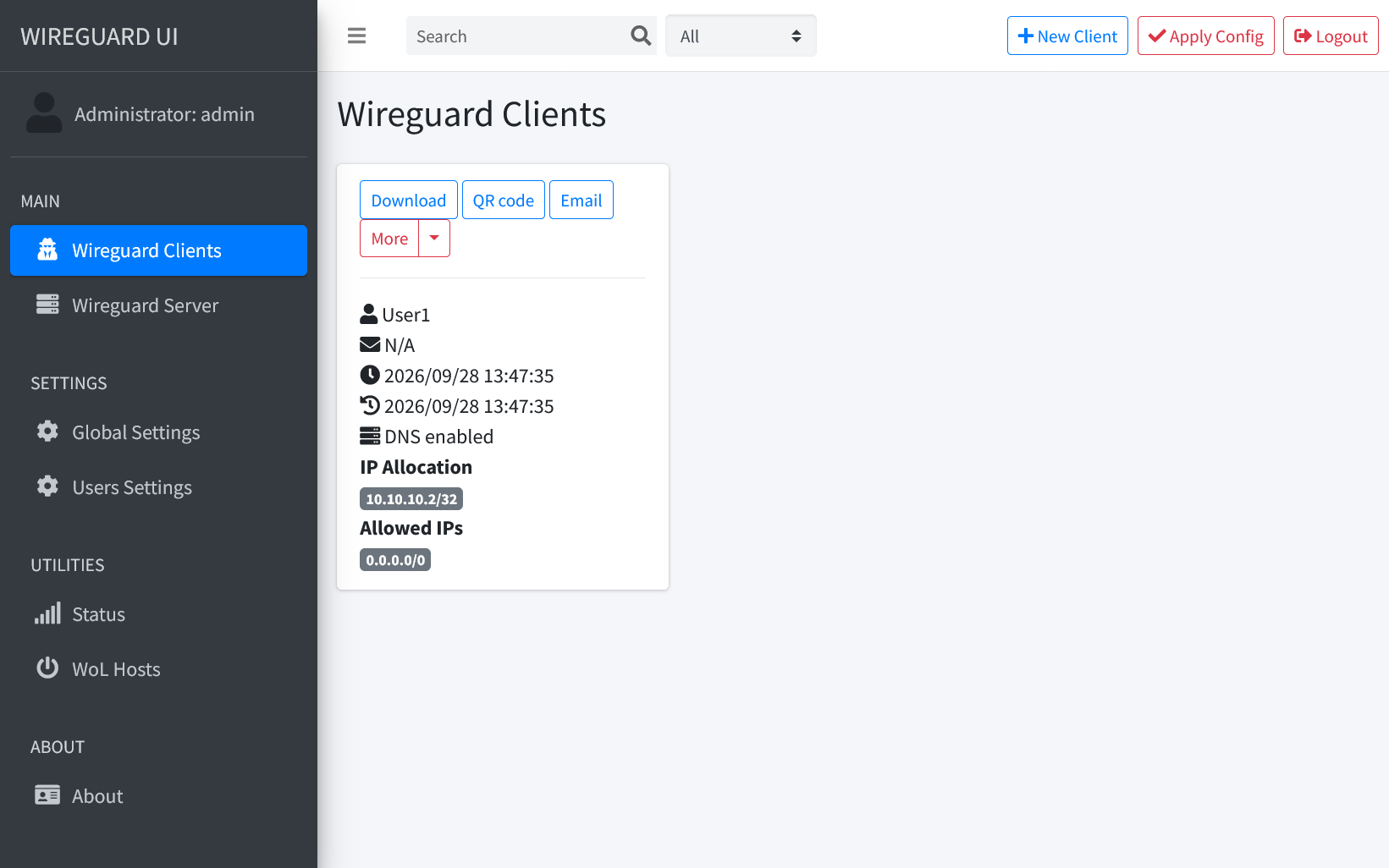
Image
Web panel. Clients. list.
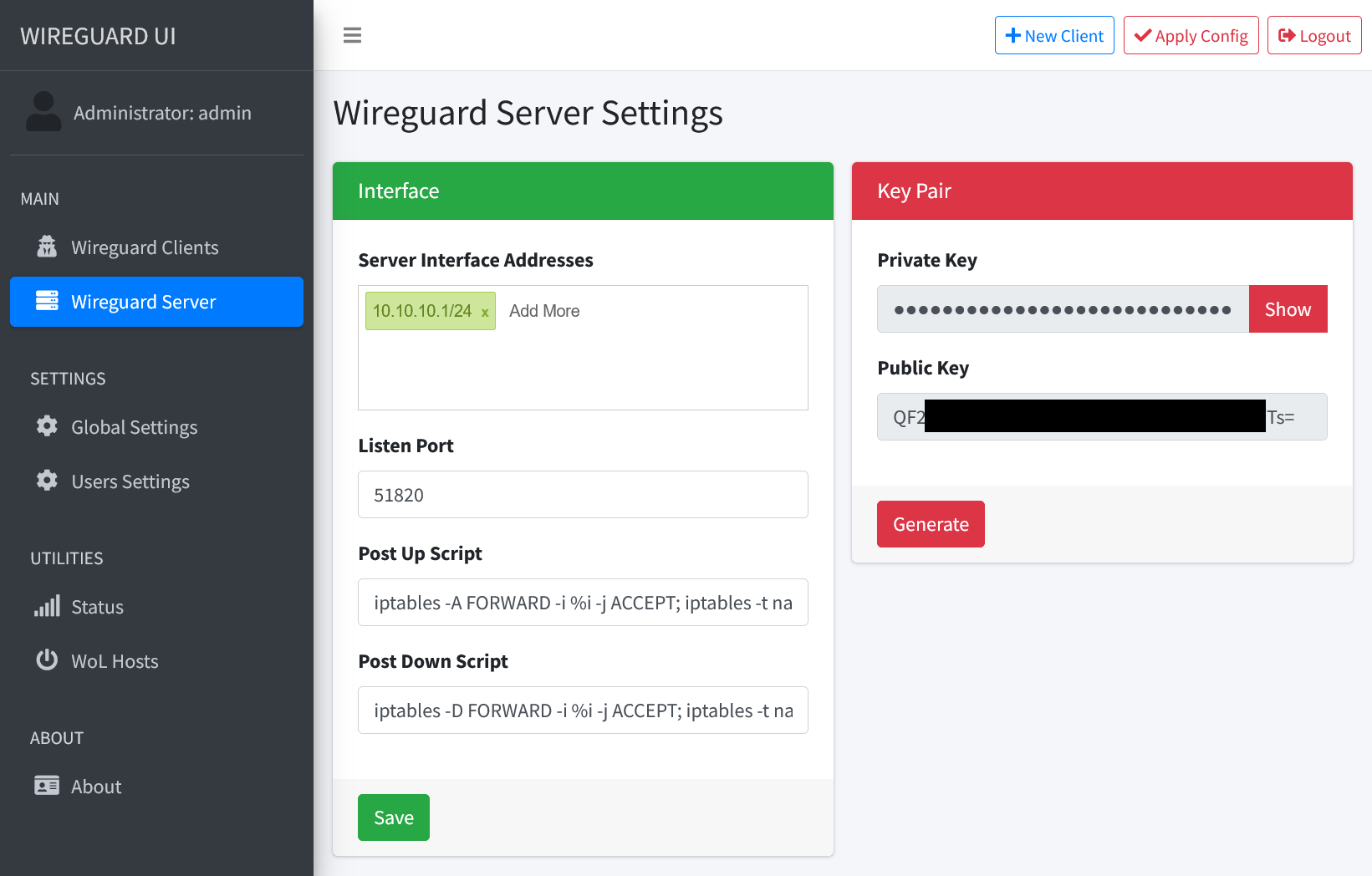
Image
Web panel. Server settings.
WireGuard VPN Server on Linux/Debian with IP Rotation and Web Interface
Deploy a fully operational WireGuard VPN server on AWS in minutes - no manual setup required. This AMI provides secure internet access for computers and mobile devices using the modern WireGuard protocol, featuring a built-in web control panel and a unique dual Elastic IP architecture that enables outbound IP rotation without disrupting client connections.
A free trial is available so you can evaluate the solution before committing.
How the Dual IP Architecture Works
When deployed via the included CloudFormation template, this server uses two separate public IP addresses (Elastic IPs):
- VPN Endpoint IP - Used for the web interface and as the address clients connect to. This IP remains stable in all client configurations.
- Outbound IP - Used for internet-bound traffic. This is the address under which client traffic appears on the internet.
This separation means you can rotate or replace the outbound IP at any time by swapping the second Elastic IP - without updating any client configuration or restarting the server. This is valuable for scenarios where IP reputation management, geographic flexibility, or periodic address changes are needed.
Key Features
- Zero-configuration launch - The WireGuard VPN server is fully operational immediately after deployment with no manual setup required.
- Modern VPN protocol - WireGuard uses approximately 4,000 lines of code (compared to hundreds of thousands in OpenVPN/IPSec), making security auditing easier and reducing the attack surface.
- High performance - WireGuard tunnels deliver faster data transfer speeds than IPSec, IKEv2, or OpenVPN, enabling efficient use even on smaller instance types such as t3.micro, t3.small, or t3.medium.
- Strong encryption - Uses modern cryptographic algorithms including Curve25519 for key exchange and ChaCha20 for symmetric encryption.
- Security key authentication - User authentication is managed through WireGuard's public/private key pairs rather than passwords.
- Intuitive web control panel - Manage VPN channel settings and users through a convenient browser-based UI. Transfer client configurations to mobile devices instantly using QR codes.
- Cross-platform client support - Compatible with WireGuard client software available for Windows, Linux, Android, macOS, and iOS.
- Default VPN Port - UDP 51820.
- IP rotation capability - Replace the outbound Elastic IP at any time via the AWS Console without touching client configurations (requires CloudFormation deployment).
Use Cases
Secure Remote Access for Distributed Teams - Provide employees or contractors with encrypted internet access from any location. The web panel makes it straightforward to create user profiles and distribute configurations via QR codes to mobile devices, reducing onboarding friction.
Commercial VPN Service Providers - Organizations offering VPN services to end users can leverage this server's web-based user management and IP rotation capabilities. The dual IP architecture allows providers to rotate outbound addresses for their subscribers without service interruption.
Internet Access in Restricted Regions - Teams operating in countries where internet access is restricted by authorities can route traffic through this VPN server deployed in an unrestricted AWS region. The IP rotation feature allows changing the outbound address if it becomes blocked.
Router-Based VPN Deployments - WireGuard is supported as a default VPN protocol in many modern routers, making this server compatible with hardware-level VPN configurations for office or home networks.
Deployment Options
The recommended deployment method is the included CloudFormation template, which automatically provisions both Elastic IPs and configures the dual IP architecture for full IP rotation functionality. Please ensure WireGuard client software is installed on all devices before establishing VPN connections.
About the Technology
WireGuard was announced in 2015 and officially integrated into the Linux kernel in 2020. Its minimal codebase and modern cryptographic design have made it one of the most trusted VPN protocols available. This server is built on the open-source WireGuard project, released under the MIT license.
Cost Efficiency
WireGuard's high efficiency allows this VPN server to perform well on smaller AWS instance types, helping you manage infrastructure costs while maintaining fast, secure connections.
Get Started
Launch the free trial to experience the full capabilities of this WireGuard VPN server. The server is ready to use immediately after deployment - simply connect using any WireGuard client application.
Highlights
- The WireGuard VPN Server on Linux/Debian provides fast and secure internet access for individual users. After launching, the WireGuard VPN Server is immediately fully operational.
- The WireGuard VPN Server on Linux/Debian uses 2 separate public IP addresses for the VPN Endpoint and the Internet access when deployed via a CloudFormation template, allowing for IP address rotation.
- WireGuard is considered a modern VPN protocol. It was developed with a focus on simplicity, high speed, and security. This WireGuard VPN Server on Linux/Debian uses UDP protocol for secure VPN communication, ensuring high-speed VPN performance.
Details
Sold by
Categories
Delivery method
Delivery option
WireGuard VPN Server (Web UI, 2 separate IPs for Endpoint and Outbound)
64-bit (x86) Amazon Machine Image (AMI)
Latest version
Operating system
Debian 13
Deployed on AWS
Features and programs
Financing for AWS Marketplace purchases
AWS Marketplace now accepts line of credit payments through the PNC Vendor Finance program. This program is available to select AWS customers in the US, excluding NV, NC, ND, TN, & VT.

Pricing
Free trial
Try this product free for 5 days according to the free trial terms set by the vendor. Usage-based pricing is in effect for usage beyond the free trial terms. Your free trial gets automatically converted to a paid subscription when the trial ends, but may be canceled any time before that.
Pricing is based on actual usage, with charges varying according to how much you consume. Subscriptions have no end date and may be canceled any time. Alternatively, you can pay upfront for a contract, which typically covers your anticipated usage for the contract duration. Any usage beyond contract will incur additional usage-based costs.
Additional AWS infrastructure costs may apply. Use the AWS Pricing Calculator to estimate your infrastructure costs.
If you are an AWS Free Tier customer with a free plan, you are eligible to subscribe to this offer. You can use free credits to cover the cost of eligible AWS infrastructure. See AWS Free Tier for more details. If you created an AWS account before July 15th, 2025, and qualify for the Legacy AWS Free Tier, Amazon EC2 charges for Micro instances are free for up to 750 hours per month. See Legacy AWS Free Tier for more details.
Dimension | Cost/hour |
|---|---|
t3.nano Recommended | $0.063 |
t2.micro | $0.063 |
t3.micro | $0.063 |
m7i-flex.2xlarge | $0.126 |
t3a.xlarge | $0.063 |
t3a.large | $0.063 |
m5.2xlarge | $0.126 |
m5n.4xlarge | $0.126 |
t3.large | $0.063 |
m7a.medium | $0.063 |
Vendor refund policy
You may terminate the instance at anytime to stop incurring charges.

Legal
Vendor terms and conditions
Upon subscribing to this product, you must acknowledge and agree to the terms and conditions outlined in the vendor's End User License Agreement (EULA) .
Content disclaimer
Vendors are responsible for their product descriptions and other product content. AWS does not warrant that vendors' product descriptions or other product content are accurate, complete, reliable, current, or error-free.
Delivery details
64-bit (x86) Amazon Machine Image (AMI)
Amazon Machine Image (AMI)
An AMI is a virtual image that provides the information required to launch an instance. Amazon EC2 (Elastic Compute Cloud) instances are virtual servers on which you can run your applications and workloads, offering varying combinations of CPU, memory, storage, and networking resources. You can launch as many instances from as many different AMIs as you need.
Version release notes
It is now possible to deploy using a CloudFormation template, which sets up a configuration with two IP addresses. The first IP is used for both the web interface and as the VPN Endpoint, which is the address specified in client configurations to connect to the VPN server. The second IP is used for the Outbound connection - this is the address under which client traffic appears on the internet. This allows you to change or rotate the outbound IP at any time by replacing the second Elastic IP, without updating the client configuration or restarting the server.
Additional details
Usage instructions
After deploying this server using the Standalone AMI, you will get a fully functional VPN server with a single IP address used for both the Endpoint and Outbound traffic.
If you want to run the WireGuard VPN server with separate IP addresses for the Endpoint and the Outbound connection - where the Endpoint IP is used by clients to connect to the VPN, and the Outbound IP is the address under which client traffic appears on the internet - you can deploy the server using a CloudFormation template. This configuration allows you, for example, to change or rotate the outbound IP address later simply by replacing the second Elastic IP, without needing to update the client configuration and without restarting the server.
Instructions for deploying the WireGuard VPN Server from the Standalone AMI:
Launch the server. This server does not require the powerful computing resources - you can choose a simple instance type. If the Elastic IP was assigned to a running instance, the instance must be restarted.
Linux username: admin
After launching the server, it is immediately ready for use, with no additional settings required. It is important that the client device has the WireGuard client application installed, which is available for Windows, Linux, Android, macOS, and iOS.
Control Panel including user management features:
- https://[Public IP address].sslip.io
- http://[Public IP address]
- Please use "admin" as username and your instance ID as password.
By default, a user named 'User 1' is already set up in the WireGuard Control Panel with a randomly generated user key. You can immediately download the configuration file for the Windows WireGuard client or use the QR code to add this user to the WireGuard client application on your mobile device.
After the server has been started, try connecting to it using a WireGuard VPN client. Ensure that when the client connects to the Internet via this VPN server, the client's IP address is different from the original.
The server and user keys were created automatically when the server was first started and are unique.
Resources
Vendor resources
Support
Vendor support
If you have any questions regarding the deployment or use of this VPN server, you can use the Contact Us form on our website or reach out via email. We guarantee a response within 24 hours.
Contact US: https://www.adeoclouds.eu/contact.php?id=12
E-mail: admin@adeoclouds.eu
AWS infrastructure support
AWS Support is a one-on-one, fast-response support channel that is staffed 24x7x365 with experienced and technical support engineers. The service helps customers of all sizes and technical abilities to successfully utilize the products and features provided by Amazon Web Services.
Updated weekly


Top
25
In Network Infrastructure, Security
Top
10
In Network Infrastructure, Infrastructure as Code
Top
10
In Migration
Sentiment is AI generated from actual customer reviews on AWS and G2
Functionality
Ease of use
Customer service
Cost effectiveness
Positive reviews
Mixed reviews
Negative reviews
AI generated from product descriptions
VPN Protocol Implementation
WireGuard protocol with approximately 4,000 lines of code, utilizing UDP port 51820 for secure VPN communication
Cryptographic Algorithms
Curve25519 for key exchange and ChaCha20 for symmetric encryption with public/private key pair authentication
Dual Elastic IP Architecture
Separate VPN Endpoint IP for client connections and Outbound IP for internet traffic, enabling IP rotation without client reconfiguration or server restart
Web-Based Management Interface
Browser-based control panel for VPN channel settings and user management with QR code generation for instant client configuration distribution
Cross-Platform Client Compatibility
Support for WireGuard client software on Windows, Linux, Android, macOS, and iOS operating systems
VPN Protocol
Built on WireGuard protocol for secure connectivity
Network Architecture
Mesh networking architecture that eliminates single points of failure and replaces legacy hub-and-spoke models
Identity-Based Access Control
Identity-based network access control enabling user and group-based permissions independent of IP addresses
Hostname Resolution
MagicDNS feature enabling device access using memorable hostnames instead of IP addresses
Connection Persistence
Connection migration capability maintaining active connections when switching between different network types
VPN Protocol Support
Routed IPsec site-to-site VPNs, remote access with Mobile IPsec, and WireGuard VPN capabilities
Routing Protocols
BGP, OSPF, RIPv2, IPv4/IPv6, and ECMP routing support
Management and Monitoring Interfaces
Command line interface (CLI), RESTCONF API, GUI, SNMP, Prometheus Exporter, and IPFIX Exporter
Security Access Control
L2/L3/L4 ACLs scalable to over 100,000 rules
Underlying Technology Stack
Vector Packet Processing (VPP), Data Plane Developer Kit (DPDK), Clixon, and Free Range Routing (FRR) on Linux/Ubuntu base
Standard contract
No
No
Customer reviews
SofiaReppo
My impressions after short testing
Reviewed on Jun 06, 2025
Review from a verified AWS customer
I tested a WireGuard-based VPN server with a built-in management panel and was thoroughly impressed. It was ready to use immediately - no manual setup or configuration needed.
User management is especially convenient. Adding new users takes just a few clicks, and the ability to share client configuration via QR code makes mobile setup quick and effortless.
The IP rotation feature works exactly as promised - you can change the external IP address without restarting the server. This is a rare and very useful function that I haven’t seen elsewhere. Performance is excellent too: Speedtest results showed almost no difference with or without the VPN.
The only downside was needing to install a separate client app on Android, but that’s more about how WireGuard works in general.
Overall: it looks like a good solution, especially if you’re looking for hassle-free management and ability to rotate IP addresses.