
Sold by: cloudimg
Deployed on AWS
Free Trial
AWS Free Tier
This product has charges associated with it for installing and configuring Oracle Database 21c Express Edition (XE) 21.3 on Windows Server 2022 or 2019, with the XE database and its XEPDB1 pluggable database open at boot. Oracle software on its own D: volume.
These options are for Oracle Database 21c Express Windows AMI | cloudimg.
View 3 other optionsOverview
Image
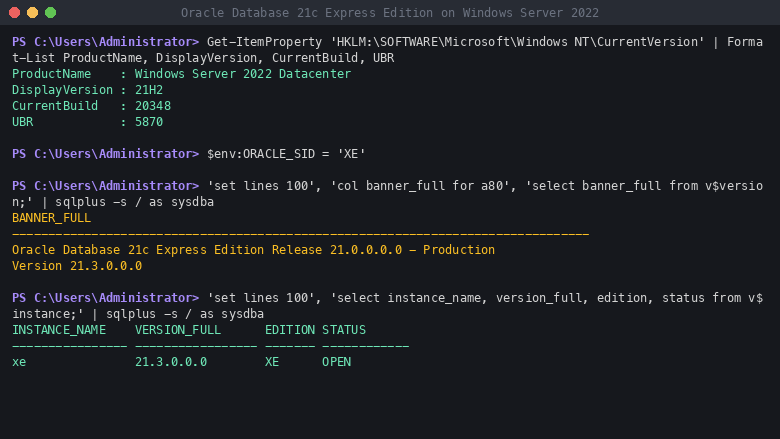
Oracle Database 21c XE on Windows Server 2022
Image
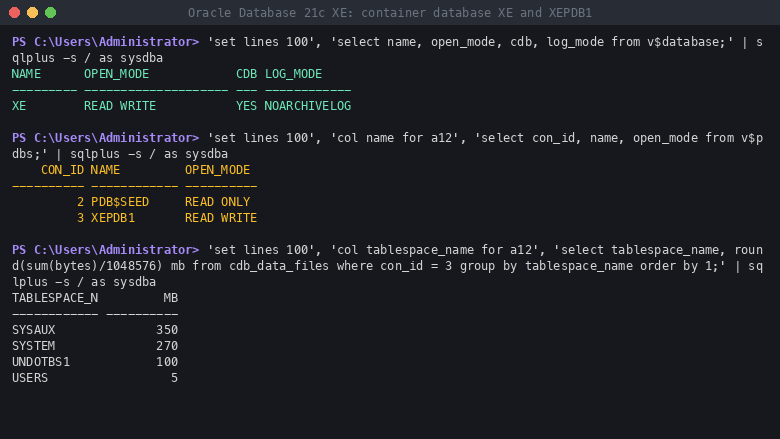
Oracle 21c XE: container database and XEPDB1
Image
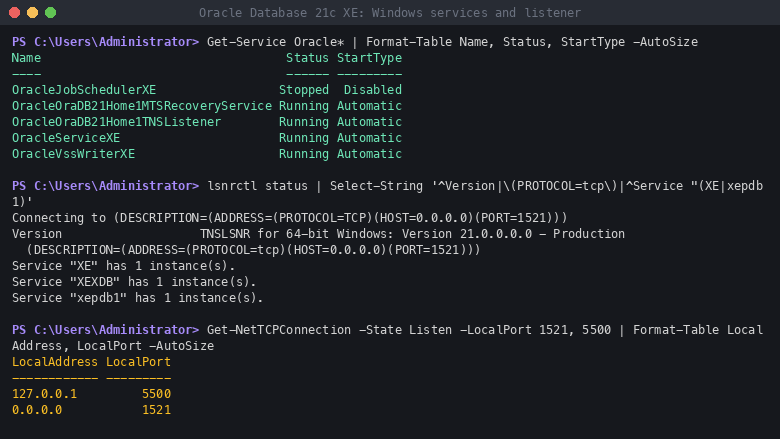
Oracle 21c XE Windows services and listener
This is a repackaged software product wherein additional charges apply for the installation, configuration and packaging of the software in this image by cloudimg.
Oracle Database 21c is an Innovation Release whose end of life is 31 July 2027, with no extension, so plan a move to 19c or 26ai.
Per-instance database passwords: the image holds no usable database password. At first boot each instance generates its own SYS, SYSTEM and PDBADMIN passwords, checks that each one logs in, and writes them to C:\ProgramData\cloudimg\oracle\oracle-db-credentials.txt, readable by Administrators only. The listener answers on 127.0.0.1:1521 only, so no Oracle port is reachable from outside the instance until you choose to open one; connect through Session Manager port forwarding or over RDP.
If you launched a version dated 13-11-2026 or earlier, change SYS, SYSTEM and PDBADMIN now and keep TCP 1521 closed: those versions start with passwords set when the image was built and a listener on every address (see the user guide).
What cloudimg adds to Oracle Database 21c Express Edition
This image installs Oracle Database 21c Express Edition (XE) 21.3 on Windows Server and configures it to open by itself, so you can connect with SQL*Plus a few minutes after boot. Choose the operating system when you subscribe:
- Windows Server 2022
- Windows Server 2019
Both versions were rebuilt on 17 November 2026, fully updated through Windows Update, and give you:
- Oracle software on its own volume: D:\Oracle, Oracle home D:\Oracle\dbhomeXE
- The XE database open at boot: container database XE (Windows service OracleServiceXE) with the pluggable database XEPDB1 open read write
- An Oracle listener on 127.0.0.1:1521 only, started at boot, for SQL*Plus, SQL Developer, JDBC and other Oracle Net clients (service xepdb1) through Session Manager port forwarding or on the instance; EM Express on 127.0.0.1:5500 only
- A step-by-step user guide covering launch, RDP access, the credentials file, connections and changing the passwords
Express Edition limits
Oracle Database 21c XE uses at most 2 CPU threads and 2 GB of memory, and holds up to 12 GB of user data. It has the core Oracle SQL, PL/SQL and JSON engine.
Licence
Oracle Database Express Edition is Oracle software used under Oracle's licence terms for Express Edition. This listing does not include a licence for any other Oracle Database edition.
Who it is for
- Learning SQL and PL/SQL on an Oracle 21c engine
- CI and test pipelines that need an Oracle instance on Windows
- ISVs testing products that embed or connect to Oracle XE
- Proof-of-concept work before moving to a supported long-term Oracle release
Getting started
- Subscribe, choose the Windows Server 2022 or 2019 version and launch (m5.large or larger is recommended).
- The suggested security group allows RDP from anywhere: change the source to your own IP. In the EC2 console use Get Windows password with your key pair, then connect over RDP as Administrator.
- About 10 minutes after launch, read your database passwords in an elevated PowerShell: Get-Content C:\ProgramData\cloudimg\oracle\oracle-db-credentials.txt.
- Run sqlplus / as sysdba on the instance, or connect a client to service xepdb1 through Session Manager port forwarding (portNumber=1521). Keep TCP 1521 closed to the internet; allow it from your own range only if you need to, as the user guide shows.
More detail and troubleshooting are in the user guide linked on this page.
Oracle and Java are registered trademarks of Oracle and/or its affiliates. Other names may be trademarks of their respective owners. cloudimg is not affiliated with or endorsed by Oracle. Windows Server is a trademark of the Microsoft group of companies.
Highlights
- Oracle Database 21c Express Edition 21.3 on fully updated Windows Server 2022 or 2019, with the XE database and its XEPDB1 pluggable database open at boot.
- Per-instance SYS, SYSTEM and PDBADMIN passwords generated at first boot in an Administrators-only file; the listener answers on 127.0.0.1:1521 only; connect through Session Manager port forwarding; user guide.
- Oracle 21c is an Innovation Release: Oracle's support ends 31 July 2027 with no extended support. XE limits: 2 CPU threads, 2 GB RAM, 12 GB user data.
Features and programs
Financing for AWS Marketplace purchases
AWS Marketplace now accepts line of credit payments through the PNC Vendor Finance program. This program is available to select AWS customers in the US, excluding NV, NC, ND, TN, & VT.

Pricing
Free trial
Try this product free for 7 days according to the free trial terms set by the vendor. Usage-based pricing is in effect for usage beyond the free trial terms. Your free trial gets automatically converted to a paid subscription when the trial ends, but may be canceled any time before that.
Pricing is based on actual usage, with charges varying according to how much you consume. Subscriptions have no end date and may be canceled any time. Alternatively, you can pay upfront for a contract, which typically covers your anticipated usage for the contract duration. Any usage beyond contract will incur additional usage-based costs.
Additional AWS infrastructure costs may apply. Use the AWS Pricing Calculator to estimate your infrastructure costs.
If you are an AWS Free Tier customer with a free plan, you are eligible to subscribe to this offer. You can use free credits to cover the cost of eligible AWS infrastructure. See AWS Free Tier for more details. If you created an AWS account before July 15th, 2025, and qualify for the Legacy AWS Free Tier, Amazon EC2 charges for Micro instances are free for up to 750 hours per month. See Legacy AWS Free Tier for more details.
- ...
Dimension | Description | Cost/hour |
|---|---|---|
t3.large Recommended | t3.large instance type | $0.10 |
t2.micro | t2.micro instance type | $0.06 |
t3.micro | t3.micro instance type | $0.06 |
m7a.large | m7a.large instance type | $0.10 |
m7i-flex.xlarge | m7i-flex.xlarge instance type | $0.15 |
m7i.large | m7i.large instance type | $0.10 |
t3.small | t3.small instance type | $0.06 |
x1e.32xlarge | x1e.32xlarge instance type | $0.28 |
r5b.24xlarge | r5b.24xlarge instance type | $0.28 |
p3.2xlarge | p3.2xlarge instance type | $0.28 |
Dimensions summary
You pay by the hour for the software, billed per running instance. The many options here are EC2 instance types, not feature tiers. Each one carries the same software and differs only by the compute, memory, and storage capacity of the underlying hardware you choose. Smaller sizes like t3.small or m5.large suit development, testing, and light workloads. Larger sizes scale up to many-core memory and metal instances for heavier use. Your hourly rate rises with instance capacity. AWS charges separately for the EC2 compute and any storage you provision.
Top-of-mind questions for buyers
The hourly rate covers the software running on the EC2 instance type you pick. For example, m5.large gives 2 vCPU and 8 GB RAM. Oracle Database Express Edition is a resource-limited edition, so it uses limited CPU, memory, and storage regardless of the instance size.
The software fee meters running time per instance. A stopped instance accrues no hourly software charge. You may still pay AWS for storage, such as the 30 GB gp3 volume, while the instance is stopped. Charges resume when you start the instance again.
Three charges can appear together: the hourly software fee for the running instance, the EC2 compute charge for that instance type, and AWS storage fees for volumes you provision. They bill independently and add up. For continuous use, the EC2 compute charge often drives the largest share on larger instances.
www.cloudimg.co.uk
Helpful?
Vendor refund policy
Refunds available on request.

Legal
Vendor terms and conditions
Upon subscribing to this product, you must acknowledge and agree to the terms and conditions outlined in the vendor's End User License Agreement (EULA) .
Content disclaimer
Vendors are responsible for their product descriptions and other product content. AWS does not warrant that vendors' product descriptions or other product content are accurate, complete, reliable, current, or error-free.
Delivery details
64-bit (x86) Amazon Machine Image (AMI)
Amazon Machine Image (AMI)
An AMI is a virtual image that provides the information required to launch an instance. Amazon EC2 (Elastic Compute Cloud) instances are virtual servers on which you can run your applications and workloads, offering varying combinations of CPU, memory, storage, and networking resources. You can launch as many instances from as many different AMIs as you need.
Version release notes
Rebuilt for per-instance passwords: the SYS, SYSTEM and PDBADMIN passwords are generated on each instance at first boot and written to an Administrators-only file; the password set when the earlier image was built does not work on this version, and the installer response file holds no password. The Oracle listener is bound to 127.0.0.1:1521 and starts at boot (EM Express on 127.0.0.1:5500 only). Windows Server 2019 Datacenter fully updated through Windows Update on 17 November 2026 (OS build 17763.9487). Oracle Database 21c Express Edition 21.3.0.0.0, container database XE with XEPDB1 open at boot. If you run an instance of an earlier version, change SYS, SYSTEM and PDBADMIN now and keep TCP 1521 closed (see the guide).
Additional details
Usage instructions
Connect with Remote Desktop (3389) as Administrator (Get Windows password with your key pair). The suggested security group allows RDP from anywhere: change the source to your own IP. About 10 minutes after launch, first boot writes this instance's own SYS, SYSTEM and PDBADMIN (XEPDB1) passwords to C:\ProgramData\cloudimg\oracle\oracle-db-credentials.txt (Administrators only; progress in C:\ProgramData\cloudimg\oracle-firstboot.log). On the instance run sqlplus / as sysdba. The listener answers on 127.0.0.1:1521 only. EM Express answers on 127.0.0.1:5500 only. From your workstation use Session Manager port forwarding (AWS-StartPortForwardingSession, portNumber=1521) and connect to localhost:1521/xepdb1, or bind the listener to the private address and allow TCP 1521 from your own IP range only; never open 1521 to the internet. Guide: https://www.cloudimg.co.uk/guides/oracle-database-21c-express-on-windows/
Resources
Vendor resources
Support
Vendor support
cloudimg's support team is on hand 24 hours a day by email for this image, with a guaranteed response within 24 hours: launch and first login, RDP access, Oracle Database XE connectivity and the listener, Windows Server questions about the image, CloudWatch Agent, Systems Manager Agent and the AWS CLI, EBS volume and networking configuration, updates and troubleshooting. Contact: support@cloudimg.co.uk or https://www.cloudimg.co.uk/support Oracle software support, patches and licences come from Oracle under your own agreement.
AWS infrastructure support
AWS Support is a one-on-one, fast-response support channel that is staffed 24x7x365 with experienced and technical support engineers. The service helps customers of all sizes and technical abilities to successfully utilize the products and features provided by Amazon Web Services.
Similar products

This product has charges associated with it for the installation, configuration and packaging of Oracle Database 21c Standard Edition 2 21.3 on Windows Server 2022 or 2019, updated at build: per-instance SYS, SYSTEM and PDBADMIN passwords set at first boot, listener on 127.0.0.1 only, CDB ORCL with PDB ORCLPDB. Bring your own Oracle licence.

This product has charges associated with it for installing and configuring eight Oracle Database versions: 19c and 21c SE2 and EE on Oracle Linux 8, 19c and 21c EE with ASM, and Oracle AI Database 26ai EE on Oracle Linux 9 with or without ASM. Bring your own Oracle licence.

This product has charges associated with it for the installation, configuration and packaging of Oracle Database 21c Enterprise Edition 21.3 on Windows Server 2022 or 2019, updated at build: per-instance SYS, SYSTEM and PDBADMIN passwords set at first boot, listener on 127.0.0.1 only, CDB ORCL with PDB ORCLPDB. Bring your own Oracle licence.

This product has charges associated with it for building Oracle Database 21c Enterprise Edition (21.3 base release) on Oracle Linux 8 (updated at build), with the database and its SYS, SYSTEM and PDBADMIN passwords created per instance at first boot and a listener on 127.0.0.1 only. Bring your own Oracle licence.
Customer reviews
No customer reviews yet
Be the first to review this product . We've partnered with PeerSpot to gather customer feedback. You can share your experience by writing or recording a review, or scheduling a call with a PeerSpot analyst.