Amazon Web Services ブログ
New – Amazon Keyspaces (Apache Cassandra 用) が正式リリース
昨年の re:Invent で、Amazon Managed Apache Cassandra Service (MCS) のプレビュー版を紹介しました。過去数か月の間に、このサービスは多くの新機能を導入し、今日 Amazon Keyspaces (Apache Cassandra 用) という新しい名前で一般公開します。
Amazon Keyspaces は Apache Cassandra 上に構築されており、フルマネージドのサーバーレスデータベースとしてご利用いただけます。アプリケーションは、既存の Cassandra Query Language (CQL) コードを使用して、まったくまたはほとんど手を加えずに Amazon Keyspaces からデータを読み書きできます。各テーブルでは、以下のように、ユースケースに応じて最適な設定を選択できます。
- オンデマンドでは、実際に行った読み取りと書き込みに基づいて料金が発生します。これは、ワークロードが予測できないときに最適なオプションです。
- プロビジョニングされた容量では、容量設定を事前に行うことで、予測できるワークロードのコストを削減できます。 また、Auto Scaling を有効にすることで、コストをさらに最適化できます。これにより、その日のトラフィックの変化に応じてプロビジョニングされた容量設定が自動的に更新されます。
Amazon Keyspaces の使用
私が子供の頃に構築した最初の「本格的な」アプリケーションの 1 つは、本用のアーカイブでした。それを今すぐ、以下を使用してサーバーレス API として再構築したいと思います。
- データを保存するための Amazon Keyspaces。
- ビジネスロジック用の AWS Lambda。
- Amazon API Gateway と新しい HTTP API。
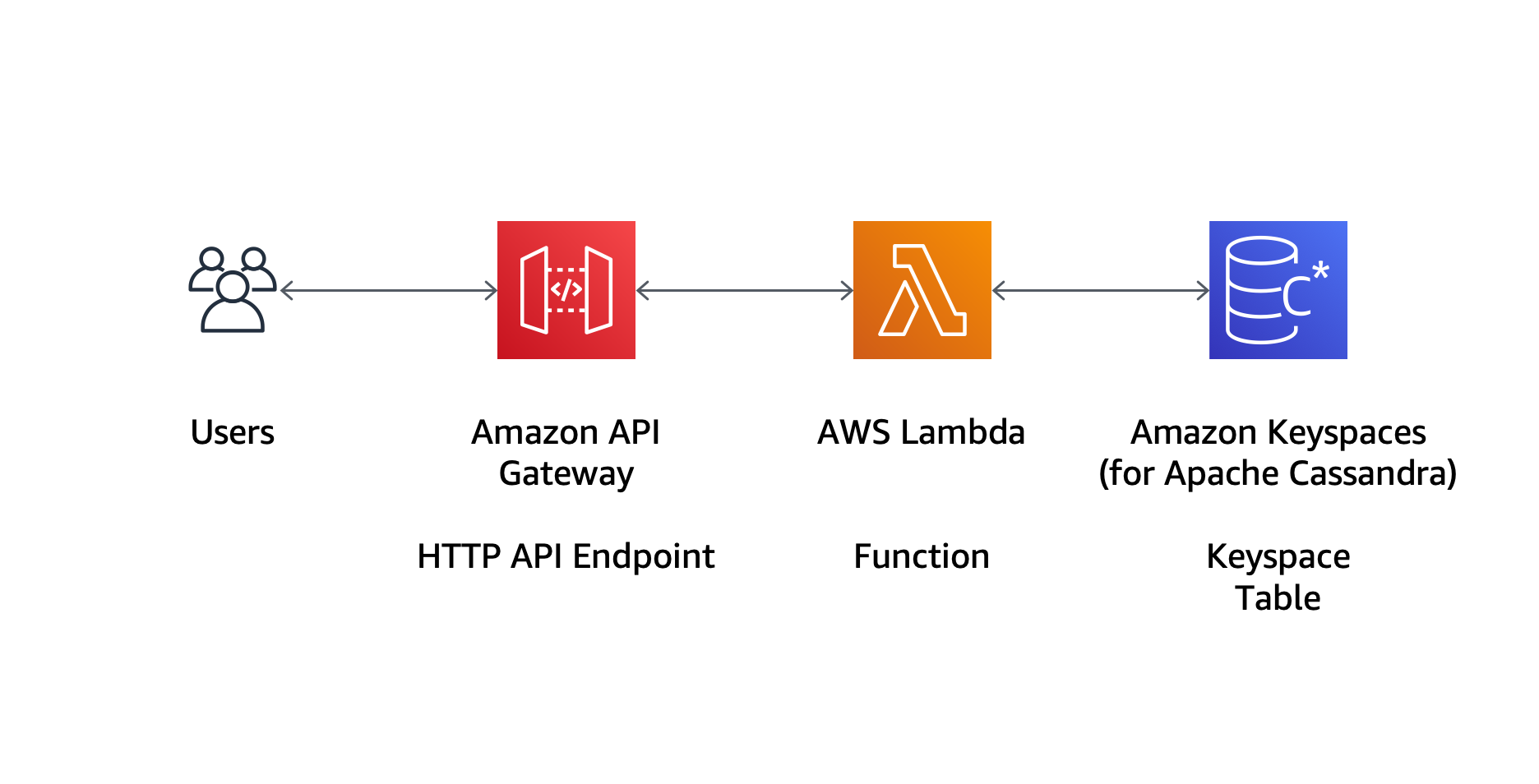
Amazon Keyspaces では、データはキースペースとテーブルに保存します。キースペースは、関連するテーブルをグループ化する方法を提供します。 プレビューのブログ記事では、コンソールを使用してデータモデルを設定しました。今では、AWS CloudFormation を使用して、キースペースとテーブルをコードとして管理することもできます。たとえば、次の CloudFormation テンプレートを使用して、bookstore キースペースと books テーブルを作成できます。
テンプレートでキースペースまたはテーブルの名前を指定しない場合、CloudFormation は一意の名前を生成します。このことから、キースペースとテーブルには通常の Cassandra 規則から外れる大文字が含まれる可能性があることに注意してください。Cassandra Query Language (CQL) を使用する場合は、このような名前を二重引用符で囲む必要があります。
スタックの作成が完了すると、コンソールに新しい bookstore キースペースが表示されます。
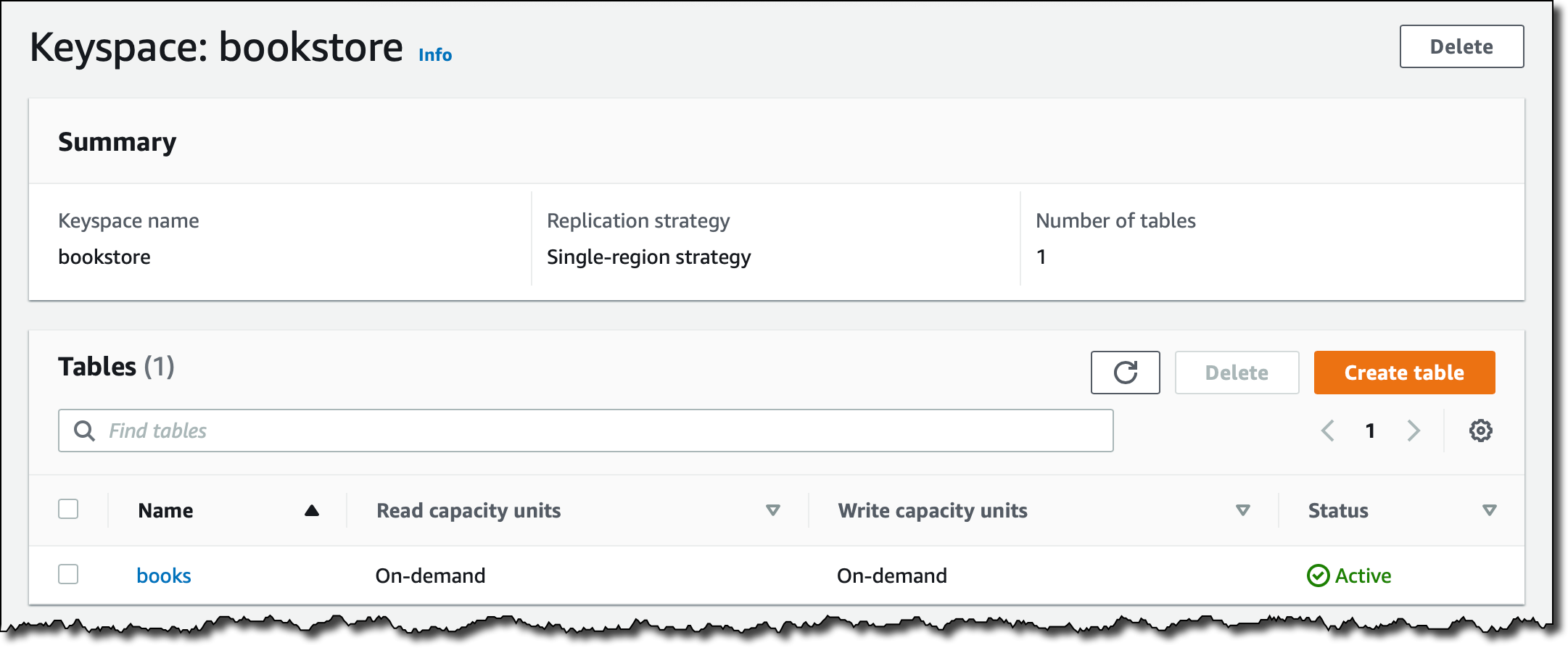
books テーブルを選択すると、パーティションキー、クラスタリング列、すべての列を含む設定と、オンデマンドからプロビジョニングへテーブルのキャパシティーモードを変更するオプションの概要が表示されます。

認証と承認のために、Amazon Keyspaces は AWS Identity and Access Management (IAM) の ID ベースのポリシーをサポートしており、それを IAM ユーザー、グループ、ロールで使用できます。Amazon Keyspaces の IAM ポリシーで使えるアクション、リソース、条件のリストはこちらをご覧ください。 また、タグに基づいてリソースへのアクセスを管理することもできます。
DataStax Java ドライバーのこのオープンソース認証プラグインで、AWS Signature Version 4 Process (SigV4) を用いて、IAM ロールを使うことができます。このようにして、認証情報を管理することなく、 Amazon Elastic Compute Cloud (EC2) インスタンス内でアプリケーションを実行し、 Amazon ECS や Amazon Elastic Kubernetes Service、または Lambda 関数でコンテナを管理でき、さらにAmazonKeyspaces への認証と承認に対して IAM ロールを活用できます。こちらのサンプルアプリケーションからは、関連付けられた IAM ロールを持つ EC2 インスタンスで、Amazon Keyspaces へのアクセス許可を与えるテストを行えます。
Books API に戻り、次の AWS Serverless Application Model (SAM) テンプレートを使用して、キースペースやテーブルなど、必要なすべてのリソースを作成します。
このテンプレートではキースペースとテーブル名を指定していません。CloudFormation は一意の名前を自動的に生成しています。関数 IAM ポリシーは、読み取り (cassandra:Select) および書き込み (cassandra:Write) へのアクセスを、books テーブルのみに許可します。 CloudFormation Fn::Select と Fn::Split 組み込み関数を使用して、テーブル名を取得しています。ドライバーには、system* キースペースへの読み取り権限も必要です。
IAM ロールをサポートする DataStax Java ドライバーの認証プラグインを使用するには、APIGatewayV2ProxyRequestEvent と APIGatewayV2ProxyResponseEvent クラスを使用して Java で Lambda 関数を記述します。これで、API Gateway で作成した HTTP API とデータのやり取りを行います。
package books;

import java.net.InetSocketAddress;
import java.security.NoSuchAlgorithmException;
import java.util.Collections;
import java.util.List;
import java.util.HashMap;
import java.util.Map;
import java.util.StringJoiner;
import javax.net.ssl.SSLContext;

import org.json.simple.JSONObject;
import org.json.simple.parser.JSONParser;
import org.json.simple.parser.ParseException;

import com.datastax.oss.driver.api.core.ConsistencyLevel;
import com.datastax.oss.driver.api.core.CqlSession;
import com.datastax.oss.driver.api.core.cql.*;

import software.aws.mcs.auth.SigV4AuthProvider;

import com.amazonaws.services.lambda.runtime.Context;
import com.amazonaws.services.lambda.runtime.RequestHandler;
import com.amazonaws.services.lambda.runtime.LambdaLogger;
import com.amazonaws.services.lambda.runtime.events.APIGatewayV2ProxyRequestEvent;
import com.amazonaws.services.lambda.runtime.events.APIGatewayV2ProxyResponseEvent;

public class App implements RequestHandler<APIGatewayV2ProxyRequestEvent, APIGatewayV2ProxyResponseEvent> {

    JSONParser parser = new JSONParser();
    String[] keyspace_table = System.getenv("KEYSPACE_TABLE").split("\\|");
    String keyspace = keyspace_table[0];
    String table = keyspace_table[1];
    CqlSession session = getSession();
    PreparedStatement selectBookByIsbn = session.prepare("select * from \"" + table + "\" where isbn = ?");
    PreparedStatement selectAllBooks = session.prepare("select * from \"" + table + "\"");
    PreparedStatement insertBook = session.prepare("insert into \"" + table + "\" "
    + "(isbn, title, author, pages, year_of_publication)" + "values (?, ?, ?, ?, ?)");

    public APIGatewayV2ProxyResponseEvent handleRequest(APIGatewayV2ProxyRequestEvent request, Context context) {

        LambdaLogger logger = context.getLogger();

        String responseBody;
        int statusCode = 200;

        String routeKey = request.getRequestContext().getRouteKey();
        logger.log("routeKey = '" + routeKey + "'");

        if (routeKey.equals("GET /books")) {
            ResultSet rs = execute(selectAllBooks.bind());
            StringJoiner jsonString = new StringJoiner(", ", "[ ", " ]");
            for (Row row : rs) {
                String json = row2json(row);
                jsonString.add(json);
            }
            responseBody = jsonString.toString();
        } else if (routeKey.equals("GET /books/{isbn}")) {
            String isbn = request.getPathParameters().get("isbn");
            logger.log("isbn: '" + isbn + "'");
            ResultSet rs = execute(selectBookByIsbn.bind(isbn));
            if (rs.getAvailableWithoutFetching() == 1) {
                responseBody = row2json(rs.one());
            } else {
                statusCode = 404;
                responseBody = "{\"message\": \"not found\"}";
            }
        } else if (routeKey.equals("POST /books")) {
            String body = request.getBody();
            logger.log("Body: '" + body + "'");
            JSONObject requestJsonObject = null;
            if (body != null) {
                try {
                    requestJsonObject = (JSONObject) parser.parse(body);
                } catch (ParseException e) {
                    e.printStackTrace();
                }
                if (requestJsonObject != null) {
                    int i = 0;
                    BoundStatement boundStatement = insertBook.bind()
                    .setString(i++, (String) requestJsonObject.get("isbn"))
                    .setString(i++, (String) requestJsonObject.get("title"))
                    .setString(i++, (String) requestJsonObject.get("author"))
                    .setInt(i++, ((Long) requestJsonObject.get("pages")).intValue())
                    .setInt(i++, ((Long) requestJsonObject.get("year_of_publication")).intValue())
                    .setConsistencyLevel(ConsistencyLevel.LOCAL_QUORUM);
                    ResultSet rs = execute(boundStatement);
                    statusCode = 201;
                    responseBody = body;
                } else {
                    statusCode = 400;
                    responseBody = "{\"message\": \"JSON parse error\"}";
                }
            } else {
                statusCode = 400;
                responseBody = "{\"message\": \"body missing\"}";
            }
        } else {
            statusCode = 405;
            responseBody = "{\"message\": \"not implemented\"}";
        }

        Map<String, String> headers = new HashMap<>();
        headers.put("Content-Type", "application/json");

        APIGatewayV2ProxyResponseEvent response = new APIGatewayV2ProxyResponseEvent();
        response.setStatusCode(statusCode);
        response.setHeaders(headers);
        response.setBody(responseBody);

        return response;
    }

    private String getStringColumn(Row row, String columnName) {
        return "\"" + columnName + "\": \"" + row.getString(columnName) + "\"";
    }

    private String getIntColumn(Row row, String columnName) {
        return "\"" + columnName + "\": " + row.getInt(columnName);
    }

    private String row2json(Row row) {
        StringJoiner jsonString = new StringJoiner(", ", "{ ", " }");
        jsonString.add(getStringColumn(row, "isbn"));
        jsonString.add(getStringColumn(row, "title"));
        jsonString.add(getStringColumn(row, "author"));
        jsonString.add(getIntColumn(row, "pages"));
        jsonString.add(getIntColumn(row, "year_of_publication"));
        return jsonString.toString();
    }

    private ResultSet execute(BoundStatement bs) {
        final int MAX_RETRIES = 3;
        ResultSet rs = null;
        int retries = 0;

        do {
            try {
                rs = session.execute(bs);
            } catch (Exception e) {
                e.printStackTrace();
                session = getSession(); // New session
            }
        } while (rs == null && retries++ < MAX_RETRIES);
        return rs;
    }

    private CqlSession getSession() {

        System.setProperty("javax.net.ssl.trustStore", "./cassandra_truststore.jks");
        System.setProperty("javax.net.ssl.trustStorePassword", "amazon");

        String region = System.getenv("AWS_REGION");
        String endpoint = "cassandra." + region + ".amazonaws.com";

        System.out.println("region: " + region);
        System.out.println("endpoint: " + endpoint);
        System.out.println("keyspace: " + keyspace);
        System.out.println("table: " + table);

        SigV4AuthProvider provider = new SigV4AuthProvider(region);
        List<InetSocketAddress> contactPoints = Collections.singletonList(new InetSocketAddress(endpoint, 9142));

        CqlSession session;

        try {
            session = CqlSession.builder().addContactPoints(contactPoints).withSslContext(SSLContext.getDefault())
            .withLocalDatacenter(region).withAuthProvider(provider).withKeyspace("\"" + keyspace + "\"")
            .build();
        } catch (NoSuchAlgorithmException e) {
            session = null;
            e.printStackTrace();
        }

        return session;
    }
}
Java ドライバーを使用して TLS/SSL で Amazon Keyspaces に接続するには、JVM 引数に trustStore を含める必要があります。 Lambda 関数で Cassandra Java Client Driver を使用する場合、JVM にパラメータを渡すことができないため、システムプロパティと同じオプションを渡し、withSslContext(SSLContext.getDefault()) パラメータで CQL セッションを作成するときに SSL コンテキストを指定します。 Apache Maven で使用する pom.xml ファイルを設定して、trustStore ファイルを依存関係として含める必要があることにも注意してください。
System.setProperty("javax.net.ssl.trustStore", "./cassandra_truststore.jks");
System.setProperty("javax.net.ssl.trustStorePassword", "amazon");これで、curl や Postman などのツールを使用して、books API をテストできます。まず、CloudFormation スタックの出力から API のエンドポイントを取得します。最初は、books テーブルに格納されている本はなく、リソースで HTTP GET を実行すると、取得できるのは空の JSON リストです。読みやすくするために、出力からすべての HTTP ヘッダーを削除しています。
$ curl -i https://a1b2c3d4e5.execute-api.eu-west-1.amazonaws.com/books
HTTP/1.1 200 OK[]
コードでは、PreparedStatement を使用して CQL ステートメントを実行し、books テーブルからすべての行を選択しています。キーストア名とテーブル名は、上記の SAM テンプレートで説明されているように、環境変数で Lambda 関数に渡されます。
リソースで HTTP POST を実行して、API を使用して本を追加しましょう。
$ curl -i -d '{ "isbn": "978-0201896831", "title": "The Art of Computer Programming, Vol. 1: Fundamental Algorithms (3rd Edition)", "author": "Donald E. Knuth", "pages": 672, "year_of_publication": 1997 }' -H "Content-Type: application/json" -X POST https://a1b2c3d4e5.execute-api.eu-west-1.amazonaws.com/books
HTTP/1.1 201 Created{ "isbn": "978-0201896831", "title": "The Art of Computer Programming, Vol. 1: Fundamental Algorithms (3rd Edition)", "author": "Donald E. Knuth", "pages": 672, "year_of_publication": 1997 }
コンソールの CQL エディタを使用して、データがテーブルに挿入されていることを確認できます。ここで、テーブルのすべての行を選択します。

前の HTTP GET を繰り返して本のリストを取得すると、たった今作成したリストが表示されます。
$ curl -i https://a1b2c3d4e5-api.eu-west-1.amazonaws.com/books
HTTP/1.1 200 OK[ { "isbn": "978-0201896831", "title": "The Art of Computer Programming, Vol. 1: Fundamental Algorithms (3rd Edition)", "author": "Donald E. Knuth", "pages": 672, "year_of_publication": 1997 } ]
isbn 列がテーブルのプライマリキーで、select ステートメントの where 条件で使用できるため、ISBN で本 1 冊を取得できます。
$ curl -i https://a1b2c3d4e5.execute-api.eu-west-1.amazonaws.com/books/978-0201896831
HTTP/1.1 200 OK{ "isbn": "978-0201896831", "title": "The Art of Computer Programming, Vol. 1: Fundamental Algorithms (3rd Edition)", "author": "Donald E. Knuth", "pages": 672, "year_of_publication": 1997 }
その ISBN では何も本が見つからなかった場合、「not found」というメッセージが返されます。
$ curl -i https://a1b2c3d4e5.execute-api.eu-west-1.amazonaws.com/books/1234567890
HTTP/1.1 404 Not Found{"message": "not found"}
上手く行きました! CQL を使用して完全にサーバーレスの API を構築し、一時的なセキュリティ認証情報を使用してデータを読み書きしました。これにより、データベーステーブルを含むインフラストラクチャ全体をコードとして管理しました。
今すぐご利用いただけます
Amazon Keyspace (Apache Cassandra 用) をお客様の用途にご利用いただけるようになりました。リージョンで利用できるかどうかは、こちらの表をご覧ください。 Keyspaces の使用方法の詳細については、ドキュメントをご覧ください。 この記事では、新しいアプリケーションを作成しましたが、現在のテーブルをフルマネージド環境に移行することで、多くのメリットが得られます。データを移行する際、この記事で説明しているように cqlsh を使えるようになりました。
どうお使いになるか、ぜひお話を聞かせてください!
— Danilo