亚马逊AWS官方博客
新 Amazon Keyspaces (for Apache Cassandra) 现已正式推出
我们在去年的 re:Invent 中已推出 Amazon Managed Apache Cassandra Service (MCS) 预览版。在过去的几个月里,此服务推出了很多新功能,今天,它以新名称 Amazon Keyspaces (for Apache Cassandra) 正式推出。
Amazon Keyspaces 构建于 Apache Cassandra 之上,您可以将它用作完全托管型 无服务器数据库。您的应用程序可以使用现有的 Cassandra 查询语言 (CQL) 代码在 Amazon Keyspaces 中读取和写入数据,只需少量或无需任何更改。对于每一个表,您都可以根据您的使用案例选择最佳配置:
- 选择按需时,您只需为您执行的实际读取和写入付费。对于不可预测的工作负载,这是最佳选项。
- 选择预置容量时,您可以通过预先配置容量设置来降低可预测工作负载的成本。 您还可以通过启用 Auto Scaling 来进一步优化成本,此操作将在您一天的流量发生变化时自动更新您的预置容量设置。
使用 Amazon Keyspaces
我小时候最先构建的“严重”应用程序之一是我的书籍存档。现在,我想要使用以下服务将其重新构建为无服务器 API:
- Amazon Keyspaces,用于存储数据。
- AWS Lambda,用于业务逻辑。
- Amazon API Gateway 及新的 HTTP API。
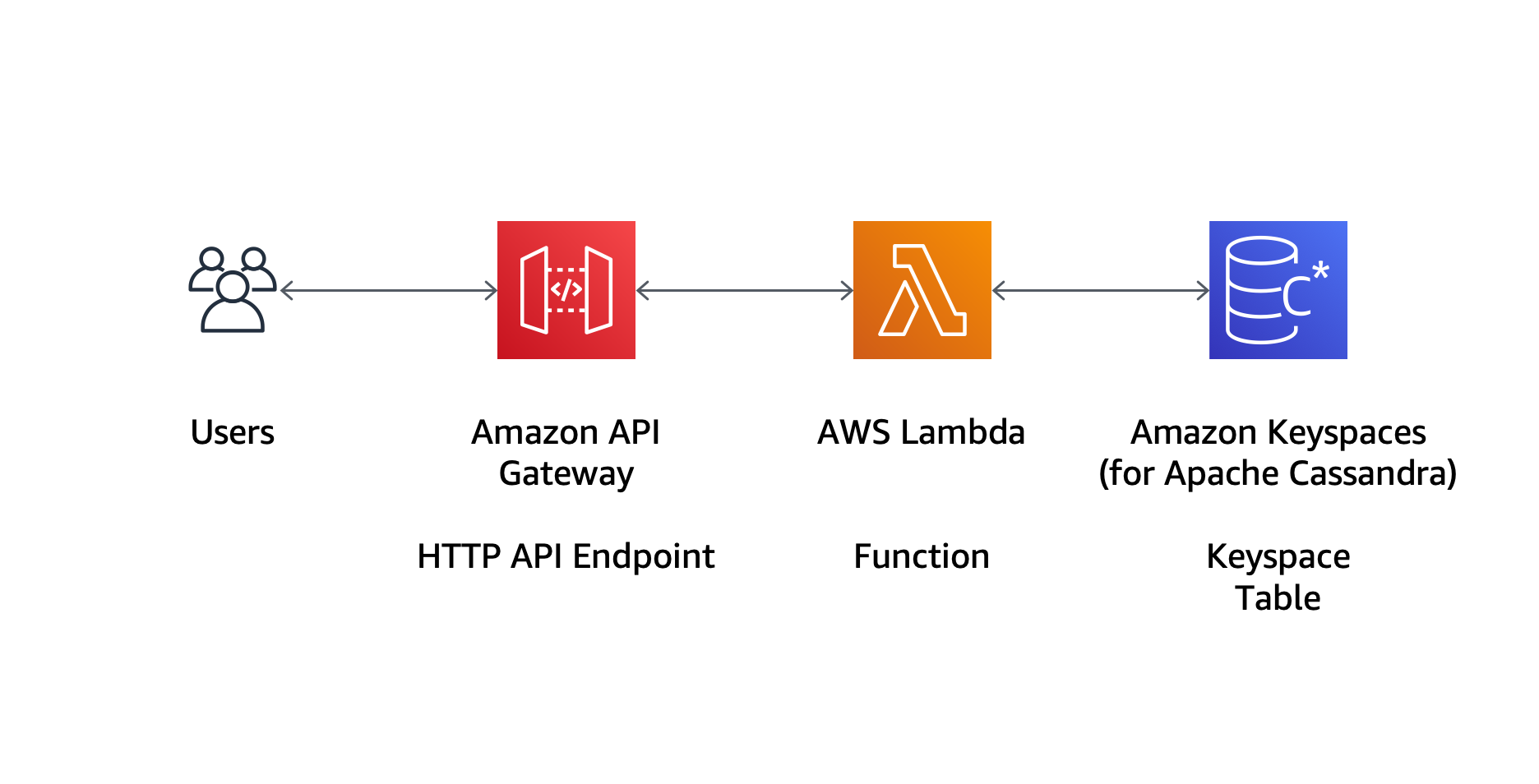
使用 Amazon Keyspaces 时,您的数据存储在键空间和表中。键空间为您提供将相关表分组到一起的方法。 在预览版的博客文章中,我使用控制台配置我的数据模型。现在,我还可以使用 AWS CloudFormation 将键空间和表作为代码来管理。例如,我可以使用此 CloudFormation 模板创建 bookstore 键空间和 books 表:
如果您没有为模板中的键空间或表指定名称,CloudFormation 将为您生成一个唯一名称。请注意,在此方式下,键空间和表中可能包含超出常用 Cassandra 规则的大写字母字符,当使用 Cassandra 查询语言 (CQL) 时,您需要将这些名称放在双引号之间。
当堆栈的创建完成时,我看到控制台中出现新的 bookstore 键空间:
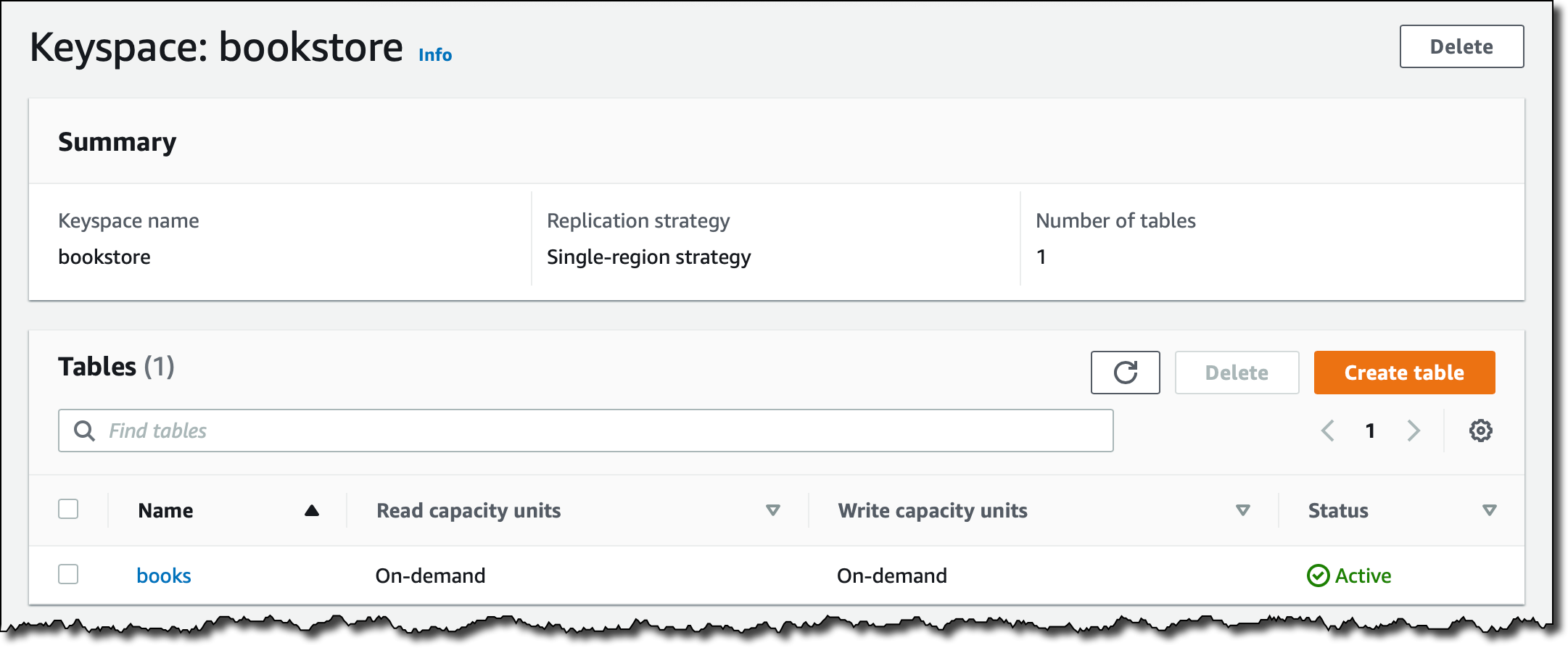
选择 books 表,可以对其配置进行概览,包括分区键、集群列和所有列,以及将表的容量模式从按需更改为预置的选项:

对于身份验证和授权,Amazon Keyspaces 支持 AWS Identity and Access Management (IAM) 基于身份的策略,您可以将该策略用于 IAM 用户、组和角色。下面是您可以在 IAM 策略中与 Amazon Keyspaces 结合使用的操作、资源和条件列表。 您现在还可以基于标签管理对资源的访问。
您可以通过将 AWS 签名版本 4 签名过程 (SigV4) 与 DataStax Java 驱动程序的这个开源身份验证插件结合使用来使用 IAM 角色。用此方式,您可以在 Amazon Elastic Compute Cloud (EC2) 实例、Amazon ECS 或 Amazon Elastic Kubernetes Service 管理的容器或 Lambda 函数内运行您的应用程序,并利用 IAM 角色进行 Amazon Keyspaces 的身份验证和授权,无需管理凭证。下面是一个示例应用程序,您可以使用相关的 IAM 角色在 EC2 实例上对其进行测试,以提供至 Amazon Keyspaces 的访问权。
再回到我的 books API 中,我使用下面的 AWS Serverless Application Model (SAM) 目标创建了需要的所有资源,包括键空间和表。
在此模板中,我没有指定键空间和表名称,CloudFormation 自动生成了唯一名称。函数 IAM 策略仅提供了对 books 表的读取 (cassandra:Select) 和写入 (cassandra:Write) 访问权。 我在使用 CloudFormation Fn::Select 和 Fn::Split 内部函数获取表名称。驱动程序也需要对 system* 键空间的读取访问权。
为了将身份验证插件用于支持 IAM 角色的 DataStax Java 驱动程序,我们使用 APIGatewayV2ProxyRequestEvent 和 APIGatewayV2ProxyResponseEvent 类在 Java 中编写了 Lambda 函数,以与 API Gateway 创建的 HTTP API 进行通信。
package books;

import java.net.InetSocketAddress;
import java.security.NoSuchAlgorithmException;
import java.util.Collections;
import java.util.List;
import java.util.HashMap;
import java.util.Map;
import java.util.StringJoiner;
import javax.net.ssl.SSLContext;

import org.json.simple.JSONObject;
import org.json.simple.parser.JSONParser;
import org.json.simple.parser.ParseException;

import com.datastax.oss.driver.api.core.ConsistencyLevel;
import com.datastax.oss.driver.api.core.CqlSession;
import com.datastax.oss.driver.api.core.cql.*;

import software.aws.mcs.auth.SigV4AuthProvider;

import com.amazonaws.services.lambda.runtime.Context;
import com.amazonaws.services.lambda.runtime.RequestHandler;
import com.amazonaws.services.lambda.runtime.LambdaLogger;
import com.amazonaws.services.lambda.runtime.events.APIGatewayV2ProxyRequestEvent;
import com.amazonaws.services.lambda.runtime.events.APIGatewayV2ProxyResponseEvent;

public class App implements RequestHandler<APIGatewayV2ProxyRequestEvent, APIGatewayV2ProxyResponseEvent> {

    JSONParser parser = new JSONParser();
    String[] keyspace_table = System.getenv("KEYSPACE_TABLE").split("\\|");
    String keyspace = keyspace_table[0];
    String table = keyspace_table[1];
    CqlSession session = getSession();
    PreparedStatement selectBookByIsbn = session.prepare("select * from \"" + table + "\" where isbn = ?");
    PreparedStatement selectAllBooks = session.prepare("select * from \"" + table + "\"");
    PreparedStatement insertBook = session.prepare("insert into \"" + table + "\" "
    + "(isbn, title, author, pages, year_of_publication)" + "values (?, ?, ?, ?, ?)");

    public APIGatewayV2ProxyResponseEvent handleRequest(APIGatewayV2ProxyRequestEvent request, Context context) {

        LambdaLogger logger = context.getLogger();

        String responseBody;
        int statusCode = 200;

        String routeKey = request.getRequestContext().getRouteKey();
        logger.log("routeKey = '" + routeKey + "'");

        if (routeKey.equals("GET /books")) {
            ResultSet rs = execute(selectAllBooks.bind());
            StringJoiner jsonString = new StringJoiner(", ", "[ ", " ]");
            for (Row row : rs) {
                String json = row2json(row);
                jsonString.add(json);
            }
            responseBody = jsonString.toString();
        } else if (routeKey.equals("GET /books/{isbn}")) {
            String isbn = request.getPathParameters().get("isbn");
            logger.log("isbn: '" + isbn + "'");
            ResultSet rs = execute(selectBookByIsbn.bind(isbn));
            if (rs.getAvailableWithoutFetching() == 1) {
                responseBody = row2json(rs.one());
            } else {
                statusCode = 404;
                responseBody = "{\"message\": \"not found\"}";
            }
        } else if (routeKey.equals("POST /books")) {
            String body = request.getBody();
            logger.log("Body: '" + body + "'");
            JSONObject requestJsonObject = null;
            if (body != null) {
                try {
                    requestJsonObject = (JSONObject) parser.parse(body);
                } catch (ParseException e) {
                    e.printStackTrace();
                }
                if (requestJsonObject != null) {
                    int i = 0;
                    BoundStatement boundStatement = insertBook.bind()
                    .setString(i++, (String) requestJsonObject.get("isbn"))
                    .setString(i++, (String) requestJsonObject.get("title"))
                    .setString(i++, (String) requestJsonObject.get("author"))
                    .setInt(i++, ((Long) requestJsonObject.get("pages")).intValue())
                    .setInt(i++, ((Long) requestJsonObject.get("year_of_publication")).intValue())
                    .setConsistencyLevel(ConsistencyLevel.LOCAL_QUORUM);
                    ResultSet rs = execute(boundStatement);
                    statusCode = 201;
                    responseBody = body;
                } else {
                    statusCode = 400;
                    responseBody = "{\"message\": \"JSON parse error\"}";
                }
            } else {
                statusCode = 400;
                responseBody = "{\"message\": \"body missing\"}";
            }
        } else {
            statusCode = 405;
            responseBody = "{\"message\": \"not implemented\"}";
        }

        Map<String, String> headers = new HashMap<>();
        headers.put("Content-Type", "application/json");

        APIGatewayV2ProxyResponseEvent response = new APIGatewayV2ProxyResponseEvent();
        response.setStatusCode(statusCode);
        response.setHeaders(headers);
        response.setBody(responseBody);

        return response;
    }

    private String getStringColumn(Row row, String columnName) {
        return "\"" + columnName + "\": \"" + row.getString(columnName) + "\"";
    }

    private String getIntColumn(Row row, String columnName) {
        return "\"" + columnName + "\": " + row.getInt(columnName);
    }

    private String row2json(Row row) {
        StringJoiner jsonString = new StringJoiner(", ", "{ ", " }");
        jsonString.add(getStringColumn(row, "isbn"));
        jsonString.add(getStringColumn(row, "title"));
        jsonString.add(getStringColumn(row, "author"));
        jsonString.add(getIntColumn(row, "pages"));
        jsonString.add(getIntColumn(row, "year_of_publication"));
        return jsonString.toString();
    }

    private ResultSet execute(BoundStatement bs) {
        final int MAX_RETRIES = 3;
        ResultSet rs = null;
        int retries = 0;

        do {
            try {
                rs = session.execute(bs);
            } catch (Exception e) {
                e.printStackTrace();
                session = getSession(); // New session
            }
        } while (rs == null && retries++ < MAX_RETRIES);
        return rs;
    }

    private CqlSession getSession() {

        System.setProperty("javax.net.ssl.trustStore", "./cassandra_truststore.jks");
        System.setProperty("javax.net.ssl.trustStorePassword", "amazon");

        String region = System.getenv("AWS_REGION");
        String endpoint = "cassandra." + region + ".amazonaws.com";

        System.out.println("region: " + region);
        System.out.println("endpoint: " + endpoint);
        System.out.println("keyspace: " + keyspace);
        System.out.println("table: " + table);

        SigV4AuthProvider provider = new SigV4AuthProvider(region);
        List<InetSocketAddress> contactPoints = Collections.singletonList(new InetSocketAddress(endpoint, 9142));

        CqlSession session;

        try {
            session = CqlSession.builder().addContactPoints(contactPoints).withSslContext(SSLContext.getDefault())
            .withLocalDatacenter(region).withAuthProvider(provider).withKeyspace("\"" + keyspace + "\"")
            .build();
        } catch (NoSuchAlgorithmException e) {
            session = null;
            e.printStackTrace();
        }

        return session;
    }
}
要使用 Java 驱动程序通过 TLS/SSL 连接到 Amazon Keyspaces,我需要在 JVM 参数中包含 trustStore。 在 Lambda 函数中使用 Cassandra Java 客户端驱动程序时,我无法将参数传递到 JVM 中,因此,我传递了与系统属性相同的选项,并且在使用 withSslContext(SSLContext.getDefault()) 参数创建 CQL 会话时指定了 SSL 上下文。 请注意,我还必须配置 Apache Maven 使用的 pom.xml 文件,以将 trustStore 文件包含为依赖项。
System.setProperty("javax.net.ssl.trustStore", "./cassandra_truststore.jks");
System.setProperty("javax.net.ssl.trustStorePassword", "amazon");
现在,我可以使用 curl 或 Postman 之类的工具来测试我的 books API。首先,我从 CloudFormation 堆栈的输出中获取 API 的终端节点。最初,books 表中没有存储书籍,而且我对资源执行 HTTP GET 操作时,获取了空的 JSON 列表。为了实现可读性,我从输出中删除了所有的 HTTP 标头。
$ curl -i https://a1b2c3d4e5.execute-api.eu-west-1.amazonaws.com/books
HTTP/1.1 200 OK[]
我在代码中使用 PreparedStatement 来运行 CQL 语句,以从 books 表中选择所有的行。密钥库和表的名称将传递到环境变量中的 Lambda 函数,如上面的 SAM 模板所述。
让我们通过对资源执行 HTTP POST 操作来使用 API 添加数据。
$ curl -i -d '{ "isbn": "978-0201896831", "title": "The Art of Computer Programming, Vol. 1: Fundamental Algorithms (3rd Edition)", "author": "Donald E. Knuth", "pages": 672, "year_of_publication": 1997 }' -H "Content-Type: application/json" -X POST https://a1b2c3d4e5.execute-api.eu-west-1.amazonaws.com/books
HTTP/1.1 201 Created{ "isbn": "978-0201896831", "title": "The Art of Computer Programming, Vol. 1: Fundamental Algorithms (3rd Edition)", "author": "Donald E. Knuth", "pages": 672, "year_of_publication": 1997 }
我可以使用控制台中的 CQL 编辑器检查数据是否已插入表中,我在其中选择了表中的所有行。

我重复上面的 HTTP GET 来获取书籍列表,并且看到了刚创建的列表。
$ curl -i https://a1b2c3d4e5-api.eu-west-1.amazonaws.com/books
HTTP/1.1 200 OK[ { "isbn": "978-0201896831", "title": "The Art of Computer Programming, Vol. 1: Fundamental Algorithms (3rd Edition)", "author": "Donald E. Knuth", "pages": 672, "year_of_publication": 1997 } ]
我可以通过 ISBN 获取一本书籍,因为 isbn 列是表的主键,我可以在 select 语句的 where 条件中使用该键。
$ curl -i https://a1b2c3d4e5.execute-api.eu-west-1.amazonaws.com/books/978-0201896831
HTTP/1.1 200 OK{ "isbn": "978-0201896831", "title": "The Art of Computer Programming, Vol. 1: Fundamental Algorithms (3rd Edition)", "author": "Donald E. Knuth", "pages": 672, "year_of_publication": 1997 }
如果没有带有该 ISBN 的书籍,将返回“not found”消息:
$ curl -i https://a1b2c3d4e5.execute-api.eu-west-1.amazonaws.com/books/1234567890
HTTP/1.1 404 Not Found{"message": "not found"}
成功了! 我们刚使用 CQL 创建了一个完全服务器的 API,以使用临时安全凭证读取和写入数据,从而将整个基础设施(包括数据库表)作为代码进行管理。
现已推出
Amazon Keyspace (for Apache Cassandra) 现已可供您的应用程序使用,请参阅此表了解区域可用性。 有关如何使用 Keyspaces 的更多信息,可参阅文档。 在此博文中,我构建了一个新应用程序,但您可以通过将当前的表格迁移到完全托管的环境来获取很多优势。对于迁移数据,您现在可以使用本博文所述的 cqlsh。
欢迎与我分享您打算用这项功能来做些什么!
– Danilo