
Sold by: OpenObserve
Deployed on AWS
10x easier, 140x lower storage cost, high performance, petabyte scale - observability solution for (Logs, Metrics, Traces, RUM, Error tracking, Session replay).
4.9
Overview
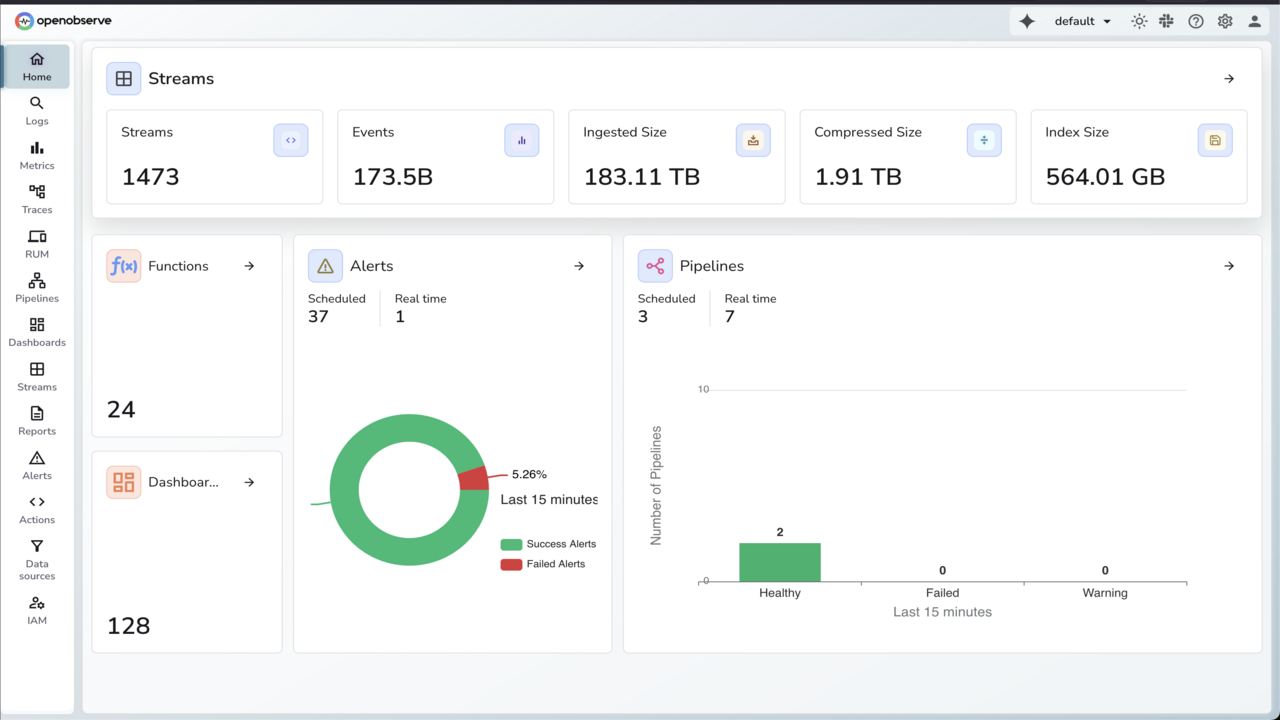
Image
Home page
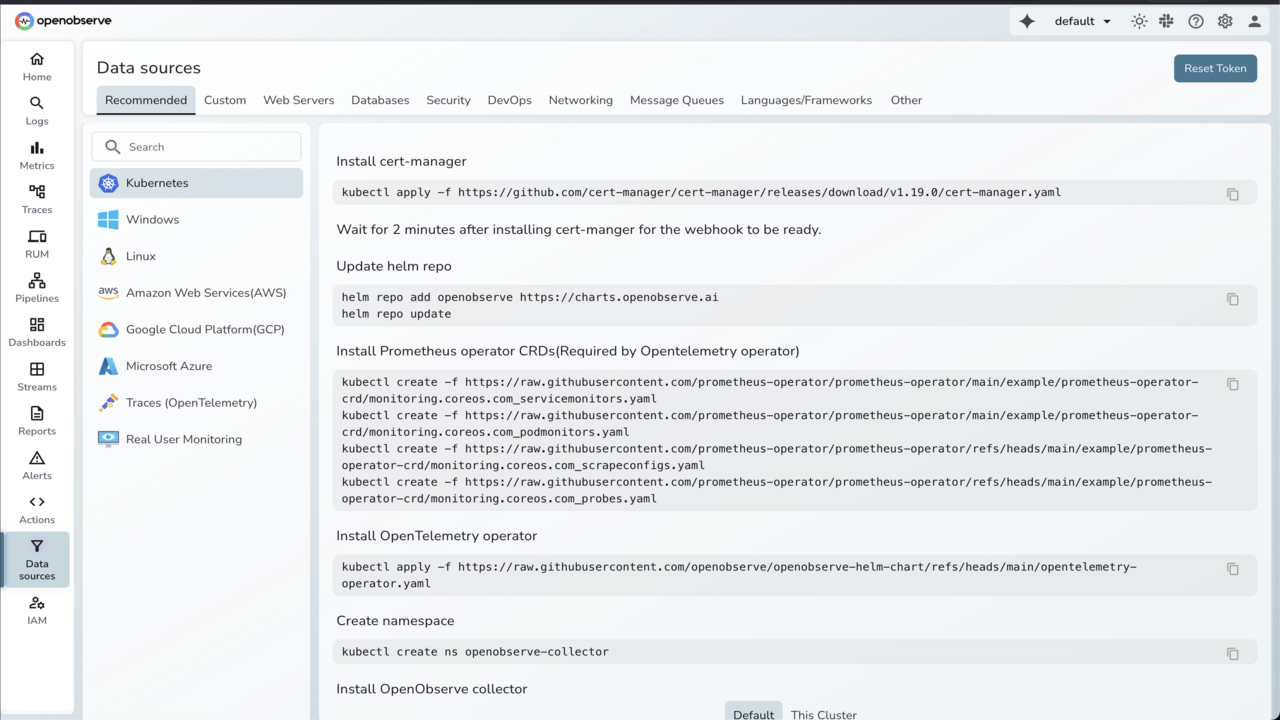
Image
Data Sources
OpenObserve is a cloud native observability platform (Logs, Metrics, Traces) that provides ~140x lower storage costs. Could be higher or lower based on data entropy) for real life log data, significantly lower operational cost and ease of use. It can scale to petabytes of data, is highly performant and allows you to sleep better at night. If you are looking for an observability tool for logs, metrics and traces, do evaluate OpenObserve and how its approach towards observability could help you build better software, save money on observability costs, and sleep better. We built OpenObserve on a simple truth - the best tech grows in the open. Our open source foundation isn't just a checkbox; it's our lifeblood. When observability tools hide their inner workings, everyone loses. That's why we've thrown open our codebase, letting you peek under the hood, tinker with the engine, or rebuild entire systems to fit your world. Our community keeps us honest. Developers from Boston to Bangalore contribute code that solves real problems they've faced firsthand. This diversity of thought has taken us places we never would have discovered alone. We're pragmatists about sustainability too. While our core platform remains free for all, our enterprise offerings fund the coffee that fuels our late-night coding sessions. This balance ensures OpenObserve stays both accessible and evolving.
Highlights
- Extremely performant - Very high ingestion rates and search speed. Upto 5x lower compute requirements compared to the competition.
- Extremely low storage cost. Upto 140x lower storage cost compared to the competition. Awesome GUI, Easy to get started with and maintain with stateless nodes.
Details
Sold by
Categories
Delivery method
Deployed on AWS
New
Introducing multi-product solutions
You can now purchase comprehensive solutions tailored to use cases and industries.

Features and programs
Financing for AWS Marketplace purchases
AWS Marketplace now accepts line of credit payments through the PNC Vendor Finance program. This program is available to select AWS customers in the US, excluding NV, NC, ND, TN, & VT.

Pricing
Pricing is based on actual usage, with charges varying according to how much you consume. Subscriptions have no end date and may be canceled any time.
Additional AWS infrastructure costs may apply. Use the AWS Pricing Calculator to estimate your infrastructure costs.
Dimension | Description | Cost/MB |
|---|---|---|
Ingestion | Ingested data in MB | $0.00048828 |
Query | Queried data in MB | $0.00000976 |
Pipeline | Transformed data in MB | $0.00019531 |
Remote Pipelines | Exported data in MB | $0.00029296 |
Data Retention | Data Retention in MB/hour | $0.00000013 |
Dimensions summary
You pay only for what you use across five independent metrics, with no upfront commitment or per-seat charges. Ingestion covers data you bring into the platform, measured in MB. Query covers data you search, also in MB. Pipeline covers data you transform in real time, while Remote Pipelines covers data you export to external destinations. Data Retention charges for storage over time, measured in MB per hour. Each dimension bills separately based on your actual volume, so your total cost scales directly with usage rather than a fixed tier.
Top-of-mind questions for buyers
Each of these dimensions bills per megabyte of data. Ingestion counts data you send into the platform. Query counts data scanned when you search. Pipeline counts data transformed in real time. Remote Pipelines counts data exported to external destinations. Each megabyte is measured against actual volume processed.
Data Retention bills per megabyte per hour, so it charges for storage held over time. The other four dimensions charge per megabyte of data moved or processed once. Retention cost grows the longer you keep data, while ingestion, query, pipeline, and remote pipeline costs reflect one-time volume events.
It depends on your workload. High data intake pushes Ingestion cost up. Heavy searching raises Query cost. Long storage periods increase Data Retention, since it bills per megabyte per hour. Real-time transformation drives Pipeline cost, and exporting data drives Remote Pipelines. All five bill independently on the same invoice.
openobserve.ai
Helpful?
Vendor refund policy
available

Legal
Vendor terms and conditions
Upon subscribing to this product, you must acknowledge and agree to the terms and conditions outlined in the vendor's End User License Agreement (EULA) .
Content disclaimer
Vendors are responsible for their product descriptions and other product content. AWS does not warrant that vendors' product descriptions or other product content are accurate, complete, reliable, current, or error-free.
Delivery details
Software as a Service (SaaS)
SaaS delivers cloud-based software applications directly to customers over the internet. You can access these applications through a subscription model. You will pay recurring monthly usage fees through your AWS bill, while AWS handles deployment and infrastructure management, ensuring scalability, reliability, and seamless integration with other AWS services.
Support
Vendor support
AWS infrastructure support
AWS Support is a one-on-one, fast-response support channel that is staffed 24x7x365 with experienced and technical support engineers. The service helps customers of all sizes and technical abilities to successfully utilize the products and features provided by Amazon Web Services.
Similar products

ClickHouse Cloud is an extraordinarily fast, seamlessly scalable and delightfully easy-to-use online analytical database.
Arduino Cloud is an all-in-one IoT platform that empowers businesses to go to market quickly, giving them the right framework to securely prototype, deploy and manage their IoT projects at any scale and from any location for a wide range of hardware products.

The HPE DevOps Roadmap for Cloud leverages our experience and IP curated through hundreds of successful enterprise cloud transformation engagements.

The HPE Accelerator Workshops for Cloud leverages our experience through hundreds of successful enterprise cloud transformation engagements. The workshop is customizable, based on clients needs, with durations of 1-3 days.
Customer reviews
Computer Software
Easy to Install and Lightweight on Resources
Reviewed on Sep 22, 2026
Review provided by G2
What do you like best about the product?
OpenObserve is very easy to install. I was able to get started with it in a short time by following the guides. And it is very light on compute resources which is one of the key strengths of it. The documentation was also easy to understand and covered what I wanted to know. And when I couldn't find something there, I asked questions in the Slack channel. The OpenObserve team was very responsive and they solved my problems
What do you dislike about the product?
Features are restricted by the pricing tier. E.g. SSO for the dashboard is not available in the free version
What problems is the product solving and how is that benefiting you?
Using OpenObserve as one of the Logs and Tracing backends for an opensource software.
Ted O.
OpenObserve Replaced Our ELK Stack with a Clean UI and Maintenance Savings
Reviewed on Sep 21, 2026
Review provided by G2
What do you like best about the product?
A single OpenObserve pod served as a drop-in replacement for our full ELK stack, making the management of our logging infrastructure significantly easier and cheaper.
It worked with our existing Fluent Bit forwarders with only minimal changes. The UI was clean and intuitive enough that end users had no trouble switching over from Kibana. Being able to store data in S3 not only saved us money, but also improved maintenance and performance.
It worked with our existing Fluent Bit forwarders with only minimal changes. The UI was clean and intuitive enough that end users had no trouble switching over from Kibana. Being able to store data in S3 not only saved us money, but also improved maintenance and performance.
What do you dislike about the product?
Since we’ve been using OpenObserve for over two years, we’ve run into a few deployment hurdles, especially with the earlier versions. Provisioning the stack could be about 95% automated out of the box, but we still hit difficulties with a few other tasks, like setting up UDS or changing the admin password.
What problems is the product solving and how is that benefiting you?
It allows us to quickly provision a high-performance log aggregation system without it ending up costing as much as the rest of our infrastructure.
Computer Software
All-in-One Observability: Logs, Metrics, Traces, and Alerts in One Place
Reviewed on Sep 15, 2026
Review provided by G2
What do you like best about the product?
I like that logs, metrics, traces, and alerts can all be integrated into a single application.
What do you dislike about the product?
Dashboards can be improved. I like Grafana like visualisations.
What problems is the product solving and how is that benefiting you?
OpenObserve lets me collect and query observability data (logs, metrics and traces) in a single place. I no longer need to configure different applications such as mimir, tempo and loki for each data type.
Hakan K.
Efficient observability, budget friendly and easy to maintain
Reviewed on Sep 15, 2026
Review provided by G2
What do you like best about the product?
I like OpenObserve for its speed and flexibility, particularly when handling queries with both PromQL and SQL. The AI integration is also really beneficial.
What do you dislike about the product?
The Kubernetes operator that we're using with OpenObserve could support more types, which feels a bit limiting. Additionally, the user management aspect could be simplified. It would be great to have service accounts for the OpenObserve API managed by the Kubernetes operator, and a streamlined way to manage users and roles across all organizations instead of handling them individually.
What problems is the product solving and how is that benefiting you?
I use OpenObserve to aggregate large volumes of metrics and log outputs, keeping costs low and the presentation easy to maintain. It provides observability for our internal developer platform, supporting the SRE team to keep production running smoothly.
Jose R.
Cost-Effective Splunk Alternative with Customization Perks
Reviewed on Sep 04, 2026
Review provided by G2
What do you like best about the product?
I love OpenObserve for its simplicity and low cost, especially since it offers everything I used to have in Splunk but cheaper. I appreciate the ability to self-host, which was smooth to set up with ECS Fargate. The community is also great, being really approachable and quick in development, like with the Terraform provider and MCP Server capabilities. Building dashboards and alerts is straightforward because it uses custom SQL. Overall, OpenObserve provides a full solution for my custom scripts automation and integrates data webhooks efficiently into a single pane of glass.
What do you dislike about the product?
Using DEX for OKTA SSO with OpenObserve requires an enterprise license, which I find less than ideal. I wish this capability could be provided natively rather than relying on the DEX broker.
What problems is the product solving and how is that benefiting you?
I use OpenObserve for centralized backup and KPI reporting, offering a full solution for script automation and data integration. It simplifies dashboard and alert development with custom SQL, providing cost-effective features I used to have in Splunk.