Sold by: HabileLabs
Deployed on AWS
Free Trial
Quick Launch
AWS Free Tier
Vigil is agentless database activity monitoring (DAM) and database auditing for Amazon RDS, Amazon Aurora, Amazon DocumentDB and Amazon DynamoDB, installed in your own AWS account. It reads the native audit logs your databases already write and gives security, DBA and compliance teams near-real-time alerts on privileged changes, bulk reads and audit tampering; an account register with an owner for every database user; a searchable activity trail with every literal value masked; weekly review sign-offs; and auditor-ready evidence for CERT-In, RBI, SEBI CSCRF, DPDP Act, PCI DSS and ISO 27001 reviews. No agent, no proxy and no change to how applications connect. Serverless, installed by AWS Marketplace Quick Launch as one CloudFormation stack in your choice of seven AWS Regions, and your audit data never leaves your account.
Overview
Image
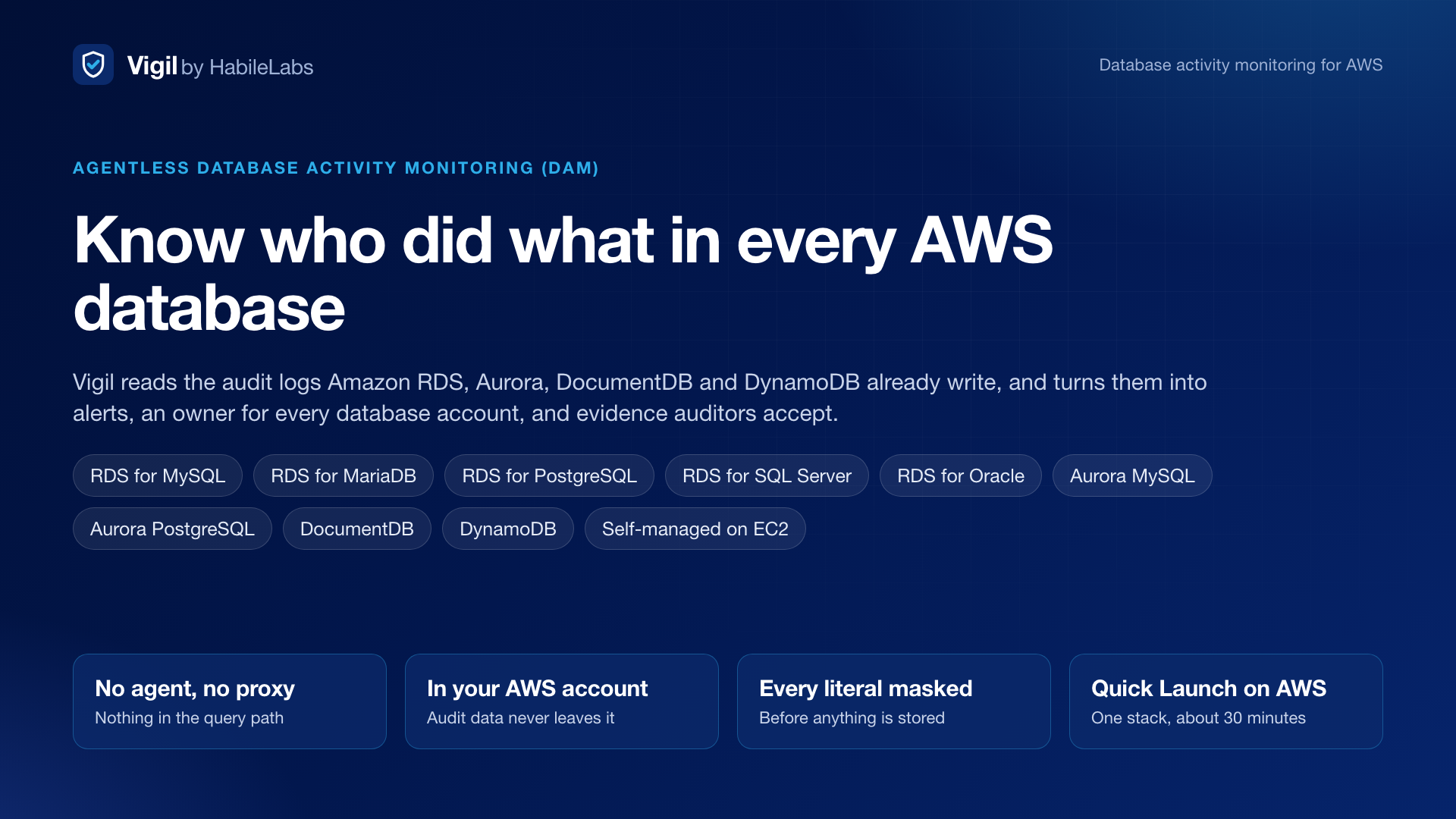
Agentless database activity monitoring for AWS
Image
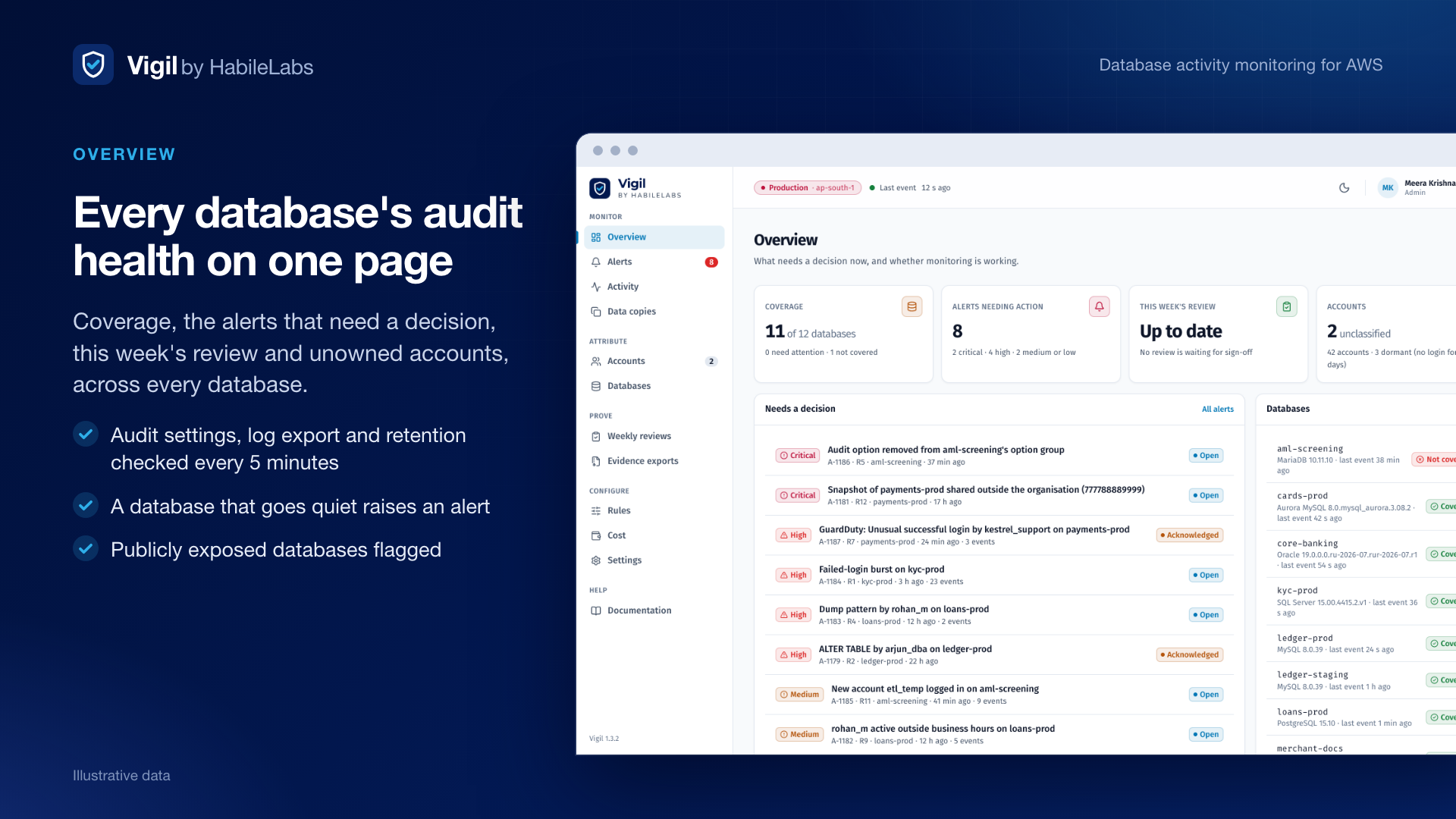
Overview: audit coverage across your databases
Image
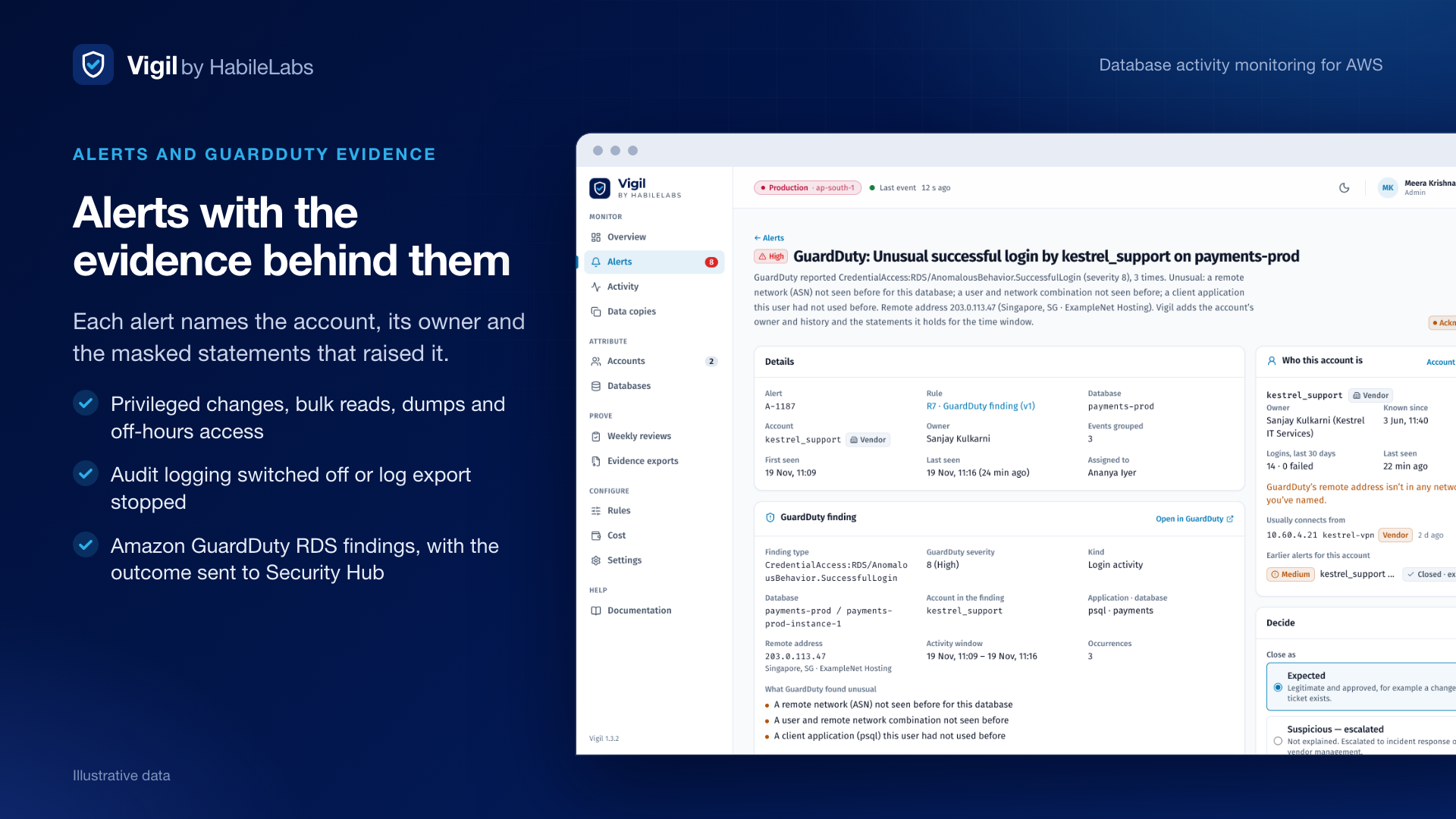
Alerts on privileged access and audit tampering
Image
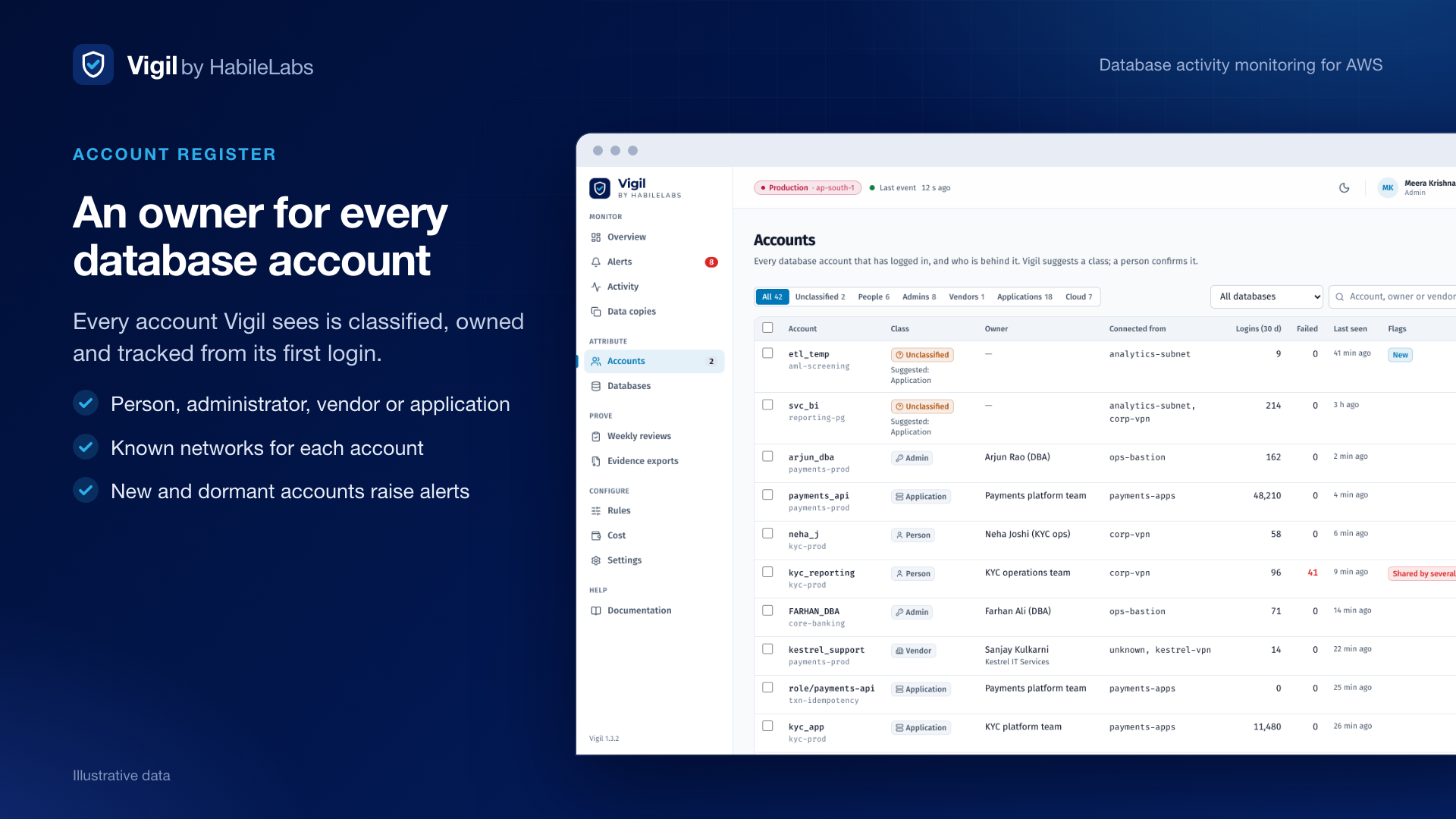
Account register: an owner for every DB user
Image
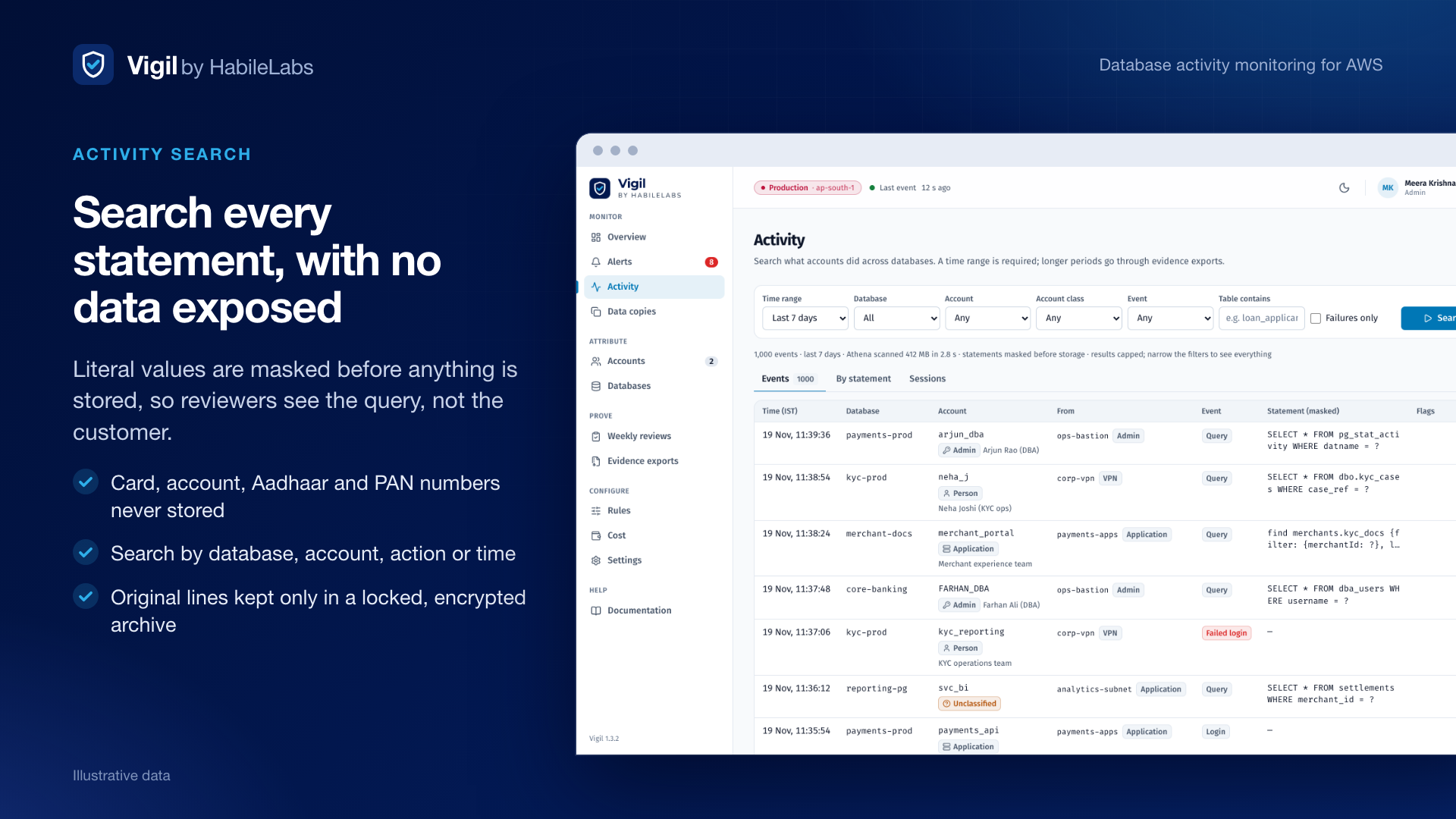
Masked SQL activity search across databases
Image
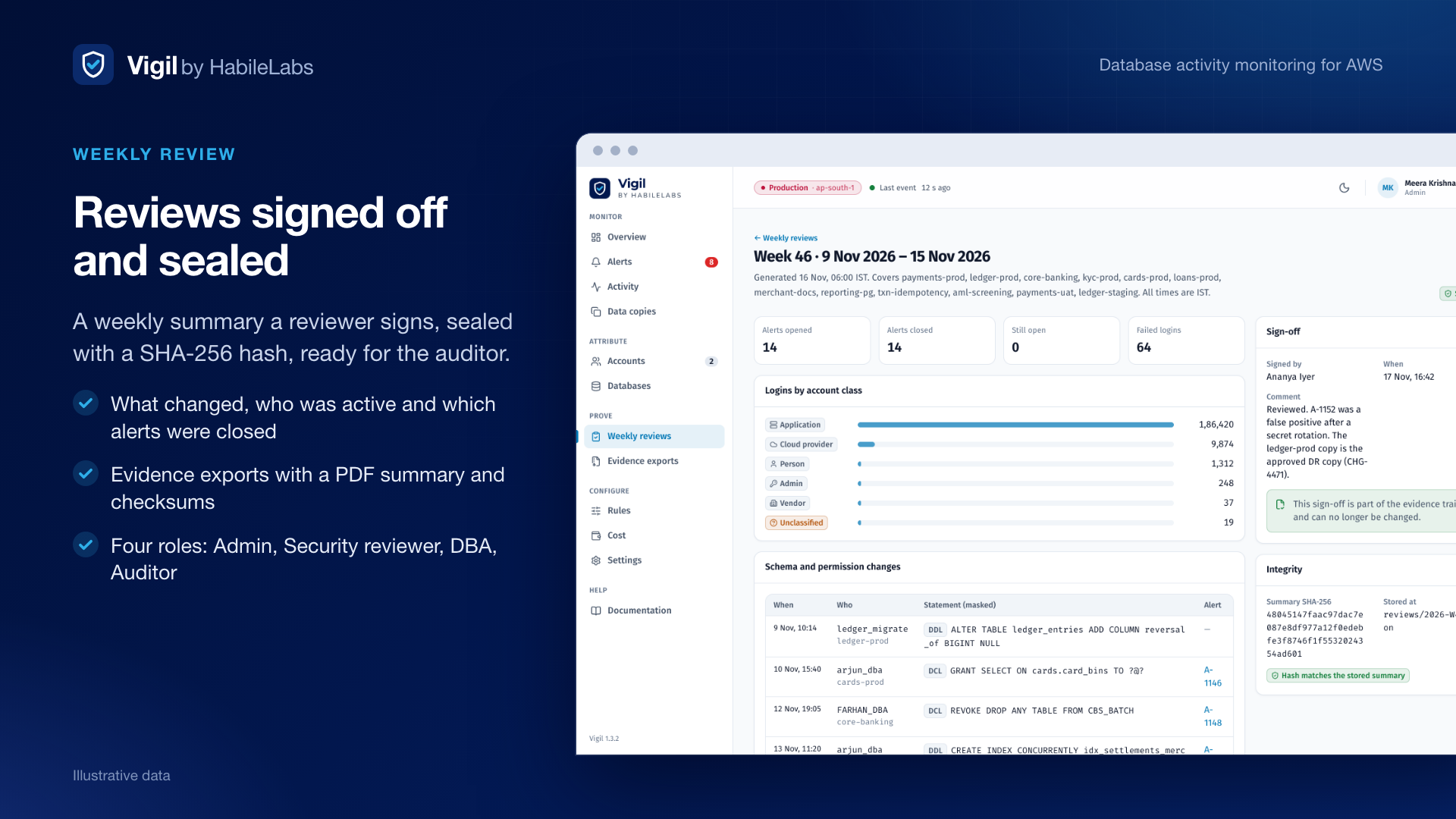
Weekly access review, signed and SHA-256 sealed
Image
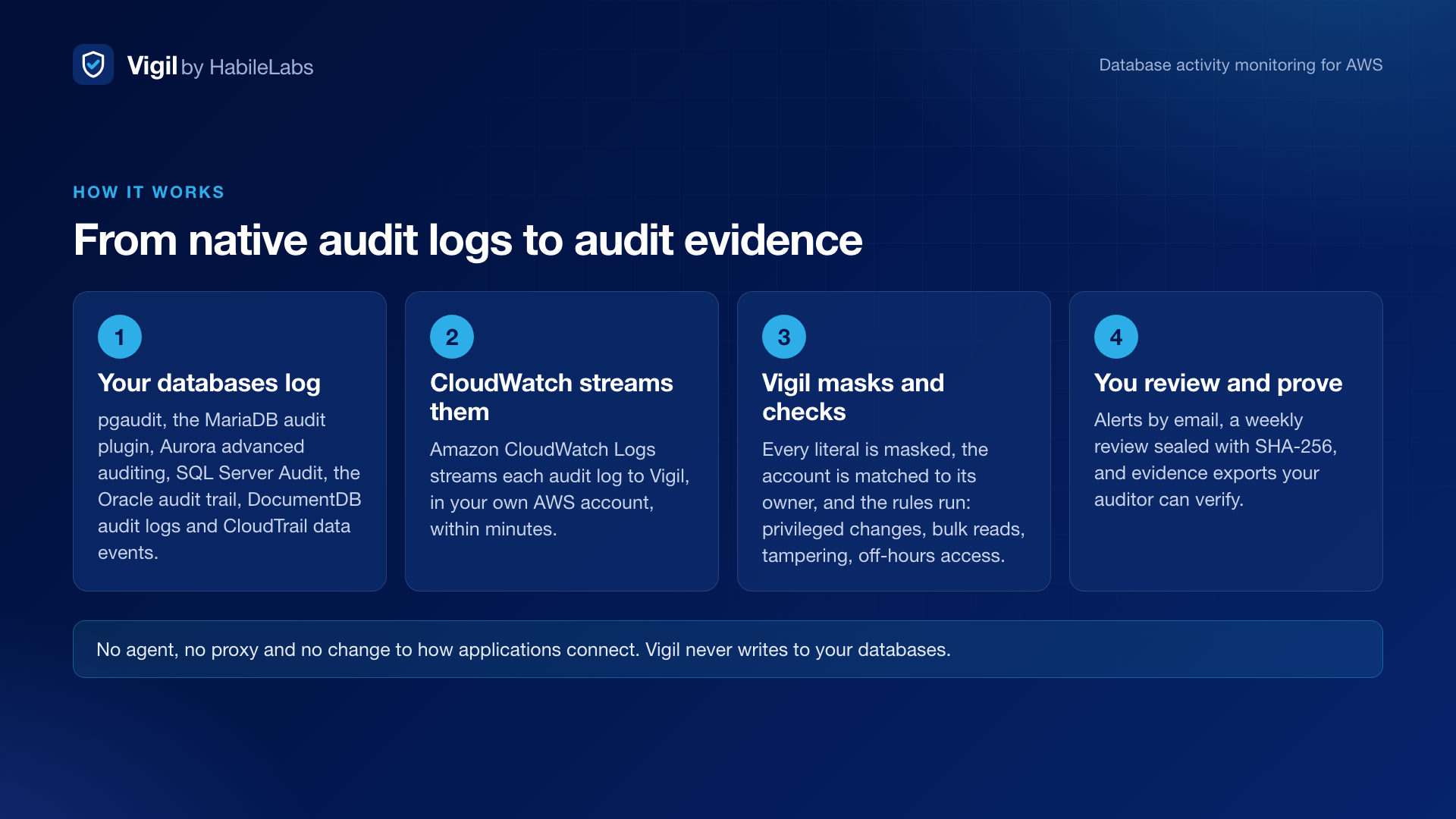
How Vigil works: audit logs to evidence
Image
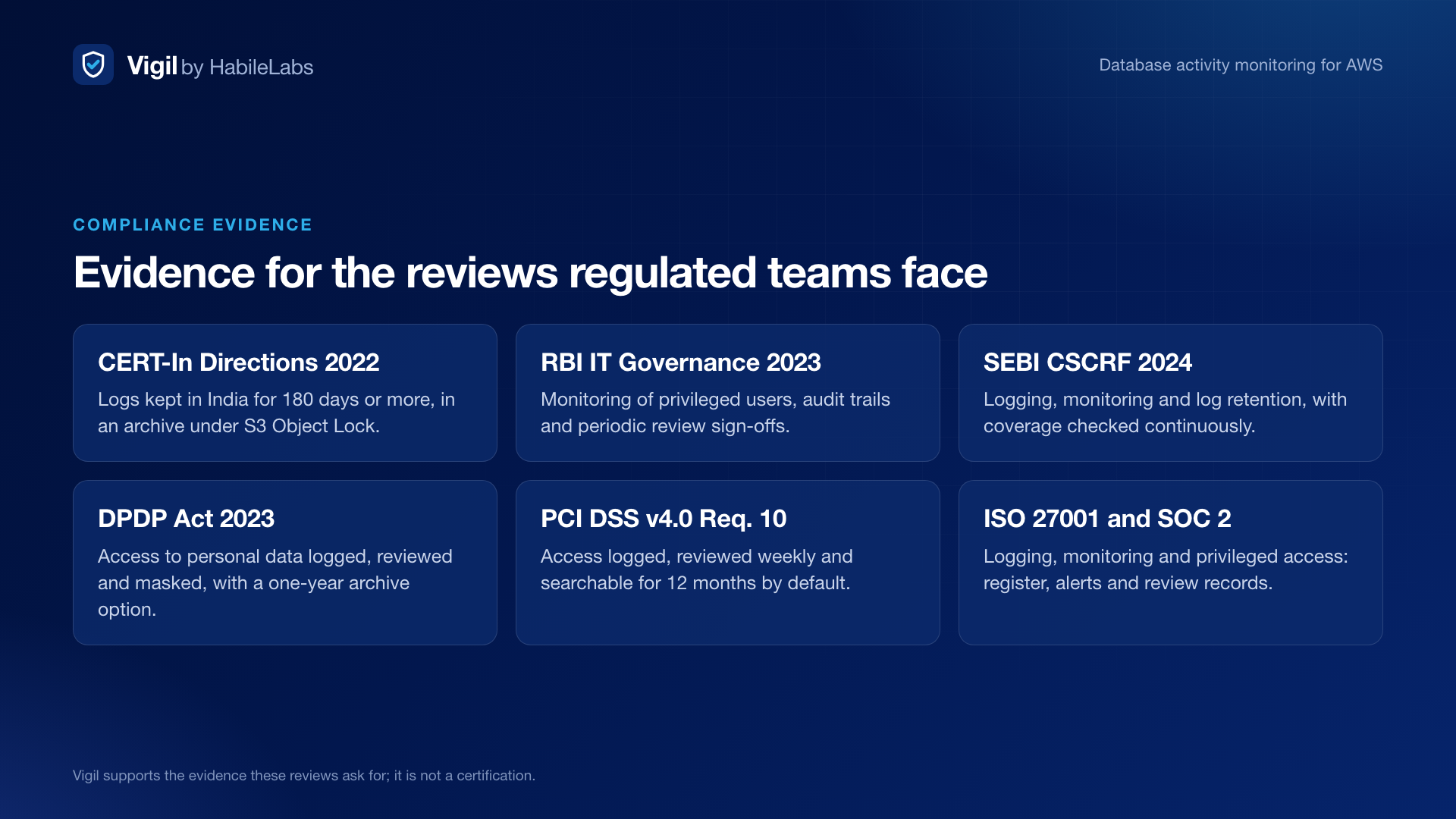
Evidence for CERT-In, RBI, SEBI, DPDP and PCI DSS
Image
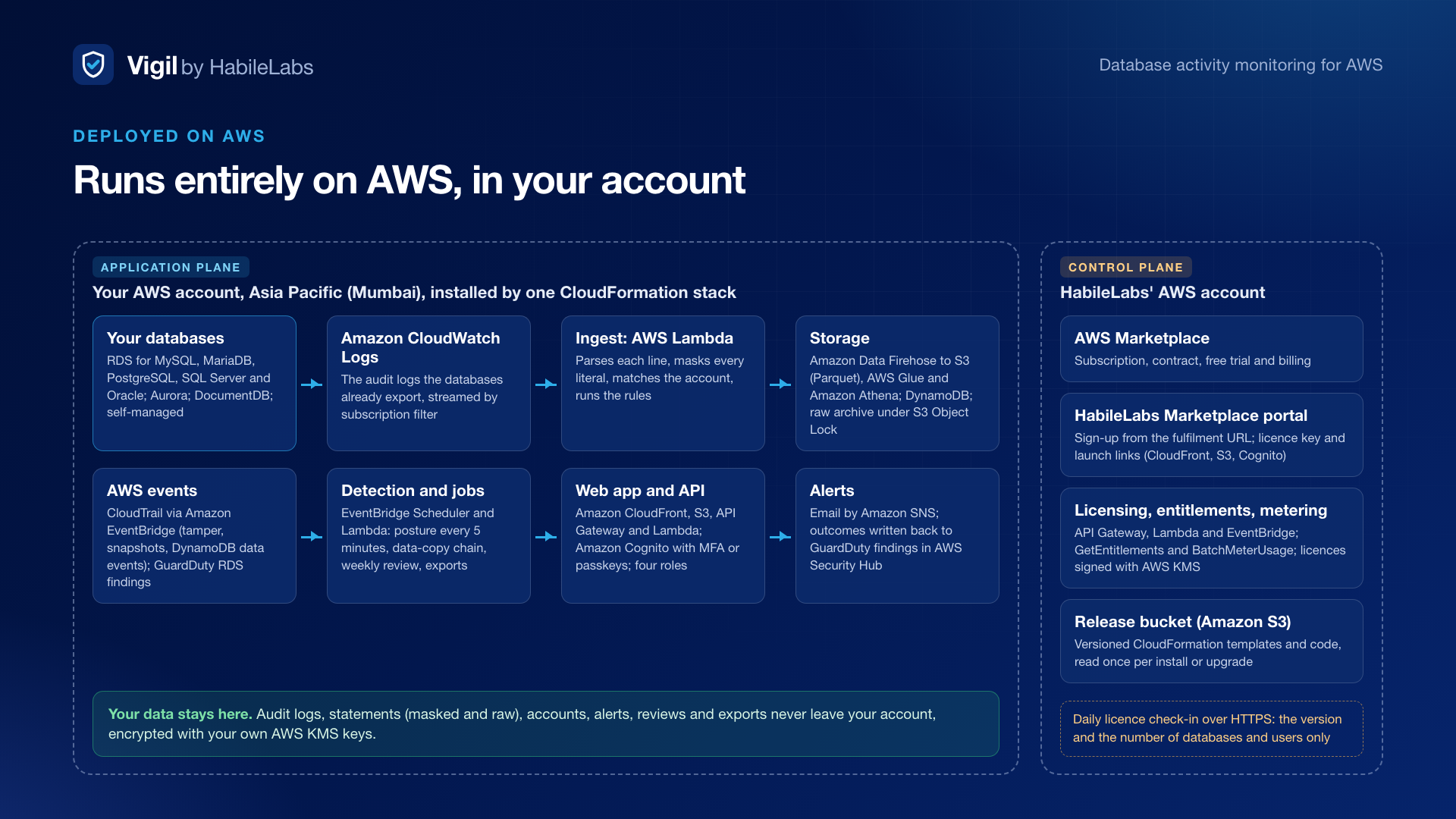
Architecture: runs entirely on AWS, your account
Image
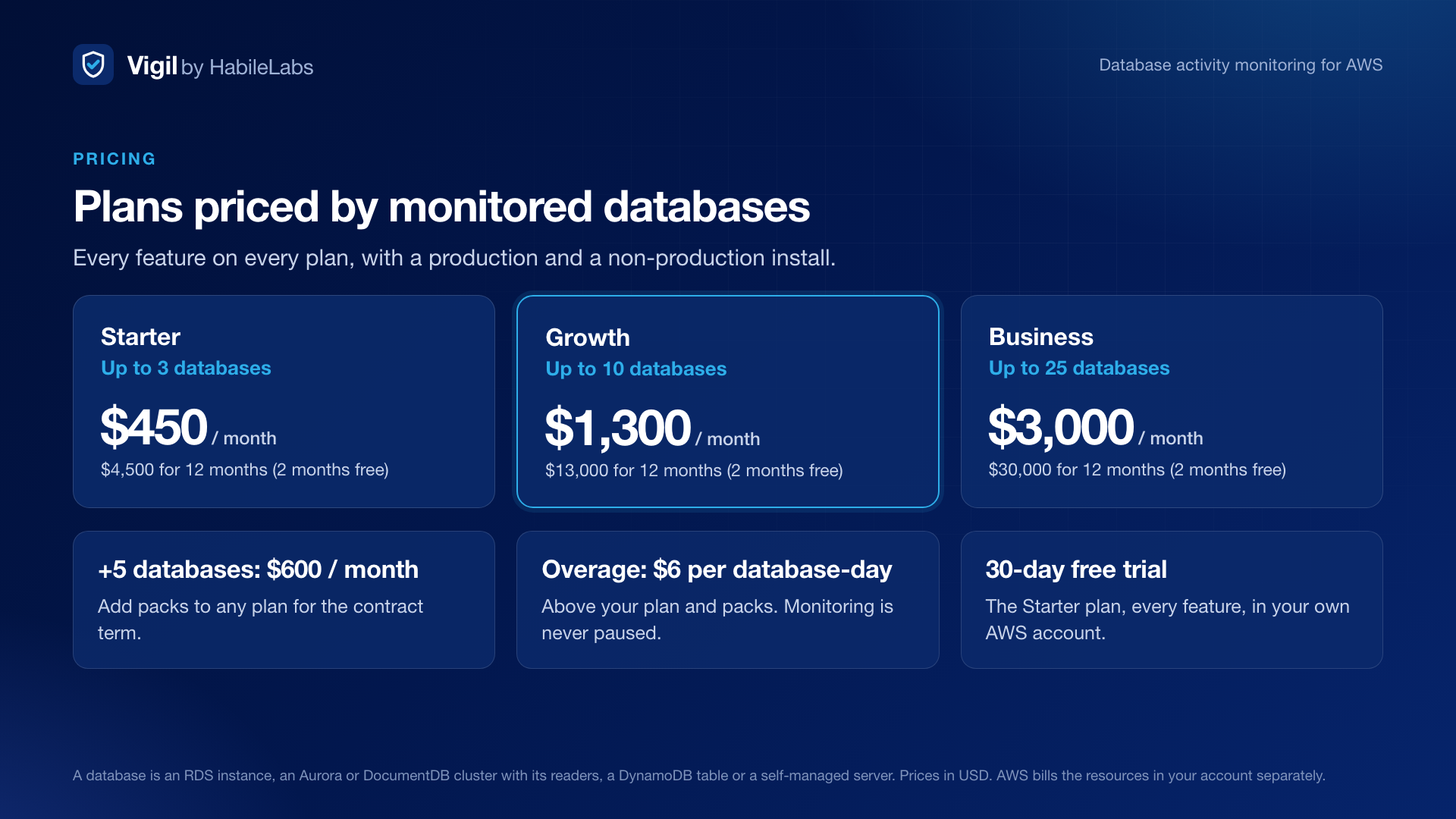
Plans priced by monitored databases
Vigil is agentless database activity monitoring (DAM) for AWS databases, installed in your own AWS account. It reads the native audit logs that Amazon RDS, Amazon Aurora, Amazon DocumentDB and Amazon DynamoDB already write, and answers the four questions auditors and security teams ask of every database: whose account is this, what did it do, did anyone review the alerts, and where is the evidence?
Who Vigil is for Banks, NBFCs, insurers, brokers, payment companies and other regulated teams that run production databases on AWS and must monitor privileged access, keep database audit logs and show reviewers proof.
Supported databases
- Amazon RDS for MySQL and MariaDB (MariaDB audit plugin) and Aurora MySQL (advanced auditing)
- Amazon RDS for PostgreSQL and Aurora PostgreSQL (pgaudit and connection logging)
- Amazon RDS for SQL Server (SQL Server Audit) and Amazon RDS for Oracle (XML, EXTENDED audit trail)
- Amazon DocumentDB (audit logs) and Amazon DynamoDB tables (CloudTrail data events)
- Self-managed MySQL, MariaDB and PostgreSQL on Amazon EC2 or on premises, through the CloudWatch agent
What Vigil does
- Alerts on privileged and schema changes in production, failed-login bursts, bulk reads and dumps, off-hours access, new and dormant accounts, application accounts used from the wrong network, and audit settings switched off or log export stopped (tamper detection). A database that goes quiet raises an alert too.
- An account register: every database account classified as a person, administrator, vendor or application, with an owner, its networks and its history.
- A masked activity trail: every statement searchable, with every literal value (card, account, Aadhaar and PAN numbers, passwords) masked before storage. Original lines go only to a raw archive under S3 Object Lock, encrypted with its own KMS key.
- Weekly review and evidence exports: a summary a reviewer signs off, sealed with a SHA-256 hash, and exports of events, alerts and reviews with a PDF summary and a checksum manifest.
- Amazon GuardDuty evidence: each GuardDuty RDS finding becomes an alert with the account's owner, history and masked statements, and the outcome is written back to AWS Security Hub.
- The data-copy chain: snapshots of monitored databases followed when they are shared, made public, copied, exported to S3 or restored, across accounts and Regions.
- Internet exposure: publicly accessible databases with a security group open to the internet are flagged.
How Vigil works
- Subscribe, then register on the HabileLabs Marketplace portal for your licence key.
- Install with Quick Launch on AWS Marketplace: one CloudFormation stack in your databases' Region, about 30 minutes.
- Connect each database in the app. Vigil checks its audit settings and gives you a readable, checksummed script for anything to change.
- Audit logs stream from CloudWatch Logs into Vigil; alerts reach your team by email within minutes.
Vigil is serverless (AWS Lambda, Amazon Data Firehose, Amazon S3, Amazon Athena, Amazon DynamoDB, Amazon Cognito, Amazon API Gateway and Amazon CloudFront). Sign-in needs MFA or a passkey, and four roles (Admin, Security reviewer, DBA, Auditor) are enforced on the server.
Compliance evidence Vigil produces the logging, monitoring and review evidence asked for by the CERT-In Directions (2022), the RBI Master Direction on IT Governance (2023), SEBI CSCRF (2024), the DPDP Act 2023 and DPDP Rules 2025, PCI DSS v4.0 Requirement 10, ISO/IEC 27001:2022 and SOC 2. Activity stays searchable for 365 days by default, and the raw archive is locked for 180 days by default (up to 10 years), in your account and Region.
Agentless or agent-based DAM? Agent and proxy DAM tools sit on the database host or in the query path. Managed databases such as Amazon RDS have no host for an agent, and a proxy changes how every application connects. Vigil reads the logs the database already writes, so it adds no latency and no point of failure. It detects and proves; it does not block queries.
Pricing Plans are priced by databases monitored (an RDS instance, an Aurora or DocumentDB cluster with its readers, a DynamoDB table or a self-managed server). Extra database-days above your plan are billed as overage; monitoring is never paused. AWS bills the resources Vigil uses in your account separately (typically US$10 to US$30 a month, plus CloudWatch Logs ingestion of your audit logs).
FAQ
- What is database activity monitoring? DAM records who did what in each database, alerts on risky activity and keeps the trail as evidence.
- Does Vigil send our data anywhere? No. A daily licence check-in sends HabileLabs only the version and the number of databases and users.
- Which Regions? Mumbai, Hyderabad, Singapore, N. Virginia, Frankfurt, London and Sydney.
- Is there a free trial? Yes: 30 days of the Starter plan (3 databases), for AWS accounts in India.
Highlights
- Agentless DAM for AWS databases: reads the audit logs RDS for MySQL, MariaDB, PostgreSQL, SQL Server and Oracle, Aurora, DocumentDB and DynamoDB already write. No agent, no proxy, no added query latency, and no change to your databases.
- Audit evidence on demand: masked activity search, an owner for every database account, weekly review sign-offs sealed with SHA-256, a raw archive under S3 Object Lock and evidence exports for CERT-In, RBI, SEBI, DPDP and PCI DSS.
- Runs entirely on AWS, in your account: Quick Launch installs one serverless CloudFormation stack with customer-managed KMS keys, MFA or passkey sign-in and four roles. Amazon GuardDuty RDS findings arrive with the masked statements behind them.
Details
Features and programs
Financing for AWS Marketplace purchases
AWS Marketplace now accepts line of credit payments through the PNC Vendor Finance program. This program is available to select AWS customers in the US, excluding NV, NC, ND, TN, & VT.

Quick Launch
Leverage AWS CloudFormation templates to reduce the time and resources required to configure, deploy, and launch your software.
Pricing
Free trial
Try this product free according to the free trial terms set by the vendor.
Pricing is based on the duration and terms of your contract with the vendor, and additional usage. You pay upfront or in installments according to your contract terms with the vendor. This entitles you to a specified quantity of use for the contract duration. Usage-based pricing is in effect for overages or additional usage not covered in the contract. These charges are applied on top of the contract price. If you choose not to renew or replace your contract before the contract end date, access to your entitlements will expire.
Additional AWS infrastructure costs may apply. Use the AWS Pricing Calculator to estimate your infrastructure costs.
Dimension | Description | Cost/month |
|---|---|---|
Starter plan | Monitor up to 3 databases. Every feature, production and non-prod installs. | $450.00 |
Growth plan | Monitor up to 10 databases. Every feature, production and non-prod installs. | $1,300.00 |
Business plan | Monitor up to 25 databases. Every feature, production and non-prod installs. | $3,000.00 |
5 additional databases | Adds 5 monitored databases to any plan for the contract term. | $600.00 |
The following dimensions are not included in the contract terms, which will be charged based on your usage.
Dimension | Description | Cost/unit |
|---|---|---|
Database-days beyond your plan | Each day each database above the plan and pack allowance is monitored. | $6.00 |
Dimensions summary
Pricing centers on three plans sized by how many databases you monitor. The Starter plan covers up to 3 databases, Growth up to 10, and Business up to 25. Every plan includes all features across production and non-prod installs, so you choose a plan based on database count, not feature set. If you need more capacity, the 5 additional databases pack adds coverage to any plan for the contract term. When monitoring goes beyond your plan and pack allowance, you pay per database-day, and monitoring continues rather than stopping.
Top-of-mind questions for buyers
One database is a single database instance whose audit log Vigil reads. This includes managed relational databases, document and key-value stores, and self-managed engines on your own servers. Each instance counts as one toward your plan or pack allowance, whether in production or non-production.
Monitoring continues rather than stopping. You pay per database-day for each database above your plan and pack allowance. One database-day is one day one extra database is monitored. These overage charges add to your plan and pack cost on the same contract.
No. The plan, pack, and database-day charges cover the Vigil software only. Vigil installs a serverless stack in your own AWS account, and AWS bills that underlying infrastructure and log ingestion to you separately from your Marketplace subscription.
www.habilelabs.io
Helpful?
Vendor refund policy
To request a refund, contact support@habilelabs.io within 7 days of the billing date with relevant details. Approved refunds are processed through AWS Marketplace as per its policies.
Custom pricing options
Request a private offer to receive a custom quote.

Legal
Vendor terms and conditions
Upon subscribing to this product, you must acknowledge and agree to the terms and conditions outlined in the vendor's End User License Agreement (EULA) .
Content disclaimer
Vendors are responsible for their product descriptions and other product content. AWS does not warrant that vendors' product descriptions or other product content are accurate, complete, reliable, current, or error-free.
Delivery details
Software as a Service (SaaS)
SaaS delivers cloud-based software applications directly to customers over the internet. You can access these applications through a subscription model. You will pay recurring monthly usage fees through your AWS bill, while AWS handles deployment and infrastructure management, ensuring scalability, reliability, and seamless integration with other AWS services.
Additional details
Usage instructions
Install Vigil in your AWS account
Vigil runs entirely in your own AWS account, in one of seven AWS Regions: Asia Pacific (Mumbai) ap-south-1, Asia Pacific (Hyderabad) ap-south-2, Asia Pacific (Singapore) ap-southeast-1, US East (N. Virginia) us-east-1, Europe (Frankfurt) eu-central-1, Europe (London) eu-west-2 and Asia Pacific (Sydney) ap-southeast-2. Install it in the Region of the databases it will monitor. Hyderabad must first be enabled in your account (Account settings, AWS Regions). The stack takes about 30 minutes and needs permission to create the resources in the IAM policy shown next to the template. The deployment and data handling guide lists everything it creates and the only data that leaves your account.
1. Create your HabileLabs Marketplace account
After subscribing you are redirected to the HabileLabs Marketplace portal . Register there. The portal shows your licence key (it starts with VIG-) and launch links for your production and non-production installs.
2. Launch the stack in your databases' Region
Use Quick Launch with the template below, or the portal's launch link, and choose the Region your databases are in. One production and one non-production install fit in an AWS account, each in any of the seven Regions. Fill in:
- Licence key: your VIG- key
- InstallSlot: production, or nonprod for a UAT install (use the stack name vigil-nonprod)
- AdminEmail: the first administrator; the sign-in invitation goes to this address
- AlertEmail: where alert and operations emails go
- Optional: the time zone, retention and archive lock, a custom domain with its us-east-1 certificate, your AWS Organizations ID, and DynamoDB monitoring
Acknowledge that the template creates IAM resources with custom names, and create the stack. Its pre-flight checks stop it within a minute if the account can't take the install, and say what to fix.
3. Sign in and connect a database
Confirm the two AWS Notifications emails (nothing is emailed until you do). Open AppUrl from the stack outputs, sign in with the temporary password emailed to the administrator, and set up an authenticator app (MFA is required). Then go to Databases > Add a database: each engine's steps are marked Admin (AWS console) or DBA (database or server), and every script can be read and checksummed before it runs.
Upgrades and support
The install checks in with the HabileLabs Marketplace daily. New releases appear in Settings > Subscription and in the portal, and are applied by updating the stack with the new template. Support: support@habilelabs.io , Monday to Friday 10:00 to 19:00 IST.
Resources
Vendor resources
Support
Vendor support
Vigil is supported by HabileLabs, an AWS Partner.
Email support@habilelabs.io with your AWS account ID and, for an install, its Vigil version (Settings > Subscription). We respond within one business day (Monday to Friday, 10:00 to 19:00 IST).
Subscribe, then register on the HabileLabs Marketplace (https://marketplace.habilelabs.io ) for your licence key, and install with Quick Launch on AWS Marketplace or the portal's launch links. Upgrades are announced there and in the app, and applied by updating the CloudFormation stack.
Billing runs through AWS Marketplace and appears on your AWS invoice. For a private offer, INR pricing or a question before you buy, email support@habilelabs.io .
AWS infrastructure support
AWS Support is a one-on-one, fast-response support channel that is staffed 24x7x365 with experienced and technical support engineers. The service helps customers of all sizes and technical abilities to successfully utilize the products and features provided by Amazon Web Services.
Similar products
Aurva's Database Activity Monitoring (DAM) and AI DAM solutions provide real-time visibility into all database interactions, ensuring sensitive data is protected from unauthorized access, potential breaches, and misuse by AI models. With precise, query-level insights, anomaly detection, and continuous compliance, Aurva empowers security teams to secure critical data assets across cloud, hybrid, and on-premises environments.
DataSunrise Database & Data Security, Data Masking and Compliance
Imperva SecureSphere Database Activity Monitor (DAM) for AWS, the market leading data security and compliance solution for data.
Database activity monitoring that detects unusual data access early. Machine learning flags risky accounts, suspicious data access and unexpected SQL patterns. Minimal to no rule writing and tuning required.
Customer reviews
No customer reviews yet
Be the first to review this product . We've partnered with PeerSpot to gather customer feedback. You can share your experience by writing or recording a review, or scheduling a call with a PeerSpot analyst.