
Sold by: Code Creator
Deployed on AWS
Free Trial
Code Creator deploys a private InfluxDB 3 Core telemetry appliance with Command Center, Explorer, health checks, and S3 backup on AWS. Repackaged open source with additional charges.
Overview
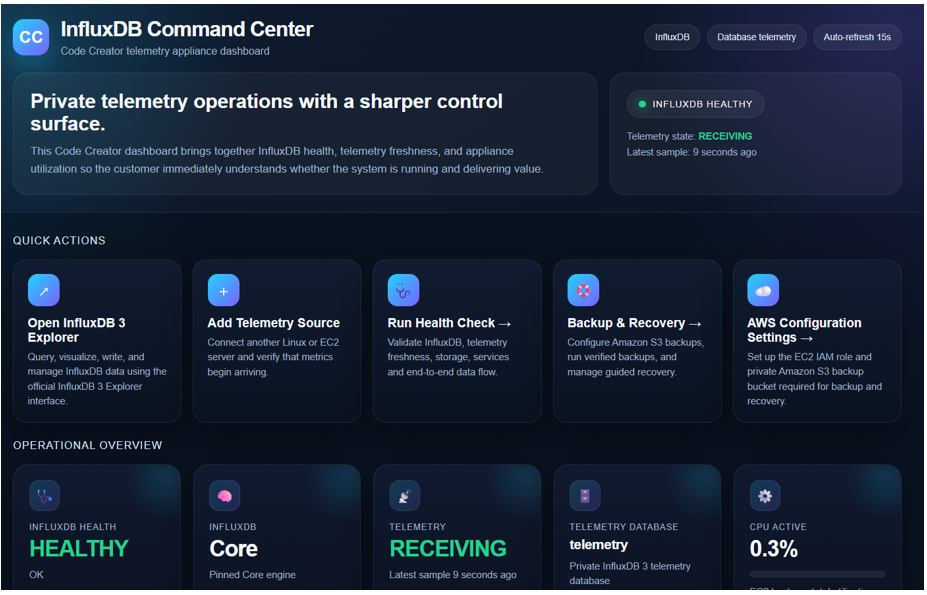
Private Telemetry Appliance Built on InfluxDB 3 Core
Code Creator Telemetry Command Center delivers a ready-to-launch private telemetry appliance built around InfluxDB 3 Core. It is designed for organizations that want the performance and flexibility of InfluxDB 3 Core running in their own AWS account - without having to assemble the surrounding deployment, monitoring, access, backup, and recovery workflows themselves.
Launch the AMI, and the appliance automatically initializes the database environment, creates customer-specific credentials, configures HTTPS access, starts built-in system telemetry, and presents the Code Creator Command Center for day-to-day operation.
Command Center Dashboard
The Command Center provides an at-a-glance view of InfluxDB health, telemetry freshness, EC2 host CPU and memory utilization, database status, and appliance services. Built-in telemetry begins automatically, allowing you to confirm that data is flowing immediately after deployment.
Integrated InfluxDB 3 Explorer
Integrated InfluxDB 3 Explorer access provides a graphical interface for querying, visualizing, writing, and managing InfluxDB data. Explorer is integrated with the authenticated Command Center workflow, so you do not need to manually create the appliance's default connection after installation.
You can also connect additional supported Linux or EC2 systems as telemetry sources and use the Command Center to verify that metrics begin arriving.
Guided Health Check
A guided Health Check performs live validation of key appliance functions, including:
- InfluxDB availability
- Telemetry freshness
- Essential service status
- End-to-end synthetic write and query test
This helps you distinguish between a healthy database, a telemetry-source issue, and an appliance service problem - without starting from Linux command-line troubleshooting.
Backup and Recovery with Amazon S3
Optional protected backup and recovery workflows are included. You can configure a private Amazon S3 bucket and authorize the appliance using an EC2 IAM role. Permanent AWS access keys are not required or stored by the Command Center. Capabilities include:
- Backup destination validation
- On-demand and scheduled backups
- Backup verification
- Guided recovery to a fresh compatible replacement appliance
Guided Recovery restores protected InfluxDB data and reconciles the Code Creator managed Explorer connection automatically. Recovery Verification provides a clear result after restoration so you can confirm that historical data has been recovered and new telemetry continues to arrive.
The core appliance does not require an S3 bucket or IAM role to begin operating. Backup and recovery can be configured later when needed.
Security Practices
Security-conscious deployment is built into the appliance architecture:
- Private database access - The InfluxDB database service is kept private behind the appliance rather than exposed directly to the public internet.
- Authenticated HTTPS interfaces - Customer access to the Command Center and Explorer is provided through authenticated HTTPS connections.
- IAM role-based authorization - S3 backup integration uses EC2 IAM roles. No permanent AWS access keys are required or stored.
- EC2 key pair administrative access - You retain administrative access to the EC2 instance using the Amazon EC2 key pair selected at launch.
Getting Started
To evaluate the appliance, launch the AMI in your AWS account. The automated first-boot process handles database initialization, credential creation, HTTPS configuration, and telemetry startup. Once the Command Center is available, you can explore the dashboard, run a Health Check, query data through Explorer, and optionally configure S3 backup - all through the browser-based interface.
If you have questions or want to discuss your deployment scenario, reach out through the support contact provided in this listing.
Deployment Details
The validated deployment configuration for this release is Ubuntu 26.04.1 LTS. Actual resource requirements may increase with telemetry volume, retention requirements, query workload, and the number of connected systems. This is a repackaged open-source software product wherein additional charges apply for Code Creator deployment automation, Command Center, integrated Explorer access, telemetry configuration, health monitoring, and verified backup and guided recovery capabilities.
Highlights
- Deploy a private InfluxDB 3 telemetry appliance with automated first-boot configuration: HTTPS is enabled, customer-specific credentials are generated, EC2 telemetry collection begins, and both the Code Creator Command Center and InfluxDB 3 Explorer are ready to use. No manual InfluxDB installation, Telegraf configuration, or dashboard setup is required - the automation handles the full stack so you can focus on your telemetry data rather than infrastructure assembly.
- Operate telemetry through the Code Creator Command Center without building a custom management layer: Monitor InfluxDB health, telemetry data freshness, CPU utilization, and memory usage from a single interface. Add Linux or EC2 telemetry sources, run end-to-end health checks, and get an at-a-glance view of your entire telemetry environment. The Command Center provides the operational visibility that a standalone InfluxDB 3 Core deployment does not include out of the box.
- Protect your telemetry with verified backup and guided recovery to Amazon S3: Configure backups using an EC2 IAM role to your private S3 bucket, run on-demand or scheduled backups, and restore to a fresh replacement appliance with built-in recovery verification. The guided recovery workflow walks you through restoring your database and confirming data integrity, reducing the risk and complexity of disaster recovery compared to manual InfluxDB backup procedures.
Details
Sold by
Categories
Delivery method
Delivery option
64-bit (x86) Amazon Machine Image (AMI)
Latest version
Operating system
Ubuntu 26.04
Deployed on AWS
New
Introducing multi-product solutions
You can now purchase comprehensive solutions tailored to use cases and industries.

Features and programs
Financing for AWS Marketplace purchases
AWS Marketplace now accepts line of credit payments through the PNC Vendor Finance program. This program is available to select AWS customers in the US, excluding NV, NC, ND, TN, & VT.

Pricing
Free trial
Try this product free for 5 days according to the free trial terms set by the vendor. Usage-based pricing is in effect for usage beyond the free trial terms. Your free trial gets automatically converted to a paid subscription when the trial ends, but may be canceled any time before that.
Pricing is based on actual usage, with charges varying according to how much you consume. Subscriptions have no end date and may be canceled any time.
Additional AWS infrastructure costs may apply. Use the AWS Pricing Calculator to estimate your infrastructure costs.
Dimension | Cost/hour |
|---|---|
t3.xlarge Recommended | $0.09 |
m7i.4xlarge | $0.09 |
m7i.xlarge | $0.09 |
m7i.large | $0.09 |
m7i.2xlarge | $0.09 |
t3.medium | $0.09 |
t3.large | $0.09 |
t3.2xlarge | $0.09 |
Dimensions summary
You pay by the hour for the EC2 instance size you run this software on. The eight options split into two instance families. The t3 sizes (medium, large, xlarge, 2xlarge) are general-purpose instances suited to lighter or variable workloads. The m7i sizes (large, xlarge, 2xlarge, 4xlarge) target steadier compute needs. Within each family, cost scales up as you move to larger sizes, which add more virtual CPUs and memory. You choose one instance size based on your workload, and billing runs per hour of use.
Top-of-mind questions for buyers
Software charges meter running instance-hours only. A fully stopped instance stops accruing hourly software fees. Note that stopped instances may still incur underlying AWS storage costs for attached volumes, but the software licence bills only while the instance runs.
Each size maps to an EC2 instance with a set number of virtual CPUs and memory. Larger sizes carry more of both and bill at a higher hourly rate. You run one instance at a time, so your bill follows the single size you select.
You get InfluxDB 3 Core, a time series database for real-time ingest and fast queries, plus InfluxDB 3 Explorer, a web interface for querying, visualizing, and managing your data. Both run together on the instance size you choose.
docs.influxdata.com+1
Helpful?
Vendor refund policy
You may cancel the AWS Marketplace subscription at any time. No contracts. Software charges already incurred are not refundable.
Custom pricing options
Request a private offer to receive a custom quote.

Legal
Vendor terms and conditions
Upon subscribing to this product, you must acknowledge and agree to the terms and conditions outlined in the vendor's End User License Agreement (EULA) .
Content disclaimer
Vendors are responsible for their product descriptions and other product content. AWS does not warrant that vendors' product descriptions or other product content are accurate, complete, reliable, current, or error-free.
Delivery details
64-bit (x86) Amazon Machine Image (AMI)
Amazon Machine Image (AMI)
An AMI is a virtual image that provides the information required to launch an instance. Amazon EC2 (Elastic Compute Cloud) instances are virtual servers on which you can run your applications and workloads, offering varying combinations of CPU, memory, storage, and networking resources. You can launch as many instances from as many different AMIs as you need.
Version release notes
Initial release of Code Creator Telemetry Command Center with InfluxDB 3 Core and Explorer. Includes automated first-boot setup, HTTPS access, built-in EC2 telemetry, integrated Explorer, health checks, optional Amazon S3 backup, and guided recovery with verification.
Additional details
Resources
Vendor resources
Support
Vendor support
AWS infrastructure support
AWS Support is a one-on-one, fast-response support channel that is staffed 24x7x365 with experienced and technical support engineers. The service helps customers of all sizes and technical abilities to successfully utilize the products and features provided by Amazon Web Services.
Similar products

Run InfluxDB 3 Core privately in your AWS account with built-in telemetry and HTTPS. This is a repackaged open source software product wherein additional charges apply for Code Creator deployment automation, Command Center, integrated Explorer, health checks, and verified S3 backup and guided recovery.

This is a license for Amazon Timestream for InfluxDB 3 Enterprise. It provides access to the industry leading, time series database tailor made for rapid insights on your analytical data.
InfluxDB 3 Enterprise is a high-performance, time series database built for real-time analytics, monitoring, machine learning, and IoT at scale. It combines SQL simplicity, columnar speed, and enterprise-grade availability to power mission-critical workloads.

Cloud-based Cloud and application monitoring and alerting

This is a repackaged open source software product wherein additional charges apply for Code Creator integrated Prometheus and Grafana deployment, EC2 ready monitoring stack packaging, Ubuntu integration, AMI maintenance, Marketplace compliance, and support. Prometheus and Grafana are two popular open-source tools used for monitoring and visualizing metrics data in complex systems.
Customer reviews
No customer reviews yet
Be the first to review this product . We've partnered with PeerSpot to gather customer feedback. You can share your experience by writing or recording a review, or scheduling a call with a PeerSpot analyst.