Sold by: KubeOpsAI
Deployed on AWS
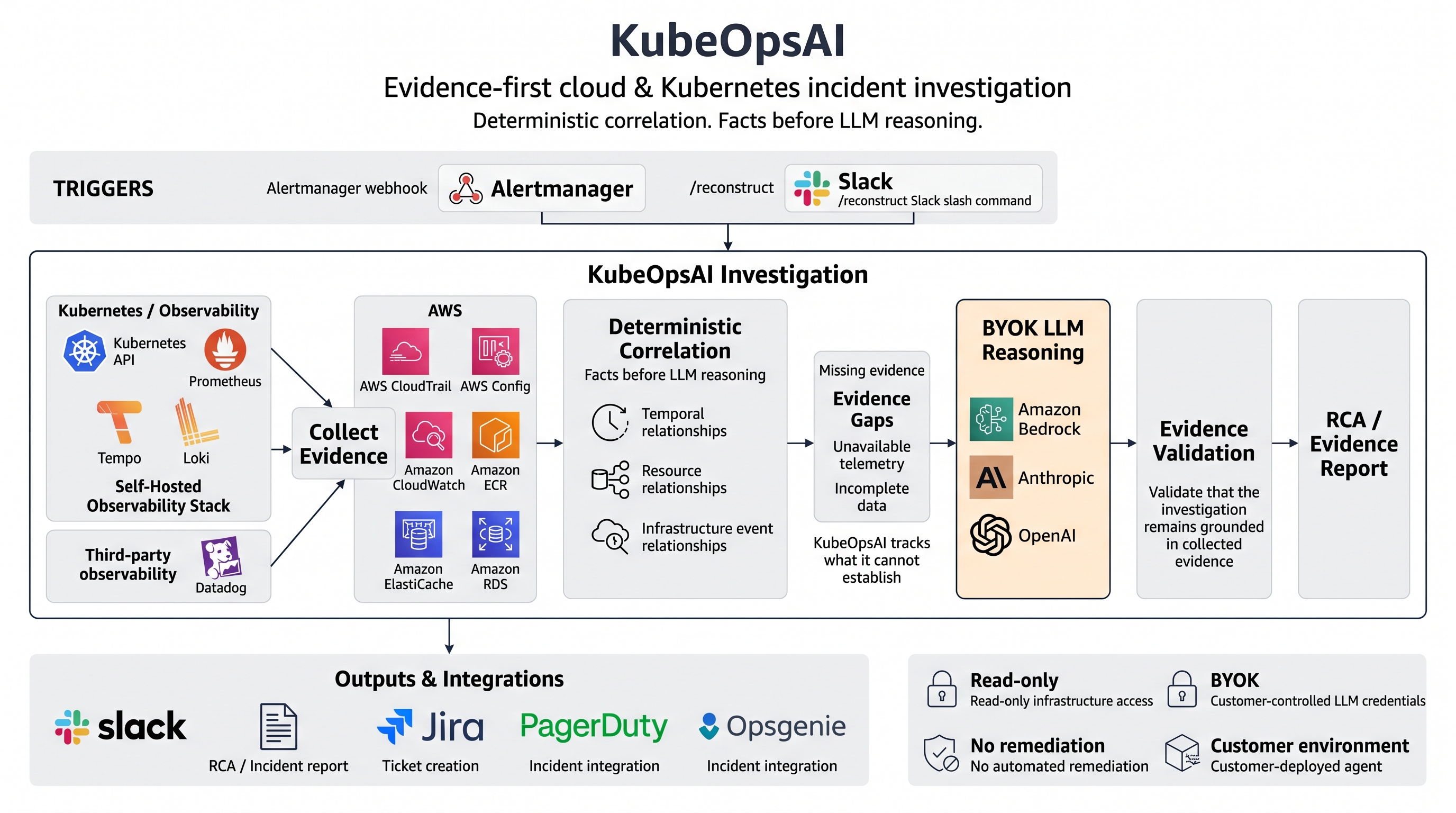
Ask why a service broke and get an ordered, evidence-cited chain of events reconstructed from CloudTrail, AWS Config and Kubernetes. Every link names its source event ID, timestamp and the principal responsible. Runs in your cluster; your data never leaves your VPC.
Overview
WHAT IT DOES
When a service breaks, the hard part is not noticing. It is reconstructing what changed, in what order, and who changed it - across the CloudTrail console, kubectl, and your metrics stack. The engineer writing tomorrow's post-incident review typically spends an hour or more assembling that timeline by hand.
KubeOpsAI does that assembly. You give it a symptom in your own words and a time window:
kubeopsai-reconstruct --symptom "checkout-api began failing readiness probes" --namespace prod --window 60 --aws AWS::EC2::SecurityGroup=sg-0abc123
It returns an ordered timeline in Markdown where every entry cites a source: a CloudTrail EventId, an AWS Config configuration item, a Kubernetes event UID. Paste it into your existing postmortem template, or hand the evidence appendix to an auditor unchanged.
IT CONNECTS AWS CHANGES TO KUBERNETES SYMPTOMS
CloudTrail names a security group. The Kubernetes event names a pod. Nothing in either payload mentions the other, and AWS Config publishes relationships only between AWS resources - it never mentions a pod.
KubeOpsAI bridges that gap using authoritative fields rather than guesswork: AWS Config relationships, the EC2 instance id in a node's spec.providerID, and the node name in a pod's spec.nodeName. The resulting chain is spelled out hop by hop:
sg-0abc123 -> i-0abc123def456 -> ip-10-0-1-5 -> checkout-api-7d9f
with a citation for every hop, so a reviewer can verify each one independently.
CAUSALITY IS DETERMINISTIC, NOT GENERATED
Links are established by timestamp precedence and declared resource relationships. No language model decides what caused what. Given the same events, the engine always produces the same links, and each one can be checked by hand against the cited evidence.
This matters because a model asked "why did this break?" always produces a fluent answer, including when the data cannot support one. KubeOpsAI declines instead. A change that happened after the symptom is never proposed as its cause. A change too close to the symptom to order - CloudTrail carries about a minute of timestamp uncertainty, AWS Config considerably more - is reported as unorderable rather than causal.
Confidence is reported as strong, moderate or weak. Never as certain, and never as a percentage, because a precise-looking number would imply a calibration that has not been earned.
IT TELLS YOU WHAT IT COULD NOT SEE
Every reconstruction ends with the gaps: a disabled AWS Config recorder, expired Kubernetes events, an interval with no recorded activity, a permission that was denied. The source coverage table distinguishes "queried and empty" from "never queried", because those are different facts and conflating them would imply the tool looked somewhere it did not.
A chain that hides its holes is worse than no chain. Each gap also names what to change to close it.
ALSO: AUTOMATED ALERT TRIAGE
The same tool set runs reactively. When Alertmanager fires at 3 AM, KubeOpsAI investigates and posts an analysis to Slack, with optional PagerDuty, Opsgenie and Jira integration, so your on-call engineer wakes to an answer rather than a question.
READ-ONLY AND IN YOUR CLUSTER
KubeOpsAI never mutates AWS or Kubernetes state. It reads, correlates and explains; your engineer decides and acts. It runs inside your cluster, and telemetry never leaves your VPC. Bring your own LLM key - AWS Bedrock, Anthropic or OpenAI - so inference happens under your account and your terms.
BUILT ON OPEN SOURCE
The 23 telemetry collectors KubeOpsAI reads are free and open source in k8s-telemetry-mcp (Apache 2.0). You can inspect exactly what is collected before you buy, and use the collectors on their own for nothing. The reconstruction engine, the deterministic linker, the gap accounting and the report are the commercial product.
REQUIREMENTS
- Amazon EKS 1.27 or later, or any conformant Kubernetes cluster on AWS
- Helm 3
- An LLM provider key (Bedrock, Anthropic or OpenAI)
- Prometheus for metric collection; Loki, CloudWatch or Datadog for logs (all optional)
- Read-only AWS permissions, listed in the deployment instructions
Highlights
- Evidence-cited incident reconstruction - every link in the causal chain cites its source: a CloudTrail EventId, an AWS Config item, or a Kubernetes event UID.
- Deterministic causality, not LLM guesswork - links are established by timestamp precedence and declared resource relationships, so the same events always produce the same chain.
- Runs entirely in your cluster - read-only access, telemetry never leaves your VPC, and you bring your own LLM key (Bedrock, Anthropic, or OpenAI).
Details
Sold by
Categories
Delivery method
Supported services
Delivery option
Helm chart on Amazon EKS
Latest version
Operating system
Linux
Deployed on AWS
Features and programs
Financing for AWS Marketplace purchases
AWS Marketplace now accepts line of credit payments through the PNC Vendor Finance program. This program is available to select AWS customers in the US, excluding NV, NC, ND, TN, & VT.

Pricing
Pricing is based on the duration and terms of your contract with the vendor. This entitles you to a specified quantity of use for the contract duration. If you choose not to renew or replace your contract before it ends, access to these entitlements will expire.
Additional AWS infrastructure costs may apply. Use the AWS Pricing Calculator to estimate your infrastructure costs.
Dimension | Description | Cost/month |
|---|---|---|
Standard | Incident reconstruction and automated alert triage for 1 Kubernetes cluster. Includes Slack, PagerDuty, and Opsgenie integration, evidence-cited root-cause analysis, and AWS Config change tracking. | $199.00 |
Enterprise | Everything in Standard, with unlimited clusters, Jira ticket auto-creation, scheduled digest reports, and priority support with a private Slack escalation channel. | $699.00 |
Dimensions summary
You choose between two contract tiers based on how many Kubernetes clusters you need to cover. Standard covers 1 cluster and includes incident reconstruction, automated alert triage, chat and paging integrations, root-cause analysis, and change tracking. Enterprise builds on Standard by covering unlimited clusters at one price, so cost does not rise as you add clusters. Enterprise also adds ticket auto-creation, scheduled digest reports, and priority support with a private escalation channel. Both are billed as a contract through AWS Marketplace, so charges appear on your AWS invoice.
Top-of-mind questions for buyers
A cluster is a single Kubernetes cluster the agent runs inside as a pod. Standard covers exactly one cluster. To cover more than one cluster, you move to Enterprise, which covers any number of clusters at one price.
No. You bring your own model provider key, and inference is billed directly to you by that provider under your own agreement. The contract price covers the agent and reconstruction features only. The vendor never sees your keys or your data.
On Standard, cost stays tied to one cluster only. On Enterprise, you pay one price regardless of cluster count. Adding clusters under Enterprise does not raise your bill, so cost stays flat as you scale.
kubeopsai.net
Helpful?
Vendor refund policy
Full refund within 14 days of the first charge, for any reason, on request to support@kubeopsai.net . Refunds are processed through AWS Marketplace and appear on your AWS bill. Cancel any time from the AWS Marketplace console; cancellation stops future charges and is not itself a refund request.

Legal
Vendor terms and conditions
Upon subscribing to this product, you must acknowledge and agree to the terms and conditions outlined in the vendor's End User License Agreement (EULA) .
Content disclaimer
Vendors are responsible for their product descriptions and other product content. AWS does not warrant that vendors' product descriptions or other product content are accurate, complete, reliable, current, or error-free.
Delivery details
Helm chart on Amazon EKS
Supported services: Learn more
- Amazon EKS
Helm chart
Helm charts are Kubernetes YAML manifests combined into a single package that can be installed on Kubernetes clusters. The containerized application is deployed on a cluster by running a single Helm install command to install the seller-provided Helm chart.
Version release notes
Fixed two entitlement/licensing bugs found via live testing against a real AWS Marketplace subscription: RegisterUsage's signature response was not being parsed correctly (it is a compact JWS, not raw base64), and License Manager tier lookups were filtered by the wrong product identifier, causing every real customer to be silently downgraded to the standard tier. Both confirmed fixed against a live EKS deployment with a real subscription and entitlement check.
Additional details
Usage instructions
PREREQUISITES
- Amazon EKS 1.27+ cluster
- Helm 3.19+ and kubectl configured for the target cluster
- An IAM role for the agent's pod (IRSA recommended)
- CREATE THE SECRETS THIS PRODUCT READS
kubectl create namespace kubeopsai
kubectl create secret generic kubeopsai-secrets --namespace kubeopsai
--from-literal=KUBEOPSAI_SLACK_BOT_TOKEN='xoxb-...'
--from-literal=webhook-secret="$(openssl rand -hex 32)"
--from-literal=KUBEOPSAI_ANTHROPIC_API_KEY='sk-ant-...' # omit if using Bedrock
- INSTALL
helm install kubeopsai-agent oci://709825985650.dkr.ecr.us-east-1.amazonaws.com/kubeopsai/kubeopsai-agent
--version 1.3.7
--namespace kubeopsai
--set marketplace.productCode=2ojmqoauzhgo56pp77lodj6po
--set marketplace.productId=prod-5mkoqpxpqvvfq
--set serviceAccount.annotations."eks.amazonaws.com/role-arn"=<AGENT_ROLE_ARN>
--set slack.channel=<YOUR_SLACK_CHANNEL_ID>
--set slack.botTokenSecret=kubeopsai-secrets
--set webhook.secretName=kubeopsai-secrets
--set llm.anthropic.enabled=true
--set llm.anthropic.apiKeySecret=kubeopsai-secrets
--set backends.prometheusUrl=http://prometheus-server.monitoring:9090
Using Bedrock instead of Anthropic? Drop the two llm.anthropic.* lines - Bedrock is enabled by default and needs only the IRSA role-arn set above.
productCode and productId are two different identifiers on your Marketplace listing's product page - do not assume they are the same value. productCode is the opaque alphanumeric "Product code"; productId is the "prod-xxxxxxxxxxxxx" Product ID.
- VERIFY
kubectl -n kubeopsai rollout status deploy/kubeopsai-agent kubectl -n kubeopsai logs deploy/kubeopsai-agent | grep -i entitlement
A successful start logs "AWS Marketplace license verified successfully" and the resolved tier.
- RECONSTRUCT AN INCIDENT
kubectl exec -n kubeopsai deploy/kubeopsai-agent -- kubeopsai-reconstruct
--symptom "checkout-api began failing readiness probes" --namespace prod --window 60
- POINT ALERTMANAGER AT IT (OPTIONAL)
receivers:
- name: kubeopsai
webhook_configs:
- url: http://kubeopsai-agent.kubeopsai:8080/webhook/alertmanager http_config: authorization: type: Bearer credentials: <WEBHOOK_SECRET>
Full configuration reference: https://github.com/kubeopsai/kubeopsai-agent
Support
Vendor support
Email: support@kubeopsai.net Hours: Monday to Friday, 09:00-18:00 CET
Standard tier First response within 2 business days.
Enterprise tier First response within 24 business hours. Private Slack channel for escalation.
When reporting a problem, include the agent version (kubectl -n kubeopsai logs deploy/kubeopsai-agent | head -20), the command you ran, and the reconstruction output if you have one. Reports include no customer data beyond what you choose to send.
Security issues: email the address above with "SECURITY" in the subject. Please do not open a public issue.
Documentation: https://github.com/kubeopsai/kubeopsai-agent and https://github.com/kubeopsai/k8s-telemetry-mcp/wiki
AWS infrastructure support
AWS Support is a one-on-one, fast-response support channel that is staffed 24x7x365 with experienced and technical support engineers. The service helps customers of all sizes and technical abilities to successfully utilize the products and features provided by Amazon Web Services.
Similar products
AI Incident Commander autonomously triages production incidents in under 30 seconds. It runs AWS diagnostics, identifies root cause, and posts structured Slack and email summaries, eliminating 3 AM alert fatigue and shrinking mean time to resolution for SRE and platform engineering teams.
KubeSense is an LLM and eBPF-Powered observability platform that provides instant application performance monitoring (APM), log management, infrastructure monitoring, with AI RCA, AI Recommendations and AgentSRE capabilities.
Koios is an on-premises/self-hosted industrial inference and engineering software platform for industrial and commercial control systems.

Fixed-scope remediation of the Critical and High findings from an EKS security and cost assessment, delivered as reviewable Terraform pull requests, with a before/after re-scan and 30 days of follow-up.
Customer reviews
No customer reviews yet
Be the first to review this product . We've partnered with PeerSpot to gather customer feedback. You can share your experience by writing or recording a review, or scheduling a call with a PeerSpot analyst.