Sold by: 2Q Software
Deployed on AWS
Free Trial
Cut container workload latency to sub-microsecond levels and reduce PCIe bus traffic by up to 72% with GPU, DPU, and shared-memory IPC acceleration engines.
Overview
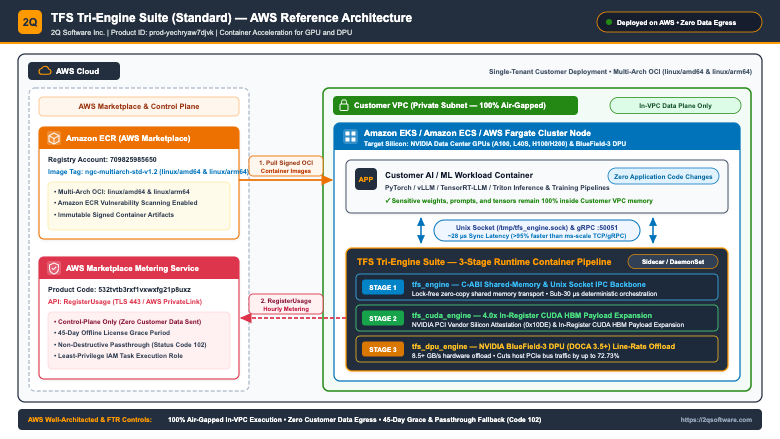
TFS Tri-Engine Suite: Low-Latency Infrastructure Acceleration for AWS
The TFS Tri-Engine Suite by 2Q Software Inc. is a low-latency infrastructure acceleration stack engineered for high-throughput AI/ML clusters, quantitative trading environments, and enterprise cloud workloads. By uniting three specialized execution cores, the platform systematically eliminates system-level bottlenecks across the entire container execution lifecycle.
The Three Engines
- Host Shared Memory IPC (tfs_engine): Deliver deterministic C-ABI shared memory inter-process communication with sub-microsecond latency (19.44 ns IPC latency). This engine optimizes CPU control plane throughput, enabling your workloads to move data between processes without the overhead of traditional socket or gRPC IPC mechanisms.
- In-Register GPU Payload Expansion (tfs_cuda_engine): Achieve 4.0x register expansion and zero-copy kinematic matrix transformations built specifically for NVIDIA GPU architectures. This engine maximizes GPU utilization by keeping data in registers rather than cycling through slower memory hierarchies.
- Network Ingress Offload (tfs_dpu_engine): Leverage NVIDIA DOCA 3.5+ to perform line-rate packet parsing directly on SmartNICs and DPUs, achieving up to 72.73% PCIe bus traffic reduction. By offloading network processing from the host CPU, this engine frees compute resources for your primary workloads.
Key Outcomes for Your Workloads
- Maximize hardware saturation: Extract more performance from existing GPU, CPU, and network infrastructure without provisioning additional instances.
- Reduce end-to-end processing delays: Sub-microsecond IPC latency and in-register GPU operations eliminate common bottlenecks in latency-sensitive pipelines.
- Lower operational cloud costs: Improving hardware utilization and offloading network processing to DPUs reduces the compute footprint required to meet throughput targets.
- Simplify deployment: Production x86_64 Linux containers deploy cleanly across Amazon EKS, Amazon ECS, and self-managed Kubernetes clusters.
Target Use Cases
AI/ML Clusters: Accelerate data movement between preprocessing, training, and inference stages. The shared memory IPC engine reduces inter-process overhead in multi-container ML pipelines, while the GPU engine maximizes register-level throughput for compute-intensive model operations.
Quantitative Trading Environments: Minimize latency across the full data path, from network ingress through DPU offload to shared memory delivery and GPU-accelerated computation. The tri-engine architecture addresses each stage of the trading infrastructure stack where nanoseconds matter.
Enterprise Cloud Workloads: Improve resource efficiency for containerized applications requiring high-throughput data processing, reducing the instance count needed to meet strict performance SLAs.
Supported Environments and Hardware
- Orchestration and Compute: Amazon EKS, Amazon ECS, and Amazon EC2 GPU/accelerated instances.
- Hardware Acceleration: NVIDIA GPUs (CUDA-enabled architectures) and NVIDIA BlueField DPUs running DOCA 3.5+. Includes automatic passthrough fallback when specialized DPU hardware is not present.
- Evaluation: Includes a 7-day free trial for full benchmark validation in your own AWS environment.
Getting Started
Deploy directly via AWS Marketplace or visit https://2qsoftware.com for technical documentation, white papers, and architecture guides. For enterprise deployment assistance, contact customerservice@2qsoftware.com .
Highlights
- Dramatically reduce PCIe bus traffic by up to 72.73% using DOCA 3.5+ DPU network ingress offload. By moving network processing off the host CPU and onto the DPU, the tfs_dpu_engine frees PCIe bandwidth for compute-critical tasks, helping latency-sensitive workloads like AI inference and quantitative trading achieve higher throughput with fewer infrastructure resources.
- Achieve sub-microsecond host control plane latency (19.44 ns IPC) through C-ABI shared memory inter-process communication. The tfs_engine eliminates serialization overhead between container processes, enabling real-time coordination at speeds that traditional socket-based or gRPC control planes cannot match in production container environments.
- Expand GPU register payloads by 4.0x with zero-copy kinematic matrix transformations via the tfs_cuda_engine. This means GPU-bound workloads process larger data batches per kernel launch without additional memory transfers, translating directly into higher computational throughput for matrix-heavy AI/ML and simulation pipelines.
Details
Sold by
Delivery method
Supported services
Delivery option
TFS Tri-Engine Suite - Standard Multi-Arch (x86_64 & ARM64)
TFS Tri-Engine Suite - Standard & Trial Container Deployment
TFS Tri-Engine Suite - OEM Enterprise Deployment
Latest version
Operating system
Linux
Deployed on AWS
Features and programs
Financing for AWS Marketplace purchases
AWS Marketplace now accepts line of credit payments through the PNC Vendor Finance program. This program is available to select AWS customers in the US, excluding NV, NC, ND, TN, & VT.

Pricing
Free trial
Try this product free for 7 days according to the free trial terms set by the vendor. Usage-based pricing is in effect for usage beyond the free trial terms. Your free trial gets automatically converted to a paid subscription when the trial ends, but may be canceled any time before that.
Pricing is based on actual usage, with charges varying according to how much you consume. Subscriptions have no end date and may be canceled any time.
Additional AWS infrastructure costs may apply. Use the AWS Pricing Calculator to estimate your infrastructure costs.
Dimension | Description | Cost/unit/hour |
|---|---|---|
Hours | Container Hours | $2.99 |
Vendor refund policy
2Q Software Inc. offers a 7-day free trial. Metered hourly usage billed thereafter via AWS Marketplace is non-refundable. If you experience technical issues or accidental charges, contact customerservice@2qsoftware.com within 14 days of the charge. Refund or credit requests are evaluated on a case-by-case basis in coordination with AWS Marketplace support.

Legal
Vendor terms and conditions
Upon subscribing to this product, you must acknowledge and agree to the terms and conditions outlined in the vendor's End User License Agreement (EULA) .
Content disclaimer
Vendors are responsible for their product descriptions and other product content. AWS does not warrant that vendors' product descriptions or other product content are accurate, complete, reliable, current, or error-free.
Delivery details
TFS Tri-Engine Suite - Standard Multi-Arch (x86_64 & ARM64)
Supported services: Learn more
- Amazon ECS
- Amazon EKS
- Amazon ECS Anywhere
- Amazon EKS Anywhere
Container image
Containers are lightweight, portable execution environments that wrap server application software in a filesystem that includes everything it needs to run. Container applications run on supported container runtimes and orchestration services, such as Amazon Elastic Container Service (Amazon ECS) or Amazon Elastic Kubernetes Service (Amazon EKS). Both eliminate the need for you to install and operate your own container orchestration software by managing and scheduling containers on a scalable cluster of virtual machines.
Version release notes
What's New in TFS Tri-Engine Suite v1.4 (Standard Edition):
- True Multi-Architecture Support (linux/amd64 & linux/arm64): Native OCI image indexes for tfs_cuda_engine, tfs_engine, and tfs_dpu_engine supporting both x86_64 and ARM64 (NVIDIA Grace / AWS Graviton) compute nodes.
- Standard Edition Hardware Scope (Up to 4 GPUs): Optimized for single- and multi-GPU deployments on AWS G5, G5g, G6, and G6e instances (NVIDIA A10G, T4G, L4, L40S).
- Hardware Silicon Attestation & Non-Destructive Passthrough: Enforces NVIDIA silicon verification (0x10DE) with automatic non-destructive passthrough fallback (Status Code 102) so workloads never experience downtime.
- Sub-Microsecond Telemetry & 4x HBM Stream Expansion: Real-time atomic telemetry reporting across CUDA, Core, and DPU engines.
Note: For 8-GPU NVIDIA Hopper (P5/P5e) and Blackwell (P6/GB200) clusters, please subscribe to TFS Tri-Engine Suite - Enterprise (Hopper, Blackwell & Vera Rubin Edition).
Additional details
Usage instructions
TFS Tri-Engine Suite - Standard Multi-Arch (x86_64 & ARM64) - Recommended Startup Sequence:
Step 1: Authenticate to AWS Marketplace ECR aws ecr get-login-password --region us-east-1 | docker login --username AWS --password-stdin 709825985650.dkr.ecr.us-east-1.amazonaws.com
Step 2: Launch Engine 1 First - Core Telemetry & IPC Backbone (tfs_engine)
Start tfs_engine first in detached mode so it binds the zero-copy Unix domain socket (/tmp/tfs_engine.sock) and gRPC port (50051):
docker run -d --name tfs_engine_core --ipc=host -v /tmp:/tmp -p 50051:50051
709825985650.dkr.ecr.us-east-1.amazonaws.com/2q-software/tfs_engine:ngc-multiarch-v1.4
Step 3: Launch Engine 2 Second - NVIDIA GPU Accelerator for G5/G6/G6e Up to 4 GPUs (tfs_cuda_engine)
Connects to host NVIDIA GPUs (--gpus all) and shares the host IPC/socket namespace with tfs_engine:
docker run --rm --gpus all --ipc=host -v /tmp:/tmp
709825985650.dkr.ecr.us-east-1.amazonaws.com/2q-software/tfs_cuda_engine:ngc-multiarch-std-v1.4
Step 4: Launch Engine 3 Third - DPU Line-Rate Ingestion & PCIe Offload (tfs_dpu_engine)
Executes 4x line-rate compression (72.73% PCIe bus reduction) and streams telemetry into the active TFS IPC pipeline:
docker run --rm --ipc=host -v /tmp:/tmp
709825985650.dkr.ecr.us-east-1.amazonaws.com/2q-software/tfs_dpu_engine:ngc-multiarch-v1.4
Optional - Run Live Zero-Copy C-ABI IPC Latency Benchmark Against Running Core Daemon: docker exec tfs_engine_core /app/tfs_bench
Notes:
- Docker and Kubernetes automatically pull the native linux/amd64 or linux/arm64 binary for your host architecture.
- Non-destructive passthrough fallback (Status Code 102) ensures uninterrupted workload execution if license renewal is required.
Support
Vendor support
Support Channels Email: customerservice@2qsoftware.com Documentation and Customer Portal: https://2qsoftware.com
Availability and Response Targets 24/7 Enterprise Technical Support is available for all TFS Tri-Engine Suite subscribers covering tfs_engine, tfs_cuda_engine, and tfs_dpu_engine.
- Critical Production Issues: Initial engineering response within 4 hours.
- Standard Deployment and Configuration Inquiries: Initial response within 1 business day.
Supported Platforms and Prerequisites
- Orchestration: Amazon EKS, Amazon ECS, and self-managed Kubernetes on Linux.
- Hardware: NVIDIA CUDA-capable GPUs for tfs_cuda_engine; NVIDIA BlueField DPUs with DOCA 3.5+ for tfs_dpu_engine (graceful host passthrough supported).
When submitting a support request, please include your AWS Account ID, cluster orchestration type (EKS/ECS), and the specific engine(s) affected to expedite resolution.
AWS infrastructure support
AWS Support is a one-on-one, fast-response support channel that is staffed 24x7x365 with experienced and technical support engineers. The service helps customers of all sizes and technical abilities to successfully utilize the products and features provided by Amazon Web Services.
Similar products
Enterprise multi-architecture (x86_64 & ARM64) GPU, CPU IPC, and DPU telemetry & memory expansion suite engineered for 8-GPU NVIDIA Hopper (P5/P5e), Blackwell (P6/GB200), and Vera Rubin clusters.
The NVIDIA GPU-Optimized AMI is an environment for running the GPU-accelerated deep learning and HPC containers from the NVIDIA NGC catalog. The deep learning containers from NGC catalog require this AMI for GPU acceleration on AWS P5d, P4d, P3, G4dn, G5 GPU instances.

Save costs by up to 80% and accelerate your Apache Spark workloads 10x, depending on workload.
Cloud Object Storage optimized for AI workloads.
Customer reviews
No customer reviews yet
Be the first to review this product . We've partnered with PeerSpot to gather customer feedback. You can share your experience by writing or recording a review, or scheduling a call with a PeerSpot analyst.