
Sold by: ADEO Imaging
Deployed on AWS
Free Trial
AWS Free Tier
Pre-configured, ONC-certified OpenEMR server on AWS. Launch a fully operational electronic medical records system with built-in HTTPS and no server setup required.
3
Overview
Image
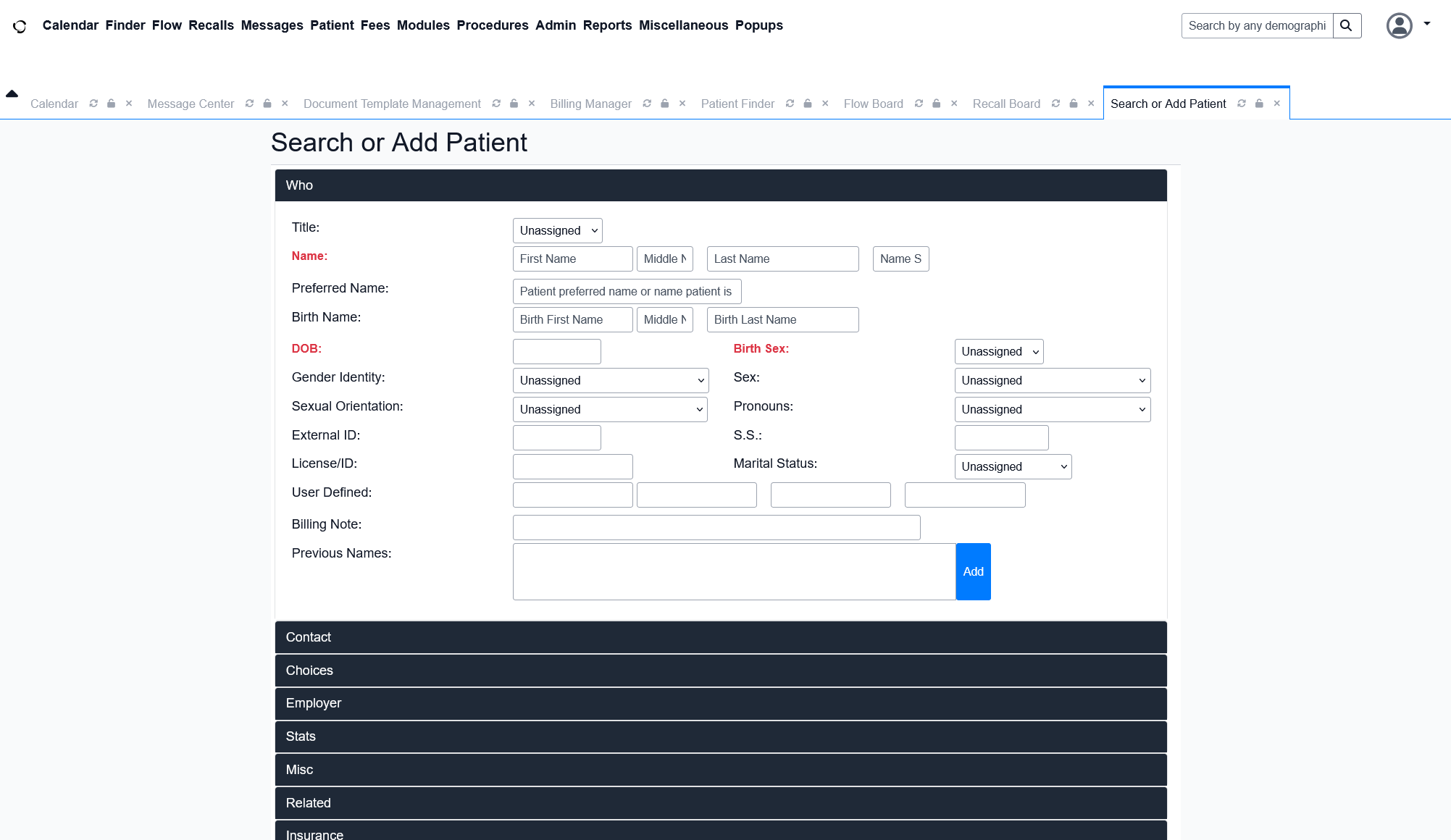
Search or add patient page.
Image
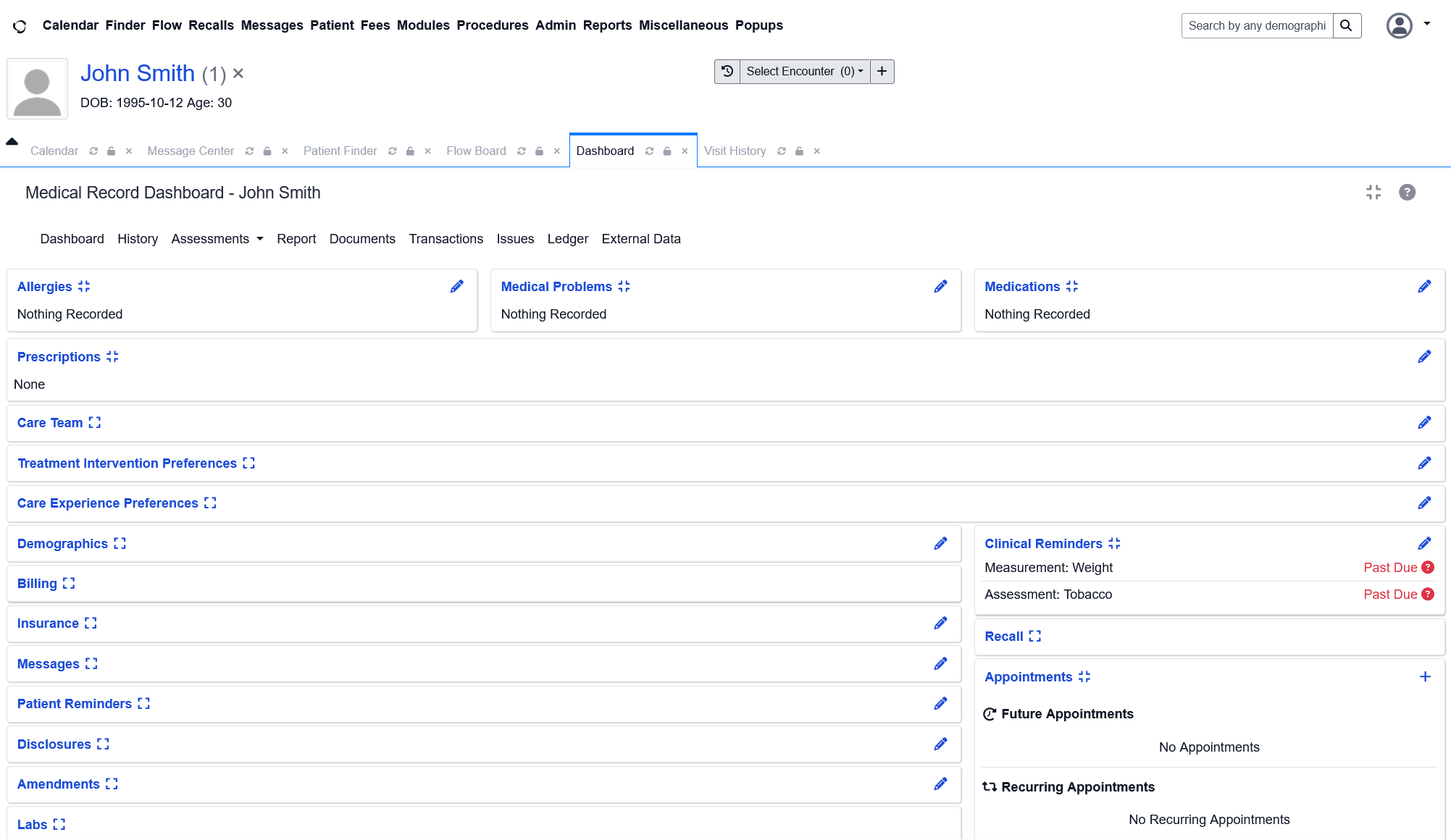
Patient page.
Image
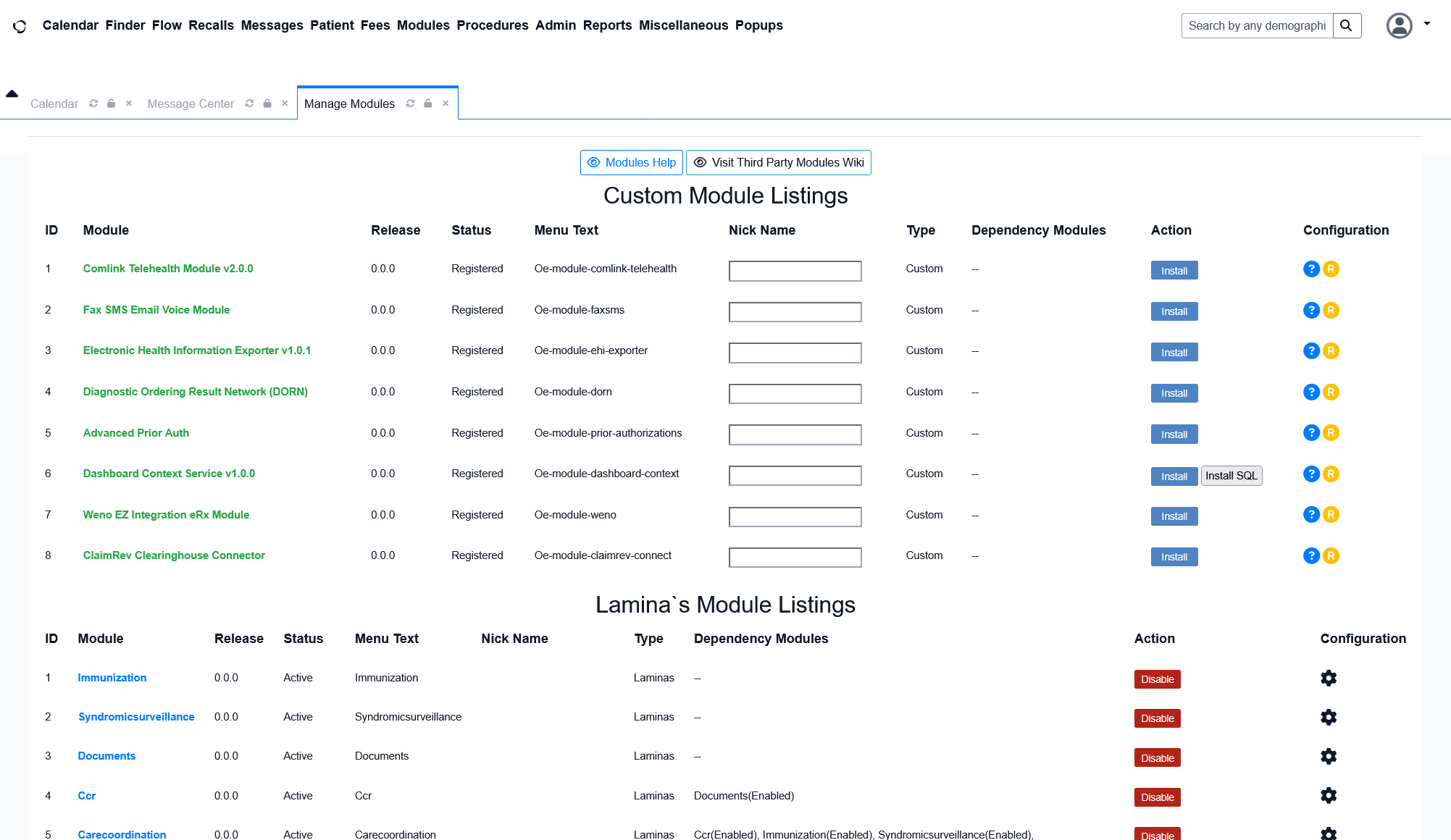
Manage modules page.
OpenEMR Cloud Server - Ready-to-Run Electronic Medical Records on AWS
OpenEMR Cloud Server is a powerful and flexible Electronic Medical Records (EMR) system designed to meet the needs of physicians, clinics, and hospitals. Packaged by ADEO Imaging as a preconfigured AWS AMI, this solution lets you launch a fully operational OpenEMR instance without manual server setup - deploy and start managing patient care in minutes.
OpenEMR is ONC Health IT certified as an electronic health record (EHR) system, giving healthcare organizations confidence that the platform meets recognized standards for health information management.
Key Capabilities
- Patient Record Management - Maintain comprehensive electronic medical records including demographics, medical history, allergies, and clinical notes
- Appointment Scheduling - Manage provider calendars, book patient visits, and coordinate clinic workflows
- Prescription Management - Prescribe medications electronically with built-in e-prescribing support
- Financial Accounts and Billing - Handle patient billing, insurance claims, and financial reporting
- Multi-Role Access Control - Six distinct access levels support your entire team: administrator, physician, clinician, accountant, front desk receptionist, and patient portal
Ideal Use Cases
OpenEMR Cloud Server serves a wide range of medical institutions and healthcare organizations. Whether you operate a solo practice, a multi-provider outpatient clinic, or a small hospital, this preconfigured server provides the electronic medical records infrastructure you need to deliver quality patient care and maintain organized health information management.
Preconfigured for Immediate Use
- Instant Deployment - After launching the AMI, the OpenEMR web interface is immediately accessible via the server's IP address over HTTPS
- Secure by Default - HTTPS protocol is enabled for the web interface even before a domain name is assigned, helping protect patient data in transit from the first moment of operation
- Domain Ready - Point your own domain to the server at any time after deployment for a professional, branded experience
Built for Healthcare on AWS
OpenEMR Cloud Server runs on AWS infrastructure, giving you the flexibility to select the instance type and storage configuration that matches your practice size. AWS provides the underlying compute, networking, and storage reliability that healthcare workloads demand. ADEO Imaging, a cloud solutions provider offering preconfigured AWS servers for small and medium businesses, packages and maintains this AMI so you can focus on patient care rather than infrastructure management.
Security and Access
The server includes role-based access controls across six user levels, ensuring that each team member sees only the information relevant to their role. The HTTPS-secured web interface protects data during transmission between users and the server.
Getting Started
- Launch the OpenEMR Cloud Server AMI from AWS Marketplace
- Access the web interface via HTTPS using the server's public IP address
- Complete the initial configuration wizard to set up your practice
- Optionally point your custom domain to the server
- Begin adding providers, staff accounts, and patient records
Disclaimer: This OpenEMR server offering includes free and open-source software. Additional charges apply for extended cloud features and configuration services.
Highlights
- Easy-to-use. After launching, the OpenEMR server is immediately operational. No server setup required.
- Automatic server binding to the domain name and free SSL certificate installation when using the CloudFormation Template deployment. OpenEMR Server provides HTTPS protocol for the web interface even if a domain name is not assigned.
- OpenEMR system has several access levels: administrator, physician, clinician, accountant, front desk receptionist and patient.
Details
Sold by
Delivery method
Delivery option
64-bit (x86) Amazon Machine Image (AMI)
Latest version
Operating system
Debian 13
Deployed on AWS
Features and programs
Financing for AWS Marketplace purchases
AWS Marketplace now accepts line of credit payments through the PNC Vendor Finance program. This program is available to select AWS customers in the US, excluding NV, NC, ND, TN, & VT.

Pricing
Free trial
Try this product free for 5 days according to the free trial terms set by the vendor. Usage-based pricing is in effect for usage beyond the free trial terms. Your free trial gets automatically converted to a paid subscription when the trial ends, but may be canceled any time before that.
Pricing is based on actual usage, with charges varying according to how much you consume. Subscriptions have no end date and may be canceled any time. Alternatively, you can pay upfront for a contract, which typically covers your anticipated usage for the contract duration. Any usage beyond contract will incur additional usage-based costs.
Additional AWS infrastructure costs may apply. Use the AWS Pricing Calculator to estimate your infrastructure costs.
If you are an AWS Free Tier customer with a free plan, you are eligible to subscribe to this offer. You can use free credits to cover the cost of eligible AWS infrastructure. See AWS Free Tier for more details. If you created an AWS account before July 15th, 2025, and qualify for the Legacy AWS Free Tier, Amazon EC2 charges for Micro instances are free for up to 750 hours per month. See Legacy AWS Free Tier for more details.
Dimension | Cost/hour |
|---|---|
t3.micro Recommended | $0.042 |
t2.micro | $0.042 |
m6a.4xlarge | $0.084 |
t3a.medium | $0.042 |
m7a.4xlarge | $0.084 |
t3a.nano | $0.042 |
m5a.2xlarge | $0.084 |
m6in.xlarge | $0.042 |
m5zn.2xlarge | $0.084 |
t3.nano | $0.042 |
Dimensions summary
You pay by the hour for the software running on your chosen Amazon EC2 instance type. Each dimension maps to a specific instance size, so pricing scales with the compute resources you select. The t2, t3, and t3a families cover lighter workloads, ranging from nano and micro up to 2xlarge. The m5, m5a, m5n, m5zn, m6a, m6i, m6in, m7a, m7i, and m7i-flex families cover larger memory-and-compute needs, ranging from large up to 4xlarge. You choose one instance type to match your practice's demand, and hourly charges follow that choice.
Top-of-mind questions for buyers
The hourly rate covers the OpenEMR software licence metered per running hour on your chosen instance type. It does not include underlying AWS infrastructure fees, such as EC2 compute, storage, or data transfer, which AWS bills separately on the same account.
Software charges accrue per running hour. When you stop the instance, the hourly software charge stops as well. Attached storage may still incur separate AWS fees while the instance is stopped, but the software meter only counts running time.
Each instance type maps to one hourly rate tied to its compute and memory size. The t2, t3, and t3a families suit lighter, burst-style workloads. The m5 through m7 families suit steady, heavier memory-and-compute demand. You run one instance type and pay its rate per hour.
www.adeoclouds.eu
Helpful?
Vendor refund policy
You can cancel the subscription at any time.

Legal
Vendor terms and conditions
Upon subscribing to this product, you must acknowledge and agree to the terms and conditions outlined in the vendor's End User License Agreement (EULA) .
Content disclaimer
Vendors are responsible for their product descriptions and other product content. AWS does not warrant that vendors' product descriptions or other product content are accurate, complete, reliable, current, or error-free.
Delivery details
64-bit (x86) Amazon Machine Image (AMI)
Amazon Machine Image (AMI)
An AMI is a virtual image that provides the information required to launch an instance. Amazon EC2 (Elastic Compute Cloud) instances are virtual servers on which you can run your applications and workloads, offering varying combinations of CPU, memory, storage, and networking resources. You can launch as many instances from as many different AMIs as you need.
Version release notes
Additional details
Usage instructions
Launch the server. This server does not require powerful computing resources; you can choose a simple instance type. If an Elastic IP is assigned to an already running instance, please reboot the server to apply the change.
Linux username: admin
After deploying this server from the AMI, it is immediately ready for use, with the OpenEMR web interface available over HTTPS using a free Let's Encrypt SSL certificate that is automatically issued and renewed.
The web interface is available at:
- https://[Public IP address]/.sslip.io
- http://[Public IP address]
- default username: administrator; initial password is your instance ID
To use your own domain and SSL certificate, first configure your domain to point to the server and install your certificate in Apache. To prevent the automatic Let's Encrypt configuration from replacing your settings after a reboot, disable it with:
sudo systemctl disable sslip-cert-check.service
For more detailed information regarding OpenEMR, visit:
Resources
Vendor resources
Support
Vendor support
ADEO Imaging provides support for the OpenEMR Cloud Server via email and a web-based contact form. We guarantee an initial response within 24 hours of receiving your inquiry.
Contact Channels:
- Web Form: https://www.adeoclouds.eu/contact.php?id=14
- Email: admin@adeoclouds.eu
If you have questions about deployment, server configuration, or general use of the OpenEMR system, please reach out through either channel above. Include your AWS instance ID and a detailed description of the issue to help us assist you as quickly as possible.
AWS infrastructure support
AWS Support is a one-on-one, fast-response support channel that is staffed 24x7x365 with experienced and technical support engineers. The service helps customers of all sizes and technical abilities to successfully utilize the products and features provided by Amazon Web Services.
Similar products

A Cloud Center of Excellence (CoE) is typically established within an organisation to drive cloud adoption, governance, and best practices but it requires a dedicated team of cross-functional experts from various departments such as IT, security, finance, and operations. TSL's team are able to guide you through the process of establising and operating a cloud CoE.

Production ready OpenEMR 7 on hardened base OS: EHR, scheduling, billing and patient portal assembled and secured. Run your practice on AWS in minutes.

The Server Labs provides a range of security in the cloud
services. We specialise in the assessment, architecture, implementation, and optimisation of security in the cloud
Customer reviews
vk
Integration is not working
Reviewed on Feb 20, 2025
Review from a verified AWS customer
We are trying to Integrate this with Mirth Connect but the process to generate Bearer token is not working on this instance. Not sure if that has been validated or not.