
Sold by: ReARC Labs
Bilinc gives Claude, Cursor, Codex and other MCP clients persistent memory that they share and that you can audit. Every change is versioned: snapshot it, diff it, and roll back a bad write. Claude connects with one MCP URL and OAuth, with nothing to install; coding agents can also use the Python SDK with an API key.
Overview

Image
Memory your AI agents can look back through

Image
Each memory keeps where it came from
Image
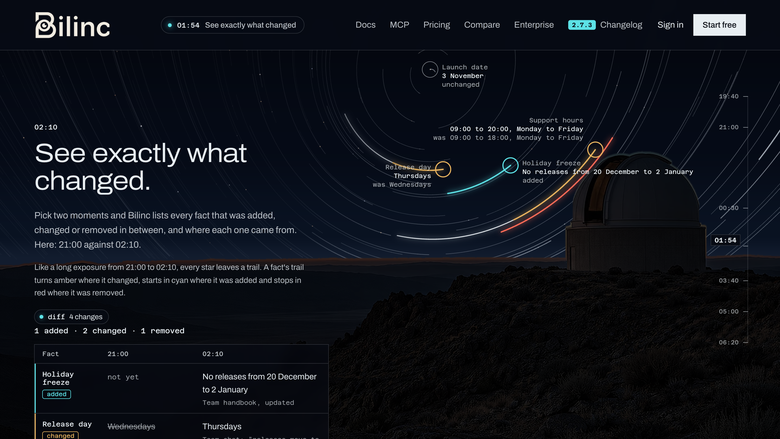
See exactly what changed between two moments

Image
Undo a wrong memory with preview and confirm
Image
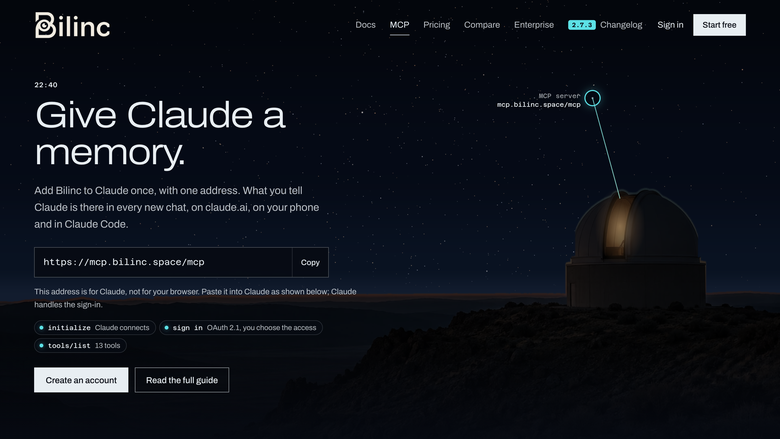
Connect Claude with one MCP URL and OAuth
Image
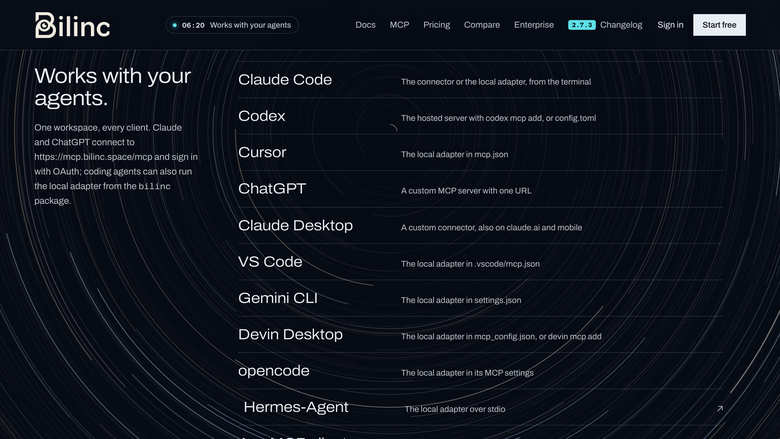
Works with Claude Code, Codex, Cursor and more
AI assistants forget between sessions, and when they do remember, a wrong memory is hard to find and harder to undo. Bilinc is a hosted memory layer for AI agents, delivered as a remote MCP server.
- One memory across clients. Claude Desktop, claude.ai, the Claude mobile apps, Claude Code and other MCP clients connect to the same memory through one URL.
- Versioned by design. remember creates entries and never overwrites; revise keeps the previous value in history; forget records a reason.
- Diff and roll back. Take a snapshot, compare the current memory against it, and roll back. Rollback is two steps: preview, then confirm.
- Know what is stale. Recall shows when each entry was last confirmed and marks entries past their review window as possibly outdated.
- You choose the access. Grant read-only or read-and-write when you connect, and revoke access at any time.
Hosted in the United States. Subprocessors are listed at https://bilinc.space/legal/subprocessors .
At the monthly limit. Each tier includes a fixed number of memory operations per month (Pro: 50,000; Team: 300,000). When they run out, saving, recalling and forgetting pause until the next monthly period. Listing, history and export keep working, and stored memory is never deleted.
Highlights
- Remote MCP server for AI agent memory: one URL, OAuth 2.1 sign-in, nothing to install. Works with Claude and other MCP clients.
- Every memory change is versioned: snapshot, diff and a two-step rollback (preview, then confirm), so a bad write can be undone.
- Read-only or read-and-write access per connection, revocable at any time. Recall marks entries that are past their review window.
Details
Sold by
Delivery method
Integration protocol
Type
Deployed on AWS
Features and programs
Financing for AWS Marketplace purchases
AWS Marketplace now accepts line of credit payments through the PNC Vendor Finance program. This program is available to select AWS customers in the US, excluding NV, NC, ND, TN, & VT.

Pricing
Pricing is based on the duration and terms of your contract with the vendor. This entitles you to a specified quantity of use for the contract duration. If you choose not to renew or replace your contract before it ends, access to these entitlements will expire.
Additional AWS infrastructure costs may apply. Use the AWS Pricing Calculator to estimate your infrastructure costs.
Dimension | Description | Cost/month |
|---|---|---|
Bilinc Pro | One Bilinc Cloud workspace for a solo builder: 50,000 memory operations per month, fast, balanced and verified recall, unlimited retention, snapshots, diff and rollback, and project audit. | $15.00 |
Bilinc Team | Shared organization memory for a small team: 300,000 memory operations per month, fast, balanced, verified and deep recall, unlimited retention, snapshots, diff and rollback, organization audit and a team support path. | $79.00 |
Dimensions summary
You choose between two contract tiers based on scale and user count. Bilinc Pro (Units) covers one workspace for a solo builder with 50,000 memory operations per month. Bilinc Team (Units) covers a shared workspace for a small team with 300,000 memory operations per month. The tiers scale by monthly operation volume and seats. The Team tier also adds deep recall, organization-wide audit, and a team support path. Both tiers include unlimited retention plus snapshots, diff, and rollback. Pick the tier that matches your operation volume and whether you work alone or across a team.
Top-of-mind questions for buyers
A memory operation is a single action the agent takes against its memory store. This includes committing beliefs, recalling them, and revising them. A revision adds to the history rather than overwriting it, so it also counts as an operation. Snapshots, diffs, and rollbacks are memory actions too.
Each tier includes a fixed monthly volume: 50,000 operations for Bilinc Pro (Units) and 300,000 for Bilinc Team (Units). The listing does not specify overage behavior once you pass that threshold. If you expect to exceed your allowance regularly, contact the vendor to confirm how added volume is handled.
Both tiers include fast, balanced, and verified recall, unlimited retention, snapshots, diff, and rollback. Bilinc Team (Units) adds deep recall, organization-wide audit across a shared workspace, and a team support path. Bilinc Pro (Units) covers a single workspace for one builder with project-level audit.
rearclabs.com
Helpful?
Vendor refund policy
You can turn off automatic renewal at any time; access continues until the end of the current contract term. We do not provide partial-period refunds except where required by law. If you were charged in error, billed twice, or could not use the service because of a problem on our side, email bilincsupport@rearclabs.com within 14 days of the charge with your AWS account ID and invoice details, and we will review your request.

Legal
Vendor terms and conditions
Upon subscribing to this product, you must acknowledge and agree to the terms and conditions outlined in the vendor's End User License Agreement (EULA) .
Content disclaimer
Vendors are responsible for their product descriptions and other product content. AWS does not warrant that vendors' product descriptions or other product content are accurate, complete, reliable, current, or error-free.
Delivery details
API-Based Agents & Tools
API-Based Agents and Tools integrate through standard web protocols. Your applications can make API calls to access agent capabilities and receive responses.
Additional details
Usage instructions
MCP
Get started
- Subscribe and link your account. After you subscribe, AWS Marketplace redirects you to bilinc.space. Sign in or create a Bilinc account; your AWS subscription is linked to it and your plan is applied.
- Claude (claude.ai, Claude Desktop, Claude mobile apps): go to Customize > Connectors > Add custom connector, paste <https://mcp.bilinc.space/mcp>, sign in to Bilinc and choose read-only or read-and-write access.
- Claude Code: run claude mcp add --transport http --scope user bilinc <https://mcp.bilinc.space/mcp>, then open /mcp, select bilinc and choose Authenticate.
- Other MCP clients: add a remote MCP server (Streamable HTTP) with the URL <https://mcp.bilinc.space/mcp>. The client discovers OAuth through the endpoint's /.well-known metadata and opens the Bilinc sign-in page.
Tools
remember, recall, revise, forget, create_snapshot, list_snapshots, diff, preview_rollback, rollback, status.
Access
Read-only access grants the memory:read scope; read-and-write adds memory:write. You can revoke a client at any time under Connected apps in the Bilinc dashboard, which cuts off its access immediately.
Documentation
- Remote MCP guide: https://bilinc.space/docs/remote-mcp
- Setup page: https://bilinc.space/mcp
- Support: bilincsupport@rearclabs.com
Support
Vendor support
- Email: support@bilinc.space
- Support page: https://bilinc.space/support
- Documentation: https://bilinc.space/docs
- Setup guide: https://bilinc.space/mcp
- Service status: https://bilinc.space/status
Email support is included with every plan. It covers setup, connection and OAuth sign-in, billing and AWS subscription questions, and bug reports. Include your workspace, plan, the error message and an approximate timestamp. Never send full API keys or other secrets through support.
AWS infrastructure support
AWS Support is a one-on-one, fast-response support channel that is staffed 24x7x365 with experienced and technical support engineers. The service helps customers of all sizes and technical abilities to successfully utilize the products and features provided by Amazon Web Services.
Similar products

Build low-latency AI applications with Redis Cloud. Real-time memory, vector search, and semantic caching for agents, RAG, and personalisation; powered by sub-ms (p99) performance, 99.999% uptime, and a $500 free trial.

Memori is agent-native memory infrastructure: an LLM-agnostic layer that transforms agent execution and conversation history into structured, persistent state for production systems. Unlike conversational memory wrappers or vector retrieval, Memori captures tool calls, decisions, traces, and user context as durable, queryable state that agents rely on across sessions, models, and workflows.
Let Memori handle agent memory so your team can improve accuracy and cut inference costs instead of building and operating a memory system themselves.
Benchmarked on LoCoMo, a benchmark from Snap Research measuring how well systems remember and retrieve details. Memori delivers industry-leading results: 87% accuracy using 721 tokens, roughly 2.8% of full-context cost, enabling teams to reduce inference spend by up to 97.2%.
Built for enterprise, Memori works with the infra you already run, no rip-and-replace, and deploys across managed cloud, single-tenant cloud, VPC, and on-premises.

OpSoul is a no-code platform for creating persistent AI operators with memory, knowledge bases, and governed growth - built for teams who need continuity across sessions.

Temporal Cloud is a fully managed durable execution platform on AWS for building reliable, long-running workflows without managing orchestration infrastructure.
Customer reviews
No customer reviews yet
Be the first to review this product . We've partnered with PeerSpot to gather customer feedback. You can share your experience by writing or recording a review, or scheduling a call with a PeerSpot analyst.