
Sold by: PuzariCloud
Deployed on AWS
Free Trial
AWS Free Tier
See what your Amazon ECR lifecycle policies will delete before they run. Groups multi-arch images, attestations and signatures, flags untagged rows that tagged images need, and warns when a rule would remove an image ECS or Lambda uses.
Overview
Problem
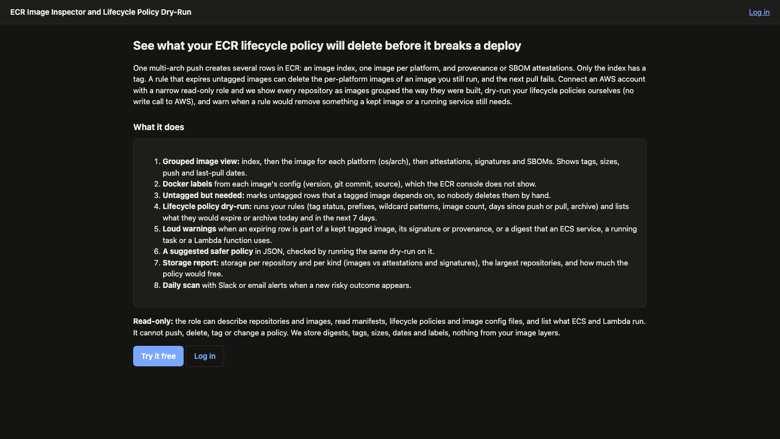
A multi-arch or provenance-enabled build pushes several rows to Amazon ECR: an image index, one image per platform and attestation manifests. Only the index carries a tag. A lifecycle rule such as "keep the last 10 untagged images" counts the platform images and attestations as untagged images and can delete them while the tagged image is still deployed. The next pull fails, often during a scale-out or a rollback.
The ECR console lists these rows as unrelated untagged images, does not show Docker labels, and its lifecycle preview does not know what your services run.
What it does
-
Groups every repository into image index > images per platform (os/arch) > attestations, signatures (cosign, Notation) and SBOMs, including OCI referrers.
-
Shows tags, sizes, push and last-pull dates, and Docker labels (version, revision, source) from each image's config file.
-
Marks untagged rows that a tagged image still needs, so nobody deletes them by hand.
-
Dry-runs your lifecycle policy with ECR's rule semantics: priority order, tag status, tag prefixes and wildcard patterns, image count, days since push or last pull, archive rules. It lists what would be expired or archived today and within 7 days.
-
Warns when a row about to go is used by an ECS service, a running ECS task or a Lambda function (critical), is part of a tagged image you keep (high), or is the signature or provenance of a kept image (medium).
-
Suggests a safer policy JSON and checks it with the same dry-run.
-
Reports storage by repository and by artifact kind, the largest repositories, and how much the policy frees.
-
Scans daily and alerts on Slack or email when a new risky outcome appears.
Security and access
You deploy a CloudFormation template that creates one IAM role in your account. Only our AWS account can assume it, and only with your unique External ID. The role is read-only: it can describe ECR repositories and images, read manifests and lifecycle policies, and list ECS clusters, services, tasks and Lambda functions. It cannot push, delete, tag or change any policy, and we never call the lifecycle preview API.
One optional permission (on by default, switchable in the template) reads image config files to show labels; we fetch only the config file named in each manifest. We store digests, tags, sizes, dates and labels, never image layers. Delete the stack to revoke access.
Typical uses
- Check a new lifecycle policy before you apply it.
- Find out why "untagged" images keep appearing after every build, and which ones are safe to delete.
- Catch an old release that ECS still runs before an age rule removes it.
- See how much of your ECR bill is attestations and signatures.
Who it is for
Platform, DevOps and SRE teams that build multi-arch or signed images with Docker BuildKit, Buildx or similar tools and push them to Amazon ECR across several accounts and regions.
Getting started
- Subscribe and create your workspace.
- Launch the CloudFormation stack from the Connect page and paste the role ARN.
- Pick your regions. The first scan finishes in a minute or two.
- Add a Slack webhook or alert emails in Settings.
Pricing
Contract pricing, billed through AWS Marketplace. Plans start at $29 per month (Starter), then $79 (Pro) and $199 (Business); yearly contracts cost 10 times the monthly price. A 14-day free trial is available.
Check your ECR lifecycle policies before they delete an image you still run. Start with the free trial.
Highlights
- Dry-run of your real lifecycle policy on every repository, with loud warnings for images in use by ECS or Lambda and for parts of images you keep.
- Grouped view: image index, the image for each platform, attestations, signatures and SBOMs, with Docker labels, sizes and pull dates.
- Suggested safer policy JSON, daily scans, Slack and email alerts, and a storage report by repository and artifact kind.
Details
Features and programs
Financing for AWS Marketplace purchases
AWS Marketplace now accepts line of credit payments through the PNC Vendor Finance program. This program is available to select AWS customers in the US, excluding NV, NC, ND, TN, & VT.

Pricing
Free trial
Try this product free according to the free trial terms set by the vendor.
Pricing is based on the duration and terms of your contract with the vendor. This entitles you to a specified quantity of use for the contract duration. If you choose not to renew or replace your contract before it ends, access to these entitlements will expire.
Additional AWS infrastructure costs may apply. Use the AWS Pricing Calculator to estimate your infrastructure costs.
Dimension | Description | Cost/month |
|---|---|---|
Starter | Starter: up to 25 ECR repositories, 1 region per account, daily scan and alerts | $29.00 |
Pro | Pro: up to 250 ECR repositories, 4 regions per account, daily scan and alerts | $79.00 |
Business | Business: unlimited ECR repositories and regions, daily scan and alerts | $199.00 |
Dimensions summary
You choose one of three tiers, each sold as a contract unit based on how many ECR repositories and regions you monitor. Starter covers up to 25 repositories in one region per account. Pro covers up to 250 repositories across four regions per account. Business removes those caps, covering unlimited repositories and regions. All three run daily scans with alerts, so the tiers scale by repository and region capacity rather than by feature set. Pick the tier that matches your repository count and how many regions you operate.
Top-of-mind questions for buyers
A repository is one ECR repository in your connected AWS account. The tool reads it through a narrow read-only role. Starter counts up to 25, Pro up to 250, and Business places no limit on how many repositories you track.
Your tier sets fixed caps on repositories and regions per account. To cover more than Starter's 25 repositories or one region, or Pro's 250 repositories or four regions, you move to a tier with higher caps. Business removes both caps. Each tier is a flat contract unit.
Yes. Starter, Pro, and Business all run a daily scan with alerts. The tiers differ only in repository and region capacity, not in features. Each still groups multi-arch images, dry-runs lifecycle policies, warns on risky deletions, and reports storage using a read-only role.
ecrinspect.puzaricloud.in
Helpful?
Vendor refund policy
Full refund within 14 days of a new subscription if the product doesn't work for you. After that, cancel any time and you won't be renewed; we don't refund partial periods. To request a refund, email support@puzaricloud.in with your AWS account ID.

Legal
Vendor terms and conditions
Upon subscribing to this product, you must acknowledge and agree to the terms and conditions outlined in the vendor's End User License Agreement (EULA) .
Content disclaimer
Vendors are responsible for their product descriptions and other product content. AWS does not warrant that vendors' product descriptions or other product content are accurate, complete, reliable, current, or error-free.
Delivery details
Software as a Service (SaaS)
SaaS delivers cloud-based software applications directly to customers over the internet. You can access these applications through a subscription model. You will pay recurring monthly usage fees through your AWS bill, while AWS handles deployment and infrastructure management, ensuring scalability, reliability, and seamless integration with other AWS services.
Resources
Support
Vendor support
Support
Email support@puzaricloud.in . We answer within one business day.
Support tiers and scope
- All plans: email support@puzaricloud.in . Scope: connecting your AWS account (CloudFormation role), product features, alerts, billing and plan questions.
- Starter: reply within 1 business day.
- Pro: priority queue, reply within 1 business day, help with multi-account setup.
- Business: reply the same business day (IST), onboarding call on request.
Escalation
If an alert or scan stops working, or a reply is late, email support@puzaricloud.in with URGENT in the subject. It goes straight to the founder and is handled the same day.
Plans
- Starter: up to 25 repositories, 1 region per account.
- Pro: up to 250 repositories, up to 4 regions per account.
- Business: unlimited repositories, all regions. Repository limits count all connected accounts together.
Refunds
Full refund within 14 days of your first purchase. Email support@puzaricloud.in from the address on your workspace.
AWS infrastructure support
AWS Support is a one-on-one, fast-response support channel that is staffed 24x7x365 with experienced and technical support engineers. The service helps customers of all sizes and technical abilities to successfully utilize the products and features provided by Amazon Web Services.
Similar products
This product has charges associated with the pre-built hardening to the CIS Benchmarks™ and recurring maintenance. The CIS Hardened Images® are hardened in accordance with the associated CIS Benchmarks, an industry best practice for secure configuration. Reduce cost, time, and risk by building your AWS solution with CIS AMIs.
This product has charges associated with the pre-built hardening to the CIS Benchmarks™ and recurring maintenance. The CIS Hardened Images® are hardened in accordance with the associated CIS Benchmarks, an industry best practice for secure configuration. Reduce cost, time, and risk by building your AWS solution with CIS AMIs.
This product has charges associated with the pre-built hardening to the CIS Benchmarks™ and recurring maintenance. The CIS Hardened Images® are hardened in accordance with the associated CIS Benchmarks, an industry best practice for secure configuration. Reduce cost, time, and risk by building your AWS solution with CIS AMIs.
This product has charges associated with the pre-built hardening to the CIS Benchmarks™ and recurring maintenance. The CIS Hardened Images® are hardened in accordance with the associated CIS Benchmarks, an industry best practice for secure configuration. Reduce cost, time, and risk by building your AWS solution with CIS AMIs.
Customer reviews
No customer reviews yet
Be the first to review this product . We've partnered with PeerSpot to gather customer feedback. You can share your experience by writing or recording a review, or scheduling a call with a PeerSpot analyst.