
Sold by: AssemblyAI
Deployed on AWS
Free Trial
Realtime speech-to-text in 32 languages with native code-switching, contextual prompting, custom vocabulary, and entity-aware endpointing, built for voice agents and live transcription. Stream audio to a SageMaker bidirectional streaming endpoint and receive partial and final transcripts while the speaker talks.
Overview
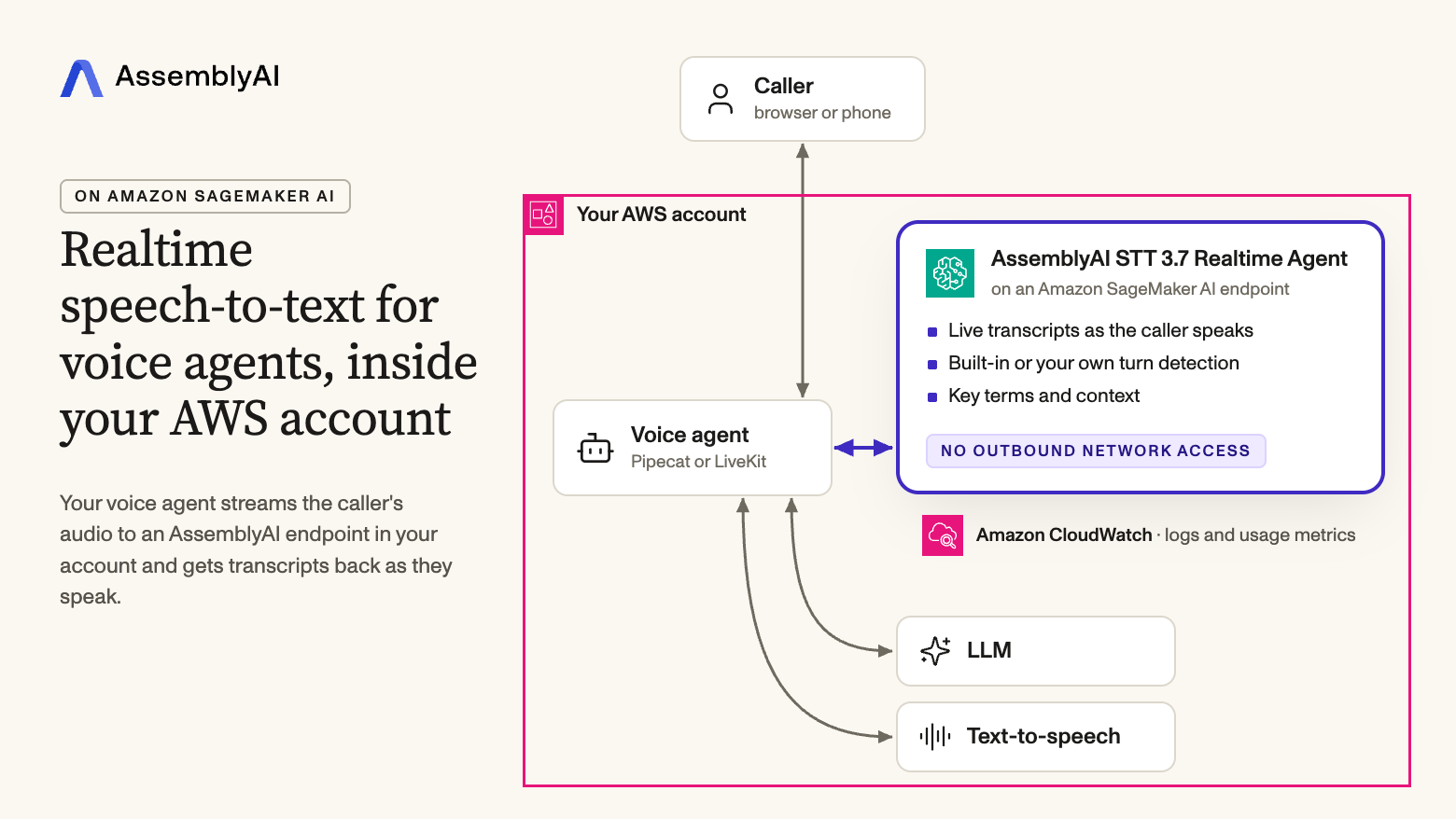
STT 3.7 Realtime Agent: realtime speech-to-text in 32 languages with native code-switching, contextual prompting, custom vocabulary, and entity-aware endpointing, built for voice agents and live transcription. Stream audio to a SageMaker bidirectional streaming endpoint and receive partial and final transcripts while the speaker talks.
Use cases:
- Voice agents and conversational AI that need each user turn transcribed as it is spoken
- Live captioning of calls, meetings and broadcasts
- Contact center agent assist and real-time call analytics
How it works:
- Open a stream with InvokeEndpointWithBidirectionalStream and send audio as it is captured: 16-bit PCM, mu-law, Opus (raw or Ogg) or AAC (ADTS).
- Receive Turn messages as the speaker talks: partials that update in place, then the final, punctuated and formatted text of each turn, with word-level timings and confidence.
- Every message follows AssemblyAI's v3 streaming protocol, so existing AssemblyAI streaming integrations port directly.
- Tune turn detection, boost key terms and give the model context (prompt, agent_context) at connection time or mid-stream with UpdateConfiguration.
- With mode=manual, your own voice activity detector ends each turn: send ForceEndpoint and the final transcript comes back right away.
- Send a whole file to the same endpoint with InvokeEndpoint, asynchronous inference or batch transform to get every turn at once.
Pricing and usage:
- Real-time endpoints: $0.45 per hour of audio ($0.0075 per minute), plus the AWS infrastructure charge for the instance. A stream that is refused, or cancelled before its first transcript (for example, when the instance is at its stream limit), is not billed.
- Pricing unit: 1 inference = 1 hour of audio processed. Usage is billed by the exact duration of the audio, in fractional inferences. Examples at $0.45: 1 minute = 0.016667 inferences ($0.0075); a 12-minute call = 0.2 inferences ($0.09); 90 seconds = 0.025 inferences ($0.01125).
- On your AWS bill, usage appears under the usage type -SMMP:inference.count.m.i.c (for example USE1-SMMP:inference.count.m.i.c).
- Batch transform: $2.25 per instance-hour, plus the AWS infrastructure charge. Audio is not metered separately in batch.
- Every stream and request writes its usage to your own CloudWatch (namespace AssemblyAI/STT-3.7-Realtime-Agent, ConsumedUnits in hours of audio), so you can reconcile what you are billed.
Capacity:
- Runs on single-GPU and multi-GPU instances with NVIDIA RTX PRO 6000 (ml.g7e), L40S (ml.g6e) or RTX PRO 4500 (ml.g7). On a multi-GPU instance the endpoint serves streams on every GPU and spreads them across the GPUs automatically.
- Recommended concurrent streams per GPU for latency-sensitive voice agents: RTX PRO 6000 90, L40S 40, RTX PRO 4500 25. Scale up with a multi-GPU instance, or out with more instances and auto scaling.
Known limitations:
- The model package contains the speech model only. PII redaction, speaker diarization, noise suppression, LLM enhancement, domain-specific correction and webhooks are not available and are refused with an error rather than silently ignored.
- A stream lasts at most 30 minutes (a SageMaker limit); reconnect to continue.
- InvokeEndpoint allows 60 seconds per request; use asynchronous inference or batch transform for longer files.
- Cannot be deployed to SageMaker Serverless Inference: Marketplace model packages run in network isolation.
- Your account needs a SageMaker quota for the chosen instance type ("ml.g7e.2xlarge for endpoint usage", "ml.g6e.xlarge for transform job usage"); new accounts often start at 0 and can raise it through Service Quotas.
Highlights
- Live partial and final transcripts over SageMaker bidirectional streaming
- 32 languages with native code-switching
- Contextual prompting, up to 100 custom keyterms, agent context carryover, and entity-aware endpointing
Details
Sold by
Categories
Delivery method
Latest version
Deployed on AWS
Features and programs
Financing for AWS Marketplace purchases
AWS Marketplace now accepts line of credit payments through the PNC Vendor Finance program. This program is available to select AWS customers in the US, excluding NV, NC, ND, TN, & VT.

Pricing
Free trial
Try this product free for 14 days according to the free trial terms set by the vendor.
Pricing is based on actual usage, with charges varying according to how much you consume. Subscriptions have no end date and may be canceled any time.
Additional AWS infrastructure costs may apply. Use the AWS Pricing Calculator to estimate your infrastructure costs.
Dimension | Description | Cost |
|---|---|---|
ml.g6e.xlarge Inference (Batch) Recommended | Model inference on the ml.g6e.xlarge instance type, batch mode | $2.25/host/hour |
inference.count.m.i.c Inference Pricing | inference.count.m.i.c Inference Pricing | $0.45/request |
ml.g5.2xlarge Inference (Batch) | Model inference on the ml.g5.2xlarge instance type, batch mode | $2.25/host/hour |
Vendor refund policy
All fees for this product are non-refundable, except where required by law or by AWS Marketplace policies. If you believe you were charged in error, contact support@assemblyai.com within 30 days of the charge and we will review the request. Charges for AWS infrastructure (such as SageMaker instance hours) are billed by AWS and governed by AWS policies, not by AssemblyAI. You can unsubscribe at any time via AWS Marketplace to stop future charges.

Compliance
Compliance profile
This information is produced by a third-party provider from the provider's trust center data and is provided for informational purposes only.
- Source
- Vanta Trust Center

HIPAA
SOC 2 Type II

PCI DSS

GDPR

ISO 27001:2022
Legal
Vendor terms and conditions
Upon subscribing to this product, you must acknowledge and agree to the terms and conditions outlined in the vendor's End User License Agreement (EULA) .
Content disclaimer
Vendors are responsible for their product descriptions and other product content. AWS does not warrant that vendors' product descriptions or other product content are accurate, complete, reliable, current, or error-free.
Delivery details
Amazon SageMaker model
An Amazon SageMaker model package is a pre-trained machine learning model ready to use without additional training. Use the model package to create a model on Amazon SageMaker for real-time inference or batch processing. Amazon SageMaker is a fully managed platform for building, training, and deploying machine learning models at scale.
Deploy the model on Amazon SageMaker AI using the following options:
Version release notes
STT 3.7 Realtime Agent (speech_model assemblyai-stt-3-7-realtime-agent), AssemblyAI's speech-to-text model for voice agents. New in this version: with mode=manual, the client ends each turn by sending ForceEndpoint when its own voice activity detector hears the end of speech, and the final transcript comes back right away; agent_context gives the model the agent's last reply.
Runs on NVIDIA RTX PRO 6000 (ml.g7e), L40S (ml.g6e) and RTX PRO 4500 (ml.g7), on one or several GPUs per instance. Not on ml.g5 or ml.p5. Batch transform runs on ml.g6e.xlarge. Usage is published to CloudWatch under the namespace AssemblyAI/STT-3.7-Realtime-Agent. Versions 1.0.0 and 1.0.1 (Universal-3.6 Pro) stay available.
Additional details
Inputs
- Summary
Live streaming: audio over InvokeEndpointWithBidirectionalStream in the session's encoding (pcm_s16le, pcm_mulaw, opus, ogg_opus or aac), with options in ModelQueryString and JSON control messages (Terminate, ForceEndpoint, UpdateConfiguration).
Whole files (InvokeEndpoint, asynchronous inference, batch transform): a WAV, FLAC, OGG or MP3 file (8-48 kHz, any channel count), raw 16-bit PCM as audio/l16 with sample_rate in the options, or application/json {"audio": "", "config": {...}}. Options go in CustomAttributes as a JSON object.
The parameters below are connection parameters (ModelQueryString for streams, CustomAttributes for whole-file requests). Turn-detection values, vad_threshold, keyterms_prompt, prompt, agent_context and session_heartbeat can also be changed mid-stream with an UpdateConfiguration message.
- Limitations for input type
- A stream lasts at most 30 minutes (a SageMaker limit). PCM audio messages hold 20-1000 ms of audio. InvokeEndpoint allows 60 seconds per request and 25 MB per payload; use asynchronous inference or batch transform for longer files. CustomAttributes is limited to 1024 characters. PII redaction, speaker diarization, noise suppression, LLM enhancement, domain-specific correction and webhooks are not available and are refused with an error. Batch transform runs on ml.g6e.xlarge. Real-time endpoints run on single-GPU and multi-GPU ml.g7e, ml.g6e and ml.g7 instance types, not ml.g5 or ml.p5; check instance availability and your account's quotas in your region.
- Input MIME type
- audio/wav, audio/flac, audio/ogg, audio/mpeg, audio/l16, application/json
https://raw.githubusercontent.com/AssemblyAI-Solutions/assemblyai-sagemaker-samples/main/stt-3-7-realtime-agent/data/input/sample-10s.wav
https://raw.githubusercontent.com/AssemblyAI-Solutions/assemblyai-sagemaker-samples/main/stt-3-7-realtime-agent/data/input/batch/sample-10s.wav
Input data descriptions
The following table describes supported input data fields for real-time inference and batch transform.
Field name | Description | Constraints | Required |
|---|---|---|---|
sample_rate | Sample rate of PCM audio, in Hz. | Integer, 8000-48000. Default 16000. | No |
encoding | Audio encoding of a stream: pcm_s16le, pcm_mulaw, opus (one packet per message), ogg_opus (an Ogg stream, any chunking) or aac (ADTS, any chunking). sample_rate applies to the PCM encodings. | String. Default 'pcm_s16le'. | No |
speech_model | Optional. The endpoint serves only assemblyai-stt-3-7-realtime-agent; any other value is refused. | String. | No |
language_codes | Expected languages, as a JSON list, e.g. ["en","es"]. Steers the model toward the declared languages. | String (JSON list of up to 10 codes). | No |
language_detection | true adds language_code and language_confidence to each final turn. | Boolean. Default false. | No |
keyterms_prompt | Words and phrases to recognise, as a JSON list. Can be changed mid-stream with UpdateConfiguration. | String (JSON list of up to 100 terms). | No |
prompt | Free-text context about the audio (topic, vocabulary, format). Can be changed mid-stream with UpdateConfiguration. | String, up to 1750 characters. | No |
agent_context | The voice agent's most recent spoken reply, used as context for the next user turn. Send it with UpdateConfiguration before each user turn. | String, up to 1750 characters. | No |
mode | balanced, min_latency, max_accuracy or manual. balanced, min_latency and max_accuracy are latency/accuracy presets that set the defaults of the turn-detection parameters below; with manual, a turn ends only when the client sends ForceEndpoint. | String. Default 'balanced'. | No |
min_turn_silence | Silence in milliseconds before the model runs an end-of-turn check; the turn ends if it reads as complete, otherwise it stays open and a partial is emitted. Raise it when an entity (a number, an address) is expected. Changeable mid-stream. | Integer, milliseconds. Default set by mode. | No |
Resources
Vendor resources
Support
Vendor support
AWS infrastructure support
AWS Support is a one-on-one, fast-response support channel that is staffed 24x7x365 with experienced and technical support engineers. The service helps customers of all sizes and technical abilities to successfully utilize the products and features provided by Amazon Web Services.
Similar products

Deepgram is the leading voice AI platform for enterprise use cases, offering speech-to-text (STT), text-to-speech (TTS), and full speech-to-speech (STS) capabilities. 200,000+ developers build with Deepgrams voice-native foundational models due to our unmatched accuracy, low latency, and pricing. Having processed over 50,000 years of audio and transcribed over 1 trillion words, there is no organization in the world that understands voice better than Deepgram.

AssemblyAI is the Voice AI infrastructure for developers building products that transcribe, understand, and act on speech. One API gives you state-of-the-art speech models for pre-recorded and real-time audio, serverless inference that scales from zero with no GPUs to manage, and built-in speech understanding across 99+ languages: speaker labels, language detection and code-switching, PII redaction, and LLM analysis. Voice agents, contact centers, AI notetakers, and healthcare scribes run on AssemblyAI, which processes more than 120 million conversations a week on AWS.
Start with $50 in usage credits during a 90-day free trial, then pay as you go with no commitment. Usage is billed through your AWS account and can count toward eligible AWS spend commitments. Volume pricing is available through private offers.

Deepgram is the enterprise Voice AI platform for building and scaling real time voice applications on AWS. This product listing contains multiple versions of the flux model which can each transcribe a set of languages. See version details for more information.
You will be billed $0.0077/min as described by https://deepgram.com/pricing. Private pricing available upon request.
Our APIs for Nova Speech to Text (STT) are natively available in the new SageMaker Bi-Directional Streaming API. Additional native touchpoints with Amazon Bedrock, Lex, and Amazon Connect make it simple to compose full voice experiences with the cloud services your teams already trust.

Deepgram is the leading voice AI platform for enterprise use cases, offering speech-to-text (STT), text-to-speech (TTS), and full speech-to-speech (STS) capabilities. 200,000+ developers build with Deepgrams voice-native foundational models due to our unmatched accuracy, low latency, and pricing. Having processed over 50,000 years of audio and transcribed over 1 trillion words, there is no organization in the world that understands voice better than Deepgram.
Customer reviews
No customer reviews yet
Be the first to review this product . We've partnered with PeerSpot to gather customer feedback. You can share your experience by writing or recording a review, or scheduling a call with a PeerSpot analyst.