Sold by: CostPulse
Deployed on AWS
CostPulse watches your AWS spend and alerts your team in Slack, Microsoft Teams, or email when any service spikes above its baseline - before the invoice arrives. Read-only, no agents.
Overview
Image
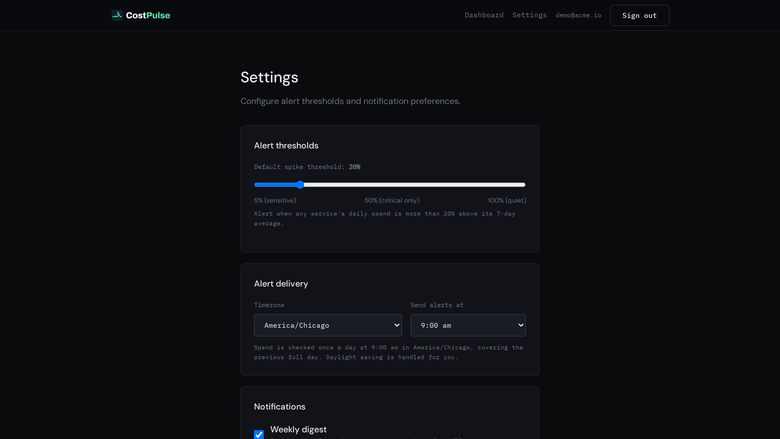
Alert settings
Image
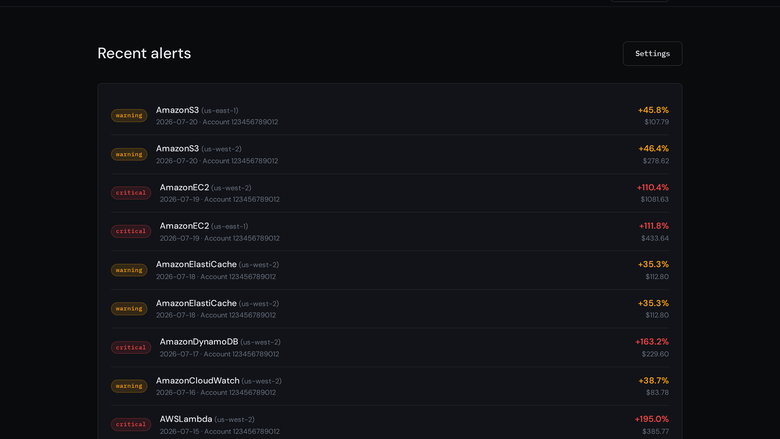
Cost anomaly dashboard
Know about cost spikes the day they start - not when the bill closes.
CostPulse ingests your AWS Cost and Usage Report, builds a 7-day rolling baseline for every service and region in each connected account, and alerts the channel your team already reads - Slack, Microsoft Teams, or email - whenever spend jumps above your threshold (20% by default, configurable per channel). Critical spikes (50%+) are flagged separately.
Setup is self-service and read-only. A CloudFormation stack creates a read-only IAM role and a CUR 2.0 export in your account - no agents, no code changes, no write access to your resources. While the first CUR file lands (up to 24 hours), CostPulse backfills from Cost Explorer so detection works from day one.
What you get:
- Daily anomaly detection with per-service, per-region baselines
- Alerts delivered at your chosen local hour, per tenant
- Slack Block Kit and Teams Adaptive Card alerts with spend, baseline, and delta
- Weekly cost digest
- Per-account channel routing (Team plan)
- Multi-account support
CostPulse sees your cost data - never your infrastructure or application data. Details: https://costpulse.io/security
Highlights
- Alerts in Slack, Microsoft Teams, or email when any AWS service spikes above its 7-day baseline - thresholds configurable per channel.
- Read-only, agentless setup via a CloudFormation stack; live in about 10 minutes with Cost Explorer backfill while your CUR export spins up.
- Flat monthly pricing per plan - no percentage-of-spend fees.
Details
Sold by
Delivery method
Deployed on AWS
Features and programs
Financing for AWS Marketplace purchases
AWS Marketplace now accepts line of credit payments through the PNC Vendor Finance program. This program is available to select AWS customers in the US, excluding NV, NC, ND, TN, & VT.

Pricing
Pricing is based on the duration and terms of your contract with the vendor. This entitles you to a specified quantity of use for the contract duration. If you choose not to renew or replace your contract before it ends, access to these entitlements will expire.
Additional AWS infrastructure costs may apply. Use the AWS Pricing Calculator to estimate your infrastructure costs.
Dimension | Description | Cost/month |
|---|---|---|
Starter - 1 AWS account | Cost anomaly detection and alerting for 1 connected AWS account: daily per-service, per-region baseline monitoring, spike alerts to Slack, Microsoft Teams, or email at your chosen local hour, and a weekly cost digest. | $49.00 |
Team - up to 5 AWS accounts | Everything in Starter for up to 5 connected AWS accounts, plus per-account channel routing so each account's alerts reach the right team, and priority support. | $99.00 |
Dimensions summary
CostPulse offers two contract plans scaled by the number of connected AWS accounts. Starter covers 1 AWS account with cost anomaly detection, spike alerts to Slack, Microsoft Teams, or email, and a weekly digest. Team covers up to 5 AWS accounts and includes everything in Starter. Team adds per-account channel routing, so each account's alerts reach the right team, plus priority support. You pick the plan based on how many accounts you monitor. Each unique 12-digit AWS account ID counts as one account, and organization member accounts count separately.
Top-of-mind questions for buyers
Each unique 12-digit AWS account ID counts as one account. Under AWS Organizations, every member account counts separately toward your total. Starter covers 1 account; Team covers up to 5. If you monitor member accounts under an organization, count each one individually against your plan limit.
Team includes everything in Starter for up to 5 accounts. It adds per-account channel routing, so each account's alerts reach the right team's channel. Team also includes priority support. Starter covers a single account with alerts sent to your chosen destinations.
Amazon Bedrock spend is baselined per model family, not just as one service line. Alerts carry the model, invocation count, and token context. They flag when cost per token drifts from its 7-day average. Other AI-adjacent services are monitored like any other service.
costpulse.io
Helpful?
Vendor refund policy
Monthly contracts are not refunded once the month begins, but you can cancel auto-renewal at any time and keep access through the end of the paid period. Contact aws@costpulse.io about billing issues - we fix mistakes on our side promptly.

Legal
Vendor terms and conditions
Upon subscribing to this product, you must acknowledge and agree to the terms and conditions outlined in the vendor's End User License Agreement (EULA) .
Content disclaimer
Vendors are responsible for their product descriptions and other product content. AWS does not warrant that vendors' product descriptions or other product content are accurate, complete, reliable, current, or error-free.
Delivery details
Software as a Service (SaaS)
SaaS delivers cloud-based software applications directly to customers over the internet. You can access these applications through a subscription model. You will pay recurring monthly usage fees through your AWS bill, while AWS handles deployment and infrastructure management, ensuring scalability, reliability, and seamless integration with other AWS services.
Resources
Vendor resources
Support
Vendor support
Email aws@costpulse.io - we respond within one business day (Team plan: priority support). Documentation and security details: https://costpulse.io and
AWS infrastructure support
AWS Support is a one-on-one, fast-response support channel that is staffed 24x7x365 with experienced and technical support engineers. The service helps customers of all sizes and technical abilities to successfully utilize the products and features provided by Amazon Web Services.
Similar products
TruCost.Cloud shows where your AWS, Azure and Google Cloud money goes and who owns it. Cost allocation without retagging, container and AI spend by team, unit economics, daily anomalies, and every saving tracked to the bill. Read-only access. Hosted in India on AWS.
SkySaver Solutions makes AWS cost optimization friendly and accessible. Our 1-hour Cloud Spend Assessment is your fast track to identifying savings, with a personalized action plan. For deeper expertise, our CloudOps Expert Consultation provides customized solutions, including automation, architecture reviews, and financial analysis, all delivered by our certified AWS professionals. We're your partner in achieving significant AWS cost savings.

Cost Anomaly Detection & Alerts solution designed to accelerate business outcomes on AWS. Includes diagnostic, planning, and value-driven delivery with AWS best practices and clear metrics.
FREE 30 DAY TRIAL. AlertD AI agents cover AWS security, cost, compliance, performance, and LLM governance. Deploy in about 15 minutes.
Customer reviews
No customer reviews yet
Be the first to review this product . We've partnered with PeerSpot to gather customer feedback. You can share your experience by writing or recording a review, or scheduling a call with a PeerSpot analyst.