Sold by: Fromkos
Deployed on AWS
Free Trial
Bastion Config provides PostgreSQL certificate authentication and approved, just-in-time read-only DBA diagnostics for self-managed PostgreSQL 18 on EC2 in your AWS account. Supported applications connect without a database password. Administrators can sign in with Microsoft Entra ID; the security key is still required. You operate the installation; AWS infrastructure charges apply separately, including during the software trial.
Overview
Image
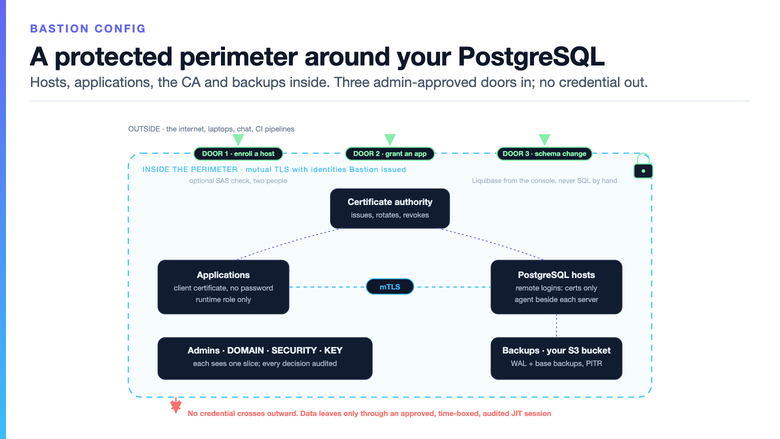
A protected perimeter around your PostgreSQL
Image
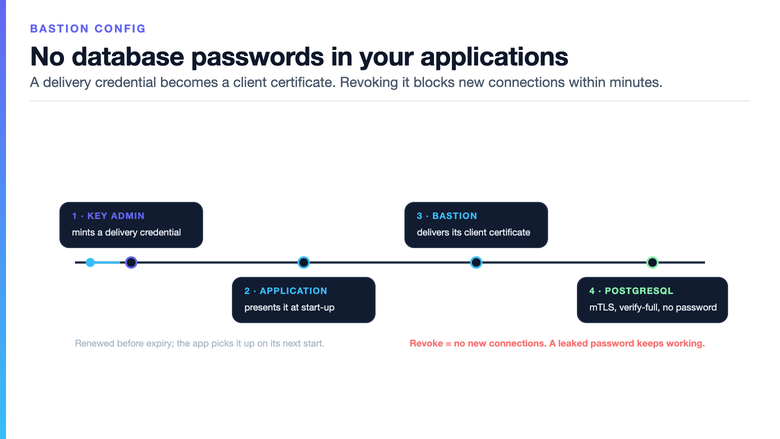
Passwordless PostgreSQL access with mTLS
Image
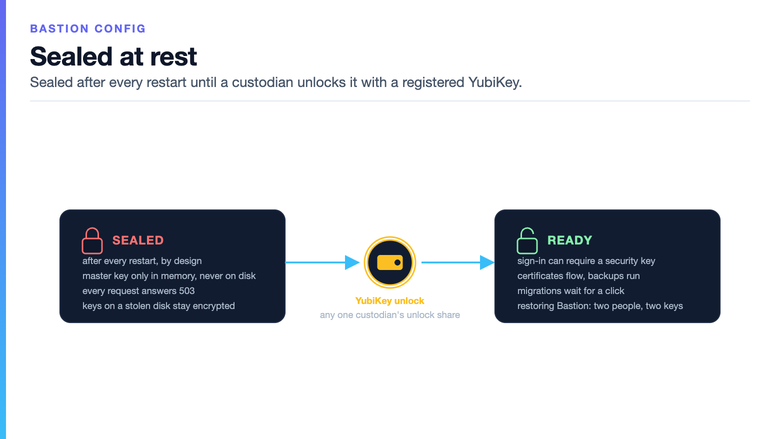
Sealed until a custodian unlocks it
Image
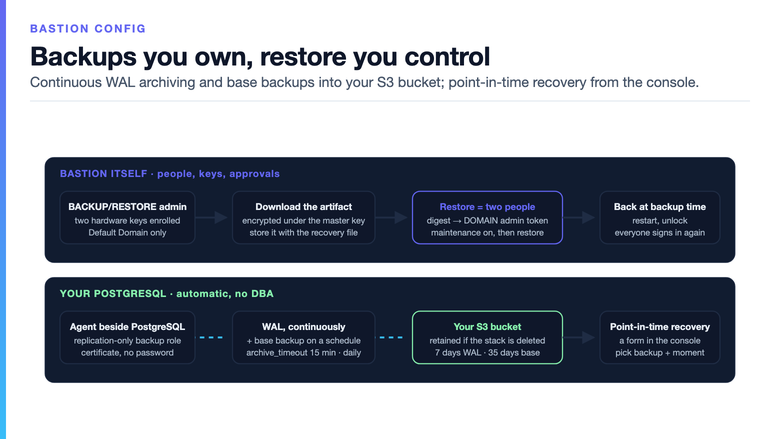
Backups and point-in-time recovery in your S3
Image
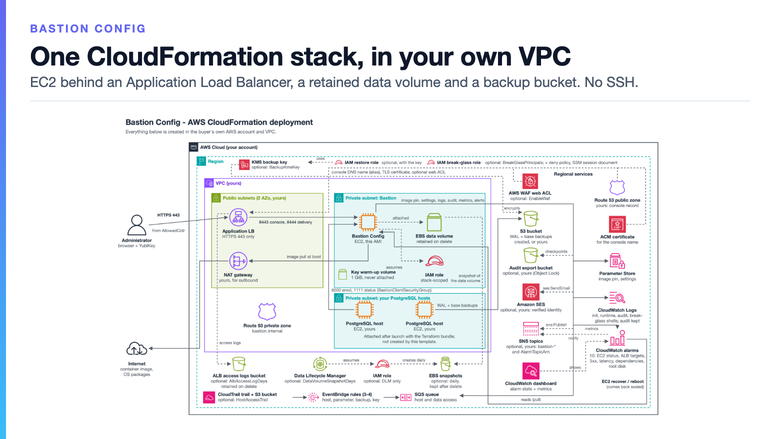
One CloudFormation stack in your own VPC
Image
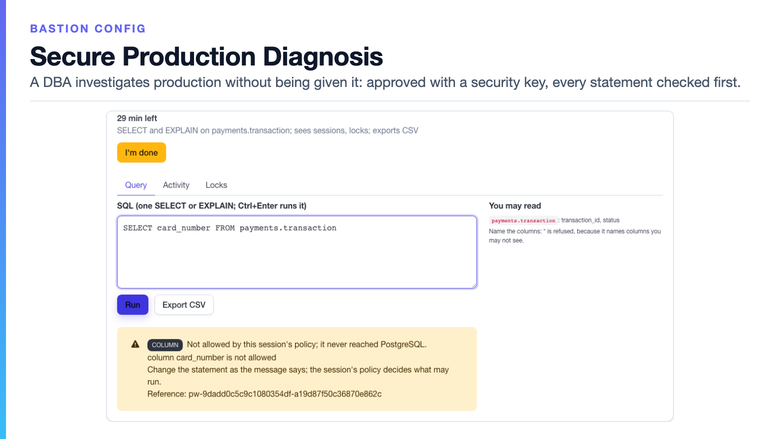
Secure Production Diagnosis
Image
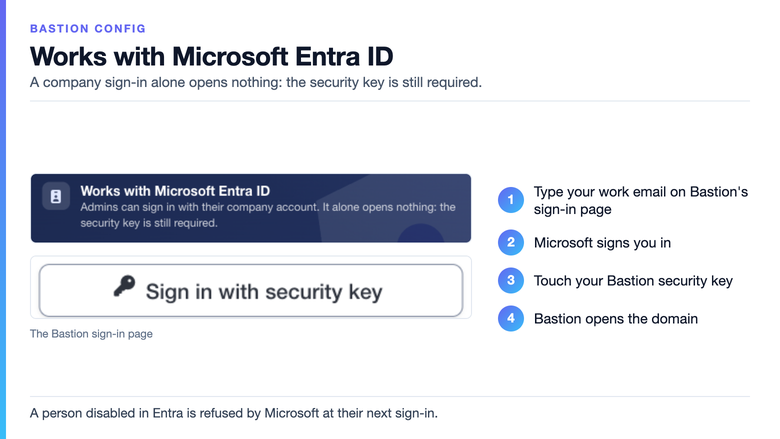
Company sign-in, security key still required

Video
Product video
Bastion Config provides PostgreSQL certificate authentication and certificate management for self-managed PostgreSQL 18 on EC2 in your AWS account. Supported applications connect with client certificates instead of database passwords. Documented integrations include Java, TypeScript/Node and Rust; confirm your runtime, driver and renewal behavior before evaluation. Revocation blocks new application connections after the change reaches PostgreSQL; it does not instantly terminate established sessions. A new client certificate defaults to 30 days and renews automatically; before issuing one, the console warns when no application using that database user has shown it renews, and the key administrator may then choose up to one year. Existing certificates keep their lifetime. New server certificates default to 90 days. Evaluate rotation with both existing and new connections.
Bastion can import the data of an Amazon RDS for PostgreSQL instance or an Aurora PostgreSQL cluster (PostgreSQL 15 to 18), once, into a new PostgreSQL 18 cluster that Bastion builds on EC2 in your AWS account. It reads from the writer only, over TLS with the server's certificate checked against the CA you enter; a read replica or an Aurora reader endpoint is refused before anything is approved, and the refusal says which endpoint to use. If an Aurora cluster fails over while tables are being copied, the copy follows the cluster endpoint to the new writer and, in our test, every row arrived once; the final comparison with the source has not been tested after a failover. RDS and Aurora are import sources only: Bastion does not manage them or run on them. The same one-time import also takes any other PostgreSQL 15 to 18 primary, in AWS or outside it, that the new cluster's host can reach on its port: through a read-only account made for the import, over TLS with the server's certificate and name checked against the CA you enter; a standby is refused, and Bastion does not attach to or take over the source.
Built for PostgreSQL you run yourself on EC2, where features built for RDS do not apply. It takes database passwords out of your applications, gives DBAs approved, time-boxed read-only diagnostics without a standing database credential through that workflow, keeps the security key required even for an administrator who signs in with a company account, and runs inside your own AWS account, so the seller holds no key and does not sit in your database path. It is priced per installation on your AWS bill, not per administrator or per application.
For database privileged access, Secure Production Diagnosis gives a DBA an approved, time-boxed diagnostic window. A separate domain administrator approves with a hardware security key. The DBA works in the Bastion console without receiving a standing database credential through this workflow. Only policy-permitted SELECT and EXPLAIN statements run under a prepared read-only database role; EXPLAIN ANALYZE is excluded. Activity and Locks panels and CSV export require policy permission. Requests, approvals, statements and exports are audited; returned rows are not copied into the audit trail. Permitted data is visible to the DBA and may be exported when allowed. This is not a data-loss-prevention tool. The Marketplace subscription includes one DBA administrator.
Bastion Config uses hardware-key setup and unlock; setup requires two different supported FIDO2/PRF keys, and passphrase unlock is unavailable. Separate roles and configured approval policies support operational control. Administrators finish their first sign-in with a temporary password they must change; an administrator who has registered a hardware security key can then sign in with the key and its PIN alone, with no login name or password. Company sign-in with Microsoft Entra ID is optional and off until an administrator turns it on: the administrators of a domain then sign in with their company account and still touch their own security key, so a company sign-in alone opens nothing. A person disabled in Entra is refused by Microsoft at their next sign-in; a session already open ends within eight hours, and administrators are still added, given roles and removed in Bastion. Bastion does not synchronise your directory. Audit evidence and optional configured S3 Object Lock checkpoints support review; they are not regulatory certification. The reference deployment supports WAL archiving, scheduled base backups and point-in-time recovery using your S3 storage. Availability depends on deployment method; confirm your configuration and exercise recovery in non-production. You own monitoring, retention, access decisions and recovery. No continuity, recovery success, RTO or RPO guarantee is implied. Start with one supported non-production application and agreed pass/fail evidence. Review current purchase and trial terms on AWS Marketplace; AWS infrastructure charges apply separately, including during the 30-day software trial.
Highlights
- PostgreSQL certificate authentication: supported applications connect without a database password. Evaluate your runtime and driver; revocation blocks new connections after propagation, while established sessions need separate consideration.
- Just-in-time read-only DBA diagnostics: a separate administrator approves a bounded window. SQL, diagnostic panels and CSV exports are restricted by policy. One DBA administrator is included.
- Company sign-in with Microsoft Entra ID: administrators sign in with their company account and still touch their security key, so a company sign-in alone opens nothing. A person disabled in Entra is refused by Microsoft at their next sign-in. Self-managed PostgreSQL 18 on EC2 in your AWS account; you own operations and recovery drills; AWS infrastructure charges are separate.
Details
Sold by
Categories
Delivery method
Delivery option
Bastion Config - CloudFormation stack in your VPC
Latest version
Operating system
Ubuntu 24.04
Deployed on AWS
Features and programs
Financing for AWS Marketplace purchases
AWS Marketplace now accepts line of credit payments through the PNC Vendor Finance program. This program is available to select AWS customers in the US, excluding NV, NC, ND, TN, & VT.

Pricing
Free trial
Try this product free for 30 days according to the free trial terms set by the vendor. Usage-based pricing is in effect for usage beyond the free trial terms. Your free trial gets automatically converted to a paid subscription when the trial ends, but may be canceled any time before that.
Pricing is based on actual usage, with charges varying according to how much you consume. Subscriptions have no end date and may be canceled any time. Alternatively, you can pay upfront for a contract, which typically covers your anticipated usage for the contract duration. Any usage beyond contract will incur additional usage-based costs.
Additional AWS infrastructure costs may apply. Use the AWS Pricing Calculator to estimate your infrastructure costs.
Dimension | Cost/hour |
|---|---|
t3.small | $0.40 |
t3.medium | $0.40 |
t3.large | $0.40 |
m6i.large | $0.40 |
Dimensions summary
You pay by the hour based on the EC2 instance type that runs the software. Four instance sizes are available: t3.small, t3.medium, t3.large, and m6i.large. You pick one when you launch the stack, with t3.small as the default. These are not feature tiers. They differ by compute capacity, so the hourly rate scales with the size you choose. The software charge is billed hourly alongside your separate AWS infrastructure costs, such as the EC2 instance, storage, and networking.
Top-of-mind questions for buyers
They change compute capacity only, not features. You pick one at launch through the InstanceType parameter, with t3.small as the default. The m6i.large option gives more compute than the t3 sizes. All four run the same software and the same capabilities.
The software charge meters running instance-hours. A powered-off instance does not accrue the hourly software fee. However, separate AWS charges for the attached data volume and other resources can continue even while the instance is stopped. Cancelling the Marketplace subscription does not terminate a running instance.
The software fee is billed by AWS alongside your infrastructure. You pay separately for the EC2 instance, the EBS data volume, a load balancer, a private DNS zone, logging, and storage for backups. Each attached PostgreSQL database runs on its own EC2 instance that you size and pay for.
fromkos.com+1
Helpful?
Vendor refund policy
Hourly usage is billed as used and is not refundable; the 30-day free trial lets you evaluate first. Annual subscriptions canceled within 30 days of purchase are refunded in full; after that, refunds are pro rata for unused full months. To request a refund, email bastion-config@fromkos.com with your AWS account ID and agreement ID; approved refunds are processed through AWS Marketplace.

Legal
Vendor terms and conditions
Upon subscribing to this product, you must acknowledge and agree to the terms and conditions outlined in the vendor's End User License Agreement (EULA) .
Content disclaimer
Vendors are responsible for their product descriptions and other product content. AWS does not warrant that vendors' product descriptions or other product content are accurate, complete, reliable, current, or error-free.
Delivery details
Bastion Config - CloudFormation stack in your VPC
Deploys Bastion Config into an existing VPC in your account: the instance runs in a private subnet behind an Application Load Balancer, the only entry from the internet, that accepts HTTPS from the CIDR ranges you choose and from the client security group the stack creates for your PostgreSQL hosts and applications. The stack creates the ACM certificate, the Route 53 records and a private hosted zone for internal names, one least-privilege IAM role for the instance, CloudWatch log groups (the audit group is retained when the stack is deleted), ten CloudWatch alarms and a dashboard, EventBridge rules and an SQS queue through which Bastion sees selected access to attached PostgreSQL hosts outside it while a CloudTrail trail logs, a data volume retained across instance replacement and stack deletion, and, unless you name your own, a versioned S3 bucket for PostgreSQL WAL archives and base backups. Optional and off by default: load balancer access logs, daily data-volume snapshots (with their own Data Lifecycle Manager role), an AWS WAF web ACL, a CloudTrail trail (with its own S3 bucket), a customer-managed KMS key for backups and new PostgreSQL volumes (with a restore role), and a break-glass role for attached PostgreSQL hosts (with a deny policy, a Session Manager document and a log group). Requires a VPC with two private and two public subnets and a public Route 53 hosted zone.
CloudFormation Template (CFT)
AWS CloudFormation templates are JSON or YAML-formatted text files that simplify provisioning and management on AWS. The templates describe the service or application architecture you want to deploy, and AWS CloudFormation uses those templates to provision and configure the required services (such as Amazon EC2 instances or Amazon RDS DB instances). The deployed application and associated resources are called a "stack."
Version release notes
What changed since v.0.2.521:
Monitoring: the stack's dashboard also shows host memory and the Bastion process's memory, threads and open files. A new optional parameter, JvmMetrics (default false), makes Bastion publish nine JVM metrics to CloudWatch, about USD 2.70 a month at list price; it takes effect within a minute, without a restart. Each PostgreSQL host the attach builds with this version gets its own CloudWatch alarm for a silent agent (A11 in ALARMS.md).
Audit: Verify now is a quick check that reads the events after the newest signed checkpoint; a deep check reads every event on request. Every event is still read each night.
Sign-in: a sign-in that waits for its next step can be given more time, within 60 minutes in all.
Console: the import and just-in-time access steps say more precisely who acts next; accessibility fixes for keyboard use, narrow screens and form labels.
Hardening: memory use is bounded in long-running installations; further hardening of the service, the agent and their dependencies.
Template: one new parameter (JvmMetrics), one instance tag and five dashboard widgets. The instance role may also write metrics to the Bastion/Jvm namespace and read what a CloudTrail trail logs; the optional break-glass role may also open a Session Manager session's data channel (ssmmessages:OpenDataChannel). No resource was added or removed; the optional extras are unchanged and stay off by default.
Upgrading from v.0.2.521 or v.0.2.512: download a Bastion backup and write down the stack's current AppImage. Upgrade the agent on every attached PostgreSQL host first (runbook 9 in /usr/local/share/bastion/docs/RUNBOOKS.md); that may restart PostgreSQL, so plan a maintenance window. Then update the stack with this version's template: the console pre-fills your current values, so set AppImage and ImageId to the values their descriptions name and leave the rest. The instance is replaced and keeps its data volume. When the update completes, run sudo systemctl restart bastion over Session Manager and unlock; the restart signs out every console session. Check the version on the About page, then take a new backup.
Additional details
Usage instructions
BEFORE LAUNCH (same Region): VPC, 2 private (NAT egress) + 2 public subnets in 2 AZs; public Route 53 hosted zone; AllowedCidr (console access); 2 different security keys (YubiKey 5/FIDO2 PRF) to unlock; Session Manager (no SSH). PARAMETERS: keep ImageId and AppImage defaults. Optional extras: off, billable. FIRST SIGN-IN
- Wait for CREATE_COMPLETE (~30 min).
- Via Session Manager, run the FirstRunSecrets output command; read both: setup_token claims the installation (30 min; lapsed: restart bastion); admin_pwd: admin's first password.
- Open ConsoleUrl. Bastion starts sealed: run setup with your keys, sign in as admin, replace admin_pwd.
- Attach PostgreSQL: the console's command builds a new PostgreSQL 18 cluster Bastion owns; approve hosts. IAM: InstanceRole (this instance only):
- bastion-ssm-agent: Session Manager, Run Command; no parameter reads.
- bastion-parameters: read/write its own agent parameters only; read this stack's image pin.
- bastion-attach-own-volume: describe; AttachVolume only on this stack's tagged volume.
- bastion-logs: write /bastion/<stack>/* logs; read only the audit group.
- bastion-metrics: PutMetricData, Bastion/Dependencies, Bastion/Jvm, CWAgent only.
- bastion-notifications: sns:Publish (bastion-* topics), ses:SendEmail (your alerts).
- bastion-audit-export (AuditExportBucket): PutObject + 2 reads, locked audit copy.
- bastion-host-access: its queue, tag and trail reads (access audit). DataVolumeSnapshotRole (DataVolumeSnapshotDays): Data Lifecycle Manager (AWS managed policy). PgRestoreRole (BackupKmsKey): creates/restores PostgreSQL volumes under the key. HostBreakGlassRole (BreakGlassPrincipals): MFA, 1 h shell, host-logged, on attach-built PostgreSQL hosts; deny policy: no shell/Run Command there for HostShellDenyGroups/Roles. No other role or user. Alarm EC2 actions: service-linked AWSServiceRoleForCloudWatchEvents. KEYS: volumes use aws/ebs. BackupKmsKey adds a customer-managed KMS key for backups and new PostgreSQL volumes, used via S3 by PostgreSQL hosts, via EC2 by PgRestoreRole and break-glass principals you tag and allow in IAM. Bastion's secrets stay encrypted on the data volume until your operators unlock; first-run secrets stay on the instance; AWS and the seller hold none. NETWORK: from the internet only the ALB (HTTPS 443, AllowedCidr). PostgreSQL hosts and apps in BastionClientSecurityGroup reach the ALB (443) and the instance's agent ports. INTERNET (HTTPS; apt HTTP): Ubuntu packages, AWS CLI + CloudWatch agent, checkip.amazonaws.com (first boot), STS GetCallerIdentity, Docker Hub bastionsecurity/bastion-app (digest) + /remotepoint, postgresql.org; the attach bundle (seller's S3 bucket, SHA-256 checked) and the Terraform AWS provider (registry.terraform.io), fetched where the attach runs. Optional Entra ID sign-in (login.microsoftonline.com): default off. The instance never connects to the seller. UNRECOVERABLE: the data volume and your operators' unlock keys. Stack deletion RETAINS the volume, backup bucket, audit/session logs, log buckets, snapshots, KMS key. Back up both. IMPORT: Bastion can import the data of one PostgreSQL 15 to 18 primary into a new deployment it builds. Trial: one deployment, once; more need a private offer (DATA_IMPORT.md). MONITORING: alarms (ALARMS.md), dashboard; AlarmTopicArn notifies; failed checks recover/reboot EC2. JvmMetrics=true (default false): 9 JVM metrics, ~USD 2.70/month list price. UPDATES: back up first; PostgreSQL attached: upgrade the agent FIRST (runbook 9, RUNBOOKS.md). Use the AppImage and ImageId the descriptions name, not pre-filled ones; a new ImageId replaces the instance, not the data volume. Old version on About, or only AppImage changed? sudo systemctl restart bastion, then unlock. REMOVAL: delete the stack; unsubscribing terminates no instance. SUPPORT: bastion-config@fromkos.com , Mon-Thu, US Pacific; add your account ID. Guide: fromkos.com/docs/deployment?src=product-docs&campaign=none
Resources
Support
Vendor support
Email: bastion-config@fromkos.com Documentation: https://fromkos.com/docs/overview Support page: https://fromkos.com/docs/support Security issues: email bastion-config@fromkos.com , subject "Security". Policy: https://fromkos.com/docs/security?src=other_external&campaign=none Accessibility: https://fromkos.com/docs/accessibility (statement and VPAT/ACR for console 0.2.454)
Support is by email, in English, Monday to Thursday during US Pacific Time working hours. Include your AWS account ID and the CloudFormation stack name so we can identify your subscription.
Target first response: 5 business days (Monday-Thursday). This is a response target, not an uptime, incident-response, or fix-time guarantee. There is no SLA and no 24/7 coverage.
Covered:
- Launching and configuring the product with the supplied CloudFormation template, on the instance types it offers.
- The sealed setup and unlock ceremony, domain and administrator setup, certificate issuance, and attaching a PostgreSQL database.
- Backup, restore, and point-in-time recovery using the documented procedures.
- Bug reports against the current version, with logs, versions, and steps to reproduce.
- Subscription and entitlement questions.
Not covered:
- Operating your installation, production incident response, or guaranteed fix times.
- Custom topologies, custom integrations or code changes.
- Your AWS account, networking, IAM, or charges billed by AWS.
- Review of unredacted secrets. Never send private keys, unlock shares, or secret values.
Two things nobody can recover for you: the data volume the stack creates (it holds the installation's identity, certificate authority, and control-plane database, and deliberately survives instance replacement) and the unlock shares handed out during setup. By design, we can't reconstruct either. Back both up before production.
Refunds are handled through AWS Marketplace under the refund policy on this listing.
AWS infrastructure support
AWS Support is a one-on-one, fast-response support channel that is staffed 24x7x365 with experienced and technical support engineers. The service helps customers of all sizes and technical abilities to successfully utilize the products and features provided by Amazon Web Services.
Similar products

Bastion Technologies is the all in one Service-as-a-software solution (cybersecurity & compliance SaaS platform + service) dedicated to SaaS, tech and AI startups and scale-ups to get compliant (SOC 2, ISO 27001, C5, GDPR etc.) and secure fast and smooth.
DBLab Standard Edition (DBLab SE) delivers fast, cost-effective database cloning, enabling agile teams to create instant, full-size production clones for development, testing, and staging, all managed like code, integrated into CI/CD pipelines, and optimized with transparent pricing.

Support and services for our BastionLinux/PostgreSQL marketplace offering.

The programs needed to create and run a PostgreSQL server
Customer reviews
No customer reviews yet
Be the first to review this product . We've partnered with PeerSpot to gather customer feedback. You can share your experience by writing or recording a review, or scheduling a call with a PeerSpot analyst.