
Sold by: Hypercubic AI
Hopper is an AI agent that drives TN3270 screens, reads source, JCL and spool, and fixes mainframe issues with your approval. Built for z/OS engineers.
Overview
Image
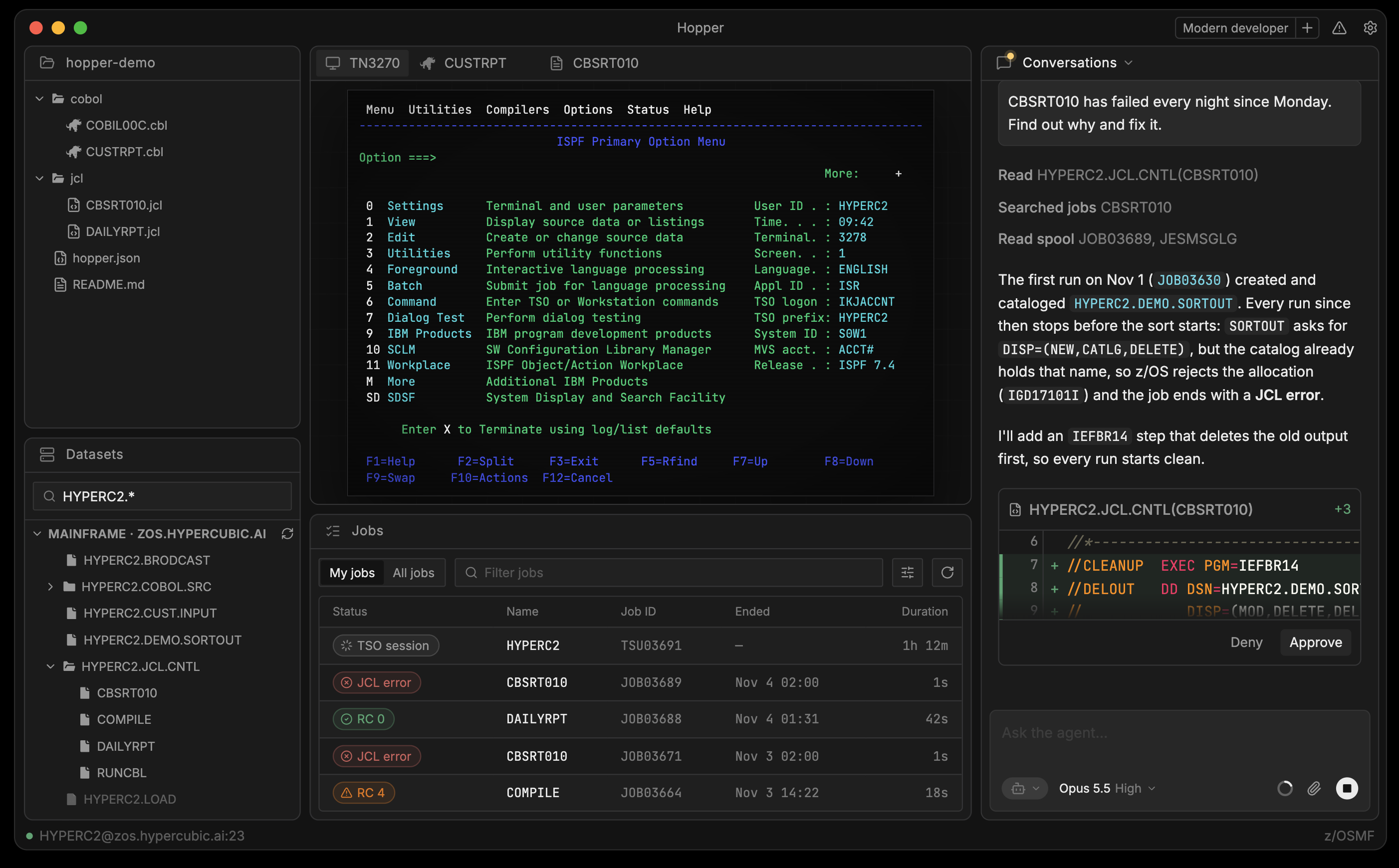
Hopper Agentic Development Environment
Image
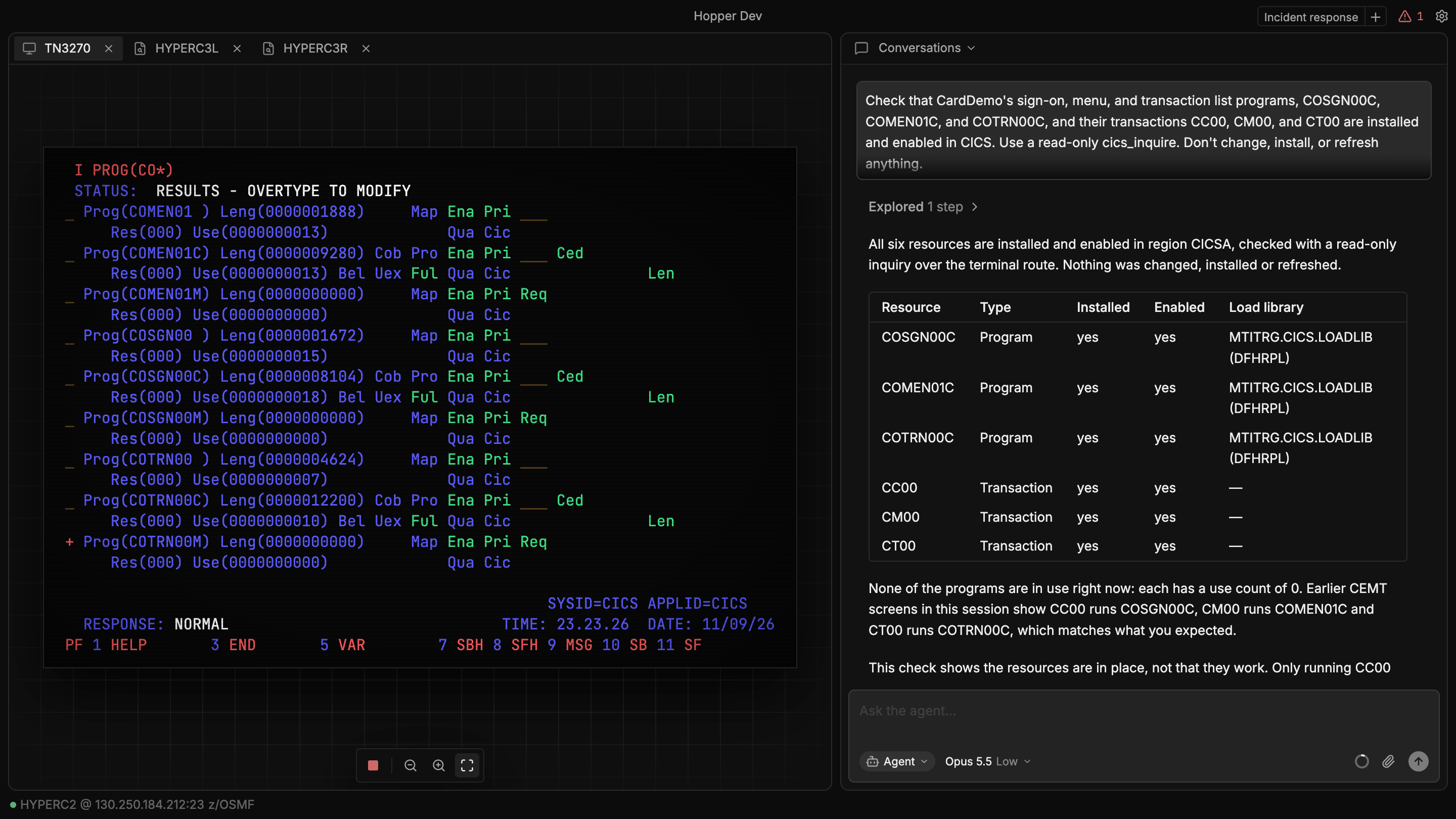
Rich Development Context
Image
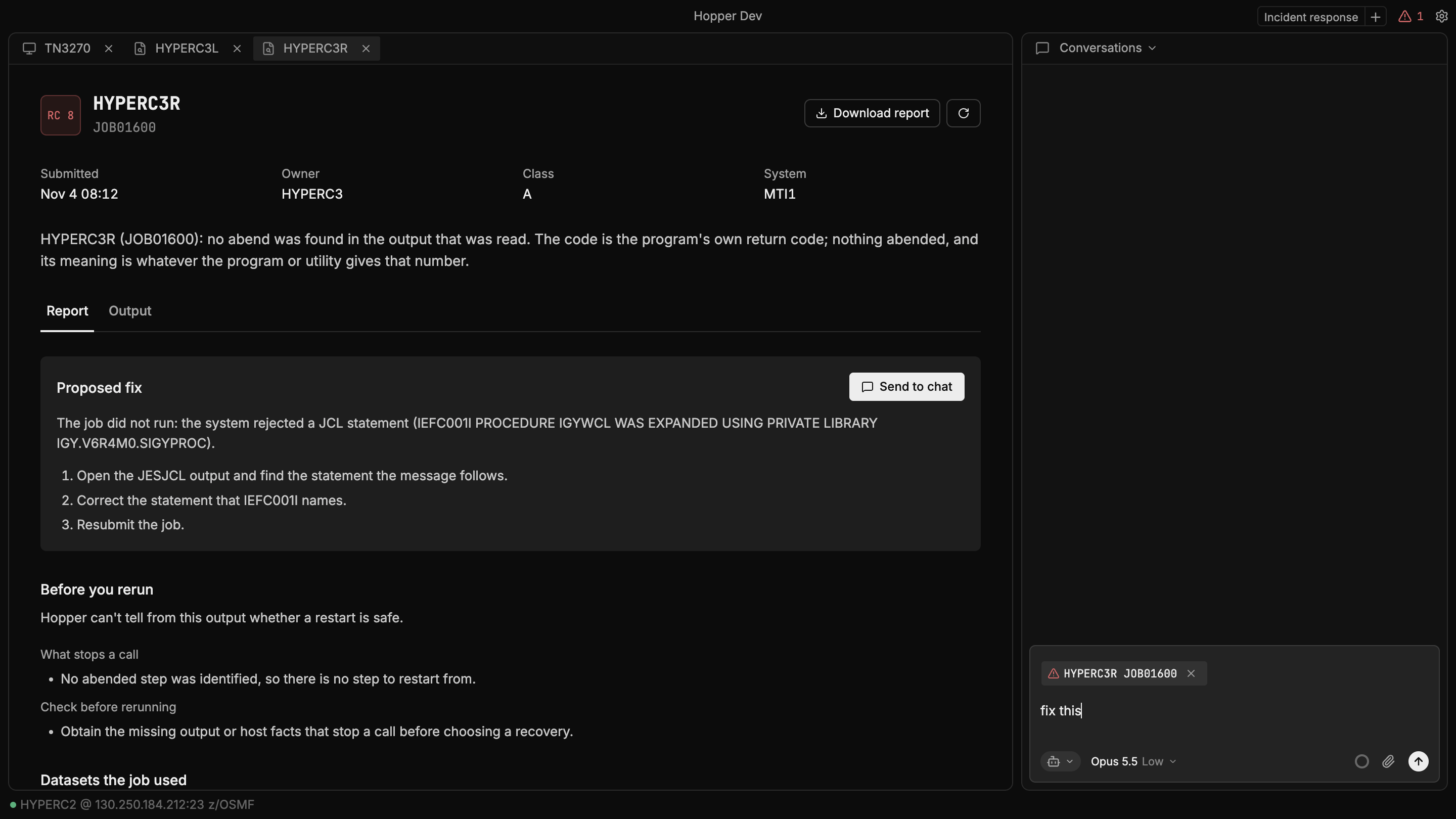
Failure Analysis & Issue Resolution
Hopper by Hypercubic - Your AI Agent for Mainframe Development and Operations
Hopper is a desktop application for z/OS engineers that bundles a TN3270 terminal, a datasets browser, a jobs browser, and an AI agent into a single interface. Ask the AI agent to read COBOL source, submit and monitor batch jobs, decode VSAM records, and drive ISPF screens - all in plain English, with your approval before any change hits the mainframe.
Hopper runs on macOS, Windows, and Linux with no mainframe-side installation required. It connects through the z/OS interfaces you already run - TN3270, FTP, and z/OSMF - so your sysprog does not need to deploy anything.
Abends Explained Before You Open SDSF
When a job abends or a transaction fails, Hopper turns the job log into a structured report with the root cause and a proposed fix. Whether it is an S0C7 data exception in a COBOL program or an SB37 out-of-space condition in JCL, the on-call engineer starts from an answer instead of manually digging through SDSF spool output.
Testing and Validation
Hopper's agent runs the screens and jobs a change touches and checks each result against the last good run. You see exactly what moved before you promote, reducing the risk of undetected regressions in batch or CICS environments.
Nightly Batch Operations
Hopper keeps track of the overnight batch run, explains each failure by morning, and reruns jobs once you approve the fix. The batch window closes on time without waiting for manual triage.
Agents That Work the Green Screen
Hopper reproduces problems in TN3270, fixes the program behind them, and checks the screen again - while you approve each step. The agent drives ISPF, navigates CICS transactions, and chains work across subsystems in a single conversation turn.
What the AI Agent Can Do
- Datasets - List, read, write, and allocate sequential datasets, PDSes, and members
- Jobs - Submit JCL, wait for completion, read spool output, and classify failures
- Terminal - Drive the TN3270 session, read screens, and send keystrokes and attention keys
- CICS - Sign-on, transaction execution, resource installation, and CEDA defines
- COBOL - Compilation, copybook parsing, and VSAM record decoding
- Data Taps - Snapshot VSAM data into a queryable local copy and run SQL against it
The agent handles COBOL, JCL, REXX, and CLIST. It traces how programs and datasets connect and works out what to edit for the task you describe.
Approval Model That Protects Your Mainframe
Hopper separates read-only actions from mutating actions. Read-only actions such as listing members, reading source, or querying spool run instantly. Mutating actions such as writing a member, submitting a job, or installing a CICS resource pause for your explicit approval before anything on the mainframe changes.
Bring Your Own Agent with Hopper MCP
Hopper MCP lets the agents your team already uses read spool, fix code, rerun jobs, and work 3270 screens. Hopper checks every action against your permissions so external agents operate within the same approval boundaries.
Security at Every Layer
- Deploy in your VPC or on-prem - Run Hopper inside your own cloud account or data center so source, job output, and screen data stay inside your network
- Model-agnostic - Use the model your security team approves, hosted or self-hosted, and switch later without changing how your team works
- No model training - Your code, spool, and screens are never used to train models, and every request runs with zero data retention
- Credential protection - Hopper stores FTP and CICS credentials in your OS keychain and replaces hidden TN3270 fields, including passwords, with placeholders before screen content reaches the AI agent
- SOC 2 Type II - Report available under NDA for Enterprise customers
Configurable Workspace Layouts
Start from a layout built for your role - modern developer, mainframe engineer, batch operations, or incident response - then rearrange panes until it fits the way you work.
Highlights
- AI agent that drives TN3270 screens, reads COBOL source, JCL, and spool, and fixes what broke with your approval. The agent operates across six tool categories - datasets, jobs, terminal, CICS, COBOL, and data taps - and can chain work across subsystems in a single conversation turn. Read-only actions run instantly; mutating actions pause for your explicit approval before anything on the mainframe changes.
- Incident response and nightly batch operations built in. When a job abends or a transaction fails, Hopper turns the job log into a report with the cause and a proposed fix, so whoever is on call starts from an answer instead of SDSF. Hopper keeps track of the overnight run, explains each failure by morning, and reruns jobs once you approve the fix, so the batch window closes on time.
- Enterprise-grade security with no mainframe-side installation. Deploy in your VPC or on-prem so source, job output, and screen data stay inside your network. Use the model your security team approves, hosted or self-hosted. Your code, spool, and screens are never used to train models. Hopper connects through standard TN3270, FTP, and z/OSMF interfaces. SOC 2 Type II report available under NDA.
Details
Sold by
Categories
Delivery method
Deployed on AWS
Features and programs
Financing for AWS Marketplace purchases
AWS Marketplace now accepts line of credit payments through the PNC Vendor Finance program. This program is available to select AWS customers in the US, excluding NV, NC, ND, TN, & VT.

Pricing
Pricing is based on the duration and terms of your contract with the vendor. This entitles you to a specified quantity of use for the contract duration. If you choose not to renew or replace your contract before it ends, access to these entitlements will expire.
Additional AWS infrastructure costs may apply. Use the AWS Pricing Calculator to estimate your infrastructure costs.
Dimension | Description | Cost/12 months |
|---|---|---|
Hopper Enterprise License | Enterprise license for Hopper, including AI-assisted mainframe development, operations, and production support workflows. | $1.00 |
Vendor refund policy
Refund requests and exceptional circumstances will be reviewed on a case-by-case basis.

Legal
Vendor terms and conditions
Upon subscribing to this product, you must acknowledge and agree to the terms and conditions outlined in the vendor's End User License Agreement (EULA) .
Content disclaimer
Vendors are responsible for their product descriptions and other product content. AWS does not warrant that vendors' product descriptions or other product content are accurate, complete, reliable, current, or error-free.
Delivery details
Software as a Service (SaaS)
SaaS delivers cloud-based software applications directly to customers over the internet. You can access these applications through a subscription model. You will pay recurring monthly usage fees through your AWS bill, while AWS handles deployment and infrastructure management, ensuring scalability, reliability, and seamless integration with other AWS services.
Support
Vendor support
Hypercubic offers support for Hopper through the following channels:
Community Support All Hopper users can connect with builders using Hopper, follow product updates, and swap ideas with the Hypercubic team through the Hypercubic Discord community.
Enterprise Priority Support Enterprise tier customers receive priority support as part of their plan. Enterprise customers can contact the Hypercubic sales team for onboarding, configuration assistance, and ongoing support needs.
Sales and Demo Requests To discuss Enterprise features including SAML SSO, MCP Server Access, admin and model controls, org-wide privacy controls, on-premises or VPC deployment, and SOC 2 Type II compliance, contact the Hypercubic sales team or request a demo through the Hypercubic website at https://www.hypercubic.ai/hopper .
Getting Started Download Hopper for macOS, Windows, or Linux, connect to your LPAR, and start working. The Hobby tier requires no credit card and includes all core Hopper features. No mainframe-side installation is required - Hopper connects through standard TN3270 and optional FTP protocols using your existing network connection.
AWS infrastructure support
AWS Support is a one-on-one, fast-response support channel that is staffed 24x7x365 with experienced and technical support engineers. The service helps customers of all sizes and technical abilities to successfully utilize the products and features provided by Amazon Web Services.
Similar products

Mendel Hypercube is a clinical AI platform that couples leading LLMs with industry leading clinical knowledge hypergraph developed by clinicians and AI scientists to add physician-like reasoning capability to large language models. The platform enables deep precision medicine insights for commercial activities and patient cohort analysis. The AI Platform ingests structured and unstructured clinical data and can be deployed relatively off the shelf.

Find out what your legacy code really does before you rewrite a line of it. Adana Technologies points ModernizeReady at your COBOL, Java or service-based codebase and returns every business rule in plain English, a data dictionary and a dependency map, each traced to its source line. Then we show the same logic converted to Java, Python, C# or TypeScript with unit tests, so your modernization decision rests on evidence.
For mid-market insurers, credit unions, lenders and payment processors in Canada and the United States whose core COBOL or PL/I applications on IBM z/OS are understood by a shrinking team and cannot leave the mainframe without proof of identical results. Dedicatted uses AWS Transform for mainframe to analyze the estate, document it and extract its business rules, refactors to Java or replatforms, migrates Db2 and VSAM data to Amazon Aurora PostgreSQL or Amazon RDS for Db2, and proves every wave in a parallel run before cutover. Delivered from Toronto and Montreal.

Fully autonomous technical documentation discovery, test suite development, legacy baselining, and functional equivalence testing using generative AI. Delivered inside your AWS account on Amazon Bedrock.
Customer reviews
No customer reviews yet
Be the first to review this product . We've partnered with PeerSpot to gather customer feedback. You can share your experience by writing or recording a review, or scheduling a call with a PeerSpot analyst.