Artificial Intelligence
Organizing Agents’ memory at scale: Namespace design patterns in AgentCore Memory
September 2026: This post was reviewed and updated for accuracy.
AI agents that remember context across sessions need memory that is organized, retrievable, and secure. In AgentCore memory, a capability of Amazon Bedrock AgentCore, namespaces determine how long-term memories are organized, how they’re retrieved, and who can access them. Get the namespace design wrong and irrelevant context surfaces in retrieval, or worse, one user’s memories leak into another’s conversation.
In this post, you’ll learn how to design namespace hierarchies for each memory strategy, choose between exact and hierarchical retrieval, extend hierarchies with custom namespace variables for multi-tenant applications, and enforce namespace boundaries with AWS Identity and Access Management (IAM). If you’re new to AgentCore memory, start with our introductory post: Amazon Bedrock AgentCore memory: Building context-aware agents.
What are namespaces?
Namespaces are hierarchical paths that organize long-term memory records within an AgentCore memory resource. They work like directory paths in a file system. When AgentCore memory extracts long-term memories from your conversations, each record is stored under a namespace such as /actor/customer-123/preferences/ or /actor/customer-123/session/session-789/summary/.
If you’ve worked with partition keys in Amazon DynamoDB or prefix layouts in Amazon Simple Storage Service (Amazon S3), the mental model transfers well. You think through access patterns before choosing a partition key, and you should think through retrieval patterns before designing a namespace. Decide who needs to access these memories, at what level of detail, and which isolation boundaries must never be crossed. The main difference from a partition key is that namespaces support hierarchical retrieval. You can query at any level of the hierarchy, so the same memory resource can serve memories scoped to a single session, a single user across sessions, or a broader grouping.
Namespace templates and resolution
When creating a memory resource, you define a namespaceTemplate within each strategy configuration. Templates support three built-in variables: {actorId}, {sessionId}, and {memoryStrategyId}. Memory resources are managed through the bedrock-agentcore-control client. Events and retrieval, which appear later in this post, go through the bedrock-agentcore data plane client.
When events arrive for actorId=customer-456 in sessionId=session-789, the resolved namespaces become /actor/customer-456/facts/ and /actor/customer-456/session/session-789/summary/.
All three built-in variables describe the conversation itself: who is talking, in which session, processed by which strategy. If you also need to isolate on dimensions such as tenant or team, you can extend templates with custom variables, covered later in this post.
Namespace design per memory strategy
Each memory strategy has different scoping needs, and the namespace should reflect how that data will be accessed.
Semantic and User Preferences: Actor-scoped
Semantic memory captures facts from conversations (for example, “The customer’s company has 500 employees”). UserPreference memory captures choices and styles (for example, “User prefers Python”). Both accumulate over time and are relevant across sessions. A fact learned in January should still be retrievable in March. Scope these to the actor:
A user’s facts and preferences are then consolidated under one namespace regardless of which session produced them. The consolidation engine merges related memories within the same namespace, so the namespace boundary is also the consolidation boundary, as Figure 1 shows.
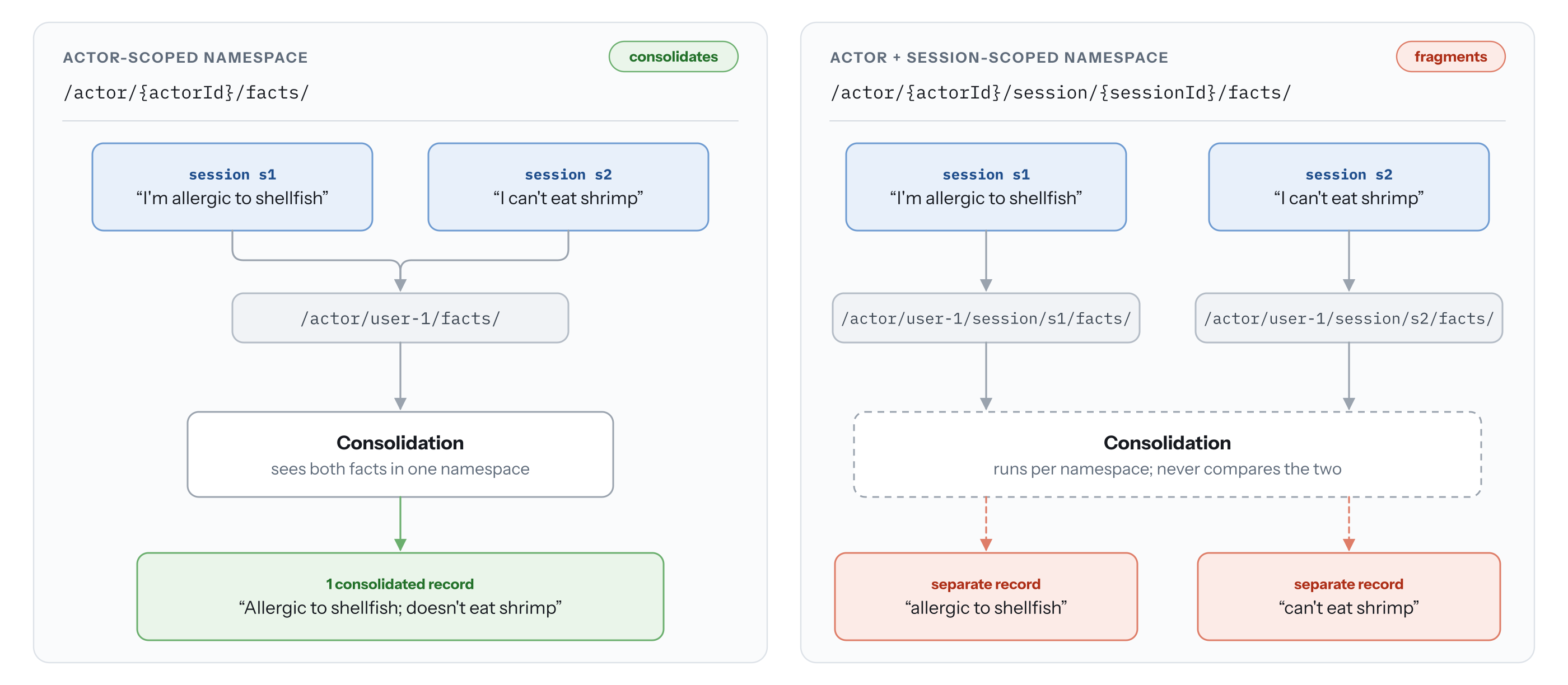
Figure 1: A namespace boundary is also the consolidation boundary for a user’s memory records
If your application needs to retrieve across actors, for instance a support agent looking up issues reported by other customers, place the actor ID beneath the memory type instead:
Querying the /facts/ subtree then spans all actors, while the exact namespace /facts/customer-123/ still returns one actor’s facts. The trade-off is that no single subtree means “everything we know about customer-123,” and per-user IAM policies need one statement per memory type. Use this layout only when cross-actor retrieval is a primary access pattern.
Summary: Session-scoped
Summary memory creates a running narrative of a conversation, so you can retrieve a compact summary instead of feeding the full history into the model’s context window. Since a summary belongs to one conversation, include the session ID:
Each session gets its own summary, organized under the actor so you can still retrieve summaries across sessions. Putting the two strategies together, a memory resource is organized like this:
Episodic: Session-scoped with reflection hierarchy
Episodic memory captures complete reasoning traces: the goal, steps taken, outcomes, and reflections. An episode records what happened in one interaction, such as how a flight booking agent handled a fare class restriction and rebooked the customer, so episodes are scoped to the session. Reflections are cross-episode insights, for instance “when a fare class restriction blocks a modification, search for alternative flights rather than only explaining the policy.” The reflections namespace must be a prefix of the episodes namespace: the same path with one or more trailing levels removed.
Here reflections are generated across all of an actor’s episodes. Cut the reflections namespace back to / and they span every actor, which means insights derived from one customer’s interactions become retrievable in every other customer’s context. Do that only when episodes contain nothing customer-specific.
Retrieving memories
Use RetrieveMemoryRecords when you need memories that are semantically relevant to a query. This is the primary retrieval method during agent interactions.
The search query can be the user’s question passed as-is when it maps naturally to stored memories (“What’s my budget?”). For vaguer input such as “Help me plan my next trip,” have the agent’s large language model (LLM) formulate a targeted query like “travel preferences, destination history, budget constraints.” That adds a model call, and therefore latency, before retrieval.
Use ListMemoryRecords when you need to enumerate everything in a namespace, such as showing a user their stored preferences or auditing what exists. GetMemoryRecord and DeleteMemoryRecord operate on a single record ID and support memory management workflows where users view, correct, or delete specific memories.
namespace compared to namespacePath
Both RetrieveMemoryRecords and ListMemoryRecords accept two scoping fields that look interchangeable and behave very differently.
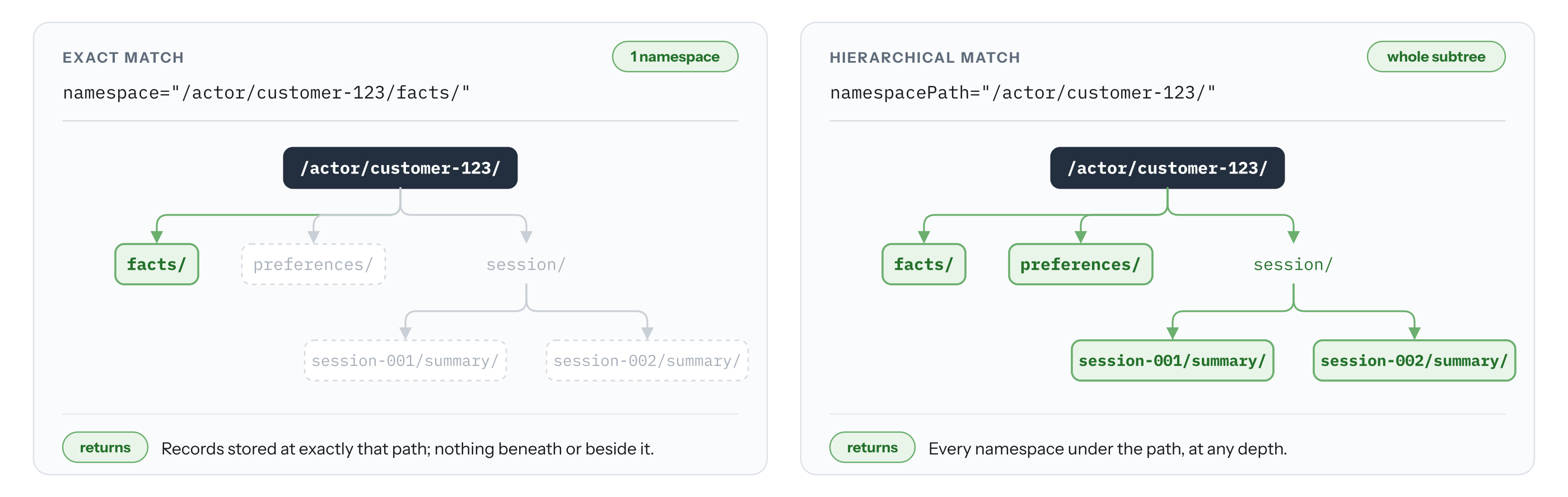
Figure 2: The namespace field matches one exact path, while namespacePath returns an entire subtree
The namespace field performs an exact match and returns only records stored at that precise path. The preceding example returns records from /actor/customer-123/facts/ and nothing else. Use it when you need precise scoping, such as a user’s preferences without their facts or summaries.
The namespacePath field performs a hierarchical match, returning every record whose namespace falls under the path:
Use it for “show me everything we know about this customer” features. Because it returns everything beneath the path, the level you start from is the level you’re trusting the caller with. Always include leading and trailing slashes in templates and in namespacePath values. Without the trailing slash, /actor/customer-1 also matches /actor/customer-12/ and returns other users’ records.
| Scenario | API | Field | Example | |
| 1 | Retrieve semantically relevant user preferences | RetrieveMemoryRecords |
namespace |
/actor/customer-123/preferences/ |
| 2 | Retrieve a specific session summary | ListMemoryRecords |
namespace |
/actor/customer-123/session/session-001/summary/ |
| 3 | List all preferences for a user | ListMemoryRecords |
namespace |
/actor/customer-123/preferences/ |
| 4 | Search across all of a user’s memories | RetrieveMemoryRecords |
namespacePath |
/actor/customer-123/ |
| 5 | List summaries across sessions for a user | ListMemoryRecords |
namespacePath |
/actor/customer-123/session/ |
Custom namespace variables for multi-tenant hierarchies
Everything so far isolates on the actor and the session, which is what a consumer-facing AI assistant needs. Multi-tenant and enterprise applications usually have at least one more boundary.
Consider an independent software vendor, AnyCompany DevTools, that sells an engineering support agent to large enterprises. Each customer is a tenant. Inside a tenant, the agent supports many services, each with components and teams whose engineers open sessions with the agent. A memory about a connection pool deadlock in Octank’s payments ledger must not surface for a different tenant, and probably shouldn’t surface for an unrelated team inside Octank either.
None of the built-in variables expresses “tenant” or “team.” The two workarounds don’t hold up. Hard-coding the tenant into the template (/tenant/octank/actor/{actorId}/facts/) means a new strategy or memory resource for every customer. Packing a composite key such as octank:payments:dev-123 into actorId breaks cross-session consolidation for the engineer and misaligns the IAM policies that scope on user identity.
Custom namespace variables close this gap. You declare variable names on the memory resource with namespaceKeys, reference them in templates alongside the built-in variables, and supply values per event at runtime. One memory resource and one set of strategies serve every tenant.
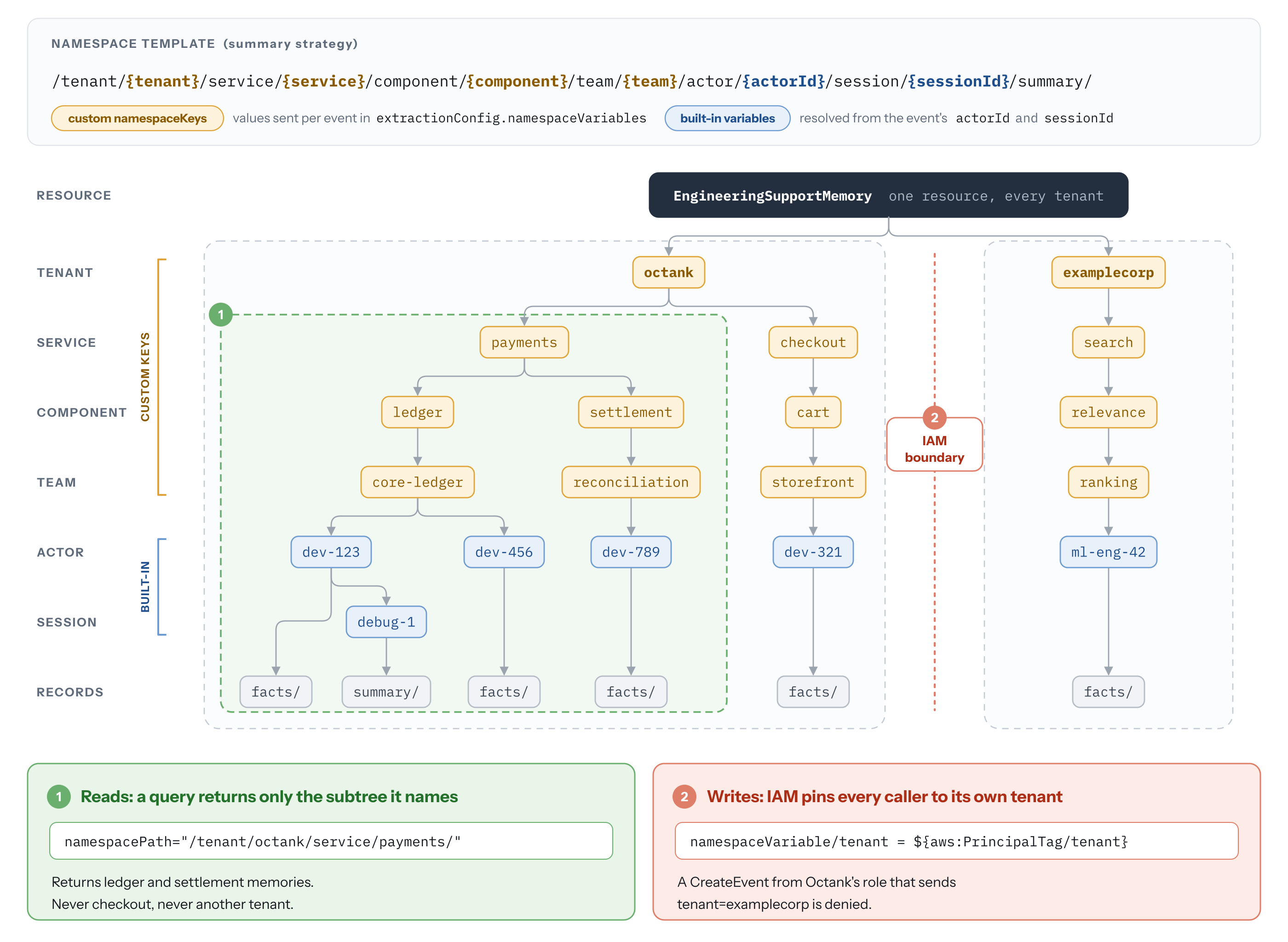
Figure 3: A multi-tenant namespace hierarchy nests tenant, service, component, team, actor, and session levels
Defining namespace keys
The per-strategy guidance still applies beneath the custom levels. Facts stay actor-scoped and summaries get the session appended:
You can define up to 5 namespace keys per memory resource and reference up to 5 in a template. Keys are at most 32 lowercase alphanumeric characters and can’t reuse a built-in variable name. Values are lowercase, up to 64 characters. allowedValues takes up to 10 values and suits closed sets such as an environment or a fixed service list. For a tenant roster that grows with your customer base, use regexPattern (up to 64 characters) and enforce the actual tenant identity with IAM. Specifying both rules applies both. A key need not be referenced by any strategy, and one key can appear in several templates.
Set validation even when it feels redundant. These values arrive from application code at request time, which is where tenant isolation bugs come from: a stale variable in a retry path, a config value pointing at the wrong environment. A value that fails validation is rejected by CreateEvent, so you find out immediately rather than discovering a stray namespace weeks later. NOTE: If there are more than one validation setup on the namespaceKey, all the validations are enforced. If one fails, the entire request fails.
Supplying values at runtime
Pass the values in extractionConfig.namespaceVariables on each CreateEvent call:
During extraction, the service substitutes those values into every template that references them, producing memories under:
Across tenants, a single memory resource looks like this:
Custom variables only affect the write path. By the time you read memories back, the namespace is fully resolved, so namespace and namespacePath work exactly as before, with no new parameters.
Ordering the hierarchy
The order of the segments is the design decision that matters most. Every namespacePath query walks down from the level you name, so the broadest isolation boundary belongs at the top. With tenant first, a search across everything the payments service has learned stays inside one tenant by construction:
Reverse those two levels and the same query shape reaches across your entire customer base. Prefix-based IAM policies inherit the same property, which is why tenant-first hierarchies are easier to secure.
Each level you add is a value you must supply on every event, and it fragments retrieval: memories under two different components live in two subtrees that only a service-level namespacePath query brings back together. Add a level only if you’ll actually query or isolate at it.
Missing values and key updates
A missing custom variable behaves differently from an invalid one. If a template references a variable the CreateEvent request doesn’t supply, the namespace can’t be resolved and long-term extraction is skipped for that strategy. The CreateEvent call still succeeds and the event is persisted in short-term memory, so the conversation keeps working while no long-term memories accumulate behind it. Monitor the NamespaceResolutionFailure metric, emitted with the dimensions Operation, Resource, StrategyType, and StrategyId, and alarm on it. It is a straightforward way to notice a client that quietly stopped sending one variable after a refactor.
The namespaceKeys value in UpdateMemory replaces the existing set rather than merging into it, so treat it as a read-modify-write: call GetMemory, append the new key to the returned list, and pass the full list back. Omitting a key that a template still references raises a ValidationException. To retire a key, remove it from the template first, then from namespaceKeys.
Custom namespace variables compared to metadata
AgentCore memory also supports structured metadata that propagates from events to extracted records. The two features answer different questions. Namespace variables define where a memory lives: they set the boundary that retrieval and IAM operate on, and a record sits in exactly one namespace. Metadata describes what a memory is about within a boundary you’ve already established, letting you narrow retrieval by category, priority, or risk level. A filter you forget to apply returns everything, so metadata is the wrong tool for tenant isolation. If getting it wrong would be a security finding, it belongs in the namespace. If getting it wrong would be an irrelevant search result, it belongs in metadata.
Writing IAM policies for namespace access control
Namespaces integrate with IAM through condition keys that restrict which namespaces a principal can include in Memory API requests.
Exact match and hierarchical read policies
Use StringEquals with bedrock-agentcore:namespace to restrict a principal to one namespace. This policy uses the userId principal tag, injected at authentication time, so each user can read only their own preferences:
For hierarchical access, use StringLike with bedrock-agentcore:namespacePath. Replace the preceding condition with the following so a user can search across all of their own namespaces (facts, preferences, summaries) while helping prevent access to other users’ data:
Write-path policies for custom namespace variables
The read-path keys act on a namespace that arrives fully resolved. Custom variables add a write path worth securing: the values in a CreateEvent request decide which namespace a memory lands in, and validation rules can’t tell you which tenant a caller is allowed to be.
The bedrock-agentcore:namespaceVariable/<variableName> condition key matches the value supplied for one custom variable. Tag each tenant’s role with its tenant name, and one policy pins every caller to its own subtree:
A misconfigured or compromised client for Octank can send whatever it likes in namespaceVariables. Unless tenant matches the tag on its own principal, the write is refused. One behavior to design around: if the request omits a variable that a policy conditions on, the condition key is absent from the request context. The Allow doesn’t match, and the request is denied unless another statement grants it. That makes the variable mandatory for every caller the policy covers, so make sure clients set it before you roll out the policy.
Conclusion
Namespace design decides what your agent can retrieve, what gets consolidated together, and what one caller can see of another’s data. Those decisions are far easier to make before the first event is written than after a year of memories have accumulated under the wrong hierarchy.
- Design from your access patterns. Decide who retrieves what, at which level of detail, and which boundaries must not be crossed. Put the broadest isolation boundary at the top.
- Scope by strategy. Facts and preferences belong to the actor so they consolidate across sessions. Summaries and episodes belong to the session.
- Pick the retrieval field deliberately.
namespacematches one exact path.namespacePathreturns the whole subtree. Keep leading and trailing slashes so prefixes don’t collide. - Reach for custom namespace variables when your isolation boundary isn’t the actor or the session. Constrain values with
allowedValuesorregexPattern, and alarm onNamespaceResolutionFailure. - Enforce boundaries with IAM condition keys:
bedrock-agentcore:namespaceandbedrock-agentcore:namespacePathon reads,bedrock-agentcore:namespaceVariable/<key>on writes.
To get started, visit the following resources:
- Specify long-term memory organization with namespaces
- AgentCore memory Documentation
- Amazon Bedrock AgentCore Samples on GitHub