Containers
One Amazon EKS, many edges: How to choose your edge container strategy on AWS
Choosing the right edge container strategy across tens or hundreds of locations determines whether your fleet operates as one system or fragments into dozens of special cases. With one Amazon Elastic Kubernetes Service (Amazon EKS) standard and a clear method for selecting deployment models, you can avoid that fragmentation entirely. For most organizations, moving containers out of the data center and closer to where the business operates is a decision already made. That means the factory floor, the distribution center, the retail store, and the remote site. The harder question is what comes next. How do you run containers consistently across many locations that differ widely in connectivity, infrastructure, and scale?
When you begin evaluating options, you encounter a range of choices: one approach suits connected sites, another suits disconnected ones, and a third targets locations with no existing infrastructure. Assessing each site individually and selecting the best-fit platform seems reasonable. However, scaling that approach across tens or hundreds of locations leads to fragmentation: different stacks in different regions, configurations that drift apart, security baselines that hold in one place but lapse in another, and updates applied inconsistently with no guarantee of uniformity. Each location becomes a special case, routine changes require per-site effort, and operational cost grows with the number of sites.
This post gives you a way to avoid that fragmentation problem entirely. Instead of picking a different platform for every site, you will learn how to standardize on one container service (Amazon EKS). Then you decide how and where to deploy it based on each location’s constraints. Along the way, you will get a straightforward method for placing each site on a spectrum of AWS deployment models, all built on the same Kubernetes foundation.
Prerequisites
To get the most from this post, you should have familiarity with Kubernetes concepts and have evaluated or deployed containers in at least one environment. No AWS resources are created in this post.
Separate the standard from the deployment model
Choosing the wrong platform isn’t really the issue. The issue is framing the decision as “which platform should I run here?” Because when you ask that question for each site, you get a different answer each time, and over tens or hundreds of sites those answers fragment your estate. Flip the question: “What’s my standard, and how does it fit each location?”
The distinction comes down to two things most teams treat as one:
- The standard is what your team builds against: it includes the API, the workload definition, the orchestration provider, the tooling, and the delivery pipeline.
- The deployment model is where and how that standard physically runs at a given location.
The standard should be constant. The deployment model should flex.
Standardize on Kubernetes. Choose where it runs.
In practice, this means you standardize on Kubernetes, specifically Amazon EKS, as the single constant across your fleet. Then you treat the deployment model as a per-site decision made underneath that constant.
A workload described once runs the same way whether the site is a connected distribution center or an air-gapped plant. Same manifests, same images, same skills, same pipeline. Supporting infrastructure such as load balancers, storage, and networking will vary by site. What stays constant is the Kubernetes API and workload definition that your team builds against.
This is what breaks the fragmentation cycle. You aren’t making a hundred independent platform choices. You’re making one standardization choice and fitting it to each location. The fleet shares one API surface and one workload definition, even where no two sites are identical. Where connectivity allows, operations converge on a consistent set of tooling and practices. For fully isolated environments, the same Kubernetes standard still applies, but your team owns more of the operational stack.
This only works if the standard can run in all those environments. That’s where Amazon EKS stands apart.
One standard that spans the whole spectrum
Amazon EKS provides one Kubernetes standard that spans an entire spectrum of deployment models, from fully self-managed and air-gapped on one end to fully AWS managed and cloud-connected on the other end, as illustrated in the following diagram.

Figure 1: The Amazon EKS deployment spectrum, from self-managed and air-gapped to fully AWS managed
The spectrum spans four models, from left to right: EKS Anywhere for air-gapped, self-managed environments; EKS Hybrid Nodes running on your machines with an AWS control plane; EKS on AWS Outposts with hardware delivered on-site; and EKS in AWS Region or Local Zone, fully managed in the cloud.
Every deployment model on the spectrum runs the same Kubernetes distribution (Amazon EKS Distro) and the same Kubernetes APIs. The management experience differs (from self-managed with Amazon EKS Anywhere to fully AWS managed), but that shared foundation is what unlocks workload portability:
- The same container images and manifests deploy against the same Kubernetes API.
- The same Kubernetes skills apply across the fleet.
- A similar pipeline ships to all locations.
- You can move a workload between deployment models without re-platforming, because it never leaves the standard.
Most approaches force a trade-off between standardizing and fitting every site. EKS removes that trade-off: one standard, from the air-gapped edge to the cloud.
Choosing your point on the spectrum
The decision is a two-step method, and the order matters. First gate on what is feasible, then select what is best among the remaining options.
Step 1. Gate on connectivity
Start with the one constraint that removes options entirely: can the site rely on a persistent connection to an AWS Region?
If not, a secure air-gapped facility, a ship, or any site with disconnected, disrupted, intermittent, or limited (DDIL) connectivity, only a fully self-managed cluster qualifies. This places the site at the self-managed end of the spectrum: EKS Anywhere.
If the site is reliably connected, it can use an AWS managed control plane, and the rest of the spectrum opens up.
Step 2. For connected sites, match to infrastructure
For a reliably connected site, the deciding factor is simply what infrastructure is already on the ground.
- You have no infrastructure of your own (or you want AWS to own the hardware lifecycle): Amazon EKS on AWS Outposts brings AWS managed hardware and services to the site.
- You have on-premises infrastructure to use (virtual machines or bare metal): Amazon EKS Hybrid Nodes attaches those machines as nodes to an AWS managed control plane, whether the site is one of many small locations or a single large one. If connectivity is briefly lost, running workloads keep running, and new scheduling and control-plane operations resume when the link is back.
- One exception runs the other way: a reliably connected site may still choose EKS Anywhere when policy mandates air-gapped operation or requires the customer to fully own the control-plane lifecycle.
The guiding principle: any operational complexity a site doesn’t need is waste. Let AWS manage the control plane wherever the site’s connectivity and policy allow, and reserve self-managed clusters for the sites that genuinely require them.
Use the following table as a quick decision aid.
| Deployment model | Choose it when… | Key constraint | Pricing model (EKS pricing) |
| EKS Anywhere | Air-gapped or DDIL connectivity, or policy requires a self-managed control plane. | Linux only. You own the full control-plane lifecycle | Open source and you can run at no cost, with an optional Enterprise Subscription for support, curated packages, and extended version support. It costs $24,000 per cluster for a 1-year term or $18,000 per cluster per year for a 3-year term (extended support included, no surcharge), and requires AWS Enterprise Support or On-Ramp. |
| EKS Hybrid Nodes | Reliably connected sites of any size. You want AWS to run the control plane and minimize per-site operations | Linux only. Requires reliable connectivity. Usage-based pricing. For more information, see the prerequisites documentation | $0.10 per cluster per hour ($0.60 under extended support). A tiered per vCPU-hour charge for the nodes is added, starting at $0.020 and decreasing at higher volumes. |
| EKS on Outposts | No existing infrastructure, or you want AWS to own the hardware lifecycle | Hardware delivered by AWS. Multi-year commitment | $0.10 per cluster per hour ($0.60 under extended support). Outposts capacity fees for the rack hardware and any Amazon Elastic Compute Cloud (Amazon EC2), Amazon Elastic Block Store (Amazon EBS), and networking usage are added. |
A note on Windows workloads
Windows containers require a Windows host (a Kubernetes constraint, not an AWS one), so support varies across the on-premises options:
- EKS Anywhere and EKS Hybrid Nodes are Linux-only — Neither runs Windows nodes on-premises.
- If the site has no existing infrastructure: EKS on Outposts (extended clusters) supports Windows worker nodes, so it can run Windows containers on hardware delivered by AWS.
- If the site already has its own infrastructure: Because Outposts means new hardware delivered by AWS, the practical path is to re-platform the Windows workloads to Linux containers where possible.
Putting it together: A decision flow
The following flowchart walks through the decision process for choosing an EKS deployment model at a given site, starting with connectivity and then evaluating on-premises infrastructure.
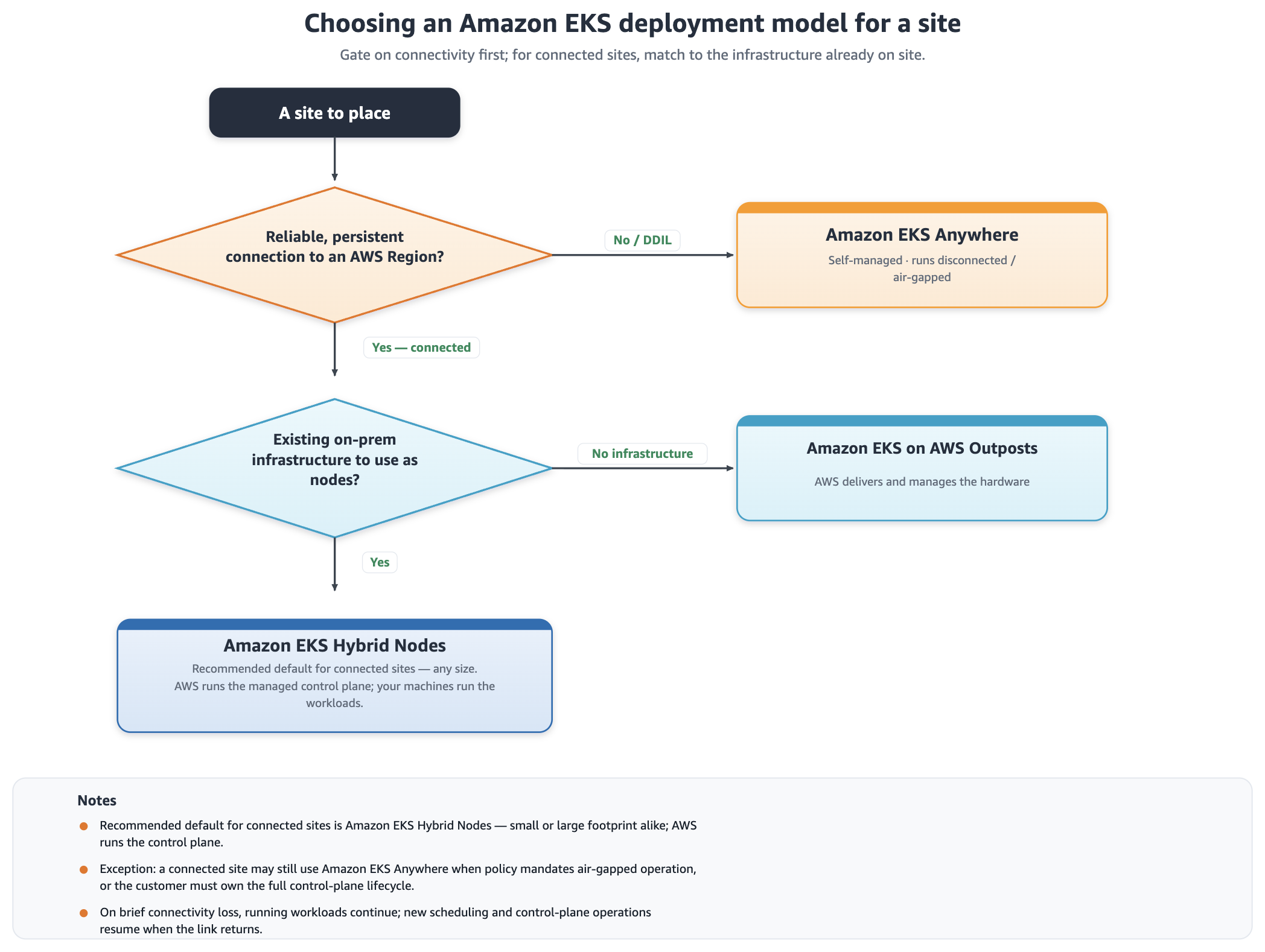
Figure 2: Choosing a deployment model site by site, gating on connectivity then evaluating infrastructure
The decision flow begins with a site to place. The first question to ask is whether the site has a reliable, persistent connection to an AWS Region. If the answer is no, or the connection is unreliable (DDIL: disconnected, disrupted, intermittent, or limited), the path leads to Amazon EKS Anywhere. That model is self-managed and runs disconnected or air-gapped. If the site is connected, a second question to ask is whether there is existing on-premises infrastructure to use as nodes. If there’s no existing infrastructure, the path leads to Amazon EKS on Outposts, where AWS delivers and manages the hardware. If existing infrastructure is available, the path leads to Amazon EKS Hybrid Nodes, the recommended default for connected sites of any size, where AWS runs the managed control plane and your machines run the workloads.
Follow it across a real fleet and the payoff becomes clear. An air-gapped plant, a set of connected sites, and a greenfield location each resolve to a different deployment model. Yet all run the same Amazon EKS Distro. They aren’t several platforms to operate. They are one fleet, hosted several ways.
Converging an existing fleet onto this model
Most organizations adopting this approach are not starting from zero. They already run containers at the edge on a mix of platforms such as self-managed Kubernetes, Docker Compose, Rancher, or OpenShift, which have accumulated over time. The value of standardizing on Amazon EKS isn’t limited to new sites. It applies equally to existing ones.
Because every deployment model on the spectrum runs standard Kubernetes, the migration path is straightforward. Workloads described as Kubernetes manifests or Helm charts move without re-architecture. For a typical stateful workload:
- Stand up the target EKS deployment model for the site.
- Re-point the continuous integration and continuous delivery (CI/CD) pipeline to deploy into it.
- Migrate any persistent data using a Kubernetes-native backup tool.
For stateless workloads, shift traffic with weighted DNS (for example, Amazon Route 53) in a blue/green pattern until the new cluster carries production load.
With EKS Hybrid Nodes, you can incrementally attach existing on-premises machines to an AWS managed control plane without replacing hardware. From there, shift workloads over progressively rather than in a single cutover. The machines stay in place. Only the control plane moves to AWS.
The key decision is sequencing. Start with a small number of representative sites, prove the operating model, and then roll the pattern outward. A site-by-site approach avoids a fleet-wide “big bang” and lets each location validate before the next begins.
Conclusion: one standard, many edges
In this post, we showed how to avoid edge fleet fragmentation by separating your container standard from where it runs. Instead of choosing a platform per site, you standardize on Amazon EKS once, then let each site decide the deployment model: gate on connectivity, then match to the infrastructure already in place. Every location resolves to its best-fit model, yet all run the same Kubernetes standard: not a hundred special cases, but one fleet that reaches every edge you need.
One EKS. Many edges.
Next steps
To put this into practice, explore the deployment models that fit your sites:
- Review the EKS Anywhere documentation for air-gapped and disconnected sites.
- Explore EKS Hybrid Nodes for connected sites where you want AWS managed control planes.
- Learn about EKS on Outposts for greenfield locations with no existing infrastructure.
- Try the decision flow from this post against your own fleet and share your results in the comments.