AWS Big Data Blog
Run a data processing job on Amazon EMR Serverless with AWS Step Functions
Update November 2026: We refreshed this post and the sample code for current AWS services:
- The Step Functions workflow now uses the optimized
emr-serverless:startJobRun.syncintegration. Step Functions submits the job, waits for it to finish, and fails the run if the job fails or is canceled. The AWS Lambda function that polled for job status has been removed. - The EMR Serverless application uses release
emr-7.14.0(Apache Spark 3.5.8) on AWS Graviton (arm64) workers, with auto-start and auto-stop and no pre-initialized capacity, so you pay only while a job runs. - The ingestion Lambda function runs on the
java21runtime and uses the AWS SDK for Java 2.x. The AWS SDK for Java 1.x reached end of support on December 31, 2025. - IAM policies are scoped to the resources the sample creates. The virtual private cloud (VPC), NAT gateway, and EMR Studio that the earlier version required have been removed.
There are several infrastructure as code (IaC) frameworks available today to help you define your infrastructure, such as the AWS Cloud Development Kit (AWS CDK) or Terraform by HashiCorp. Terraform, an AWS Partner Network (APN) Advanced Technology Partner and member of the AWS DevOps Competency, is an IaC tool similar to AWS CloudFormation. With Terraform, you can create, update, and version your AWS infrastructure. Terraform offers a friendly syntax, planning (see changes before they happen), graphing, and modules that break infrastructure configurations into smaller, reusable pieces. We use these Terraform features to build an API-based ingestion process into AWS.
In this post, we show how to build and orchestrate a Scala Spark application using Amazon EMR Serverless, AWS Step Functions, and Terraform. In this end-to-end solution, we run a Spark job on EMR Serverless that processes sample clickstream data in an Amazon Simple Storage Service (Amazon S3) bucket and stores the aggregation results in Amazon S3.
With EMR Serverless, you don’t need to configure, optimize, secure, or operate clusters to run applications. You still get the benefits of Amazon EMR, such as open source compatibility, concurrency, and optimized runtime performance for popular data frameworks. EMR Serverless offers quick job startup, automatic capacity management, and straightforward cost controls.
Solution overview
We provide the Terraform infrastructure definition and the source code for an AWS Lambda function that ingests sample website click events into Amazon Data Firehose. Firehose converts the incoming JSON into Apache Parquet using a schema in the AWS Glue Data Catalog and writes the files to Amazon S3. An EMR Serverless Spark job, orchestrated by Step Functions, then processes the Parquet files and writes a report of aggregate clickstream statistics to S3. The following diagram shows the sample architecture.
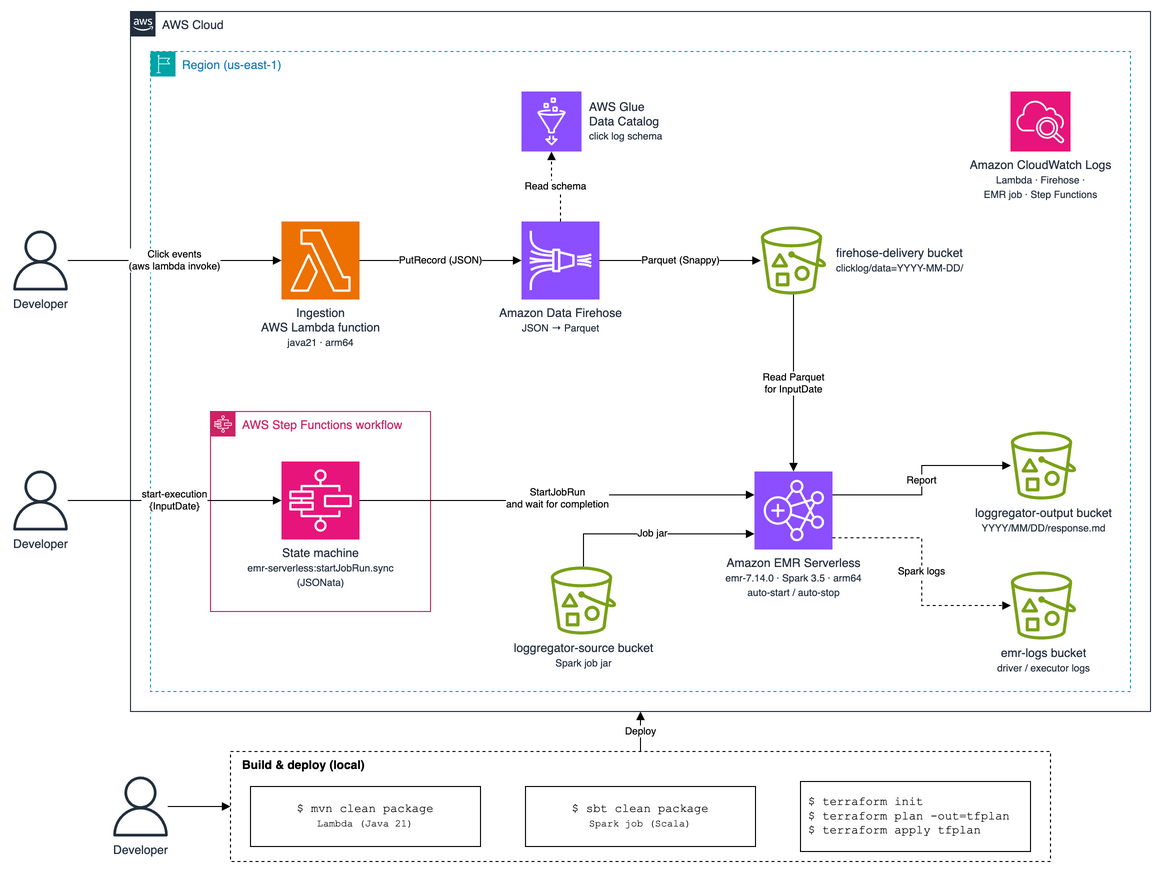
Figure 1: Solution architecture for ingesting click events and processing them with an EMR Serverless Spark job orchestrated by Step Functions
For a similar ingestion pattern, refer to Provision AWS infrastructure using Terraform (By HashiCorp): an example of web application logging customer data.
The following are the high-level steps and AWS services used in this solution:
- The Lambda function is built with Apache Maven, and the Spark job is built with sbt.
- Terraform deploys the infrastructure to AWS.
- The EMR Serverless application runs the Spark job. It starts automatically when a job is submitted and stops after 5 idle minutes.
- The ingestion Lambda function validates incoming click events and writes them to the Firehose stream.
- Amazon Data Firehose buffers the events, converts them to Parquet, and writes them to S3, partitioned by date.
- Step Functions submits the Spark job to EMR Serverless with the
startJobRun.syncintegration and waits for it to complete. No custom polling code is needed. - The solution uses four S3 buckets:
- Firehose delivery bucket – Stores the ingested click logs in Parquet format.
- Loggregator source bucket – Stores the Spark job JAR.
- Loggregator output bucket – Stores the job’s report.
- EMR Serverless logs bucket – Stores the Spark driver and executor logs.
- Amazon CloudWatch Logs collects Lambda, Firehose, EMR Serverless job, and Step Functions execution logs.
For this solution, we made the following design decisions:
- Step Functions optimized integration for EMR Serverless – The
arn:aws:states:::emr-serverless:startJobRun.syncintegration submits the job and waits for a terminal state. A job that ends inFAILEDorCANCELLEDfails the task, and stopping the execution cancels the job run. This replaces the earlier pattern of an SDK integration plus a polling Lambda function, which was limited by the Lambda 15-minute maximum timeout and could report success for a failed job. - JSONata in the state machine – The workflow uses
QueryLanguage: JSONatato build the job name and arguments from the execution input, and returns the job run ID and report location as output. - On-demand capacity – The application has no pre-initialized workers. Auto-start and auto-stop handle the application lifecycle, so the workflow doesn’t need start or stop steps. Add
initial_capacityinterraform/templates/emr.tfif you need faster job start times. - AWS Graviton – Both the EMR Serverless application and the Lambda function run on arm64 for better price-performance.
- Least-privilege IAM – Each role is limited to the specific buckets, AWS Glue tables, log groups, EMR Serverless application, and Firehose stream it uses.
- No VPC required – None of the components need private network access, so the sample doesn’t create a VPC or NAT gateway. If your Spark job needs to reach resources in a VPC, add a
network_configurationblock to the EMR Serverless application.
Prerequisites
To use this solution, you must complete the following prerequisites:
- Have an AWS account and credentials with permission to create the resources in this sample.
- Install the AWS Command Line Interface (AWS CLI) version 2.
- Install a Java Development Kit, version 21, such as Amazon Corretto 21.
- Install Apache Maven 3.9 or later.
- Install sbt 1.11 or later.
- Install Terraform 1.5 or later. The configuration uses AWS provider version 6.x.
Configure the solution
To deploy the infrastructure and the application, complete the following steps:
- Clone the GitHub repository. The provided
exec.shscript builds the Lambda JAR and the Spark job JAR, deploys the infrastructure, and sends sample click events. - Run the following commands:
To run the commands individually, use the following:
Test the solution
After you deploy the application, send sample click events. The exec.sh script sends several. The following AWS CLI command is an example:
Firehose buffers records for up to 60 seconds, then writes Parquet files under clicklog/data=YYYY-MM-DD/ in the Firehose delivery bucket. You can query the files with Amazon Athena by using the clickloggerdev-table table in the clickloggerdevdatabase AWS Glue database.
The following screenshot shows an example of the bucket contents.
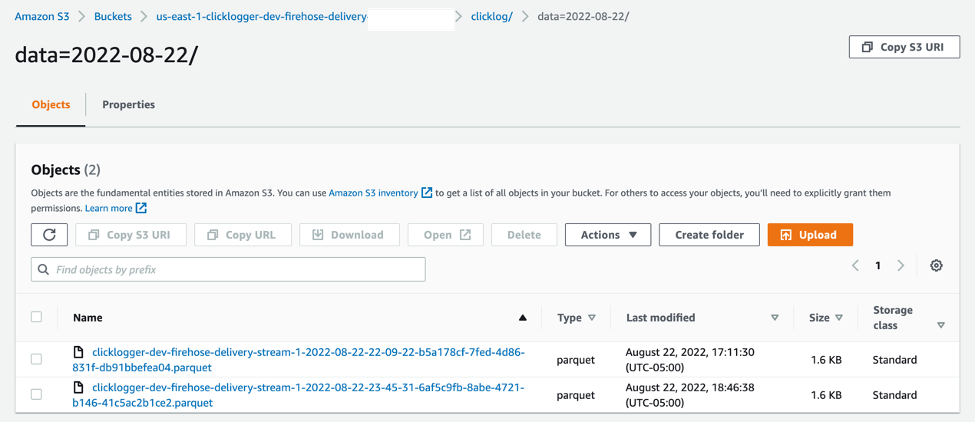
Figure 2: Parquet files written to the Firehose delivery bucket, partitioned by date
Next, run the Step Functions workflow with the date (UTC) that the sample data was ingested:
You can also start the run from the Step Functions console by opening clicklogger-dev-state-machine and choosing Start execution. When the job completes, the execution output contains the job run ID and the report location:
The following screenshot shows a successful state machine run on the Step Functions console.
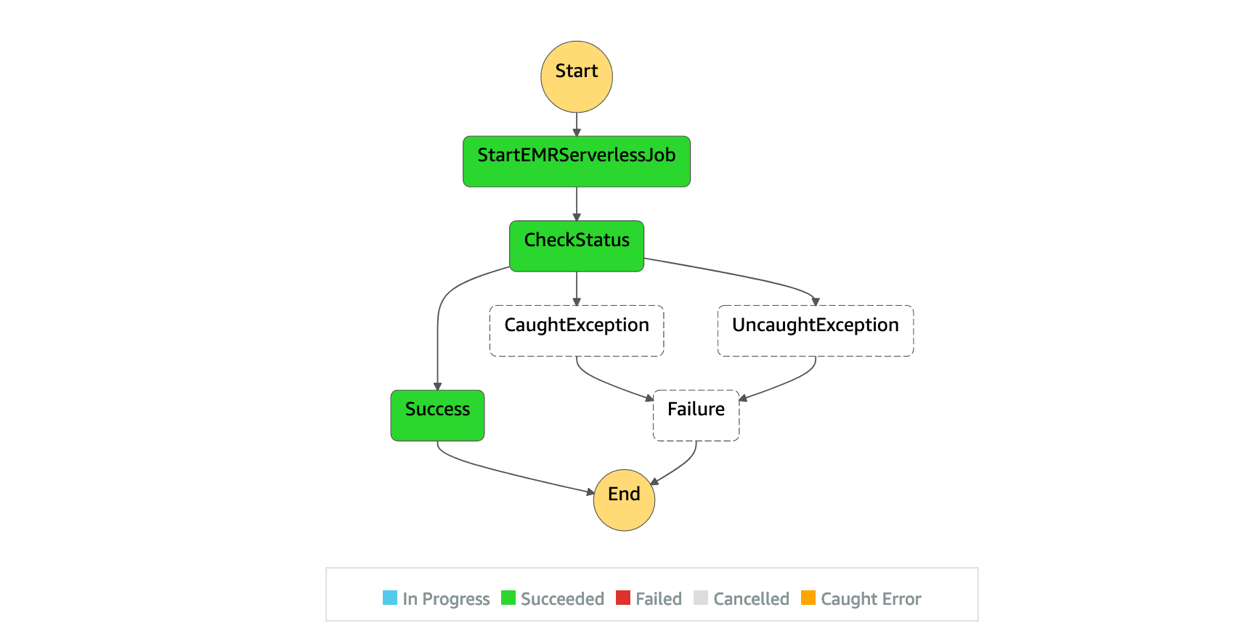
Figure 3: A successful state machine run on the Step Functions console
To view the EMR Serverless application and its job runs, open the Amazon EMR console and choose EMR Serverless, then Applications. You can also use the AWS CLI:
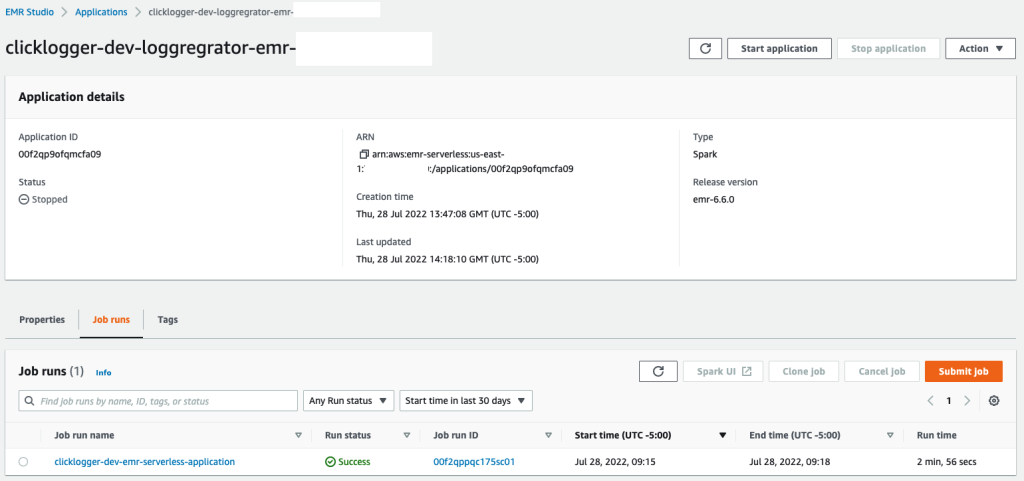
Figure 4: The EMR Serverless applications list on the Amazon EMR console
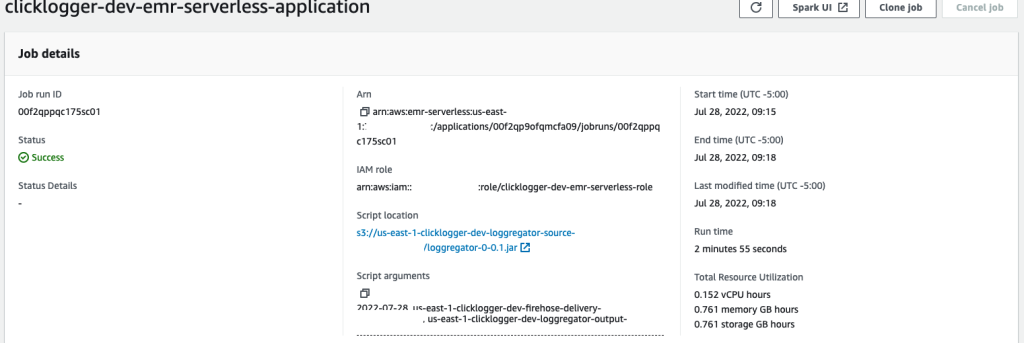
Figure 5: Details of the EMR Serverless application
Review the output
The job writes its report to the output bucket under a yyyy/MM/dd/response.md key. To download it, run the following command:
The following code shows an example of the report:
Clean up
The provided cleanup.sh script empties the S3 buckets created by this sample and runs terraform destroy. It asks for confirmation before deleting anything, and Terraform shows the resources it will destroy before you approve.
To clean up manually, use the following commands:
Conclusion
In this post, we built, deployed, and ran a Spark data processing job on EMR Serverless, orchestrated by Step Functions and deployed with Terraform. The Step Functions optimized integration for EMR Serverless lets the workflow submit a job and wait for its result without custom polling code, and EMR Serverless auto-start and auto-stop mean you pay only for the capacity the job uses. You can use any supported language for your Lambda functions and Spark jobs. You can trigger EMR Serverless jobs manually, on a schedule with Amazon EventBridge Scheduler, or from orchestrators such as Step Functions and Amazon Managed Workflows for Apache Airflow (Amazon MWAA).
We encourage you to try this example, then replace the sample code with your own and let EMR Serverless run it for you.
If you implement this example and run into any issues, or have any questions or feedback about this post, please leave a comment!
References
- Create and manage Amazon EMR Serverless applications with Step Functions.
- Amazon EMR Serverless release versions.
- Transforming data with JSONata in Step Functions.
- Lambda runtimes.
- Terraform: Beyond the Basics with AWS.
- Provision AWS infrastructure using Terraform (By HashiCorp): an example of web application logging customer data.